














Email Retargeting 101: Benefits, Strategy & Examples [2026]
Published By Marilia Dimitriou
March 2, 2026

02/03/26
Email retargeting is that gentle nudge you wish you could give every visitor who almost took an action on your website.
Usually, people browse, check a product, maybe even add it to their cart, and then life happens. Instead of losing that sale for good, retargeting lets you follow up with a message that feels timely, relevant, and genuinely useful.
In this post, we’ll show how email retargeting works, its benefits, and how to create a successful strategy. Also, we’ll see real examples to recover sales, re-engage subscribers, and get more value from every visit.
Visitors leave, opportunities shouldn’t.
Retarget your audience with emails that arrive just when they need them.
Try MoosendWhat is Retargeting in Email Marketing?
Email retargeting is a smart marketing tactic that helps you reconnect with people who showed interest in your online store but didn’t take the final step.
Instead of starting from zero, you follow up with website visitors, email subscribers, or existing customers based on what they actually did, like browsing products, abandoning their shopping cart, or skipping checkout. The result is more conversions, higher retention, and fewer lost sales.
How Does Email Retargeting Work?
Retargeting works by responding to user behavior rather than sending the same email to everyone. This approach is based on behavioral marketing, where real actions guide your messaging.
When someone visits your online store, actions such as product views, shopping cart activity, or checkout drop-offs are tracked using browser cookies, pixels, or site events. These signals are then passed to your email marketing platform through a remarketing pixel or tracking script installed on your website.
Once this behavior is recorded, it’s combined with data from your email list, such as past purchases or engagement history. This allows you to create highly targeted email campaigns that reflect what each subscriber actually did, rather than assuming what they might want.
From there, marketing automation takes over. Triggered emails are sent automatically based on predefined rules and timing, ensuring each message arrives while intent is still high.
Popular flows include:
- Cart abandonment emails after someone leaves checkout
- Follow-up messages after viewing a product multiple times
- Re-engagement (win-back) campaigns for inactive subscribers
If you set everything up correctly, a visitor will receive something like this:
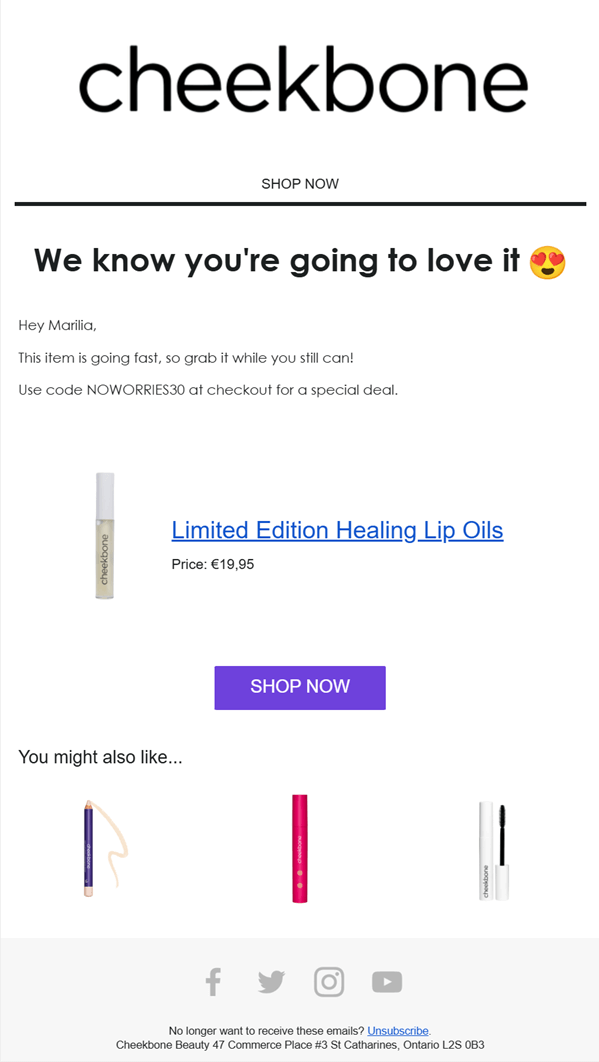
Here, Cheekbone Beauty follows up with a targeted email that highlights the exact product the shopper viewed, adds urgency with a limited-time offer, and includes a clear call-to-action (CTA) to return to checkout.
Related product recommendations are also added to encourage cross-sell, all in one focused message sent at the right moment.
Email retargeting and email privacy
Before you get started with email retargeting, it’s worth noting that it depends on data availability. This means that privacy updates, cookie restrictions, and GDPR rules can limit what you track, especially for anonymous visitors.
That’s why effective email retargeting needs to rely on:
- First-party data from your email list
- Clear consent through sign-up forms, pop-ups, and checkout opt-ins
- Triggering emails based on confirmed actions, not assumptions
While remarketing pixels help capture behavior, they work best when combined with strong email list growth and permission-based tracking.
To retarget your audience effectively, stay informed about email privacy regulations and ensure every email marketing campaign is built on clear consent, transparent data use, and compliant tracking practices.
Retargeting Ads Vs. Email Retargeting
You’ve probably heard (or even used) retargeting ads. They’re the ones that seem to follow you on social media or across the web after you visit an online store.
Ads like this one from Shopify can work well, but they’re never free.
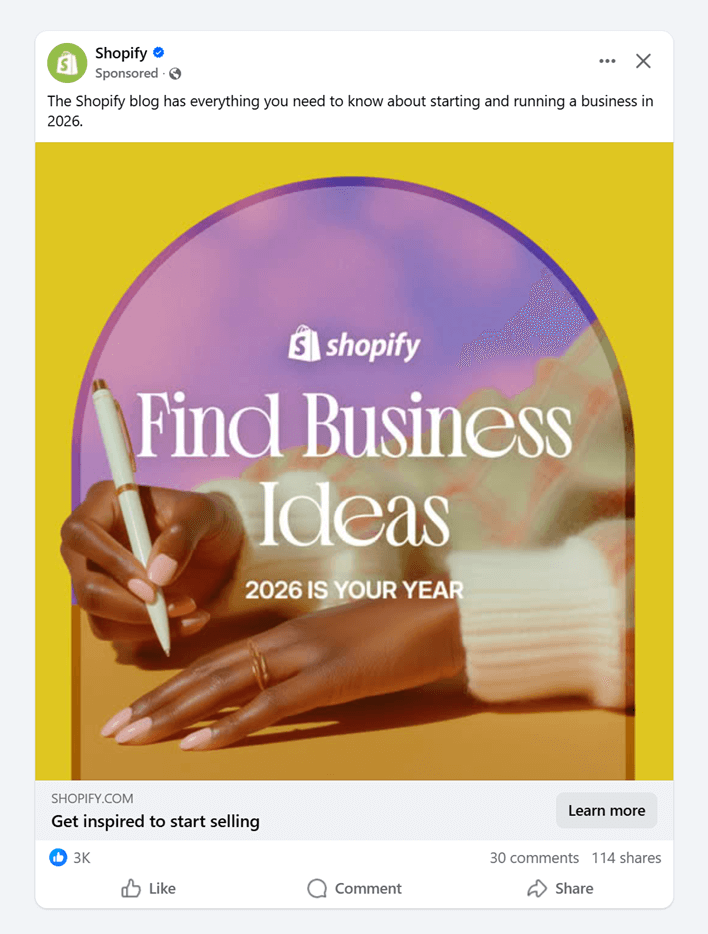
On platforms like Facebook, advertisers pay for every interaction, with click-per-cost (CPC) typically ranging from $0.26 to $0.50 and an average click-per-thousand (CPM) between $1.01 and $3.00.
Per month, ad costs can range from $101-$500 for SMBs to up to $5,000 for enterprises. And as competition grows, those costs add up fast.
With email retargeting, once someone joins your email list, follow-ups don’t come with a per-click or per-impression cost. That’s what makes it a more predictable and cost-efficient way to re-engage interested users and recover lost sales.
Here’s a quick comparison between email marketing retargeting and retargeting ads:
| Email retargeting | Retargeting ads | |
| Cost | Fixed monthly cost (e.g., $9/month for 500 subscribers and unlimited emails) | Pay per click or impression ($101–$500 per month) |
| Cost growth | No added cost per send or click | Costs increase as traffic and competition grow |
| Audience | Email subscribers and existing customers | Website visitors and ad audiences |
| Personalization | High, based on behavior and purchases | Limited by ad formats |
| Automation | Advanced workflows and triggered emails | Basic rule-based setups |
| Visibility | Depends on subject lines and open rate | Immediate and highly visible |
| Long-term value | Supports retention and repeat sales | Stops once ad spend stops |
Why Ecommerce Brands Use Email Retargeting
Not every visitor converts on the first visit, and that’s normal. Some will take their sweet time, especially with higher-value purchases.
Email retargeting helps eCommerce brands stay top of mind during the decision process and bring shoppers back when they’re ready.
Here’s why it’s such an effective strategy that numerous online stores use:
- Recovers lost sales without increasing ad spend: It brings back shoppers who have already shown intent, helping reduce shopping cart abandonment without paying for clicks or impressions again.
- Turns existing traffic into higher conversions: By following up based on real behavior, brands improve conversion rates, opens, and click-through rates (CTR) with messages that feel timely and relevant.
- Builds long-term retention: Retargeting increases repeat orders and overall customer lifetime value by reminding potential shoppers of your products or services. Targeted upselling, cross-selling, and product recommendations also boost average order value without aggressive promotions.
- Creates a more efficient marketing strategy: It complements ads, SMS, and other channels, giving online stores a scalable way to engage customers with owned data rather than rented attention.
How to Create a Successful Email Retargeting Strategy Step-by-Step
If you want email retargeting to work, you need a plan. The steps below will help you set up a simple strategy you can automate, measure, and improve over time.
1. Define the retargeting goal
The first step is to decide exactly what you want the email to achieve. Email retargeting works best when each campaign has a clear, single outcome.
For example, your goal might be to:
- Get someone to complete checkout
- Bring a shopper back to their shopping cart
- Encourage another look at a product
- Re-engage inactive subscribers
- Upsell or cross-sell to an existing customer
Avoid mixing goals in the same email. A cart abandonment message should focus on finishing the purchase, not browsing more products or joining a loyalty program.
If a customer, for instance, adds a skincare product to their cart but leaves before checkout, your goal is to get them back to complete the purchase. That determines how the email looks, what it says, and when it’s sent.
Defining the goal upfront keeps your messaging focused and your workflows simple.
2. Segment your target audience
Whether you already have segments in place or you’re doing this for the first time, segmentation is essential, not only for retargeting but also for email marketing in general.
At a minimum, you should separate:
- Existing customers from potential customers
- First-time visitors from returning buyers
- High-intent users based on browsing history or cart activity
- Inactive subscribers on your email list
This ensures each email matches the recipient’s level of intent and familiarity with your brand. Better targeting leads to higher conversion rates, stronger engagement, and fewer irrelevant sends.
If you already use segmentation, this is also a good moment to clean your email list. Remove hard bounces, suppress long-term inactive subscribers, and revisit outdated segments. Clean data improves deliverability and ensures your email retargeting campaigns reach people who are actually likely to engage.
Solid segmentation sets the foundation for everything that follows.
3. Connect your website and install tracking
Now, to trigger emails based on actual visitor behavior, your eCommerce website needs to be connected to your email marketing platform.
This usually happens through website tracking, either via a plugin or a tracking code snippet added to your site. Once connected, your platform can start collecting behavioral data, such as product views, cart activity, and purchases.
The setup typically follows three simple steps:
- Select the website you want to track
- Install tracking using a plugin or code snippet
- Start turning behavioral data into actions
These steps vary based on your ESP, so make sure you check how to connect the two before moving on.
Here’s an example from Moosend’s platform:
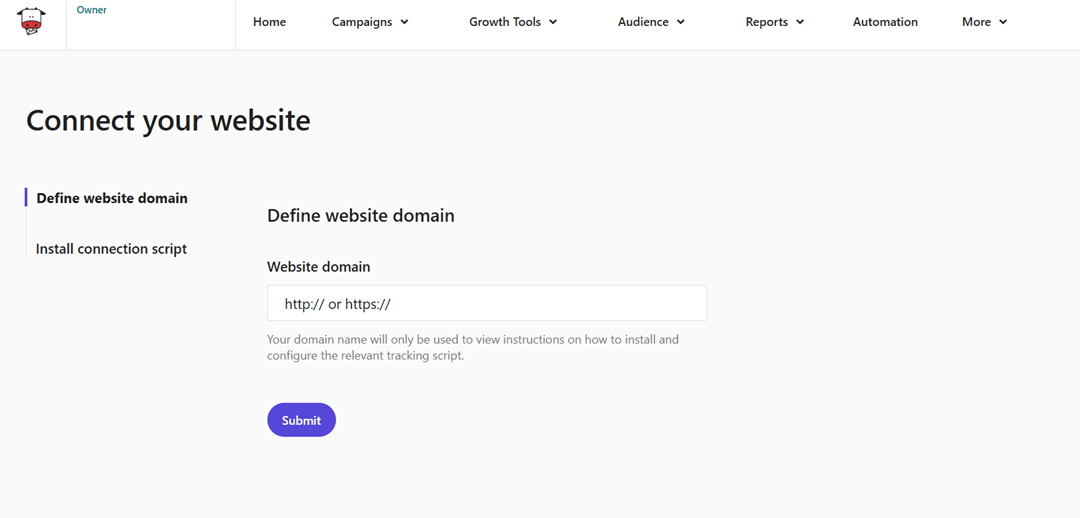
To enable website tracking, go to More > Websites, add your domain, and submit. Once the website is added, Moosend automatically generates a website ID, which you use to install tracking via a plugin or code snippet.
You can then install website tracking using one of the following methods:
- Plugin installation, using one of Moosend’s supported plugins for popular eCommerce platforms
- JavaScript tracking, by inserting a code snippet into your website’s head section
- PHP tracking, for custom setups that require server-side tracking
All methods collect the same behavioral data and can be used to trigger automated retargeting workflows.
4. Set a trigger and build your workflow
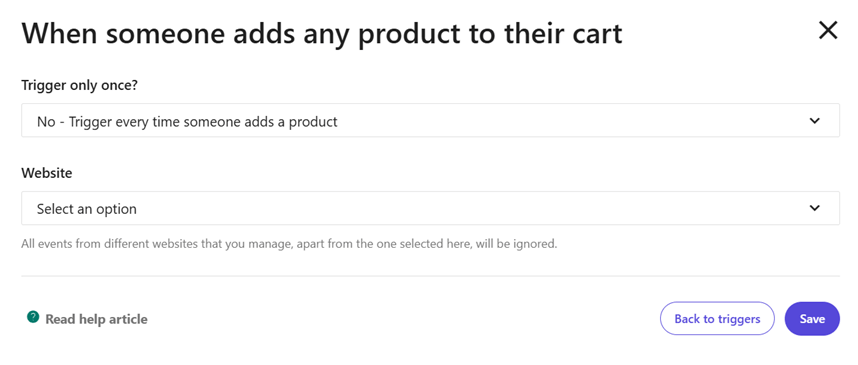
With website tracking in place, you can start defining when your retargeting emails should be sent.
This begins with selecting a trigger event, meaning the specific action that activates the automation. Common triggers include website abandonment, product page visits, email inactivity, or purchase completion.
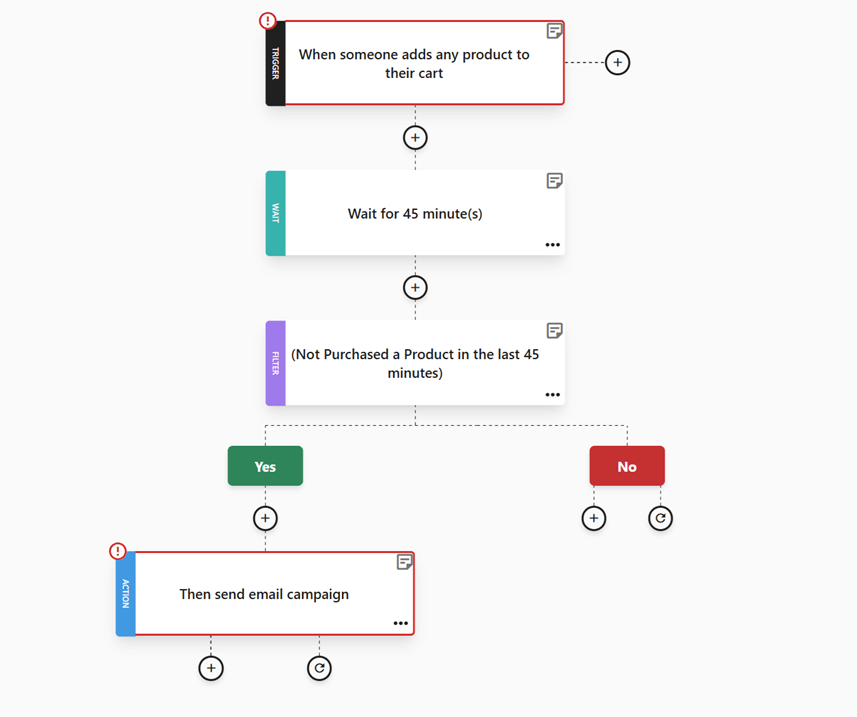
From there, you build the automation workflow. For example, a shopper adds one or more products to their shopping cart but leaves the site without completing checkout:
The automation then:
- Waits for a short delay, such as 30 or 45 minutes
- Checks whether a purchase has been completed
- Sends a cart abandonment email only if no order is detected
If the customer completes the purchase during the waiting period, the workflow is automatically stopped, and no further emails are sent (unless specified).
This trigger-and-condition structure ensures your retargeting emails arrive only when they’re relevant. Instead of manual follow-ups or one-size-fits-all campaigns, automation handles the timing and decision-making in the background.
5. Choose or design the email template
This is where your retargeting email finally starts to take shape visually. Most email platforms, including Moosend, offer pre-made templates you can use as a starting point.
For example, an abandoned cart template like the one shown below already includes the essential structure: a clear headline, product blocks with images and prices, and a prominent checkout CTA.
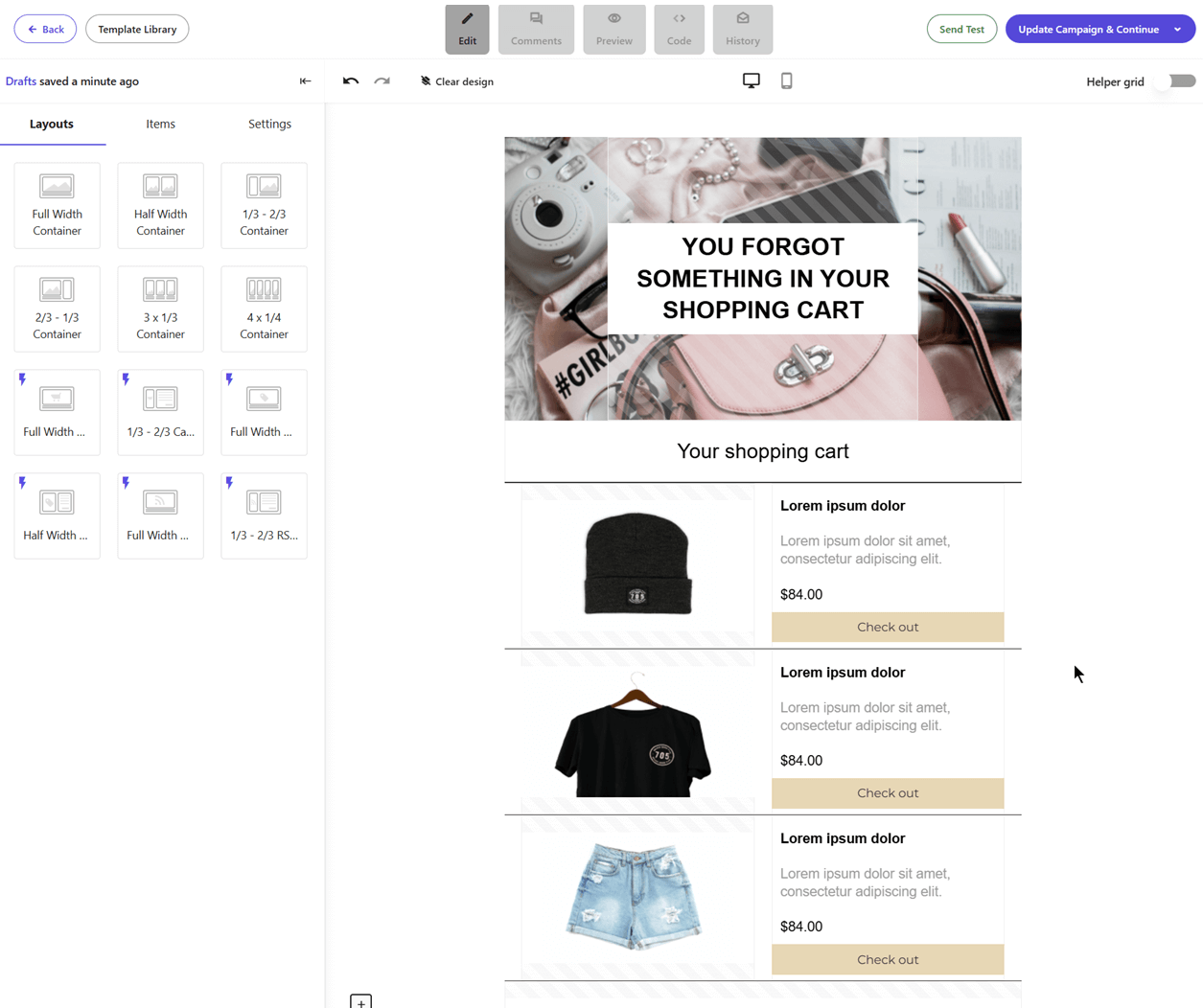
Using pre-made templates like the one above can save you a lot of setup time and help you launch faster.
That said, these designs are blueprints, not finished emails, and you should always customize them to match your brand:
- Update colors, fonts, and spacing to align with your branding
- Replace generic copy with product-specific messaging
- Adjust CTAs to match your tone and conversion goal
Keep the layout simple, make important elements like product images and prices easy to scan, and ensure the main CTA is visible without scrolling. A well-designed template connects copy, visuals, and structure into a clear path back to taking the desired action.
6. Write the subject line, copy, and CTAs
Speaking of copy, the goal of your email remarketing campaign is to deliver instant value. The recipient already showed interest, so your job now is to remove friction and make the next step obvious.
Start with the subject line. It should clearly reflect the action or intent, whether that’s returning to checkout, finishing a purchase, or revisiting a product.
Here are a few tips to help you write effective email subject lines:
- Use action-based language like “Finish your order”
- Keep it under 45–50 characters so it’s readable on mobile
- Avoid jokes, puns, or vague phrases that don’t signal the next step
- Match the subject line to the rest of the copy to avoid confusion
- Add urgency only when it’s real, like low stock or expiring carts
When it comes to the email copy, keep it short and focused on benefits. Remind the reader why they were interested in the first place, without being aggressive. This works across use cases, from abandoned carts to re-engagement or product reminders.
Lastly, your CTA should always match the behavior you’re responding to. That said, avoid over-selling or adding too many buttons at once. Retargeting emails are meant to guide visitors to take a single action. So, one clear message and a single action are enough.
If you want to speed up this process, Moosend’s AI writer can help you generate subject lines and copy based on your campaign goal, saving time while keeping messaging consistent.
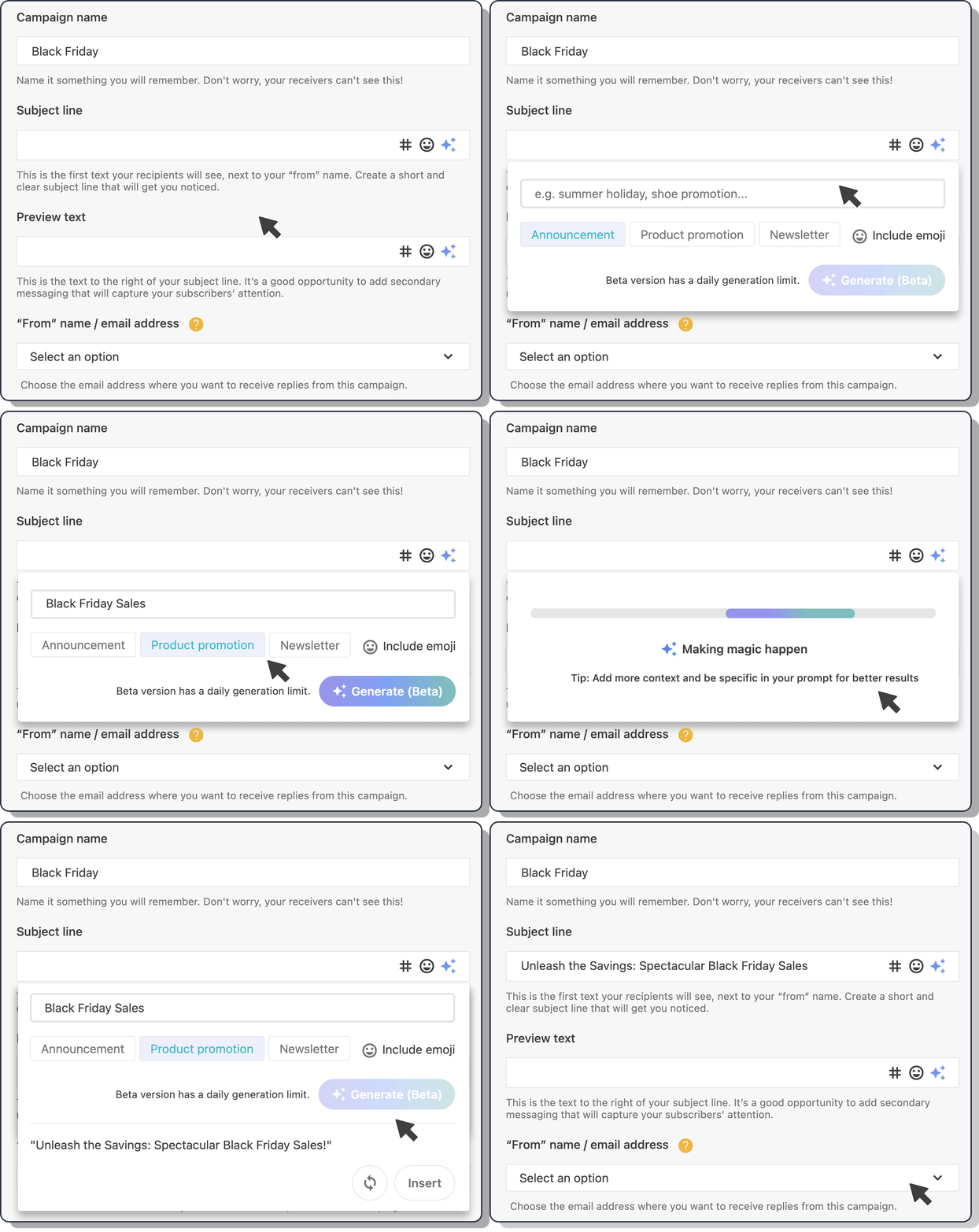
Don’t worry about getting every detail perfect at this stage. In the next section, we’ll walk through real retargeting email examples to help you refine your copy and get inspired.
7. Personalize the email content
Once you’ve defined the value of the message, personalization helps deliver it to the right person in the right context.
Now, you may think that email personalization is about adding someone’s name everywhere, but it’s so much more. Using data and segmentation, you can make the message feel relevant based on what the user has already done.
For example, you can add dynamic elements in your email remarketing campaigns, such as:
- The exact items left in the shopping cart or recently viewed
- Product recommendations related to browsing or purchase behavior
- Personalized email content blocks that change based on segment, action, or even weather conditions
- Basic details like first name or location only when they add clarity
Before you launch your retargeting emails, keep one thing in mind: over-personalized messages can feel intrusive. That’s when users get the “my device is listening to me” feeling. It’s usually just tracking, but not everyone knows that or feels comfortable with it.
Stick to data users recognize, avoid surprises, and use personalization to support the message’s value. As a rule of thumb, show them exactly what they need to return, nothing more.
8. Track your performance
For retargeting to work effectively, tracking needs to be in place. This allows you to see what’s working and where users drop off.
Your email platform will let you track:
- Opens and clicks to see how many users engage with your message
- Conversions and orders to measure completed actions after the click
- Revenue recovered from users who returned to finish a purchase
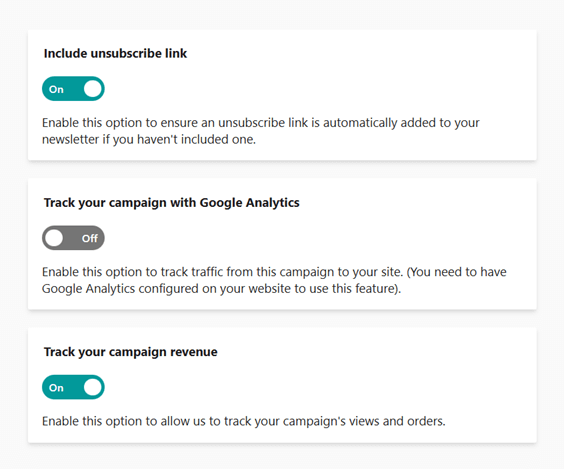
You can also connect campaigns with Google Analytics to track post-click behavior on your website and see how retargeting emails support the full customer journey.
9. Test, launch, and optimize your retargeting emails
Finally, before linking your email to your retargeting workflow, run a final round of checks.
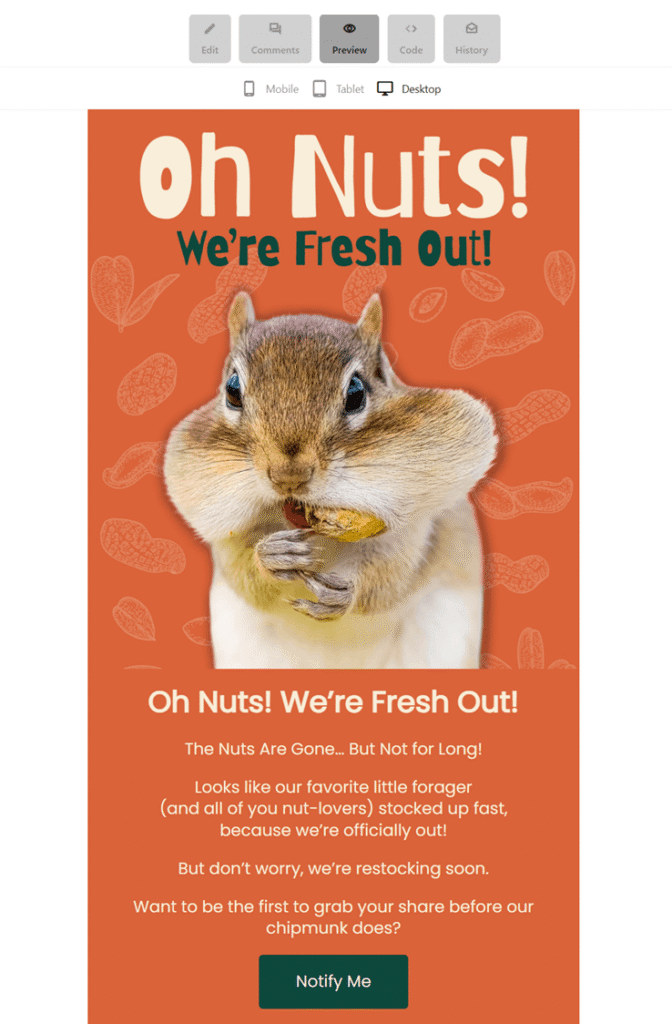
Most ESPs let you preview your email across desktop, tablet, and mobile, so you can confirm the layout works on every screen. You can also send test emails to check links, images, subject lines, and CTAs in real inboxes.
Many platforms also include spam and deliverability testing tools, helping you spot issues that could affect inbox placement before you go live.
Once everything checks out, connect the email to your automation and launch.
After that, optimization doesn’t stop. Review key metrics regularly, test timing, copy, and CTAs, and adjust your workflow rules based on performance.
Email retargeting works best when it’s treated as an ongoing process rather than a one-off send.
Best Examples of Email Retargeting
Here are some of the most effective email retargeting examples, each triggered by real user behavior and designed to bring visitors back at the right moment.
Abandoned cart emails
When a shopper adds a product to their cart but leaves before checkout, this email steps in to gently bring them back.
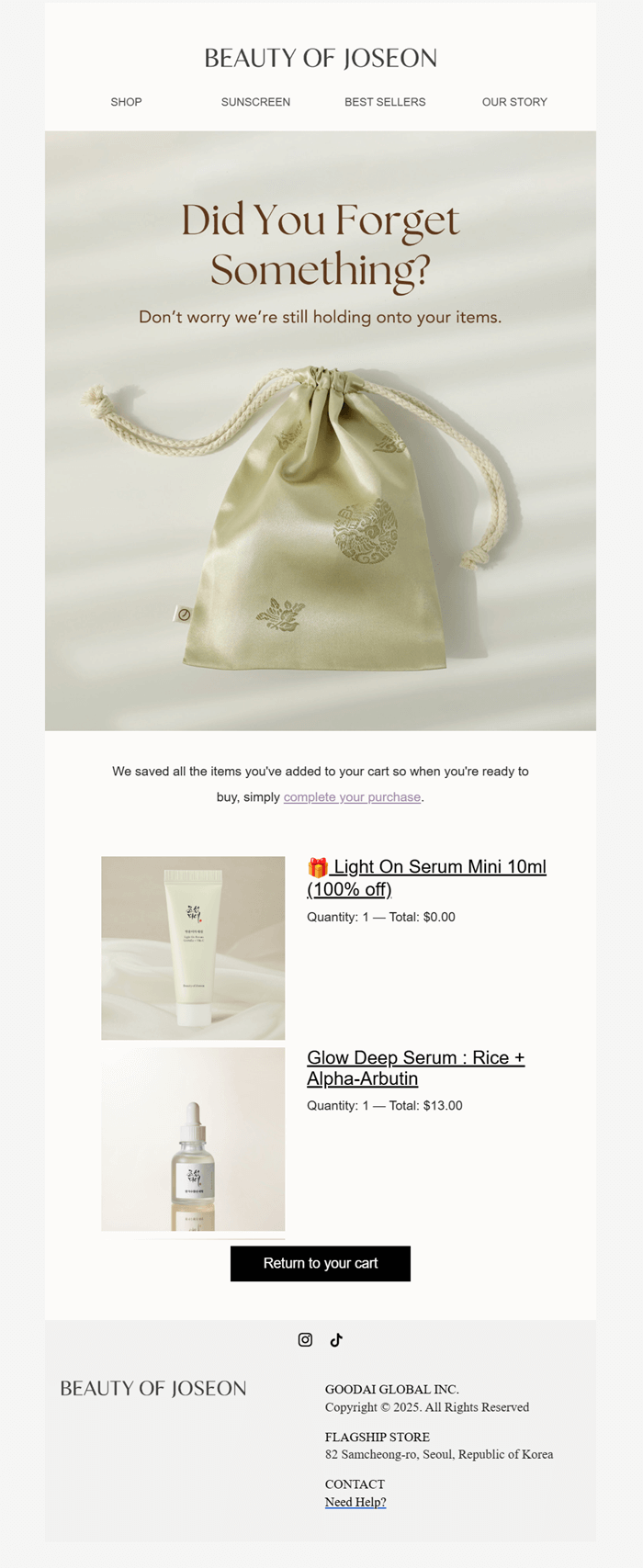
Here, Beauty of Joseon’s goal isn’t to rush the sale, but to remind them of what they were already interested in and make returning feel easy. Plus, they throw a little freebie to encourage abandoners to complete the purchase.
Subject line: Oops! You left something behind 🎁
Why it works:
- Uses a friendly, low-pressure email subject line with an emoji
- Brings the exact product back into view, so users don’t have to search again
- Keeps the message simple and product-led instead of salesy
- Matches the brand’s calm, minimal tone, which builds trust
- Makes returning to checkout feel quick and low-effort
If you need more inspo, check out our best abandoned cart email examples and templates.
Website abandonment
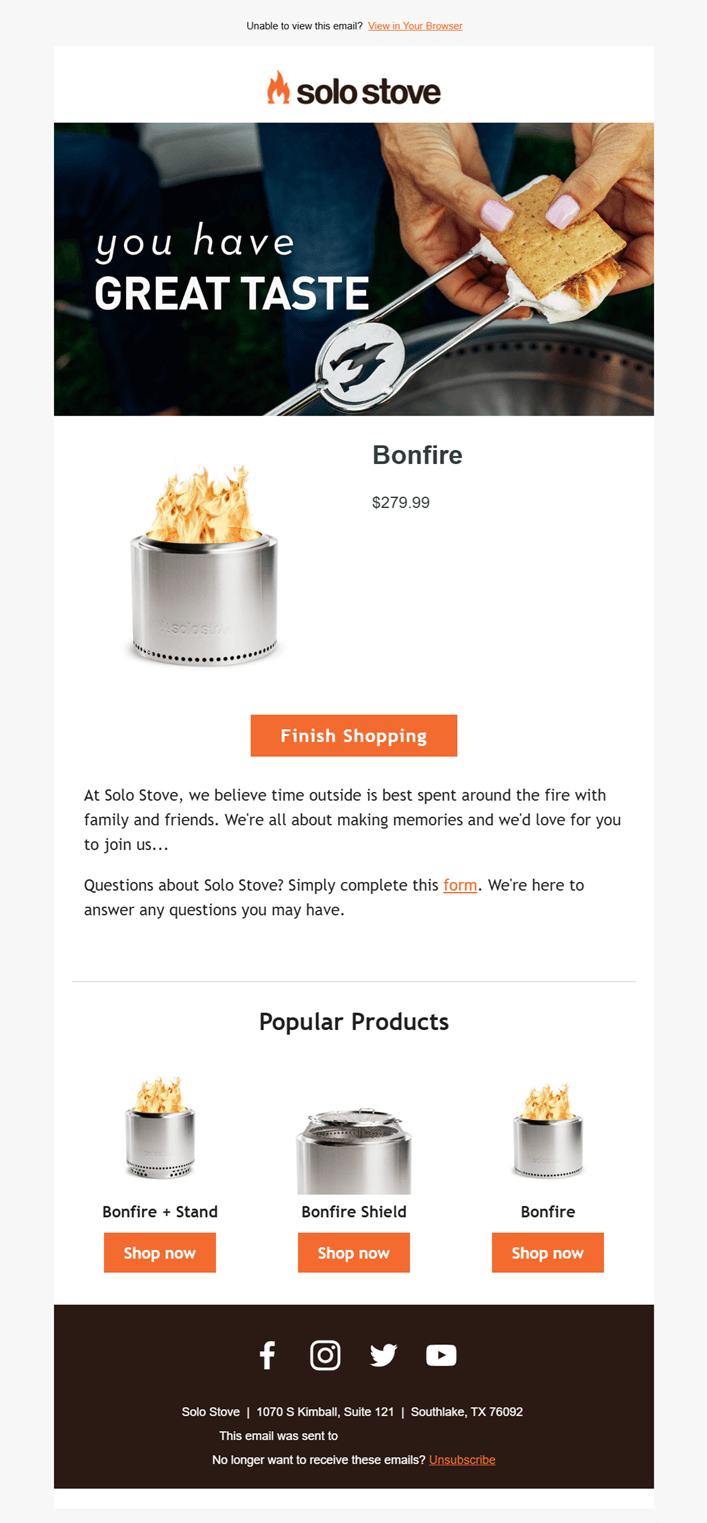
When a visitor spends time browsing a product but leaves without adding it to their cart, this email brings them back into the experience. In this case, Solo Stove focuses on rekindling interest rather than pushing for an immediate sale.
Unlike cart abandonment emails, there’s no “you forgot something” message or urgency cue. Instead, the email highlights the product again, promoting the brand’s lifestyle appeal, and invites the user to continue shopping at their own pace.
Subject line: Did you see something you like?
Why it works:
- Leads with lifestyle imagery instead of urgency, reminding users why they were interested, not just what they viewed
- Reintroduces the exact product with price, keeping the decision context clear without pushing checkout
- Uses a soft, continuation-based CTA that fits a browsing mindset
- Reinforces brand values through storytelling elements
- Adds popular products at the bottom to prompt further exploration
Back-in-stock alerts
Back-in-stock emails usually go to shoppers who have opted in to receive notifications. They also work as retargeting when someone checked a product, didn’t complete the purchase, and then left while it was unavailable.
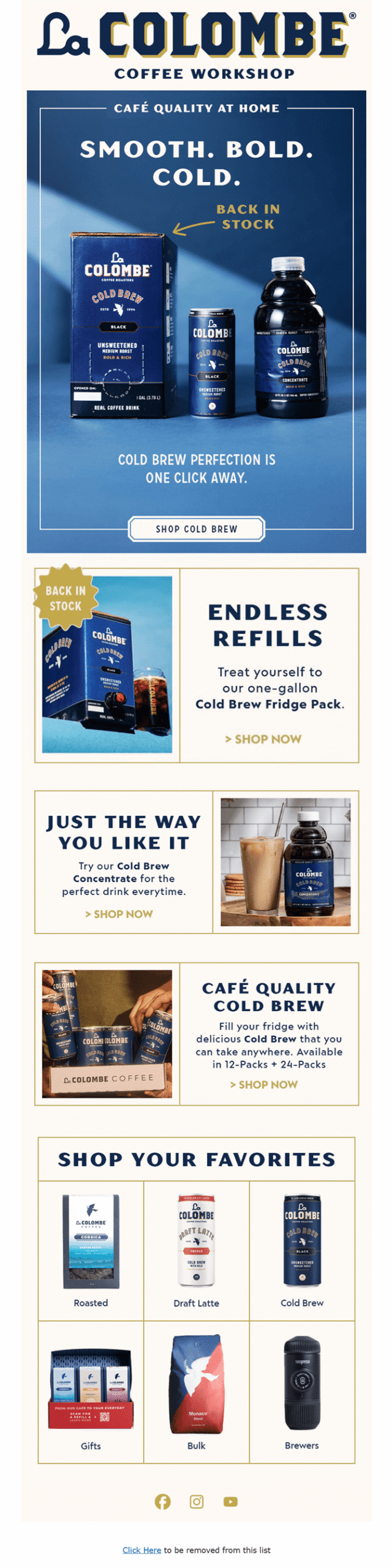
That’s the approach La Colombe takes here. The email reconnects with users who have already shown intent and brings them back as soon as the product is available again to finish what they started.
Subject line: Back in Stock: Our Bestselling Cold Brew 🙌
Why it works:
- Calls out “Back in stock” immediately, aligning perfectly with the subscriber’s earlier interest
- Keeps the focus on the specific product lineup that went out-of-stock
- Uses strong visuals to guide clicks toward key products
- Expands beyond a single item with related options, increasing the chance of conversion
Price drop email example
Similar to the above example, this email targets users who viewed a specific item, left without purchasing, and then received it after the price dropped.
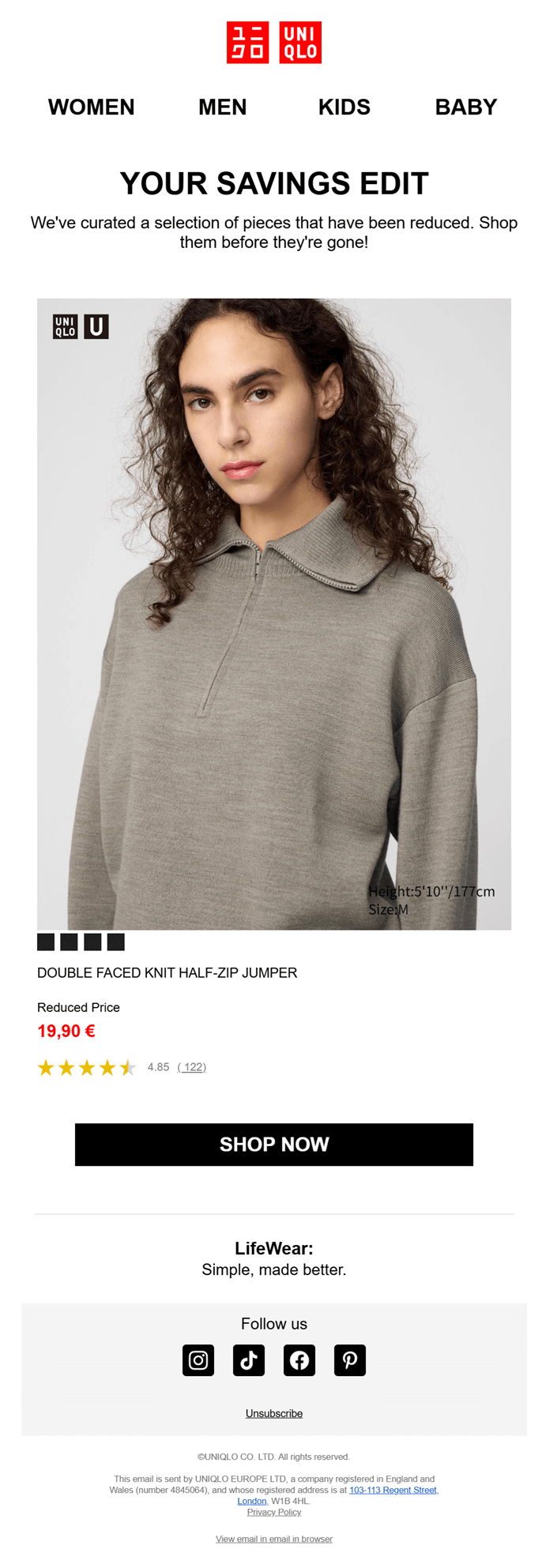
Instead of pushing a generic sale, Uniqlo reframes the discount as a personal “savings edit,” turning a price change into a timely reason to return and complete the purchase.
Subject line: Price drop on something you liked
Why it works
- Connects the price drop directly to an item the user already checked
- Makes the discount feel curated with ample white space and only the necessary details
- Keeps the focus on one product, reducing decision fatigue
- Uses social proof and clear pricing to remove last-minute hesitation
Replenishment reminders
Based on past purchases, replenishment messages reach customers right as everyday essentials are likely to run low, making it a strong form of behavior-based email retargeting.
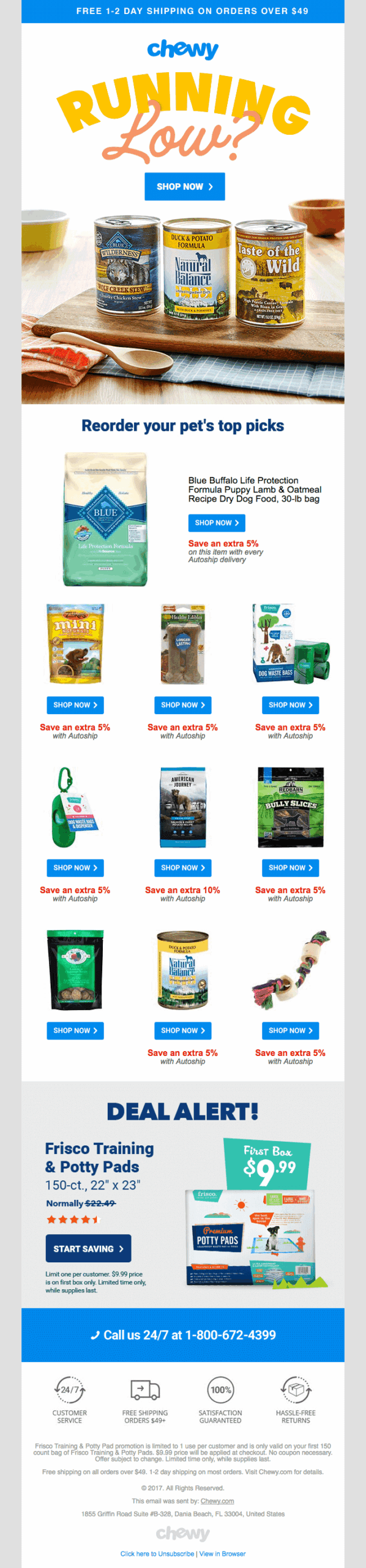
Chewy doesn’t wait for customers to realize they need to reorder. It anticipates the need, surfaces familiar products, and removes friction from the repeat purchase.
Subject line: Running Low?
Why it works:
- Uses purchase history to predict needs instead of pushing a generic promo
- Brings previously bought items back into view, reducing effort and decision time
- Boosts convenience with quick CTAs and autoship incentives
- Fits naturally into routine-based categories like pet food, skincare, and household staples
Pet supply brands can benefit greatly from this email retargeting strategy and should incorporate it into their pet care marketing efforts to increase revenue.
Win-back emails
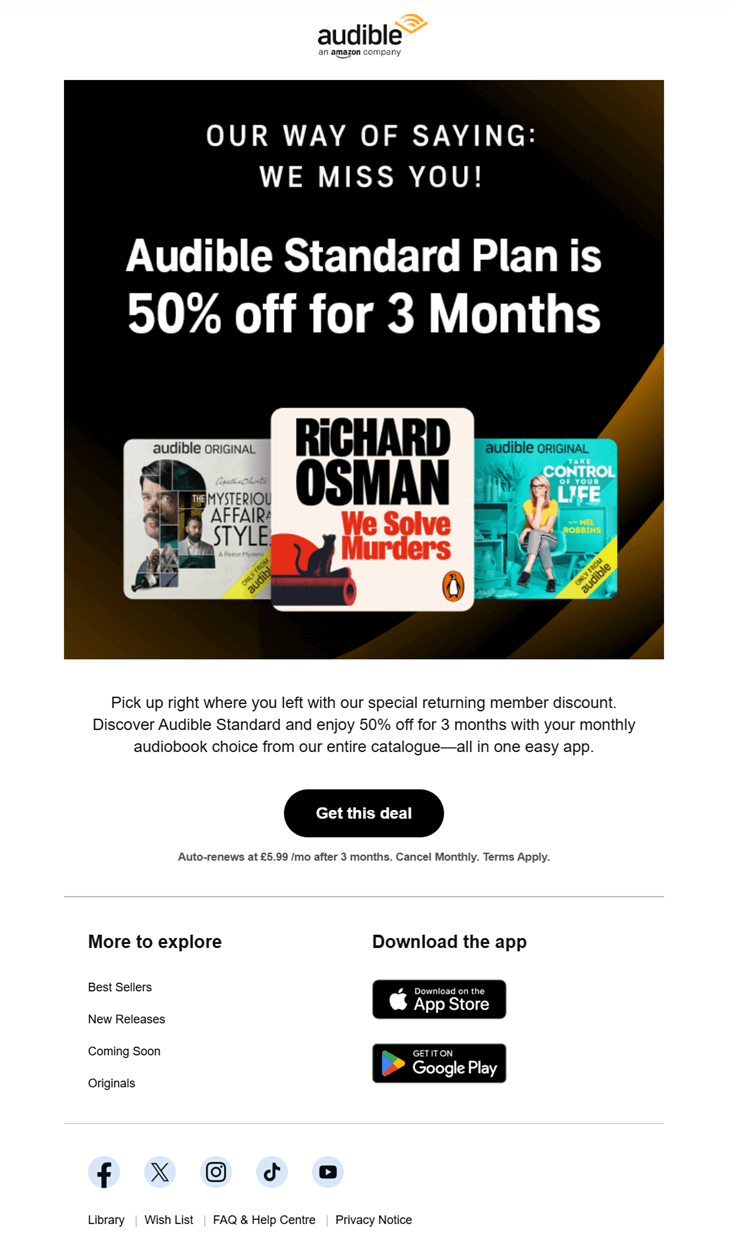
After a subscription ends and a user goes inactive, this type of email retargeting steps in to help warm the relationship back up. In this case, Audible reaches former subscribers with a clear incentive to return.
Instead of reintroducing the service, the email assumes prior use. It focuses on what the user already knows, pairs it with a limited-time offer, and removes friction from rejoining.
Subject line: Welcome back with 50% off for 3 months
Why it works
- Acknowledges inactivity directly with a “we miss you” message that feels personal
- Uses a time-bound discount to create a clear reason to return now
- Highlights recognizable content to tap into past listening habits
- Makes reactivation simple with a single, focused CTA
Cross-sell newsletter campaigns
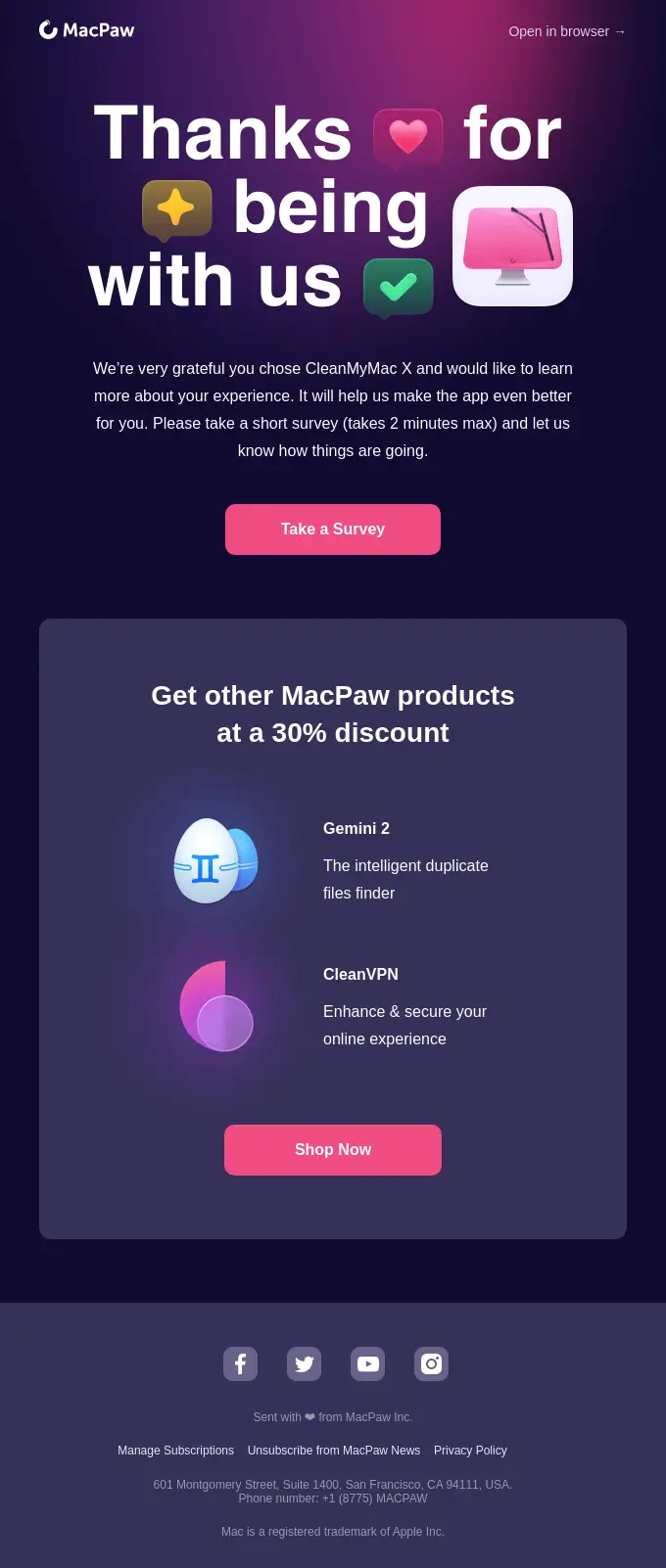
This retargeting example builds on an existing customer relationship to introduce relevant add-ons or upgrades. After a user installs or actively uses a product, cross-sell emails expand value by suggesting tools that naturally fit their needs.
MacPaw follows up after CleanMyMac X usage with a thank-you message, then smoothly promotes related products at a discount.
Why it works:
- Ties the offer to recent product usage
- Leads with appreciation and feedback before introducing additional products
- Cross-sells tools that clearly complement the original purchase
- Uses a discount as added value for existing users
Post-purchase follow-ups
Post-purchase emails are a smart form of email retargeting because they reconnect with customers after delivery. The goal isn’t to sell right away, but to keep the conversation going and turn a completed purchase into long-term value.
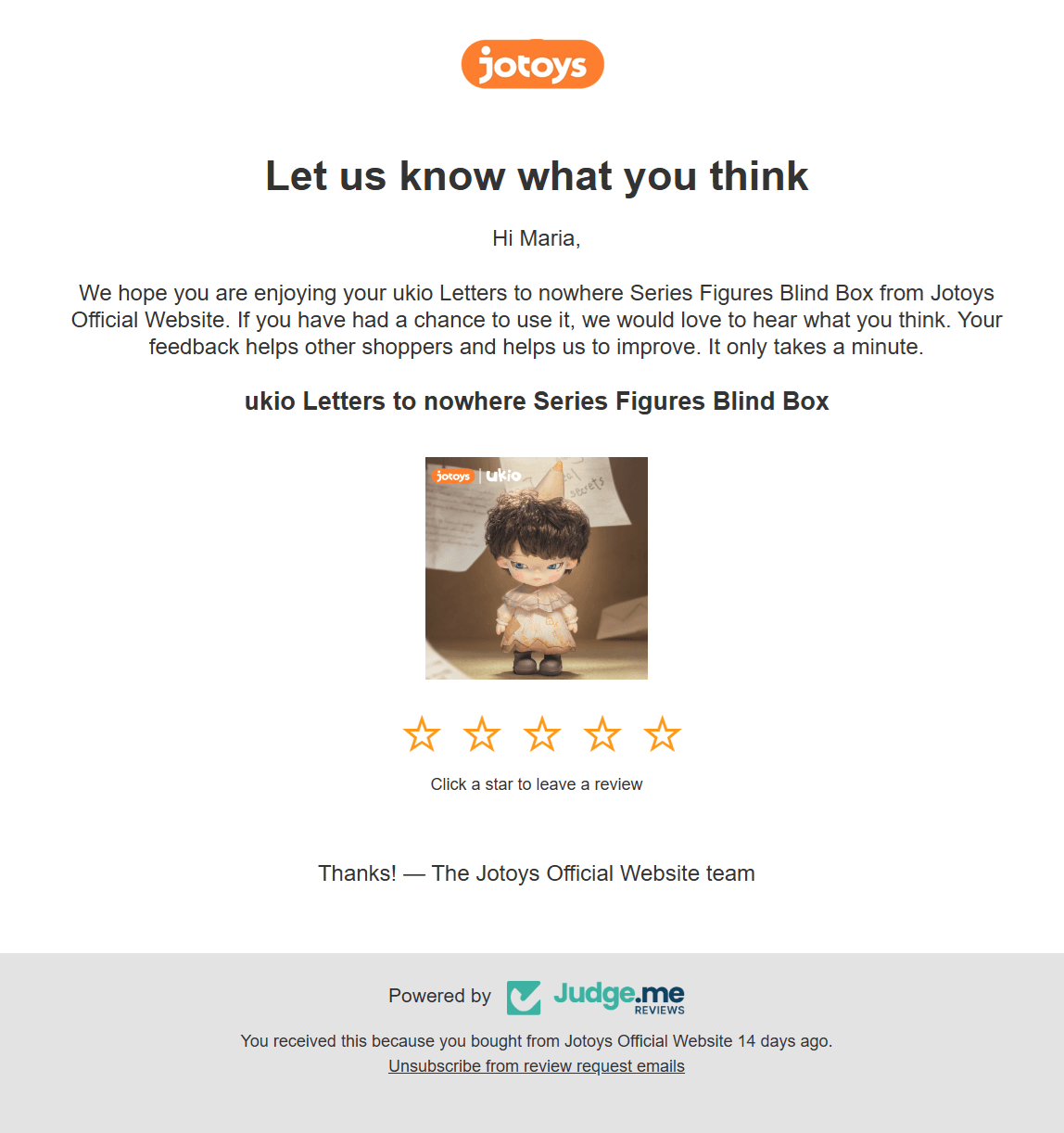
Here, Jotoys follows up shortly after the order arrives to ask for a quick review. It’s a low-effort ask that benefits both sides: customers share their opinion, and the brand collects feedback and social proof it can reuse across product pages and future campaigns.
Subject line: ⭐️ Maria, what did you think about ukio Letters to nowhere Series Figures Blind Box
Why it works:
- Arrives right after delivery (14 days after the purchase), when customers are most likely to respond
- Keeps the action simple with a one-click star rating
- Includes the subscriber’s name in the subject line and copy to make it look more personalized
- Sets the stage for future retargeting with reviews, recommendations, and loyalty follow-ups
Feature or usage-based nudges
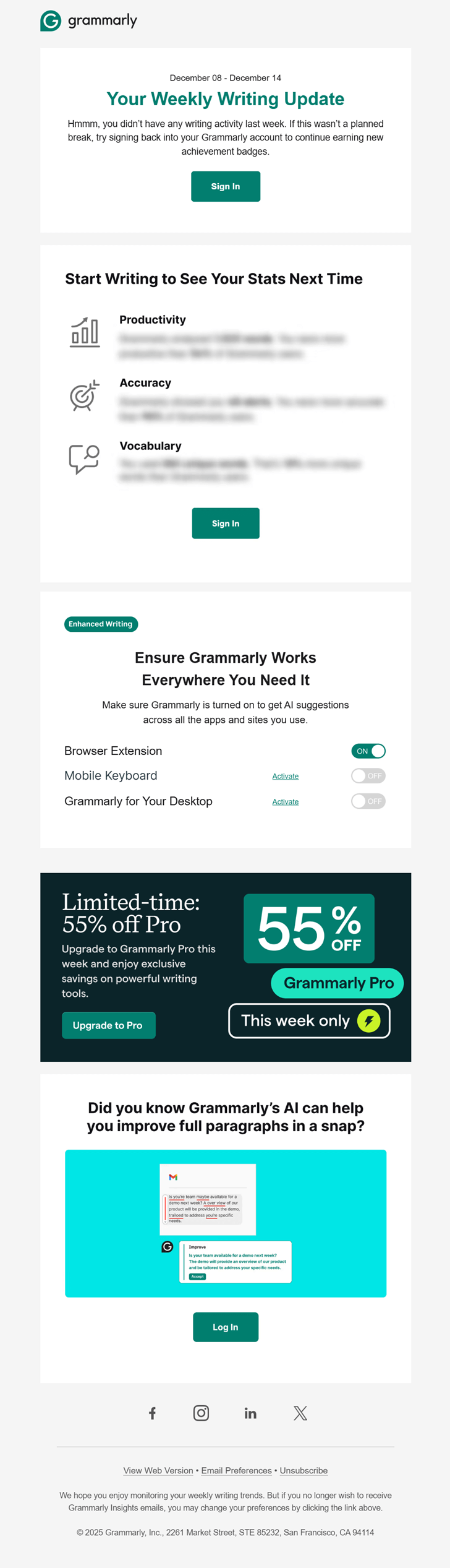
Feature- or usage-based retargeting is triggered when activity slows, features go unused, or key actions are missed, guiding users back into the product with a clear and timely next step.
In this example, Grammarly notices a drop in writing activity and steps in with a weekly progress update. The email gently reminds users what they’re missing, shows what they could unlock next, and pairs the nudge with a limited-time upgrade offer.
Subject line: 🏆 Weekly progress + 55% off Pro!
Why it works:
- Uses real usage data to make the message feel relevant
- Reframes inactivity as an opportunity to improve, not a failure
- Highlights specific features users haven’t fully activated yet
- Adds a time-bound incentive that aligns with renewed engagement
Retargeting Customers at the Right Time
While email retargeting doesn’t deliver instant spikes the way ads sometimes do, over time, it can bring back lost sales, strengthen retention, and make every visit more valuable without constantly asking for more budget.
For brands that think beyond the next click, email retargeting becomes a long-term advantage. And if you want a simple way to get started, Moosend gives you the tools to track behavior, automate follow-ups, and turn intent into results without overcomplicating the process.
FAQs
Here are some common questions regarding email retargeting:
1. How long should I wait before sending a retargeting email?
It depends on the trigger. For high-intent actions like cart abandonment, 30 minutes to a few hours works best. For product views or re-engagement, waiting 1–3 days often feels more natural. The key is to send while the intent is still fresh, not after it’s gone cold.
2. Can email retargeting work without discounts?
Many of the strongest examples rely on reminders, availability updates, convenience, or reassurance rather than price cuts. Discounts are useful, but relevance, timing, and clarity usually drive better long-term results.
3. What’s the biggest mistake brands make with email retargeting?
The biggest mistake is treating it like a one-off campaign. Email retargeting works best as a system. That means clear goals, proper segmentation, testing, and ongoing optimization. Brands that “set it and forget it” miss out on most of the value.
Similar Posts
 Published by
 Published by

Create, send and optimize your email marketing campaigns