















Email Personalization: The Complete Guide for 2026
Published By Marilia Dimitriou
January 21, 2022

21/01/22
Think about the last marketing email you opened. It probably felt relevant to you in some way. Now think about the dozens you ignored.
That difference often comes down to email personalization.
A few years ago, adding a first name to the subject line and creating a few basic segments felt impressive. Today, that’s the starting point. Real email personalization goes further by using behavior, preferences, and past interactions to send messages that make sense for each subscriber and each moment.
In this guide, we’ll explore what personalization in email marketing really means. Learn why it drives measurable growth, how it has evolved, and how to apply it in a practical, effective way. Plus, we’ll take a look at some data collection tips and tools you can use.
Go beyond first-name personalization
Create campaigns based on behavior, preferences, and lifecycle stage.
Try MoosendWhat Is Email Personalization?
Email personalization is a data-driven digital marketing strategy that delivers personalized email campaigns to the right customers at the right time. The information needed to create personalized messages varies depending on your campaign’s goal. For example, it can be their first name, demographics, behavioral data, or purchase history.
Email personalization strategies are usually powered by marketing automation software like Moosend or Constant Contact. They enable users to set up and schedule timely, relevant messages in just a few steps, using simple or complex criteria.
The Evolution of Email Personalization
Email personalization has changed dramatically over the years.
To understand where personalization stands now and where it’s heading, let’s look at how it has evolved over time:
- Basic personalization focuses on static data such as name, gender, or location.
- Behavioral personalization goes further by reacting to what subscribers actually do, including product views, past purchases, email clicks, and website activity. This is where emails start to feel timely and relevant.
- Predictive personalization is even more advanced. Instead of reacting to past behavior, it anticipates future actions. It can suggest products customers are likely to buy next, identify subscribers at risk of churning, or adjust send times based on engagement patterns.
Based on this shift, brands are moving from static segments that rarely change to dynamic audiences that update automatically as customer data evolves. Campaigns are no longer one-size-fits-all, but adapt in real time.
If you are still relying on “Hi [First Name],” it may be time to rethink your approach. The real opportunity lies in using data intentionally, building automations that respond to behavior, and helping your personalization strategy grow along with your audience.
Why Is Email Personalization Important for Businesses?
Personalized marketing helps you reach your target audience faster compared to other popular marketing methods, such as social media marketing and search engine optimization (SEO). Plus, it’s a cost-efficient solution suitable for every business.
But that’s not all. Here are some additional benefits to consider.
Increases open rates and conversions
When your subscribers first see your newsletter in their inboxes, they must decide whether to open or ignore it. If they sense that your message is relevant to them, they’ll be more willing to have a look, which can ultimately boost your open rate.
However, your challenge doesn’t stop there; you should now bravely attempt to increase your click-through rate, too. A consistent, personalized experience and a clear call-to-action (CTA) can drive higher conversion rates.
For example, when you understand your customers’ buying preferences and send them a relevant offer, you are far more likely to convert them than if you rely on generic email blasts sent to everyone.
Builds stronger relationships with your audience
Think about how many irrelevant emails you receive every day. It’s hard to feel connected to brands that clearly do not understand what you want.
Now compare that to the brands that consistently send offers, recommendations, and content that match your interests. You’re more likely to trust them and stay engaged over time.
That trust is what turns subscribers into loyal customers, and it starts with showing that you’re actually paying attention.
Reduces email fatigue and list burnout
Generic mass campaigns often lead to email fatigue. When subscribers receive messages that don’t match their needs, they start ignoring them, unsubscribing, or marking them as spam.
Personalization helps you avoid that. By sending fewer but more relevant emails, you reduce overload and keep your audience engaged. Instead of overwhelming subscribers with constant promotions, you communicate with intention.
Over time, this protects your sender reputation, improves deliverability, and keeps your list healthier.
Boosts engagement and business ROI
Targeted emails bring business growth, especially for eCommerce stores.
If you start promoting the proper products or services to the right customers, you’ll notice a positive shift in your email marketing ROI.
Email Personalization Stats
If you need more evidence of the benefits of email personalization, here are some statistics that justify its power.
- 71% of consumers expect companies to deliver personalized interactions, while 76% say they feel frustrated when personalization doesn’t happen. (McKinsey)
- 65% of customers consider targeted promotions a top reason to make a purchase. (McKinsey)
- Retailers that implement targeted promotions effectively can see a 1–2% lift in sales and a 1–3% improvement in margins. (McKinsey)
- 80% of shoppers said they are more likely to purchase from brands that offer personalized experiences. (Epsilon)
These numbers show two important things. First, personalization directly impacts email performance and revenue. Second, customers now expect relevance as part of the experience.
When brands combine better data, smarter segmentation, and targeted offers, personalization becomes a competitive advantage.
Top Email Personalization Tactics
Ready to use the best personalization strategies to capture your readers’ attention?
1. Add a relevant sender name
When your email arrives, the first thing that your reader sees is the sender’s name. The rule is simple: the more personal it is, the better. But what does that mean?
When sending emails to your subscribers, especially in B2B organizations, avoid using a generic sender name, as it will look unnatural to them.
Instead, use the name of a person they usually interact with, such as an account manager or sales agent, to make it feel more human.
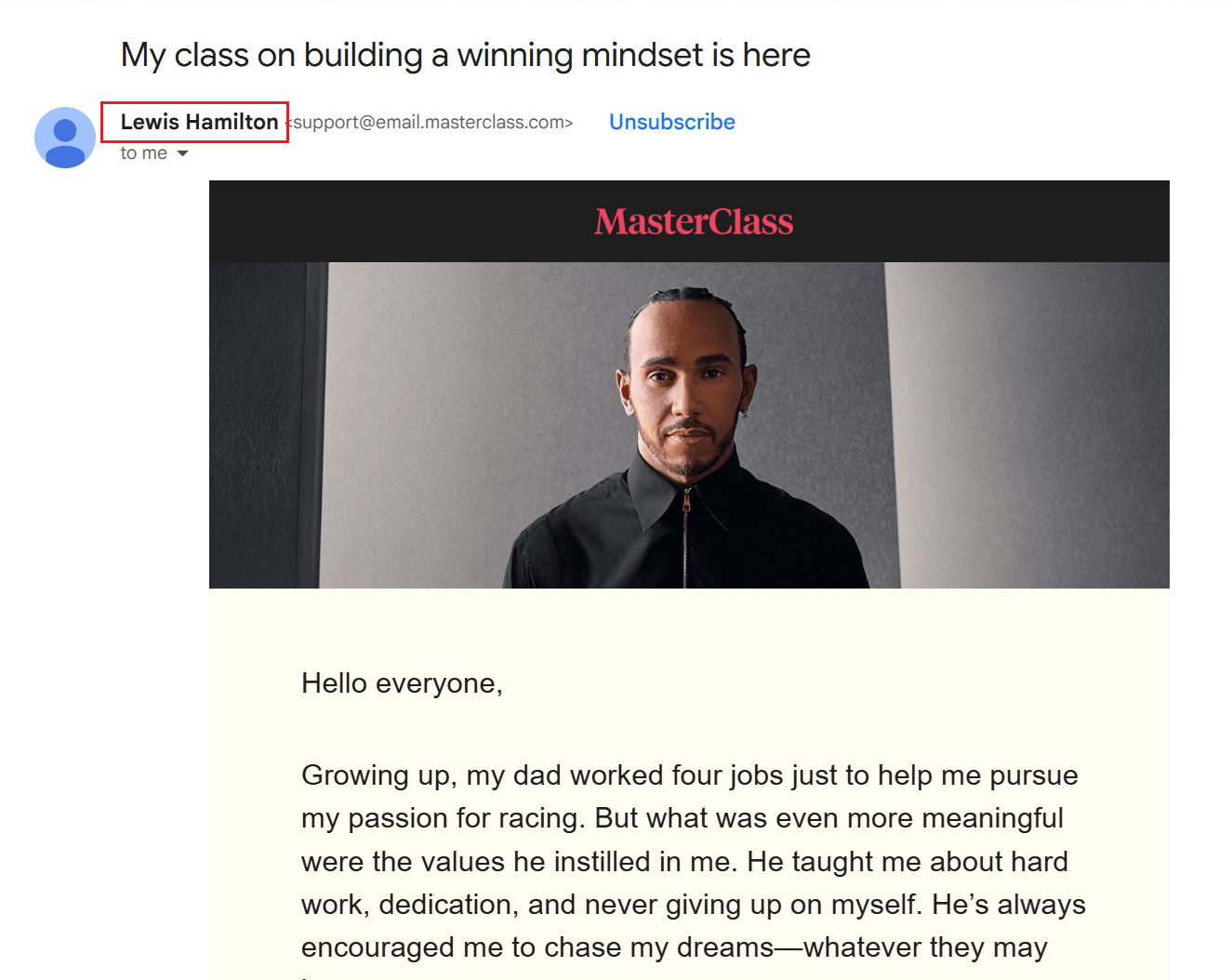
Look at the sender’s name above by MasterClass. They not only added the course instructor’s name, Lewis Hamilton, to entice readers to open the email, but also added credibility and reinforced the value of the content inside.
2. Craft context-driven subject lines
The subject line is one of the first elements your subscribers notice, and it often determines whether your email gets opened or ignored. It should clearly convey your campaign’s purpose and give readers a compelling reason to click.
Personalization here goes beyond inserting a first name. You can reference recent behavior, such as a product view or an abandoned cart, highlight location-specific offers, or tailor urgency based on lifecycle stage.
Here are some subject line examples from popular brands to get inspired:
- Alexandra, don’t miss your January offer (ASK Italian)
- Still looking for the perfect Valentine’s gift, Marilia? (LEGO)
- Price drop on something you liked (Uniqlo)
- Alexandra, your rewards recap is here 💜 (e.l.f. Cosmetics)
- A Pikachu-Themed Gift for You 🎉💛 (Pokemon)
- Maria, what did you think about Ukio letters to nowhere? (Jotoys)
Data consistently shows that personalized subject lines can increase open rates. The key is to make them contextual, timely, and aligned with what the subscriber actually cares about, not just technically personalized.
If you’re unsure how to phrase it, you can also use an AI Writer to generate context-driven subject lines based on your campaign and audience, then refine the suggestions to match your tone.
3. Segment your email list properly
List segmentation is one of the most widely used methods to send personalized campaigns. You divide your master list into smaller, targeted lists based on specific criteria, such as demographics, geographic location, time zone, or behavioral data.
For example, if you run an eCommerce business, here are some segments to consider:
- Purchase frequency (first-time buyers, repeat buyers, VIP customers)
- Average order value (high spenders vs budget shoppers)
- Product category interest (e.g., skincare vs makeup)
- Cart abandoners vs active buyers
- Browsing behavior (frequent product viewers, discount hunters, seasonal shoppers)
- Discount sensitivity (customers who only buy during sales)
- Loyalty tier or reward status
- Geographic shipping zones (for delivery time or local promotions)
The options are limitless here. Knowing your top buyer personas’ customer journeys and characteristics will help you gradually segment them. Plus, if you operate in B2B organizations, you can use company size and industry criteria to form targeted emails.
4. Predict next-best actions with AI
Most personalization is based on what subscribers have already done. Predictive personalization, though, uses AI models to anticipate what they are likely to do next and adjust your campaigns accordingly.
Instead of waiting for churn to happen, predictive systems can identify early signals of declining engagement and automatically trigger retention offers or win-back sequences.
Rather than promoting the same products to everyone, AI can calculate which items a subscriber is most likely to purchase next based on browsing patterns, past orders, price sensitivity, and similar customer behavior.
You can also use predictive scoring to prioritize high-intent users. For example, subscribers who repeatedly visit pricing pages or product categories can be grouped into targeted campaigns with stronger calls to action or limited-time incentives.
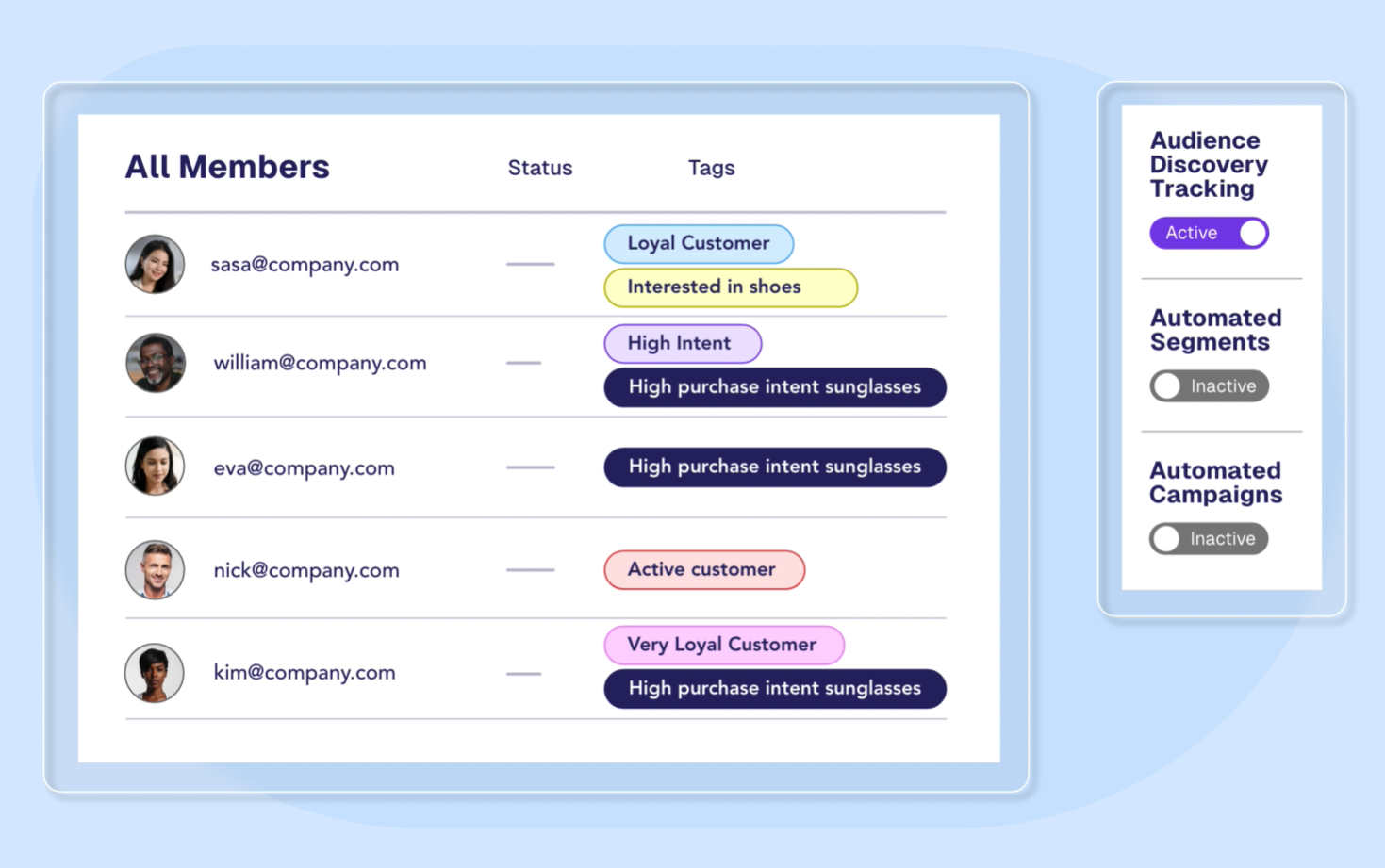
To implement this:
- Start with one clear goal, such as reducing churn or increasing repeat purchases.
- Ensure you collect behavioral and transactional data through proper website tracking.
- Activate built-in AI features in your email platform, such as predictive product recommendations, engagement scoring, or send-time optimization.
- For more advanced setups, sync predictive scores from your CRM or data platform back into your email tool to trigger automated workflows.
5. Use triggered emails strategically
One of the most effective ways to personalize your campaigns is to trigger emails based on real customer behavior. Instead of sending generic promotions, you respond to specific actions subscribers take.
These actions can include:
- Signing up for your newsletter
- Completing a purchase
- Registering for an event
- Becoming inactive
- Viewing a product multiple times
Transactional emails are just the starting point. The real opportunity lies in reacting to browsing behavior.
For example, this email from Uniqlo was triggered after a customer viewed a specific sweater. When the price dropped, the brand sent a personalized email with the exact product and the new price.
Subject line: Lower prices on styles you love!
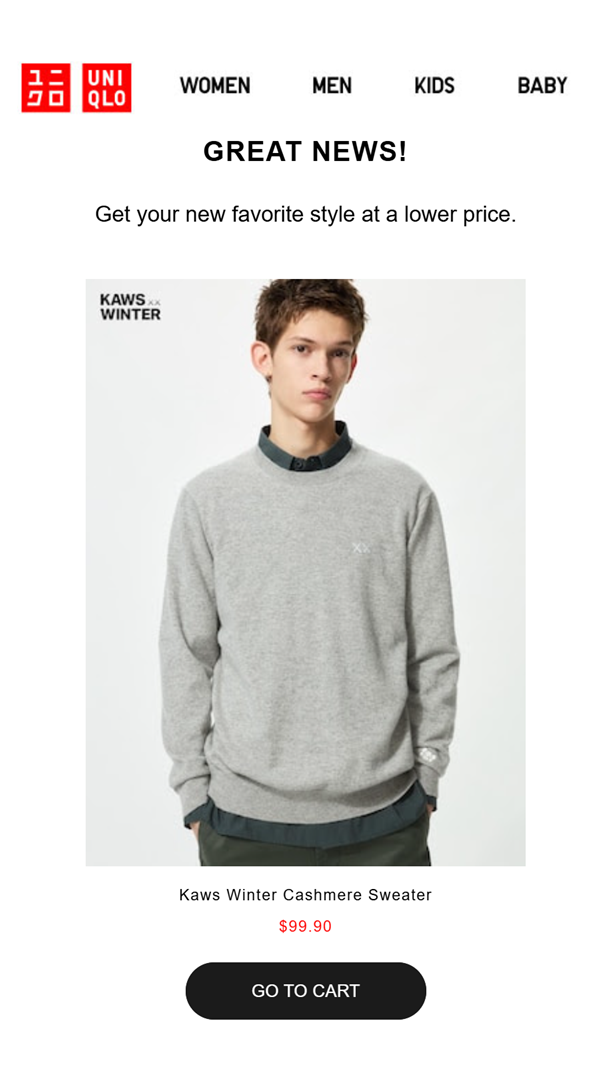
This triggered campaign works because it’s timely and specific. It references something the customer has already shown interest in, making the offer feel helpful rather than promotional.
Behavior-based triggers turn personalization into action. So, instead of guessing what your audience might want, you respond to what they have already told you through their behavior.
6. Include dynamic content elements
Dynamic content allows you to tailor parts of your email automatically based on each subscriber’s behavior, preferences, or activity. Instead of creating multiple versions of the same campaign, you build a single email that adapts to each reader.
Here’s how you can use dynamic blocks strategically:
- Display cart-abandonment items: Remind subscribers of the exact products they left behind, including images, titles, and prices. This keeps the reminder specific and increases the conversion potential.
- Insert personalized product recommendations: Recommend items based on purchases, views, best-sellers, revenue performance, or AI-driven predictions. This supports cross-sell and upsell initiatives without manual effort.
- Trigger browse abandonment reminders: Show subscribers the products they recently viewed but didn’t add to cart, giving them a gentle nudge to purchase.
- Pull real-time content through RSS feeds: Automatically display the latest blog posts, articles, or updates without manually updating each campaign.
The key is control. You decide how many products to display, how they are sorted, and which dynamic elements appear. Each block updates based on live website events, ensuring subscribers only see content that matches their activity.
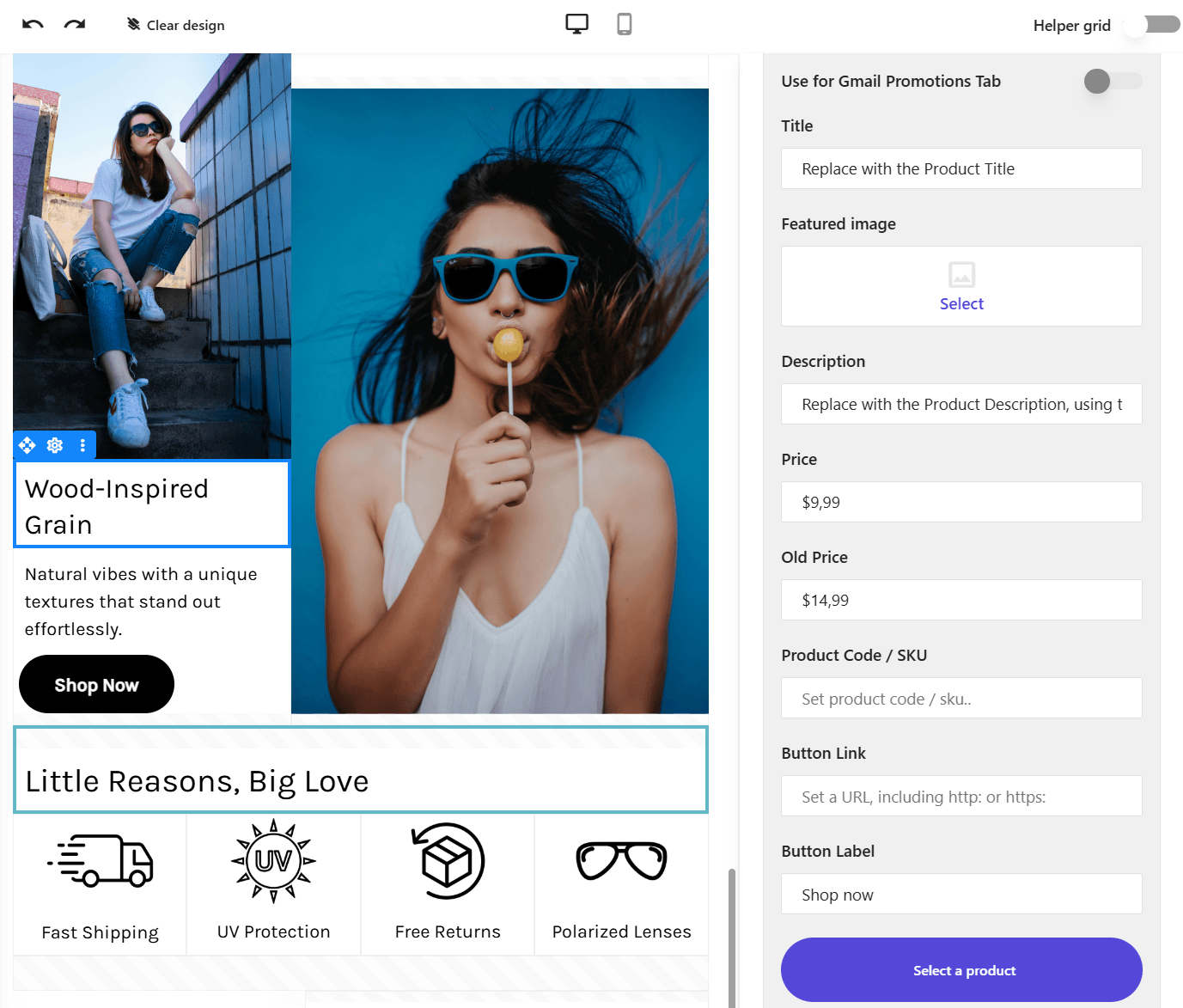
With tools like Moosend, you can create repeatable dynamic blocks directly inside the editor, making advanced personalization both scalable and easy to manage.
Then, you can either start from scratch or select a pre-made design to craft your personalized email template.
7. Take advantage of contextual data
Product recommendations are among the most effective personalization tactics when they utilize behavior and context.
Start with what your customers actually do. Use browsing history, past purchases, category interest, and engagement patterns to recommend relevant products that support cross-selling and upselling. If someone buys running shoes, suggest performance socks or related gear. If they frequently browse skincare, highlight new arrivals in that category.
Then layer in contextual data to further increase relevance. For example, weather-based targeting allows you to adjust recommendations based on local weather conditions. If it’s cold in one region and warm in another, your campaign can automatically promote coats to one audience and swimwear to another.
Brands like The North Face use this type of personalization to align products with local conditions. The result is a campaign that feels practical and relevant, not generic.
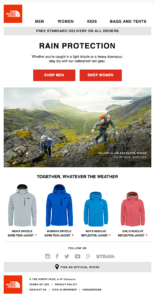
This combination of behavioral and contextual personalization ensures your emails feel helpful rather than promotional. When recommendations reflect both what customers like and what they are experiencing in the moment, engagement and conversions naturally improve.
8. Opt for industry-specific personalization
Effective personalization looks different across industries. What feels relevant in one may feel excessive or misplaced in another. Instead of applying the same tactics universally, align personalization with how your audience naturally interacts with your brand.
Here’s how that plays out in practice:
- eCommerce: Personalize around shopping behavior. Recommend products based on past purchases, category affinity, or browsing activity. For example, if a customer regularly buys skincare, highlight new arrivals in that category or replenishment reminders for products they are likely to run out of.
- SaaS: Focus on product usage and lifecycle stage. If a user hasn’t activated a key feature, send a tutorial or case study. If they’re approaching their usage limits, you can also trigger an upgrade-focused email.
- Travel & hospitality: Rely on past destinations, loyalty status, or booking patterns. For example, suggest similar destinations to previous trips or offer exclusive upgrades to frequent guests before peak seasons.
Industry-aware personalization ensures your emails feel helpful and expected, not forced. When personalization reflects how customers actually engage with your business model, it drives stronger results.
Which Email Campaigns Should You Personalize?
Personalization works best when applied where it matters most. So, instead of trying to personalize every email equally, focus on the campaigns where relevance has the biggest impact.
Here are the key campaign types you should always personalize:
- Welcome emails: These messages should reflect why the subscriber joined. Use the sign-up source, declared preferences, or first-interaction data to tailor the first impression.
- Onboarding sequences: Adapt content to product interests, industry, or user behavior. The goal is to guide each subscriber toward activation, not overwhelm them with generic information.
- Cart and browse abandonment emails: Reference the exact products viewed or left behind. Add pricing updates, availability signals, or complementary items to increase conversion.
- Post-purchase follow-ups: Recommend related products, offer how-to guides, or suggest replenishment timing based on the purchase.
- Product recommendation campaigns: Base suggestions on purchase history, browsing behavior, or similar customer activity to drive cross-sell and upsell.
- Price drop alerts: Notify subscribers when items they viewed decrease in price. This feels helpful and timely rather than promotional.
- Re-engagement campaigns: Adjust messaging depending on how long a subscriber has been inactive. A customer who has been silent for 30 days requires a different approach than one who has been inactive for a year.
- Birthdays and loyalty milestones: Personalize rewards based on past spending or significant anniversaries, such as birthdays, to strengthen long-term retention.
Personalized Email Examples That Work
Here are some effective email examples from top brands and retailers that use personalization to attract new and existing customers.
Four Seasons
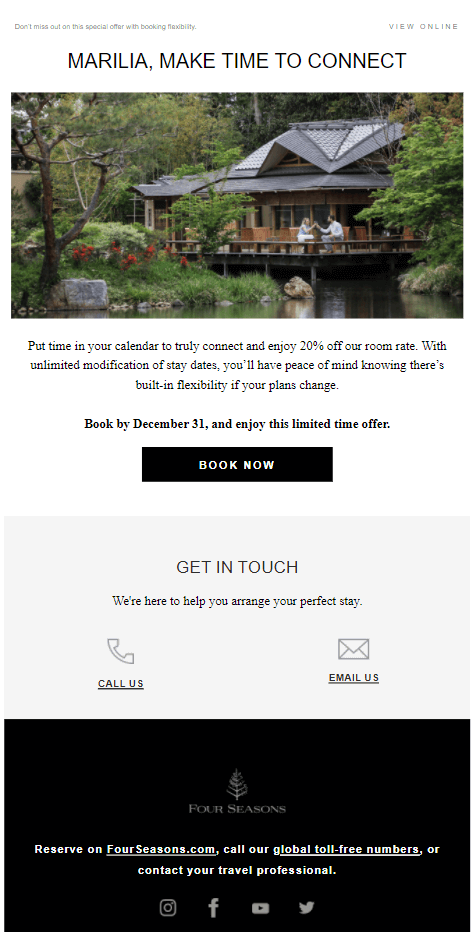
This example from the Four Seasons focuses on travel intent, promoting a flexible, limited-time stay that is likely to align with destinations or properties the subscriber has previously explored.
Subject line: Marilia, book by Dec 31 to enjoy 20% off
What works:
- Highlights a clear incentive (20% off) both in the subject line and near the CTA.
- Adds urgency with a specific booking deadline.
- Keeps one strong, visible CTA above the fold.
- Supports the offer with premium visuals and benefit-driven copy.
Calvin Klein
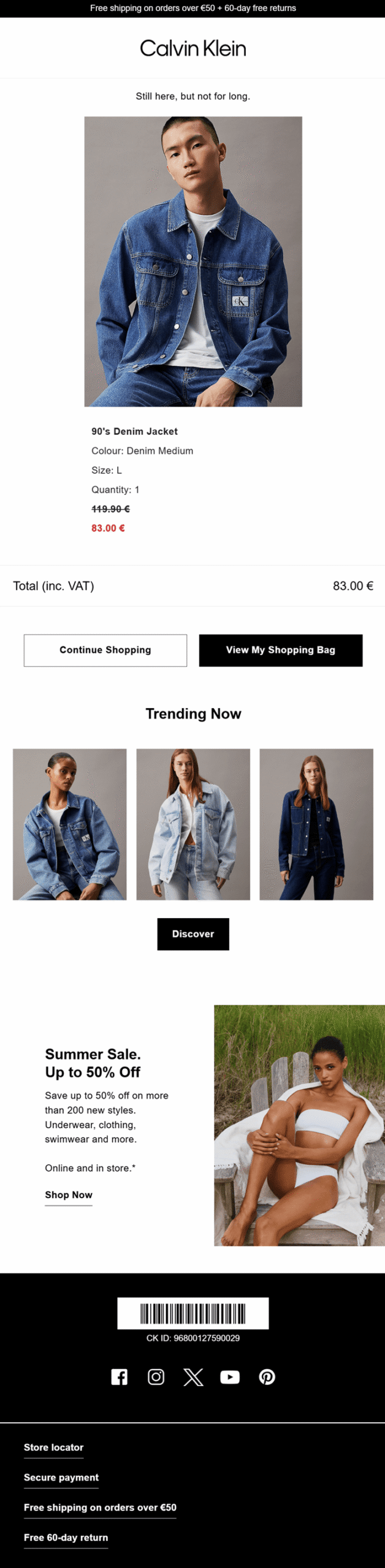
Here’s a simple yet effective abandoned cart email campaign from Calvin Klein to recover lost sales.
Subject line: You Left Something Behind
What works:
- Shows the exact abandoned product, including image, size, color, and quantity, for clarity.
- Highlights the discounted price in red to reinforce urgency and savings.
- Uses a scarcity-driven headline (“Still here, but not for long”).
- Adds strong CTAs (“View My Shopping Bag” and “Continue Shopping”) to reduce friction.
- Includes extras like free shipping, free 60-day returns, and trending product recommendations to remove hesitation and increase basket value.
Further reading: For more, check these additional cart abandonment email campaign examples.
Uniqlo
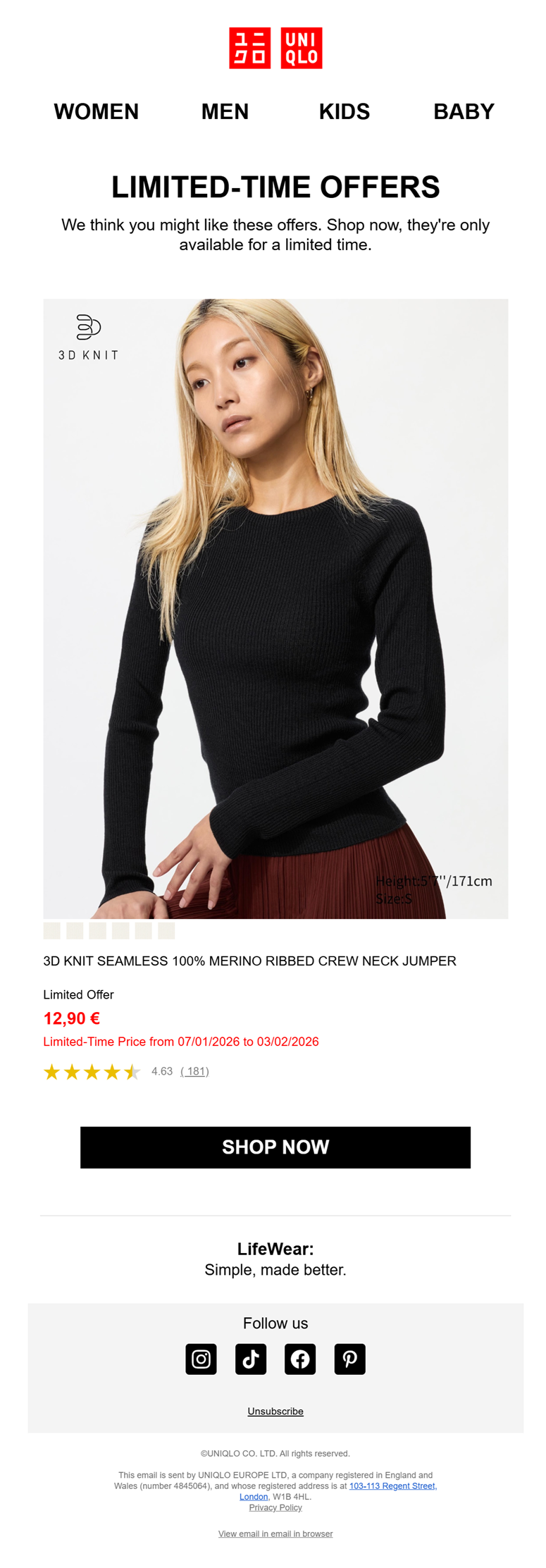
This personalized limited-time offer email from Uniqlo was triggered after the subscriber viewed a specific product.
Subject line: A product you might like is on offer
What works:
- References prior interest with “We think you might like these offers.”
- Highlights a strong limited-time discount with clear pricing and dates.
- Displays the exact product previously viewed to keep it relevant.
- Adds social proof with ratings and review count.
- Uses a bold, single CTA (“Shop Now”) to drive immediate action.
YouTube
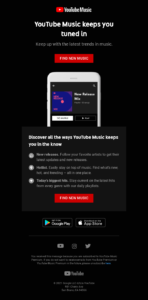
YouTube Music aims to remind inactive or less active subscribers of the platform’s value and features.
Subject line: Never miss the latest hits with YouTube Music
What works:
- Highlights key features, such as new releases and trending playlists, to spark interest.
- Uses the second person to make it all about “you.”
- Includes a bold, action-driven CTA (“Find New Music”) to encourage immediate engagement.
- Keeps the design clean and focused, reducing distractions.
- Promotes app downloads to drive usage beyond the inbox.
MacPaw
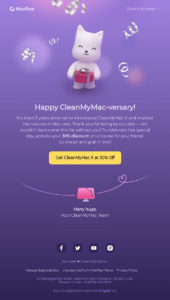
MacPaw celebrates customer loyalty with a milestone email that feels personal, grateful, and reward-driven.
Subject line: Happy CleanMyMac-versary! Grab your discount 🎁
What works:
- Marks a clear milestone (3 years) to strengthen the brand relationship.
- Offers an exclusive 30% discount as a celebratory reward.
- Uses warm, appreciation-driven copy to build emotional connection.
- Keeps one strong, benefit-focused CTA to drive action.
- Reinforces brand personality through playful visuals and tone.
How to Measure the Impact of Email Personalization
Personalization shouldn’t be judged by how “smart” it feels, but by how it performs. So, if you want to prove that your personalization strategy works, measure it against a clear baseline.
Here’s how to do it in a practical way:
- Measure open rates for personalized vs. non-personalized emails: compare personalized subject lines or send-time-optimized campaigns against a control group. The performance difference shows the real impact.
- Track revenue per email: This is one of the most important metrics. If targeted emails generate significantly more revenue per send than generic broadcasts, your personalization is working where it matters most.
- Analyze conversion rate by segment: Break down conversions across dynamic segments. Are repeat buyers converting more with product recommendations? Are at-risk customers responding to targeted offers? Segment-level insights reveal where personalization drives growth.
- Run A/B tests: Test behavior-triggered emails against batch campaigns. You can also see how dynamic vs static content performs. Let the data determine whether personalization adds incremental value.
- Monitor customer lifetime value (CLTV) over time: The real power of personalization is retention. If customers exposed to tailored experiences show higher repeat purchase rates and longer engagement cycles, your strategy is building long-term value.
Personalization becomes strategic when it moves beyond theory and proves its impact through measurable performance gains.
Data Collection Methods For Email Personalization
So, how can you gather data to create segments that lead to highly personalized experiences?
Sign-up forms
First off, you can place subscription forms on your website to start collecting your visitors’ email addresses. This will help you get a head start with your email personalization.
However, it’s best to avoid asking for more than their basic data, like their name and address, as it’s better to win their trust first. You can always collect more details later as engagement grows. Using double opt-in is also recommended, as it confirms consent, improves data quality, and helps protect your sender reputation.
Here are the main sign-up form types to consider:
- Pop-up form: Appears over the page and requires the visitor to either subscribe or dismiss it before continuing.
- Floating bar: Stays fixed at the top or bottom of the screen while the visitor scrolls.
- Fixed form: Remains anchored to a specific area of the screen during navigation.
- Inline form: Embedded within the page content and spans the full width of the layout.
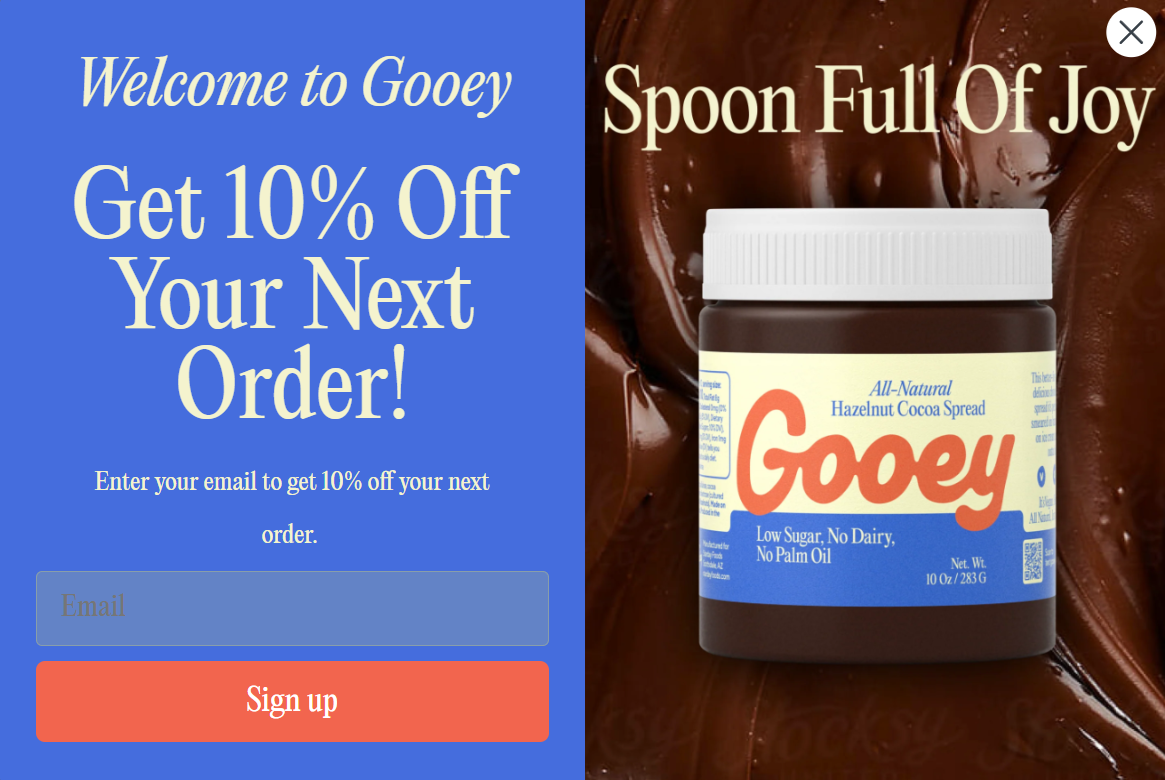
Look at the pop-up form above made by Gooey Snacks. To make it more appealing, they offer a 10% discount on customers’ first order. It’s wise to do something similar to collect those email addresses faster.
Customer surveys
Now that you have those customers by your side, it’s time to dive deeper into that data. Once you define your target audience, you can craft customer surveys to build effective segments and lists.
From demographics to customer preferences and product quality, ask short questions that customers won’t skip. The best format combines consistent rating scales with open-ended questions. Avoid asking vague questions, as they may reduce the number of replies.
Moreover, consider offering an incentive, such as an Amazon coupon, to encourage more responses from lucky survey participants.
Integrations
Finally, another way to collect that valuable data is through your additional marketing or sales stack, native integrations, or via API.
For example, you can sync your data with your CRM or solutions such as HubSpot and start using them to boost your email personalization efforts. It’s totally worth it.
Before you start sending marketing emails, you must obtain your customers’ explicit opt-in. Permission-based email marketing not only protects you from spam complaints and high unsubscribe rates, but also ensures compliance with regulations such as GDPR and CCPA.
Best Email Personalization Tools
Let’s have a sneak peek at three top-tier marketing software solutions that make personalization easy for you.
1. Moosend
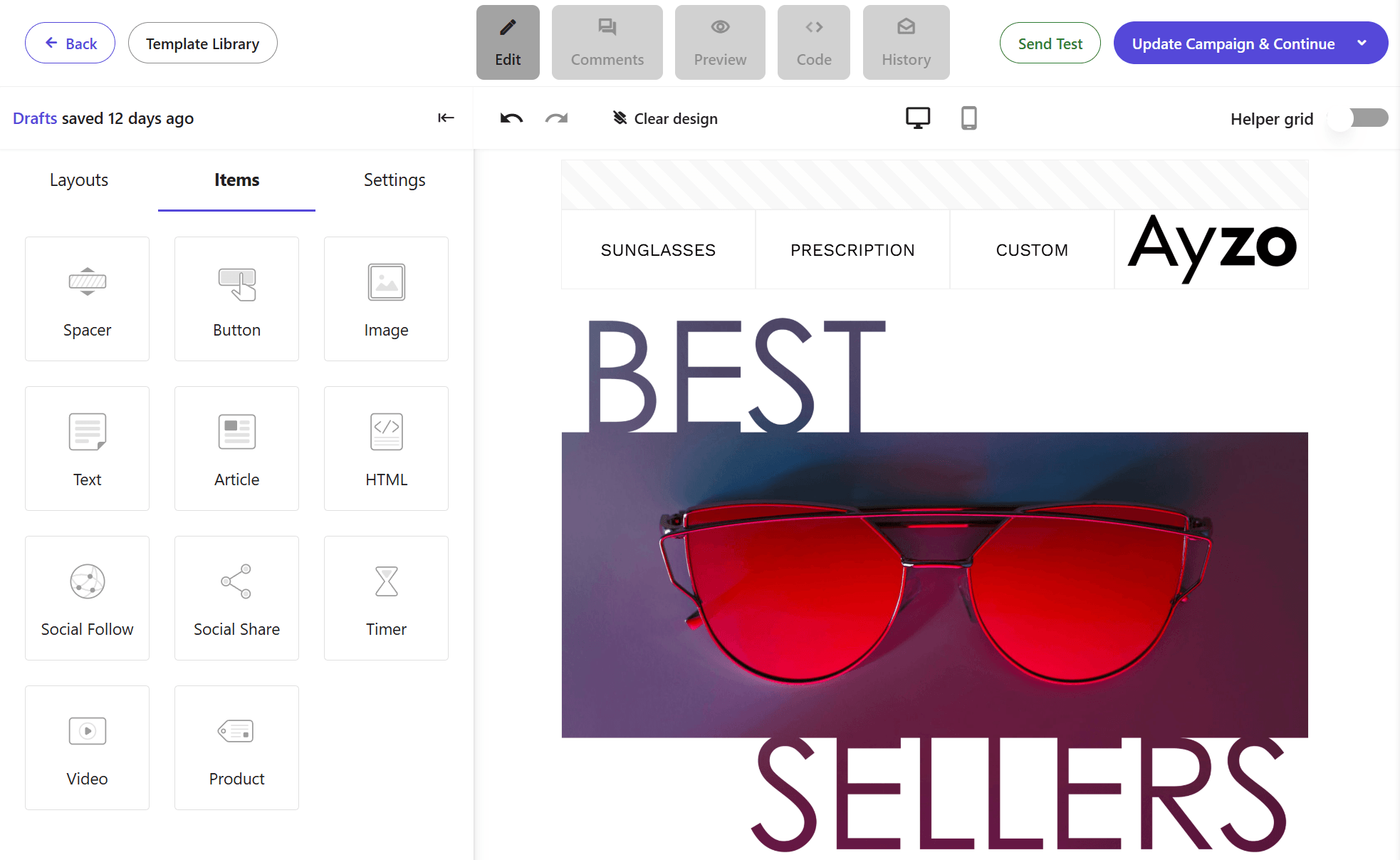
Moosend is an email marketing and marketing automation platform built for advanced personalization at scale.
You can design campaigns using its intuitive editor and enhance them with dynamic content blocks, including cart abandonment, browse abandonment, and product recommendations that update automatically based on user behavior.
Its audience management features allow you to create dynamic segments based on purchase activity, engagement, lifecycle stage, and custom fields. Personalization tags and behavioral triggers ensure each message adapts to the subscriber, not the other way around.
Moosend also includes an AI writer to help generate and refine campaign copy. With an integrated subscription form builder and seamless connections to popular tools and CRMs, you can collect data efficiently and activate personalization across your entire marketing stack.
Pricing: Paid plans start at $9/monthly. You can also sign up for a free 30-day trial to see how the platform works for you.
2. Klaviyo
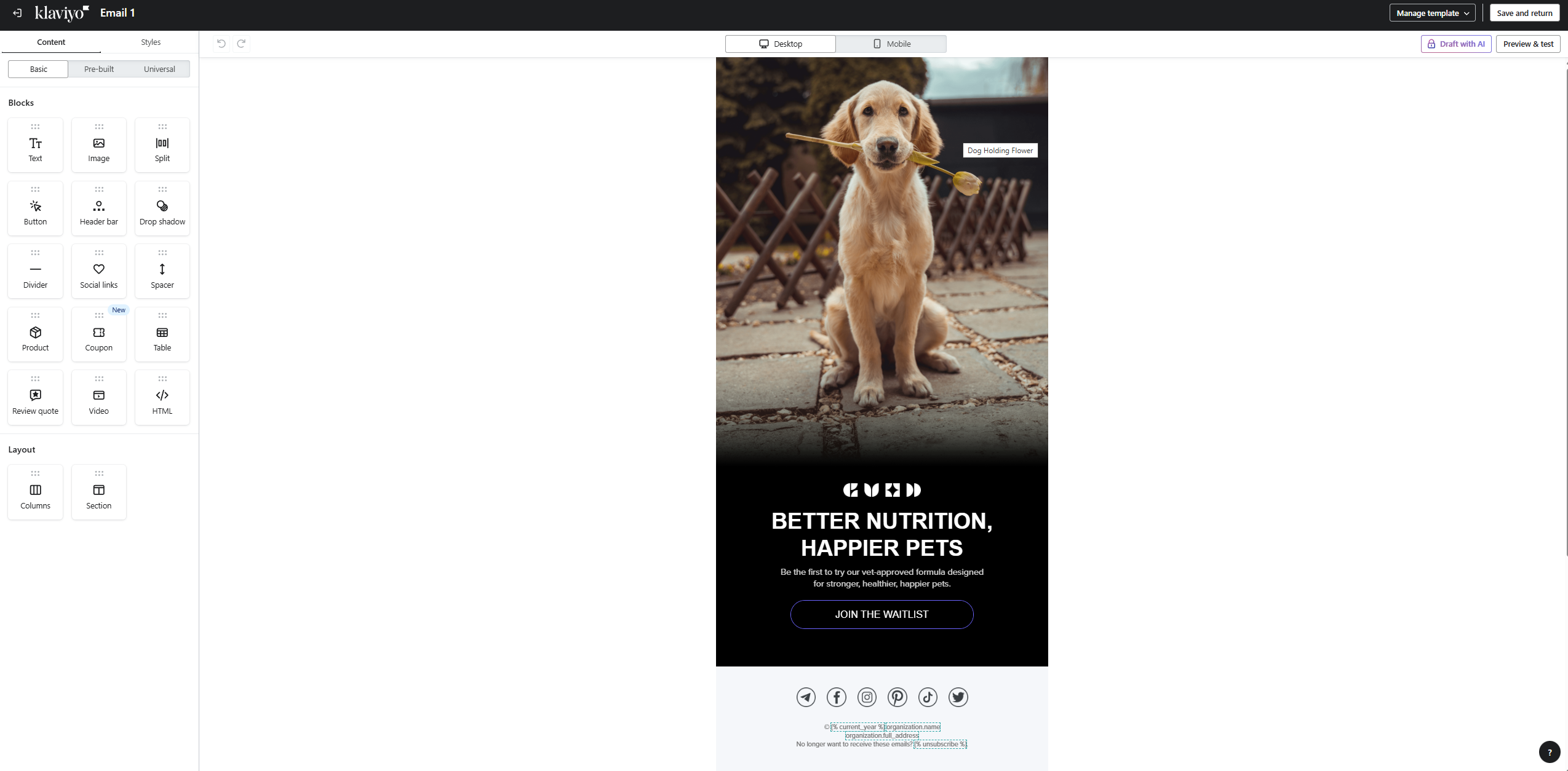
Klaviyo is an email and SMS marketing platform that enables users to power up their personalization initiatives.
It specializes in form building, enabling you to quickly collect valuable data from your customers and prospects.
And of course, once the customer data is in place, you can start segmenting those contacts dynamically based on your chosen criteria and couple your activities with SMS marketing for better outreach.
Pricing: Klaviyo offers a free plan for up to 250 contacts and 500 email sends. Paid plans start at $20 monthly for up to 500 subscribers and 5K emails.
For a more in-depth look, take a look at our Klaviyo review here. Or if you need to learn about other options, check out these Klaviyo alternatives.
3. ActiveCampaign
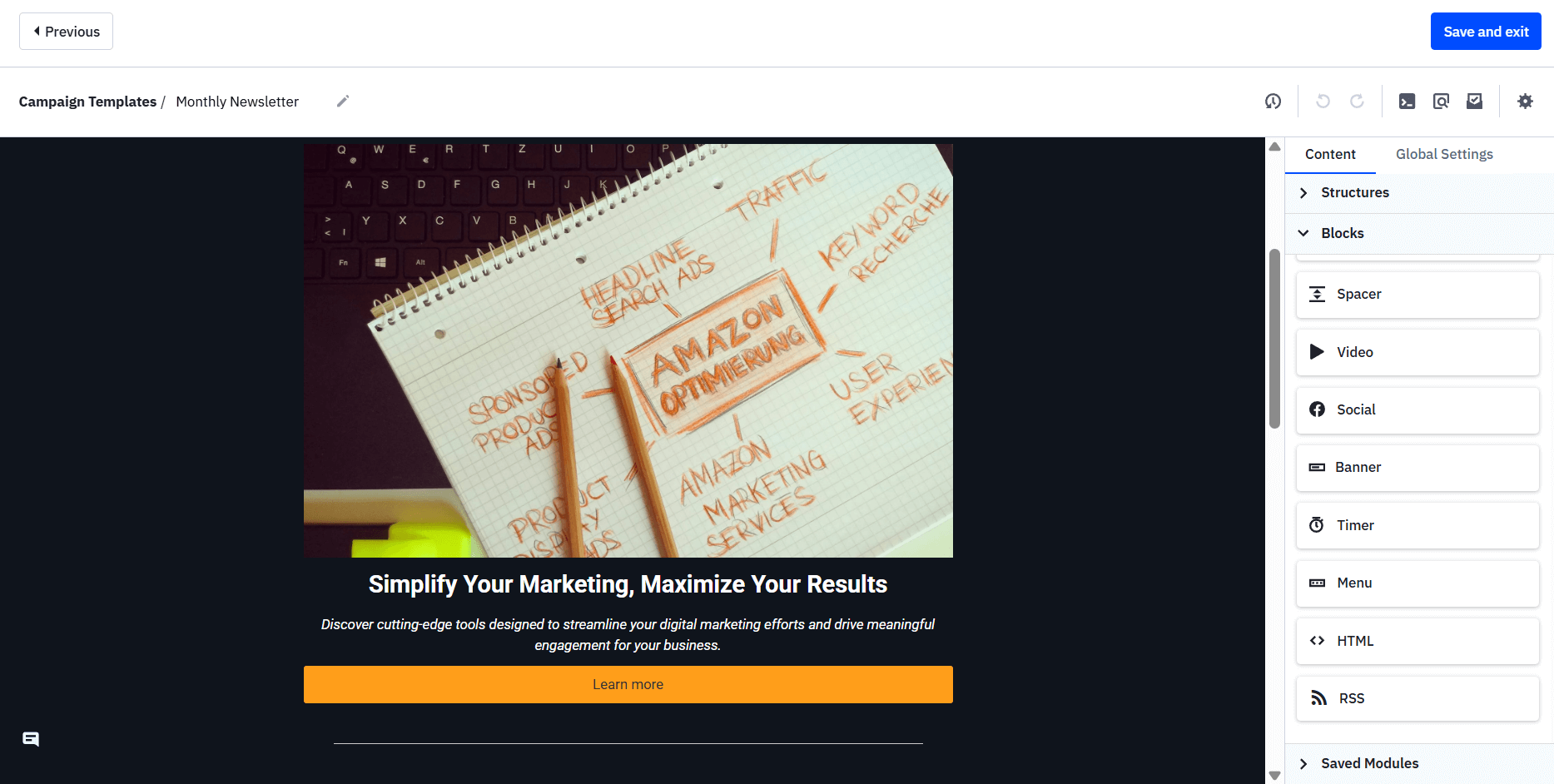
ActiveCampaign is a customer experience automation platform with email marketing, CRM, and sales engagement capabilities.
You can use segmentation and dynamic content features to create triggered, targeted, and automated campaigns.
It also lets you perform split testing and manage your audience for maximum results.
Pricing: ActiveCampaign doesn’t offer a free plan, but it does offer a 14-day free trial. Overall, they have four different packages, starting at $19/month for 500 contacts (paid monthly).
For more details, refer to our ActiveCampaign review. And for similar options, check out our ActiveCampaign alternatives post.
4. Maestra
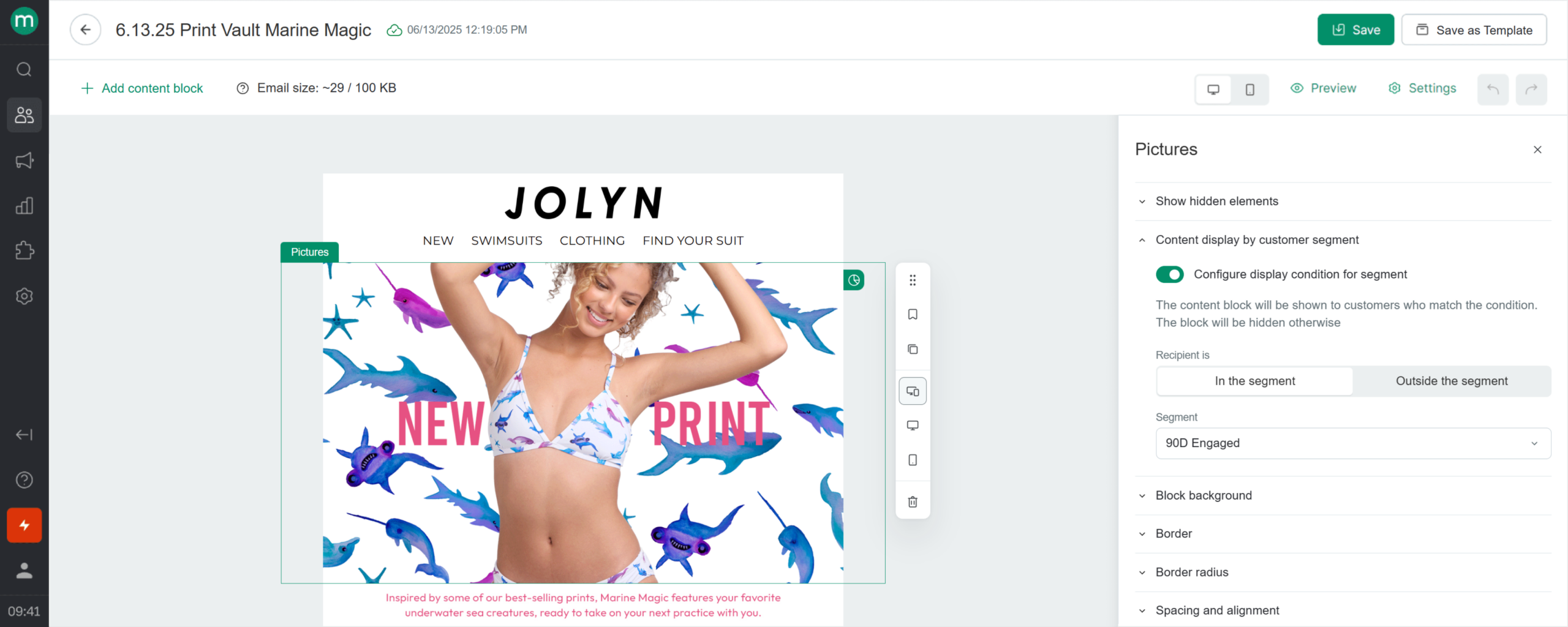
Maestra personalizes every email at the individual level. Dynamic content blocks pull product recommendations, loyalty balances, promo codes, and personal offers from each customer’s profile, while a drag-and-drop builder makes creating emails code-free.
Its real-time customer data platform combines page views, clicks, email engagement, orders, and cross-channel interactions into a single profile, enabling targeting by lifecycle stage or custom attributes.
Features like Send-Time Optimization and Next Best Action help deliver the right message at the right moment. For example, customers who regularly reorder a product can automatically receive reminders when they’re likely running low, while product recommendations adapt to browsing and purchase behavior.
The same personalization engine powers other channels and on-site content. To support deliverability, Maestra also handles warm-up and authentication, while its Email Health dashboard monitors sender reputation and inbox placement.
Pricing: Starts at $2,990/month for 150K active profiles. The subscription includes omnichannel communications, on-site personalization, recommendations, loyalty engine, and analytics dashboards, powered by the real-time CDP. Every Maestra subscription includes a dedicated marketer who helps build your strategy and optimize campaigns.
Email Marketing Personalization to the Rescue
Email personalization is about understanding behavior, respecting context, and delivering messages that genuinely match your audience’s needs.
When used wisely, it strengthens engagement, improves conversions, and builds long-term loyalty. When used carelessly, though, it can feel intrusive or superficial. The difference lies in how intentionally you collect data, segment audiences, and apply insights across the customer journey.
If you want to start targeting your customers with relevant personalized messages, sign up for a Moosend account today and reap all these benefits with minimal effort and cost.
Email Personalization FAQs
Looking for some quick answers about this method? Here’s a quick-fire round of frequently asked questions about email personalization:
1. What is a personalized email?
Personalized emails are targeted messages that customers receive at the right time in their customer journey. The more relevant the content is, the higher the chances of converting.
2. How does segmentation relate to personalization?
List segmentation is a popular email personalization method with successful results. It divides subscribers into groups based on their characteristics and interests to deliver tailored messages.
3. Which are the best email personalization methods?
Some of the most common email personalization methods are list segmentation, personalized subject lines, dynamic content, behaviorally triggered emails, and product recommendations.
4. Which are the top email personalization tools?
The three top email personalization tools are Moosend, Klaviyo, and ActiveCampaign. You can also integrate platforms like Hyperise with your existing marketing stack to boost your personalization efforts.
Similar Posts
 Published by
 Published by

Create, send and optimize your email marketing campaigns