















Klaviyo Review 2026: Pros, Cons & Pricing [Analysis]
Published By John Desyllas
February 27, 2024

27/02/24
If you own an eCommerce business and email marketing is on your radar, Klaviyo is one of the first tools that come to mind.
This popular marketing automation platform allows online stores to contact, engage, and convert their audience through various channels. More specifically, you get email, SMS, WhatsApp, and web push notifications. What’s more, it’s a comprehensive solution to understand your customers and collect essential data to optimize your digital marketing strategy.
But is it all as effective as it seems? In this Klaviyo review, we’ll put the platform to the test and provide an in-depth analysis of its strengths and weaknesses, standout features, and how it fares against popular alternative services.
Disclaimer: The information below is accurate as of January 2026.
Exploring email marketing tools?
Moosend helps teams grow faster with powerful automation, scalable pricing, and fast support.
Klaviyo Overview & Ratings
Klaviyo was founded in 2012 with the aim to make the life of eCommerce store owners easier in their email marketing efforts.
The company focused on building extensive integrations with popular eCommerce platforms such as Shopify, Magento, BigCommerce, and WooCommerce. As a result, the customer base quickly grew and Klaviyo now serves thousands of eCommerce brands across the globe.
But while the platform is a powerful tool for online businesses, its pricing model is more expensive than other top email marketing services. This is why smaller online stores usually can’t bear its cost.
What’s more, it has a substantial learning curve to make the most of the platform due to its advanced functionality. Finally, users complain about the quality of customer support and specifically the slow response times.
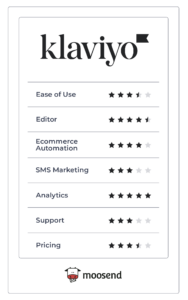
Before we see all these in more detail, here’s a quick evaluation of the platform’s key features.
Klaviyo Pros & Cons: Summary
Every software comes with strengths and weaknesses. Let’s get a quick taste of what follows in this Klaviyo review.
| Pros | Cons |
| Email Editor | Setup & Ease of Use |
| Email Template Library | Customer Support |
| Marketing Automation | Affordability & Pricing Structure |
| Segmentation (List Management) | Spam & Design Testing |
| Signup Forms | |
| SMS Marketing | |
| Reporting & Analytics | |
| Integrations |
Klaviyo Pros: Analyzed
We’ll start our review with the things we liked about Klaviyo.
Email Editor
Klaviyo’s email campaign builder is similar to other email marketing software, featuring drag-and-drop functionality, A/B testing, and a variety of pre-designed email templates. To create your email campaigns, Klaviyo gives you 3 options:
- A drag-and-drop editor: drag and drop blocks and layouts into your design
- A text-only builder: send plain text emails that feel personal
- An HTML editor: use custom code for unique emails and ultimate control
The drag-and-drop email editor is fast and user-friendly. You have two options: starting from a blank email or selecting one of the available pre-made designs and customize them to your liking. Using the left-hand menu, you can easily add layout blocks like images, products, social links, reviews, and coupons.
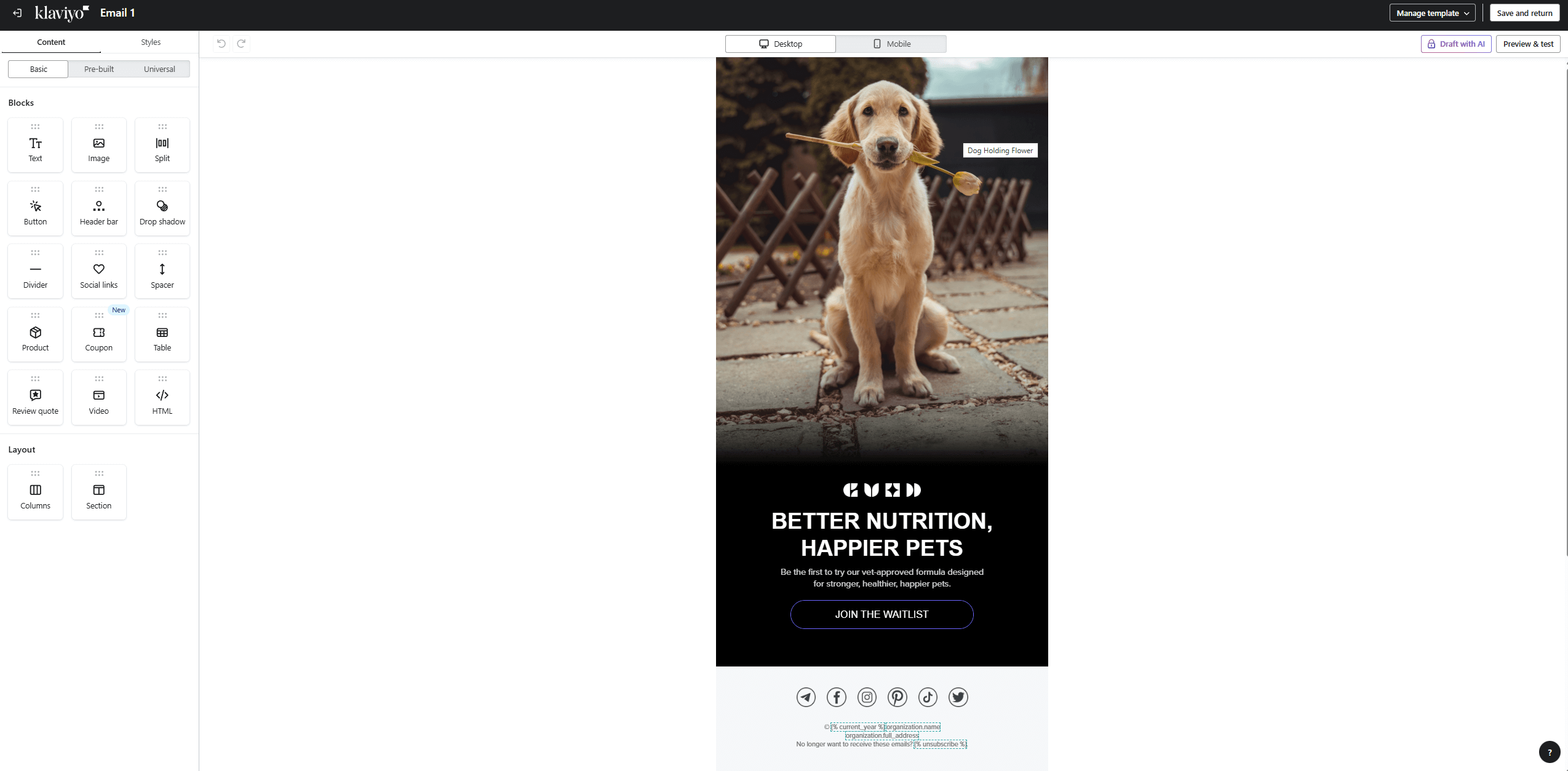
Since the focus of the platform is eCommerce, inserting product blocks should be effortless; and it is. You can have static product blocks, which are catalog items that you hand-select, or dynamic product feeds. With dynamic feeds you showcase personalized product recommendations, tailored to each subscriber based on their browsing and buying behavior.
We also liked the review quote block that allows you to feature real customer reviews and boost conversions through the power of social proof.
To create even more relevant emails, Klaviyo lets you apply conditional logic to determine whether a recipient will see a certain block or not. This option applies to all kinds of blocks.
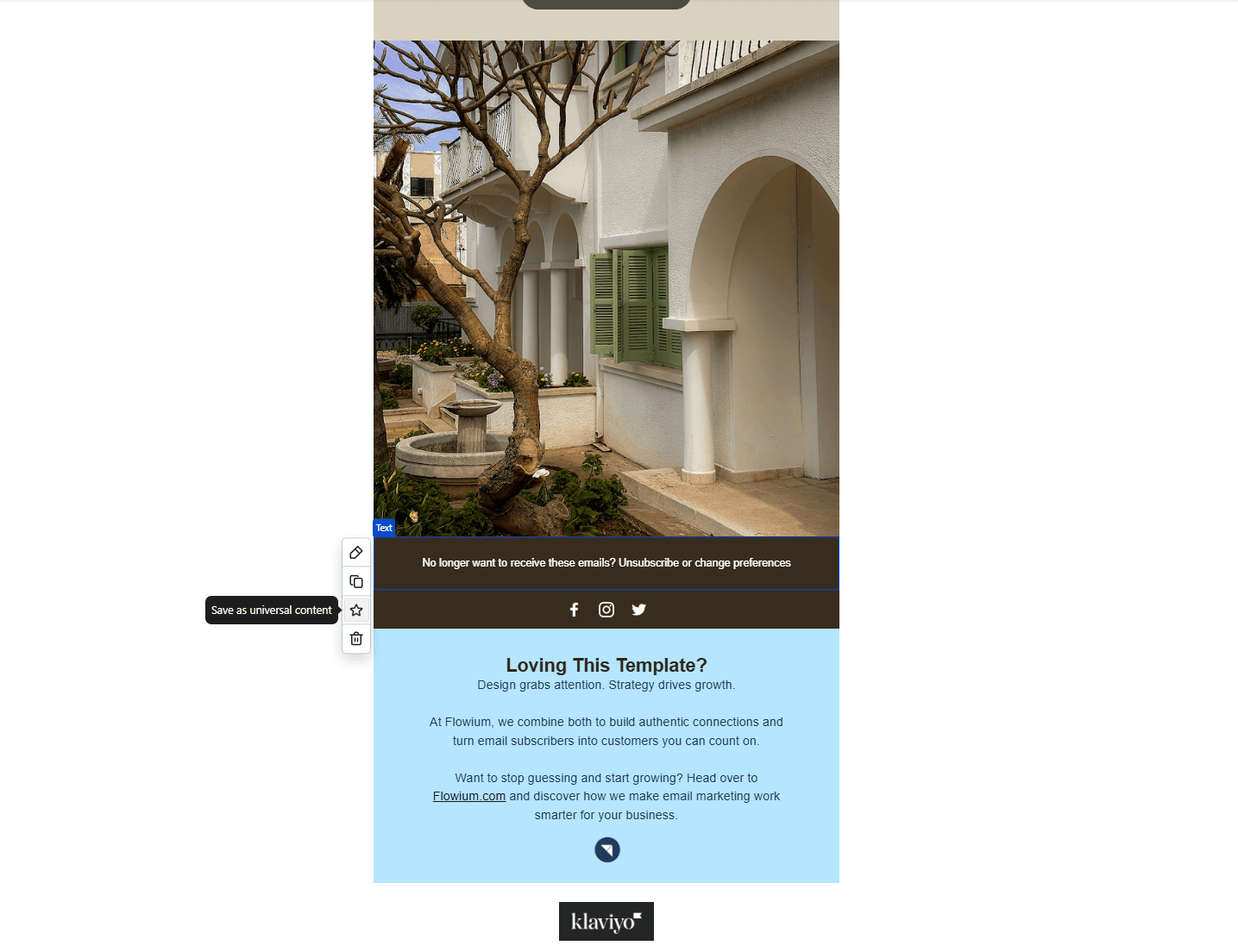
The same goes for turning a specific block or section into a universal one. This means that you can save it as universal content and have it ready to use in future templates. Like we did here:
Klaviyo also offers AI-powered features that help you generate content blocks (including images and products) based on plain-text prompts that describe your campaign goal (e.g., announcement). You can also use the platform’s AI to refine copy or create an email template.
Finally, Klaviyo lets you A/B test your email content (e.g., subject lines, CTAs, etc.), sender names, and send times (date and time). You also have the option to send a test email to yourself or certain recipients to check how it looks.
Overall, you get all the must-haves to launch and optimize your email marketing campaigns.
Email Template Library
Klaviyo’s email builder comes with a huge variety of pre-made email newsletter designs that cover multiple use cases. Specifically, the platform offers more than 160 aesthetically pleasing templates and 9 basic layout templates.
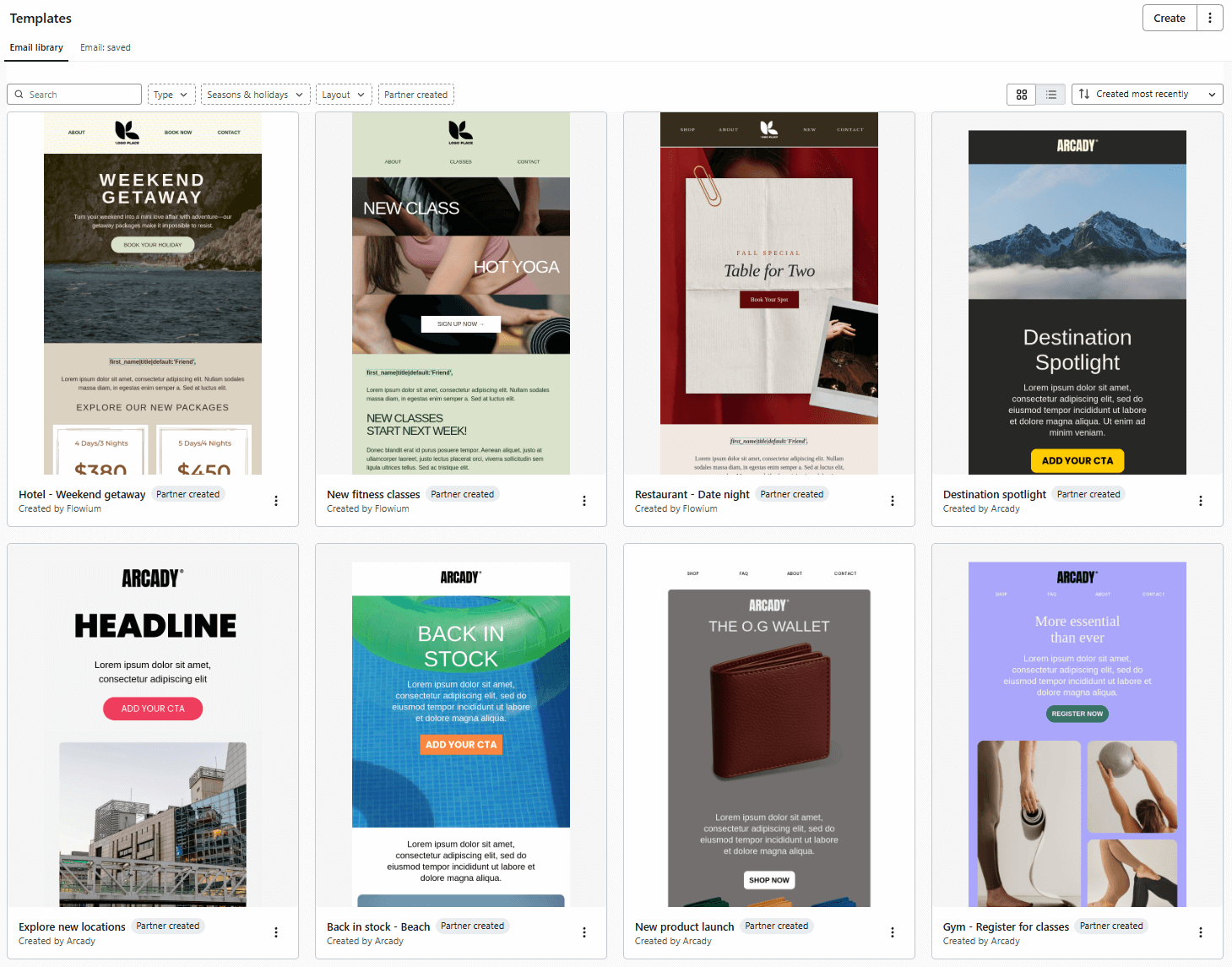
These templates are fully customizable and responsive so they adjust to all screen sizes. You can find themes like welcome templates, sales and deals, holiday, post-purchase, back-in-stock reminders, order confirmations, and shipping updates, among others.
What’s great about these templates is that they offer numerous customization options, so you won’t need any HTML knowledge to adjust them to your store’s look and feel. Generally, eCommerce businesses won’t have any trouble finding a template that fits their purposes.
Did you create a custom design you love? You can always save and reuse it in similar campaigns.
Marketing Automation
Klaviyo’s marketing automation is available for both email and SMS. The platform has a visual drag-and-drop workflow builder that’s easy to use. You can add filters (conditions) at every split, including a contact clicking on a link in your email, subscribing to a list, viewing a product.
Besides adding time delay and conditional logic, you can use webhooks to trigger emails based on actions on integrated platforms, for instance to offer gift cards for positive brand mentions on social media.
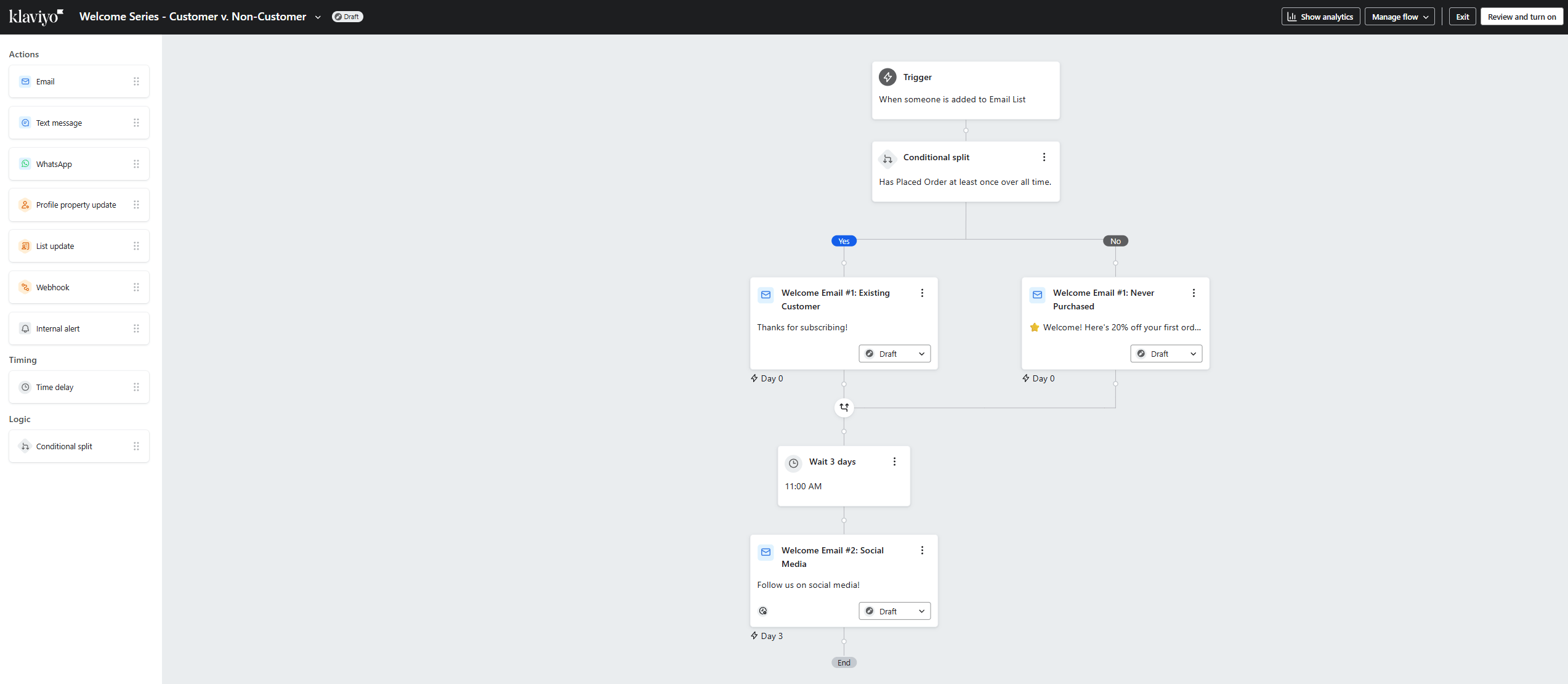
During our Klaviyo review, we found out the platform lets users monitor your sent campaigns analytics during flow creation, which can be particularly helpful for marketing teams. One negative aspect though is that it’s impossible to change the starting trigger of a flow.
There’s a workaround, where you can clone the flow and select a new trigger, but it has a tradeoff. Once you do it, you’ll lose any analytics associated with that flow. You can always keep the original flow if you need the insights. Also, you have the option to A/B test your emails and SMS in any automated campaign.
The platform speeds up setting up your automated email strategy with 60+ built-in flows. You get abandoned cart reminders, post-purchase follow-ups, customer win-backs, and order notifications.
Finally, if you decide to start from scratch, Klaviyo’s AI-powered Marketing Agent analyzes your website and brand library so it can provide flow recommendations that match your style and tone of voice.
Although the email software offers powerful automation and fast workflow creation, it took us some time to navigate through some of the functions, especially when customizing multi-step workflows.
Segmentation
To manage your audience, Klaviyo lets you create lists and segments, which are dynamic groups that you create based on specific properties.
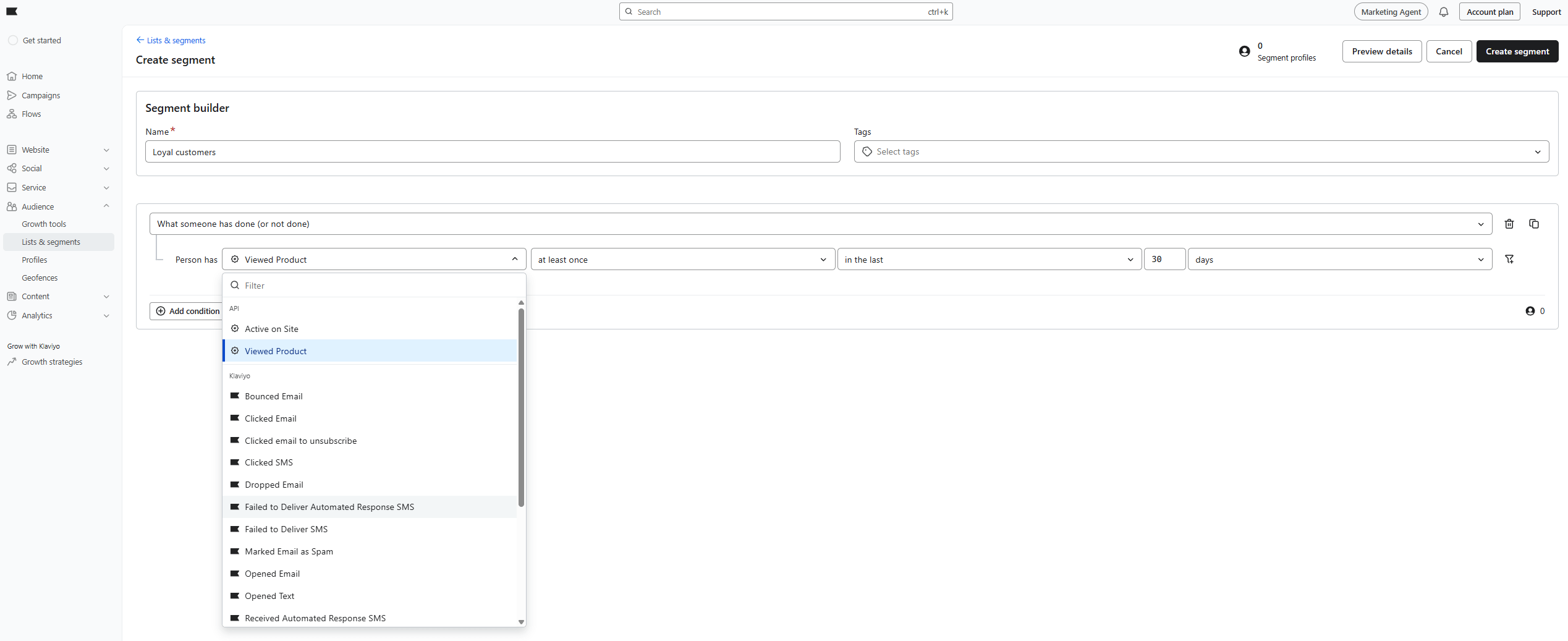
Klaviyo’s segment builder allows you to build precise segments with unlimited conditions. For example, you can define segments based on contact data and location or proximity to a location. On top of that, you get to group subscribers based on their behavior on your website (e.g., purchase history) or email and SMS engagement (like bounced emails or undelivered text messages).
Klaviyo’s CDP system offers a quick path to syncing customer data across channels, leveraging real-time behavior to create better segments. For example, integrating your account with your Shopify store gives you access to actions like cancelling or fulfilling orders or starting checkout.
What’s great is that segments can be synced with Meta, Google, and Pinterest Ads, plus TikTok Audiences, so you can perfect your social ad targeting.
Klaviyo’s AI does its magic here too, with predictive analytics like customer lifetime value (CLV) or churn risk that help you build effective segments.
Additionally, Klaviyo lets you keep customer profiles in the Profiles tab of the Audience section. There, you’ll find customer data collected from different touch points to create unique and detailed profiles.
These profiles include location and time zone, purchases, marketing channels, support requests, coupons received, and more. With this built-in eCommerce CRM functionality, you can easily send highly targeted campaigns and build strong relationships with your customers.
Within the Audience section, users can even customize their email confirmation or unsubscribe pages (among others) to provide a consistent experience at all stages.
Growth Tools
With Klaviyo, you can create signup forms to collect both email addresses and phone numbers and send marketing messages with consent. There’s the option to create popups, full-page forms, flyouts (forms that slide on the screen), and embedded forms.
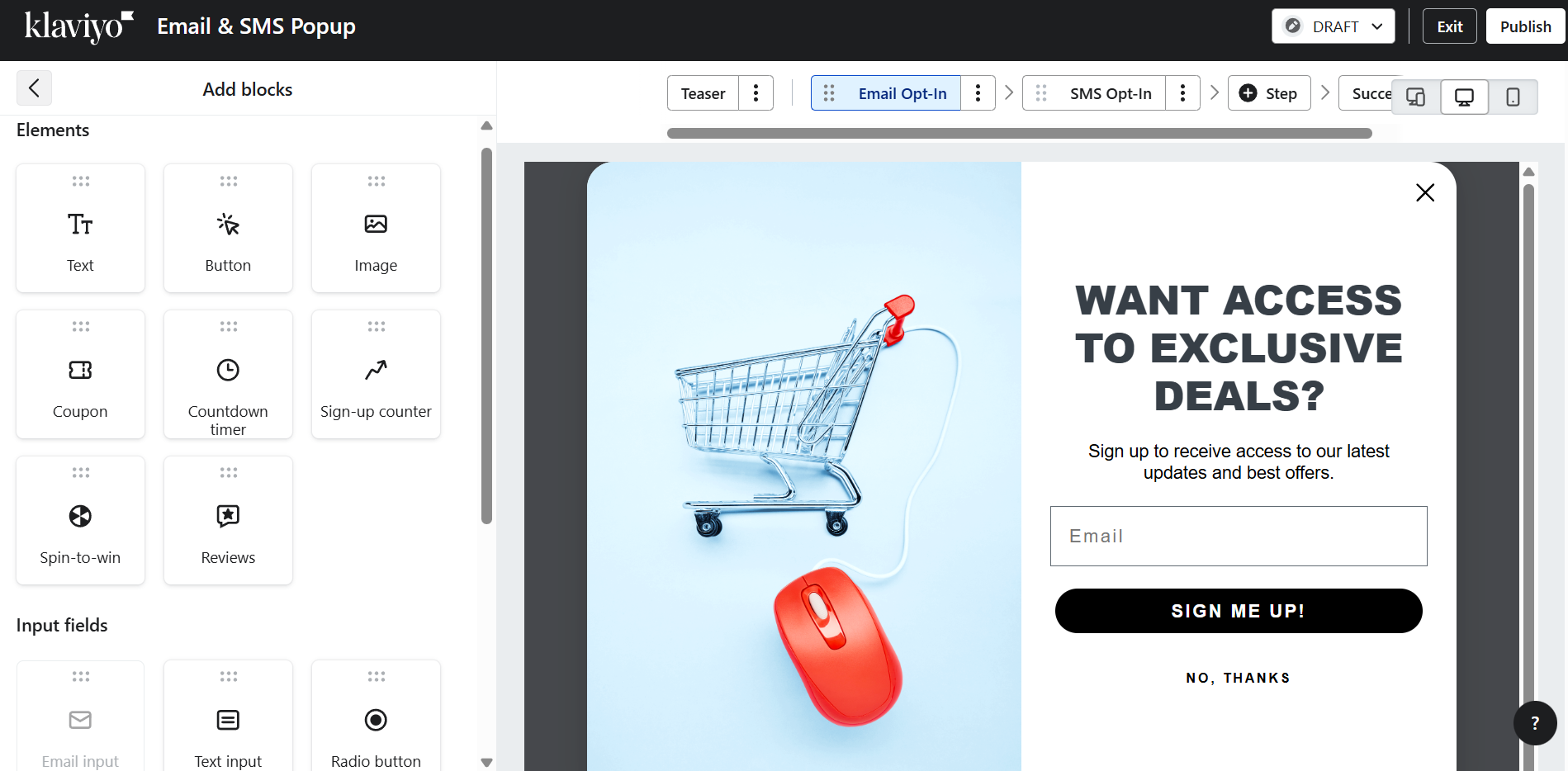
The flexible drag-and-drop builder allows you to customize your form to a large extent. For example, you can incorporate elements like countdown timers to evoke urgency, reviews to gather valuable insights, or spin-to-win wheels to make a game out of lead generation. Input fields include email and phone number, multi-checkboxes, radio buttons, dates, and drop-down menus.
When it comes to ready-made templates, Klaviyo offers an impressive library with 110+ designs. The forms cover almost every purpose, from holiday offers and announcements to coupon-based and order updates. All these options reduce the need to pay for a separate form builder, unless you have very specific requirements.
Klaviyo allows you to select when your form is displayed: after a predefined time delay, based on rules like viewing a specific number of pages, or a custom trigger. You can also customize how often each visitor sees the form and choose whether the form will be displayed on desktop devices, mobile, or both.
Another useful thing is the option to create multi-step forms, for instance asking for the user’s phone number in a second step to break the process into digestible chunks. This means you can collect visitors’ email addresses and phone numbers with ease while reducing friction for users.
Lastly, you can set up A/B tests for up to five variations, experimenting with different form styles to identify what works best for your audience.
Besides subscription forms, you can edit email confirmation, unsubscribe, and preference pages. However, the customization options are rather limited compared to form design. There’s also a Growth Strategies section that guides users with helpful resources on how to build and optimize their lead generation strategy.
SMS Marketing
Another thing that Klaviyo is popular about is its SMS capabilities, allowing users to send targeted text messages to their audience across more than 20 countries.
First, Klaviyo asks for your country and assigns you a toll-free number. But to start sending SMS messages, you first need customer consent.
To get it, the platform gives you various SMS opt-ins or consent forms. You have regular signup forms with options like tap-to-text, subscribe links to share via email or social media, consent at checkout, etc.
There are also many different types of SMS messages you can send, ranging from product announcements, back-in-stock alerts, and welcome offers to transactional messages like order confirmations and shipping updates.
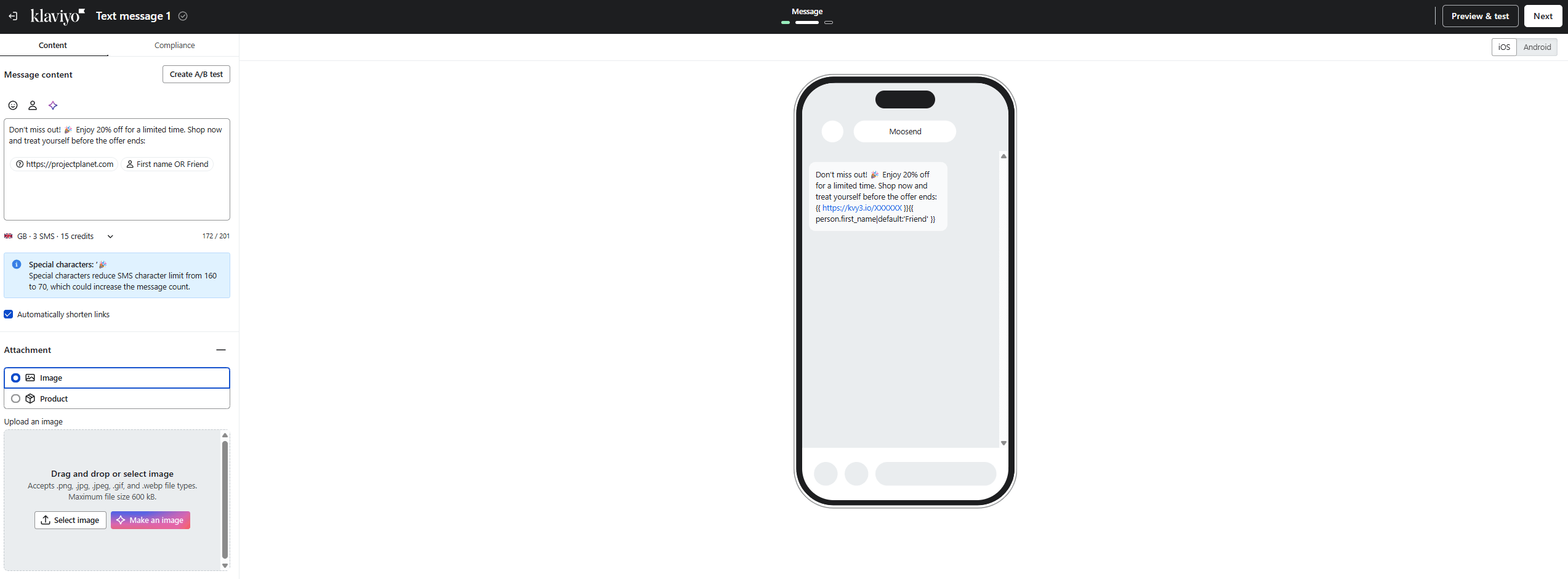
If you need help crafting a converting text message, AI takes charge and comes up with ideas. You can also use personalization tags to make it more relevant or add conditions to ensure your message reaches the right recipients at the right time.
Klaviyo offers users the opportunity to have two-way SMS conversations with their customers, something that most of its competitors don’t.
This means your customers can contact you directly via SMS messages and you can instantly provide feedback from the same number you use to send messages. There are also integrations with Gorgias and Zendesk in case you want to use SMS as a customer support channel.
And let’s not forget A/B testing since Klaviyo lets you test variants to see which resonates best with your audience. For the same reason, you can access SMS analytics directly in the campaign builder.
Overall, although Klaviyo’s SMS tools aren’t cheap, the platform takes the SMS vs email dilemma out of the equation so you can reach your audience on the most effective channel depending on the message type.
Reporting & Analytics
Klaviyo’s reporting and analytics are among its strongest assets. The platform provides you with clean dashboards to monitor the performance of your campaigns and automation flows, plus display highlights. You also get a distinct Experiments section where you can check A/B test results for campaigns and flows in the same dashboard.
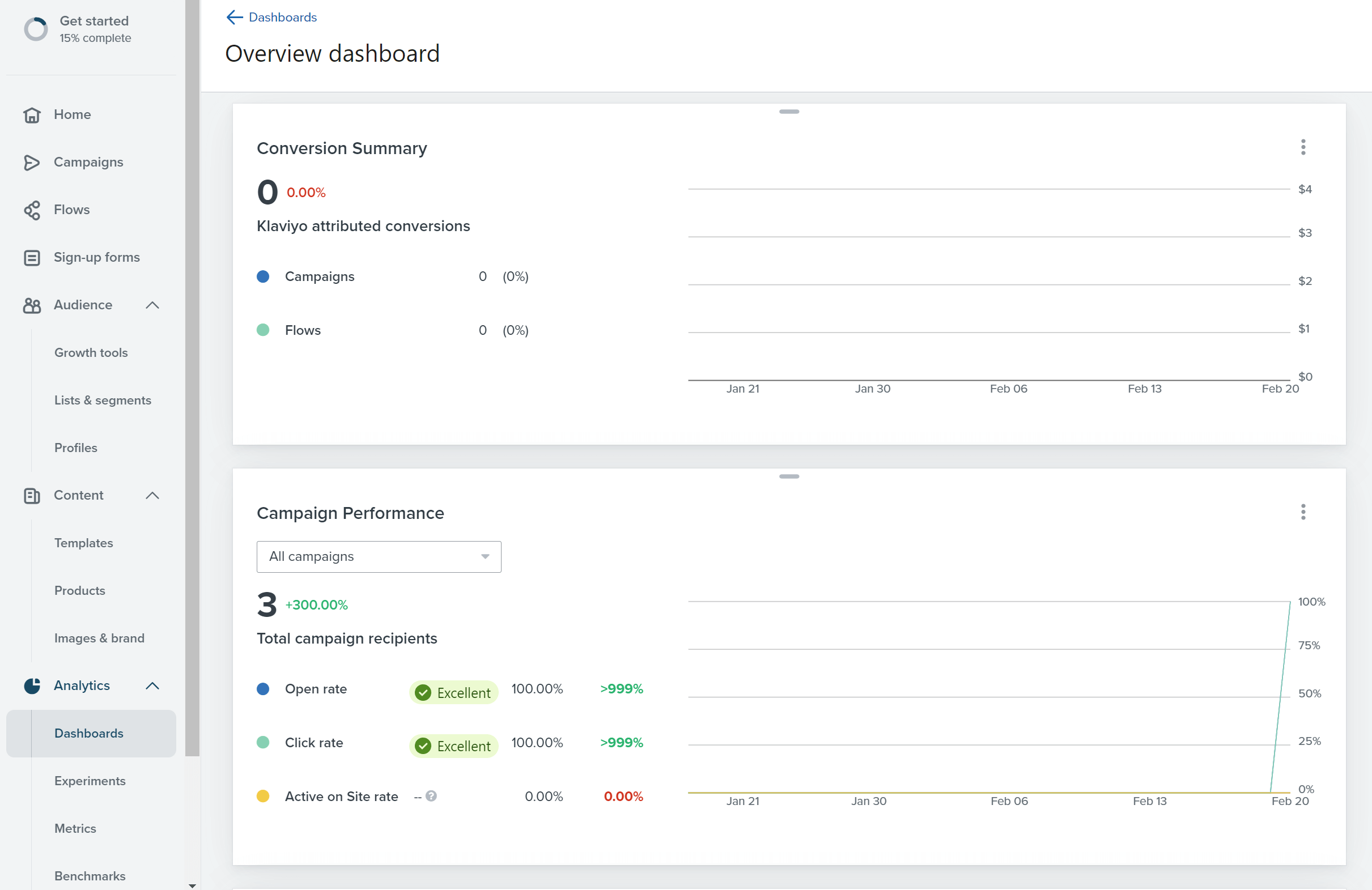
The platform tracks all essential metrics like opens, clicks and bounce rate as well as other important metrics such as active on site rate, revenue generated, total orders, and SMS deliverability.
Klaviyo also lets you create custom dashboards that include the insights that really matter to you. You can select from various pre-built campaign performance reports or build a unique dashboard from scratch.
Data can be visualized in multiple ways like tables, line charts, bar charts and numbers to cater to every user’s unique preferences. You can also receive automatic reports on a schedule you select (delivery time and frequency), and then share them with team members or stakeholders.
Another interesting feature is Benchmarks. This feature gives you a point of reference to compare your business to similar ones in your industry. You can analyze your KPIs, identify your strengths, and compare your performance with competitors. We also liked the fact that you can easily create numerous custom reports for your store and then use them to identify patterns.
An interesting new addition is Klaviyo’s predictive analytics. With the help of AI, you can get forecasts about customers’ next order date, lifetime value, spending potential, churn risk, and more.
Integrations
Klaviyo has a very strong list of software and app integrations so eCommerce store owners can connect their account with their existing tech stack.
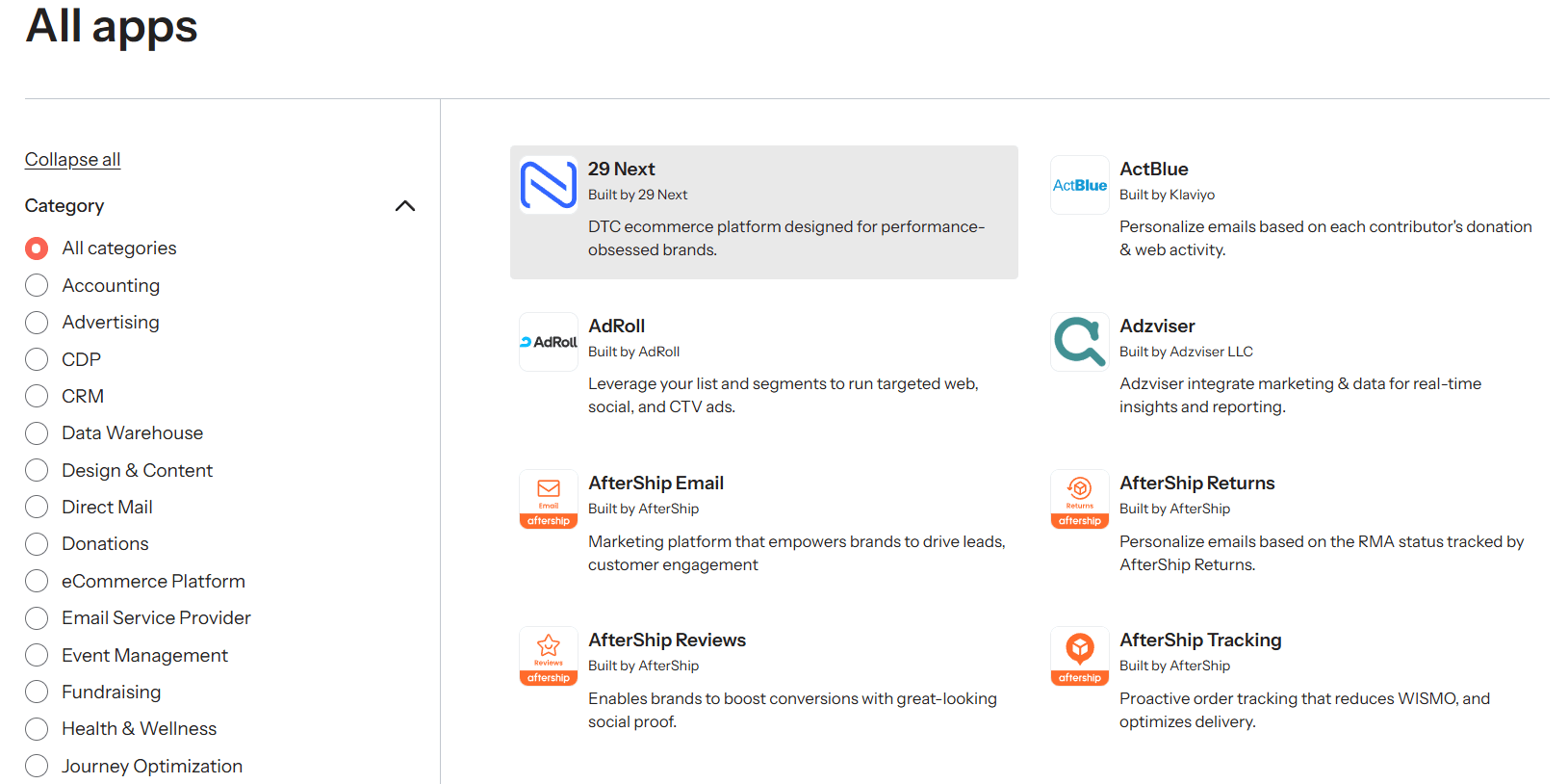
There are 350+ integrations with popular eCommerce platforms like Shopify, WooCommerce, BigCommerce, Magento, Wix, and other software categories, including:
- CRM
- Forms and landing page builders
- Quiz & survey tools
- Referral programs
- Event management platforms
- Support & help desk solutions
- Shipping and payment apps
Additionally, Klaviyo offers flexible and scalable APIs for developers to build new integrations, as well as new SDKs and developer tools. So, if you have a custom tech stack, you can connect it with the platform.
Klaviyo Cons: Analyzed
Now, we’ll take a look at Klaviyo’s areas for improvement.
Setup & Ease of Use
The initial setup process of Klaviyo is straightforward. To sign up for a Klaviyo account, you should provide basic business information such as your email address, company name, phone number, and website. After that, the onboarding starts.
There are 11 steps to get things up and running, but you can always start with the essentials and skip any step that you want to leave for later. First, you’ll have to connect Klaviyo with your eCommerce platform (e.g., WooCommerce, Shopify).
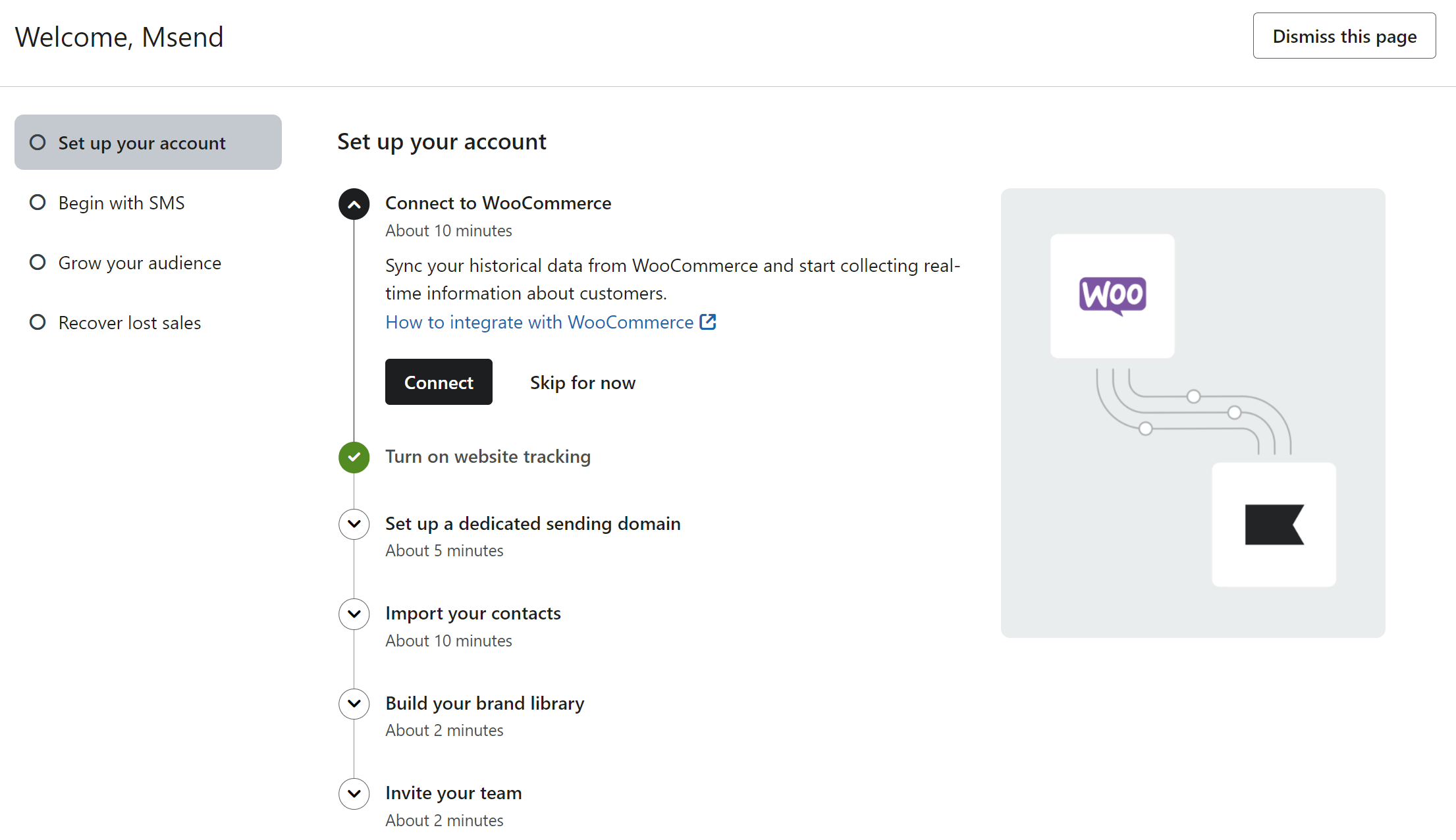
We tried connecting with WooCommerce but quickly found out that the integration wasn’t working properly. Eventually, we had to find a workaround and import a custom catalog to do the review and test the platform’s functionality. However, most users report that integrating the tool with their Shopify and WooCommerce stores was seamless.
After connecting your store, you can proceed to set up a sending domain, import your email list (if you already have one), as well as using SMS marketing and other core features like signup forms and automation.
The platform’s interface generally easy to navigate. All the features of the platform are neatly placed on the left side of your dashboard. The main drawback is that with so many features available, it will take some time before you get used to the platform.
From our hands-on experience, some actions like building an omnichannel campaign or a multi-step automated flow may be frustrating and time-consuming, especially for beginners. On top of that, the frequent UI changes seem to be a common drawback for Klaviyo users.
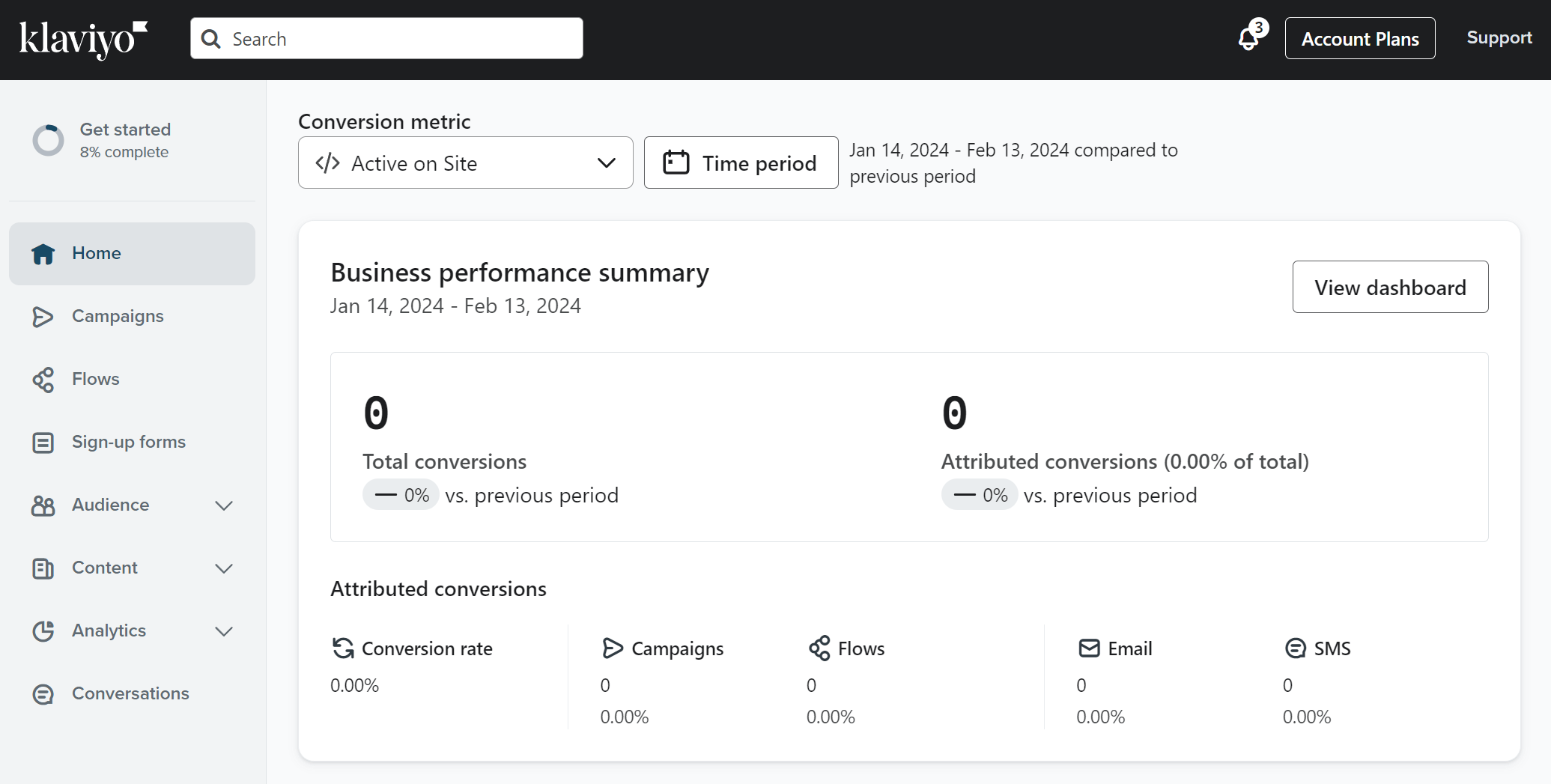
The good news is that the company provides various online resources to help you familiarize yourself with the platform and grasp its multichannel tools. For users with prior professional marketing experience, the learning curve is still there, but not as steep.
Customer Support
Klaviyo’s customer support seems to be a major pain point for many customers, according to reviews. The main complaint is the slow response times they experience, which means that they’re left without an instant response to their issues.
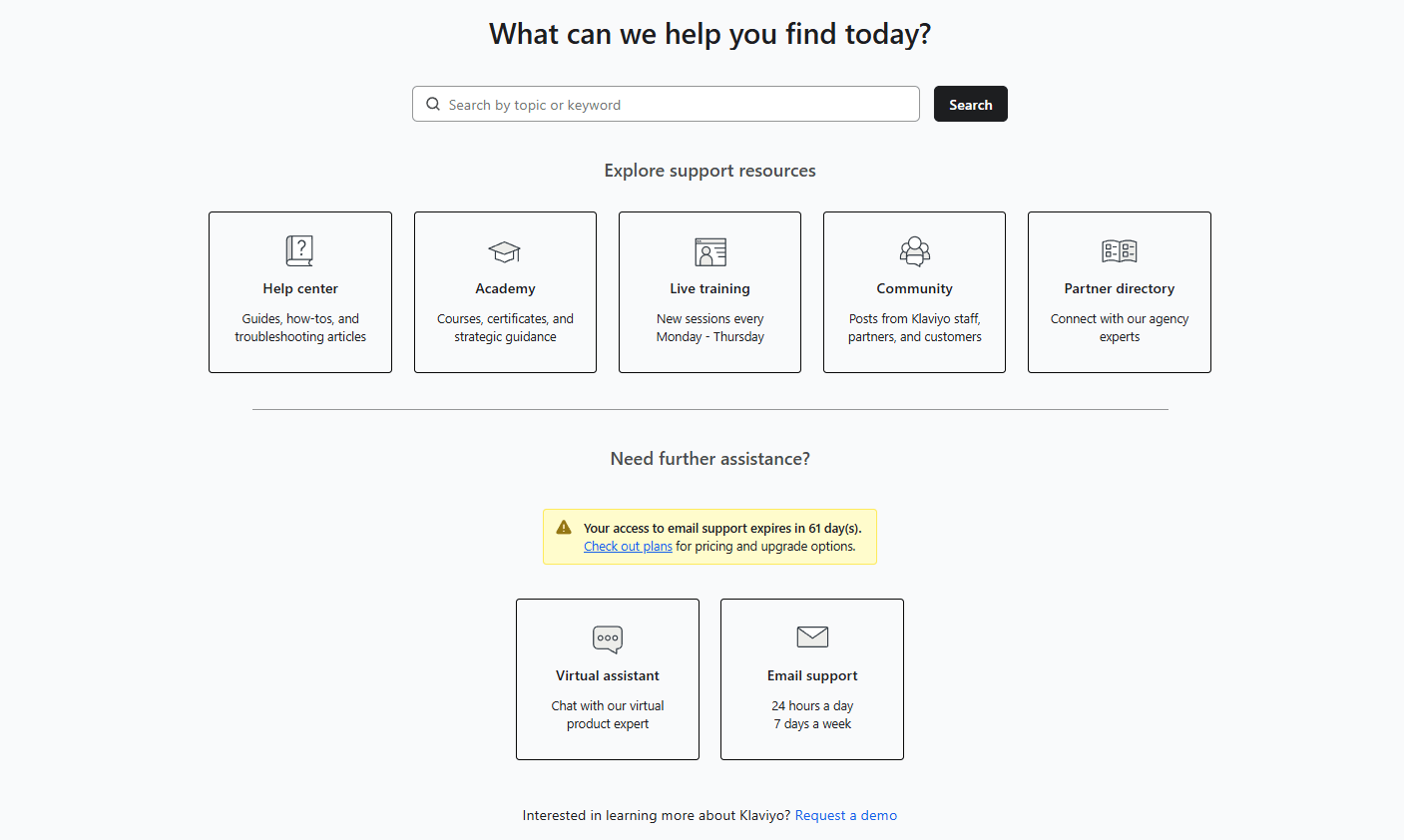
The company offers email and live chat support on all paid plans, but no phone support. Live chat support is only available on weekdays (9 am – 5 pm EST) while weekend hours may vary depending on your subscription. Free plan users get email support for the first 60 days.
There’s also an extensive help center with step-by-step guides and troubleshooting articles that you can access directly through your account. Some of the options offered include the Help Center, Academy, and live training sessions. What’s more, you have an active Community where you can get guidance from Klaviyo staff, peers, and industry experts.
Affordability & Pricing Structure
Klaviyo offers a Marketing Hub that gives you access to some basic email marketing tools, starting at $20/month for 500 subscribers, 5,000 emails, and 150 SMS messages. If you want to get more out of your SMS marketing, the pricing starts at $35/month for up to 1,250 messages.
Compared to similar tools, Klaviyo’s pricing is steep, especially for users with large email lists. You may get a lot of valuable features like AI-powered tools content and segment generation, but there are still several alternative services that will cover your needs without breaking the bank.
*Klaviyo changed its pricing in February 2025 (check below for more details).
Additionally, if you want to commit to an annual plan, there’s no discount available, whereas many email marketing services offer such discounts as an extra incentive.
As for the Free Plan, it may be limited, but it’s a great start for users who need to test the platform’s functionality and decide whether they want to build their email marketing strategy with Klaviyo. However, they’ll have to rely on self-service support like the platform’s Help Center since users on Free can’t access any kind of support after the first 60 days.
Spam and Design Testing
Unfortunately, Klaviyo doesn’t offer spam testing. However, you can send test emails and preview how they render across different inbox providers and device types through inbox testing (only available on paid plans).
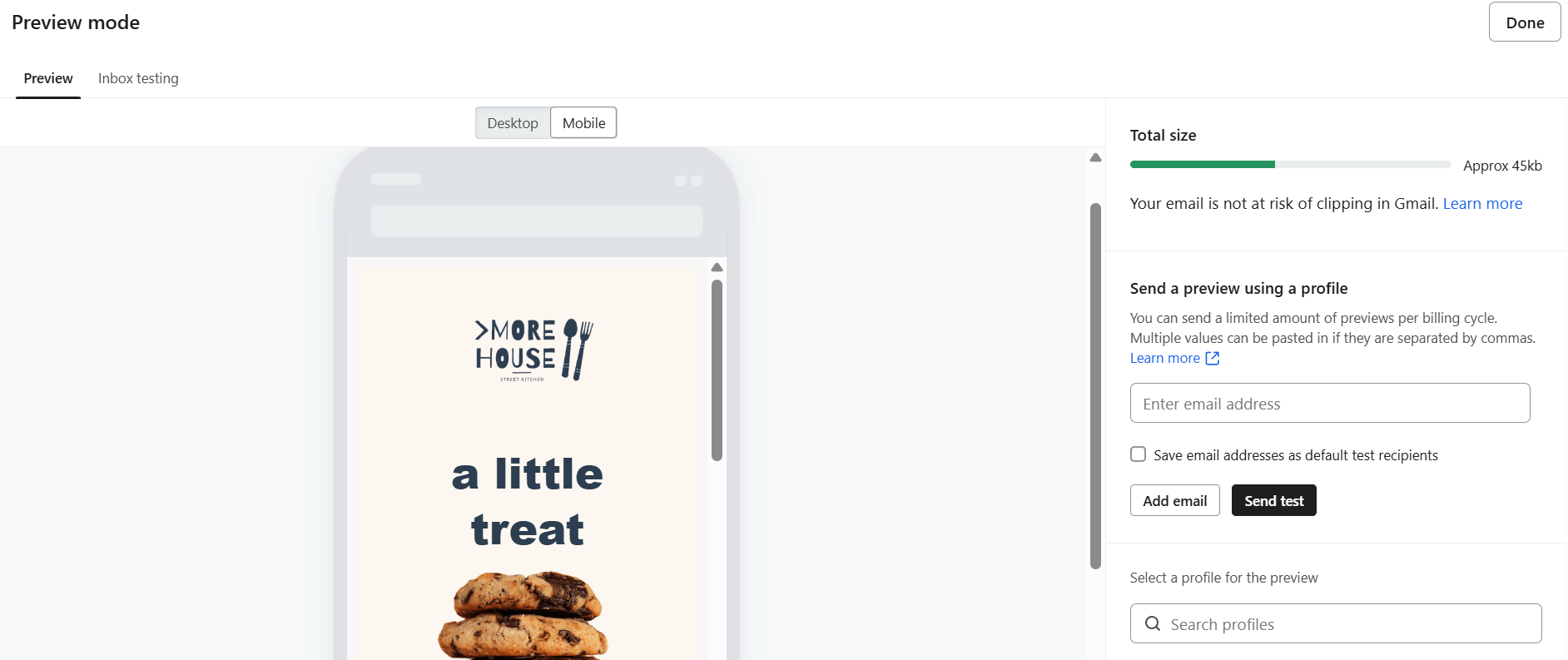
Interestingly, Klaviyo’s platform allows you to see your emails’ file size to notify you for potential risk of Gmail clipping.
Klaviyo Pricing (2026 Update)
As we mentioned above, Klaviyo’s pricing model consists of a free plan and a base paid plan for email. This freemium model allows new users to test the platform before committing to it with a paid plan.
As of February 2025, Klaviyo’s pricing is based on “active profiles.” These are essentially your subscribers and people who engage with your messages. This change affects all legacy users by automatically moving them to the pricing plan that matches or exceeds their active profiles count.
Also, there are no discounts for purchasing annual plans, unlike other competing solutions.
But let’s get more specific.
Free Plan
Klaviyo’s free plan is a great starting point to dip your toes into eCommerce email marketing. It allows you to have up to 250 contacts and send 500 monthly emails. You also get 150 free monthly SMS/MMS credits, which is great to get a taste of this tool. Plus, you can reach customer support via email for the first 60 days.
However, this free tier is limited in terms of features like advanced templates and AI tools. What’s more, you can’t remove Klaviyo’s branding from any email design you create. To lift this, you’ll have to purchase a paid plan.
Email – $20/month
The base paid option of Klaviyo includes email marketing tools only. This plan starts at $20/month for up to 500 active profiles. You can send up to 5,000 emails per month.
You get access to multichannel campaigns, predictive analytics, and detailed customer profiles, among others. The plan also includes mobile push notifications and 150 free monthly SMS messages. If you surpass your SMS limit, you can purchase additional credits.
Email + Mobile messaging – $35/month
To send more SMS messages, you’ll have to add mobile messaging to the Email plan. Pricing starts at $35/month, giving you 1,250 SMS messages (for messages sent to US recipients). Costs may vary depending on SMS volume and the destination country.
Note that SMS and MMS messages count differently in terms of credits. For example, adding 450 MMS (US recipients) costs an additional $15/month. The same applies if you want to use WhatsApp messaging.
This plan is best suited for eCommerce businesses that want to reach their customers through these channels, but the price increases as you add them to the base plan.
We should also note that Klaviyo’s pricing page isn’t easy to follow. The mobile messaging credit system and add-on calculations gets quite confusing, especially for users unfamiliar with similar pricing schemes.
Klaviyo Alternatives
Based on our Klaviyo review, the platform is great if you need advanced eCommerce functionality and you’re prepared for a steep learning curve to make the most out of it. Otherwise, you’re better off with an alternative solution that’s more affordable and easier to use.
Researching the market, we found the top Klaviyo alternatives you need to consider based on affordability, advanced marketing automation functionality, and responsive customer service.
Moosend
Moosend is a reliable email marketing automation solution that’s popular among retailers for its affordable pricing, powerful eCommerce features, and stellar customer support. The platform has an intuitive drag-and-drop editor, a library of modern and fully customizable newsletter templates, plus a visual workflow builder and pre-made recipes that make flow creation effortless.
The tool incorporates eCommerce AI tools like Audience Discovery for effective segmentation based on customer actions and personalized product recommendations to boost customer engagement or drive repeat sales. You also get easy-to-grasp lead generation and list segmentation tools to grow and manage your audience with ease. Moreover, Moosend’s rich real-time analytics, custom reports, and A/B testing help you monitor your performance and identify trends in your audience.
Overall, Moosend is a more intuitive tool compared to Klaviyo with scalable pricing for growing businesses while it doesn’t fall behind in advanced eCommerce features.
Omnisend
Omnisend is a dedicated email marketing platform for eCommerce brands that provides a wealth of tools to engage with new and existing customers. Its standout features include powerful automation options, rich analytics, and revenue tracking. Regarding multichannel targeting, the tool offers email, SMS, push notifications and retargeting ads.
The tool integrates seamlessly with popular eCommerce platforms, while the 24/7 live chat and email customer support makes it a great option for running your business smoothly. Omnisend is also a great choice if you need to handle multiple stores from a single account.
Overall, this email solution is easy to navigate and still offers multichannel marketing options, although its reporting is somewhat limited compared to Klaviyo.
Constant Contact
Constant Contact is another robust email marketing solution for online store owners who need great email tools with user-friendly automation, granular list segmentation, and opportunities to engage customers via email, SMS, and social media. The platform offers a large email template variety and a beginner-friendly editor to craft beautiful emails.
Regarding list growth, users can choose between landing pages, forms, paid ads, and a useful Lead Magnet feature. Constant Contact also offers great event marketing options, including the option to handle payments, send follow-up emails, and collect leads in-person at events or physical store locations.
Overall, Constant Contact is a beginner-friendly platform with all the must-have features for omnichannel eCommerce marketing, plus stellar customer support based on reviews. However, it doesn’t offer the deep automation that Klaviyo does.
ActiveCampaign
ActiveCampaign is an advanced platform known for its automation capabilities and range of built-in tools to to scale online store marketing. Equipped with a CRM system, it enables sophisticated audience management, allowing for highly targeted messages across channels.
Besides marketing and transactional emails, you also get SMS and WhatsApp messaging. You can reach out to new audiences through converting landing pages and signup forms, or even targeted paid campaigns. Also, ActiveCampaign shines with its multi-step automation workflows, built-in recipes for every use case, and in-depth reporting.
While ActiveCampaign also comes with a learning curve, its automation is more advanced and easier to implement than Klaviyo’s. However, you’ll have to pay more for some must-have tools, such as landing pages or AI content generation.
Drip
Drip is a great eCommerce email marketing tool with simple-to-use features and robust automation. The intuitive interface simplifies the creation of targeted emails. When it comes to audience segmentation, the platform’s tools enable precise targeting based on demographics, purchase behavior, and email engagement.
Drip also offers pre-built workflows, such as automated abandoned cart emails and product recommendations, helping you drive conversions without complex setup. Its simple workflow editor and integrations with eCommerce platforms make automation straightforward.
Overall, Drip is a solid option for eCommerce businesses that need to get started with minimal effort.
Conclusion
To sum up our experience through this Klaviyo review, the platform is an effective tool for eCommerce brands to reach and convert their audience through email, SMS, and WhatsApp. The platform offers robust, omnichannel marketing automation, although it does come with a substantial learning curve. Also, its audience management options help online store owners deliver hyper-personalized campaigns that resonate with each subscriber.
Despite the above, Klaviyo is quite an expensive solution that takes some email marketing knowledge to reach its full potential. This means that users need to be prepared to invest time and effort into learning how the platform works. What’s more, since customer support isn’t its strongest suit, you may have to deal with technical issues that distract you from delivering exceptional messages.
Nevertheless, the platform is a decent option for eCommerce stores on Shopify, WooCommerce, Square and other popular platforms. The free version lets small retailers test some of its advanced tools. As their business scales, Klaviyo can help them grow and build lasting relationships with their customers across channels.
Frequently Asked Questions (FAQ)
Here you can see some common questions and answers regarding Klaviyo.
1. Can I use Klaviyo for free?
Klaviyo offers a free tier for up to 250 contacts and 500 monthly email sends, but only basic email templates and segmentation. On top of that, you get 150 free SMS credits. However, this free version is quite limited in terms of advanced capabilities and customer support.
2. Who is Klaviyo best for?
Klaviyo is an email service for eCommerce brands wanting to reach their customers and generate sales on multiple channels like email and SMS. However, it’s not the most beginner-friendly platform and has a steep learning curve to master. Also, most omnichannel marketing options are available as add-ons, which may make costs rise quickly.
3. What are the best Klaviyo alternatives?
If you’re looking for a powerful Klaviyo alternative with more flexible pricing, you should consider Moosend, Constant Contact, and Omnisend. Another popular Klaviyo competitor for eCommerce is ActiveCampaign, but it gets pricey if you want to access its full functionality.
Similar Posts


Create, send and optimize your email marketing campaigns