















Essential Email Automation Workflows for Every Industry [2026]
Published By Tea Liarokapi
January 21, 2026

21/01/26
Most marketers have had that moment: staring at a campaign and thinking they have to send it manually because their automation workflow doesn’t make sense. And it’s not because you lack creativity, it’s because your workflows might not fit your industry, customer journey, or the story your data tells you.
This guide was built with that moment in mind.
From guiding a SaaS user through activation to preparing a guest for their stay, the goal is the same: creating non-generic email automation workflows that are ready to support your business objectives while staying true to the customer journey.
Here are the core email automation workflows to build, along with how to make them work best for your business.
Forget manual campaign sends
Send targeted emails and get results with pre-made email automation recipes.
Try MoosendWhat to Do Before Activating an Email Automation Workflow
Most automation failures happen because something small was overlooked before you ever clicked “activate.” So, think of the stage before activating the automation as checking your car engine before a long drive.
Getting your foundation right before you begin saves you from messy data, broken flows, or customers receiving the wrong message at the wrong time.
Here’s what to prepare before activation:
- Get your data in order: Clean duplicates, standardize fields, and confirm you have the data your automations rely on. Accurate syncing and triggers start with a reliable email automation platform.
- Verify data syncing across systems: Ensure your CRM, ecommerce, or booking tools are properly connected and updating in real time. Missing or delayed events can break even the most personalized workflows.
- Map out the workflow logic: Clarify entry criteria, conditions, and timing for each step. Visualizing the customer journey helps surface friction points before automations go live.
Anatomy of a High-Performing Automation Workflow
A strong email automation workflow starts with a few core elements. When these pieces work well, the automation feels simple and effective.
- Triggers: The single event that admits someone into the flow. That could be a signup, an “add to cart,” a completed booking, or a long gap in activity. Pick the smallest, most reliable signal that actually correlates with the outcome you want.
- Conditions: These are the “if this, then that” checks that keep your messages relevant. It could be anything from your subscription plan to the product you bought or a recent activity. The key here is to use only the conditions you need. Excessive branching makes flows hard to test and harder to optimize, while using just one condition can slow things down.
- Actions. When a specific condition is met (such as a date being reached), the workflow performs a clear step, like sending an email. Each action moves the user forward in the sequence, whether that’s a celebratory message, a reminder, or a follow-up. Keeping actions simple and intentional makes the workflow easy to understand and maintain.
Apart from the core components, there are also timing and delays, which are the human layer. Some actions happen instantly, like sending an anniversary email the moment the date is reached.
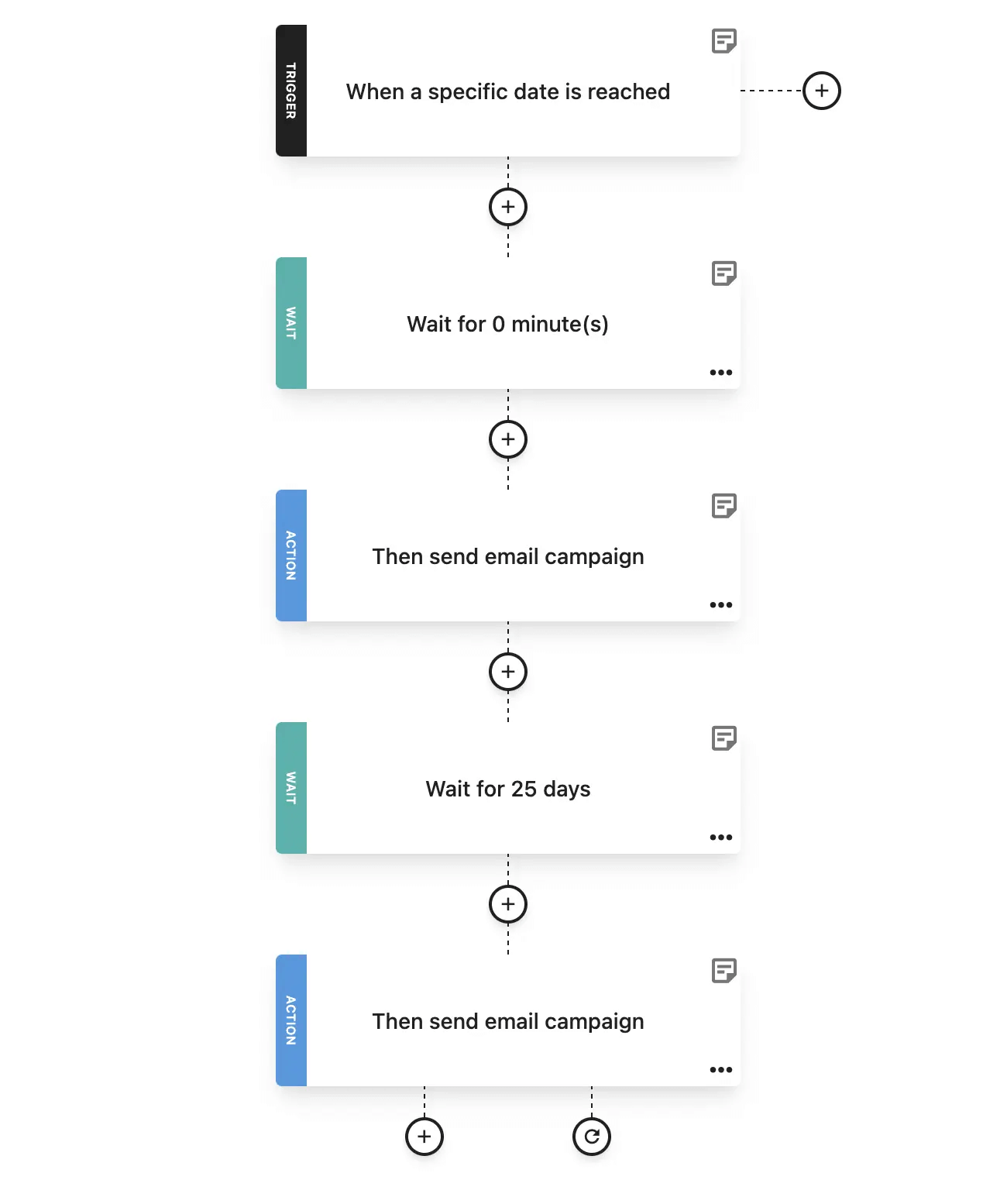
Others require waiting. Short delays work for immediate acknowledgments, while longer waits, like days or weeks, help space out follow-ups so messages feel timely and non-intrusive. Understand when the best time to send an email is and how each delay should serve a purpose. Give the recipient time to respond before taking the next step.
Lastly, every workflow needs a clear endpoint. Whether it’s sending a final follow-up, completing a celebration cycle, or simply delivering value at the right moment, you should clarify what success looks like right off the bat. Once that goal is met, the user should exit the workflow.
Key Email Workflows by Industry
Before diving into the specifics, here’s what you need to keep in mind: every industry has its own pressure points and customer patterns. The best automations work because they’re built around this fact.
Next, we’ll be using Moosend’s ready-made automation recipes and visual workflow builder to demonstrate the examples. You can follow the logic step by step or try the workflows yourself by signing up for a free Moosend trial.
1. SaaS industry: From onboarding to activation
For SaaS brands, the first days after subscribing make or break the entire customer lifecycle. Once someone creates an account or starts a free trial, your automation workflow should immediately guide them to the action that demonstrates your product’s value.
Let’s start with the recipe you’ll need for that. Choose the “Onboarding email sequence” recipe from the “Automations” tab on your Moosend account. After that, things are fairly simple.
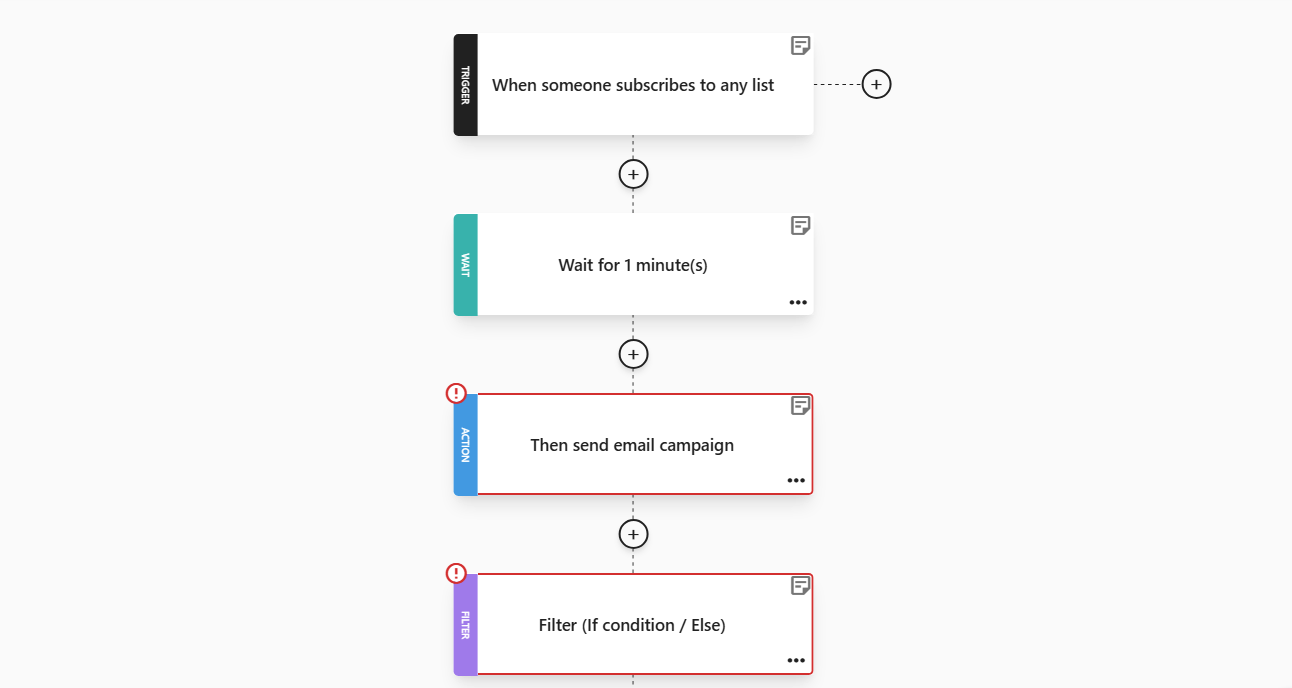
Here, the trigger is a new subscription. You decide how long to wait before sending the email. After that, your marketing automation software should take over and deliver your welcome email campaign.
A strong onboarding SaaS workflow keeps the path simple. Your onboarding email should arrive instantly and give users exactly what they need to get started: a short checklist, a single CTA, and zero distractions. The goal here is to help them complete one meaningful action as quickly as possible.
As you can see, there is a “Filter” tab in our workflow. This concerns who opened your campaigns and who didn’t.
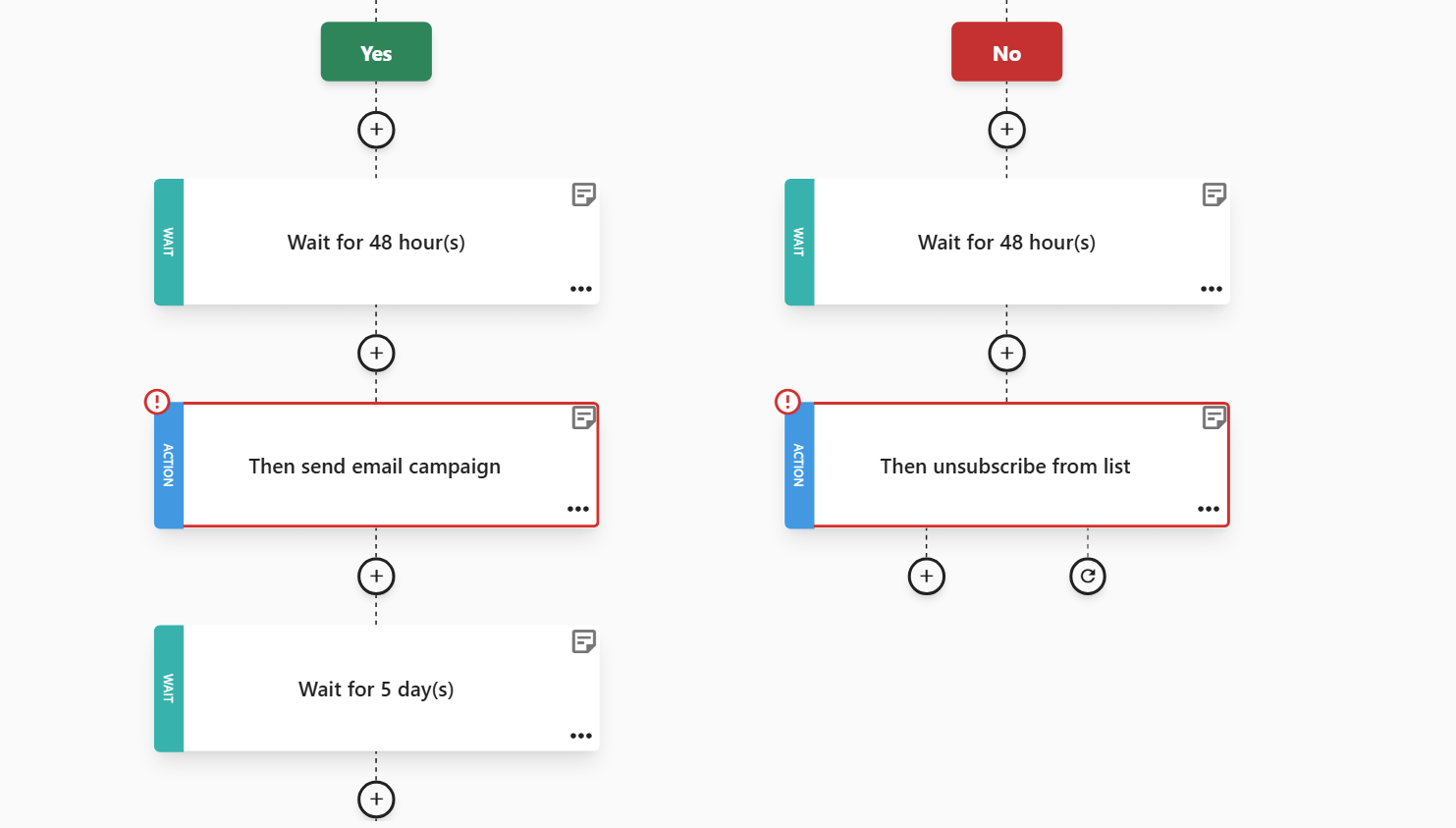
In our example, around the 48-hour mark, we follow up with a milestone or progress-style message. This works especially well when it nudges users toward the Aha moment you’ve defined. So, include a quick-win tutorial, a short video, or a prebuilt template to get them moving without extra thought.
If your email remains unopened, then the user is most likely disengaged. So, keeping them in your workflow won’t benefit you. This is why we included the “No” and “Unsubscribe from list” step.
By day five, you can add more value with a feature-highlight campaign that showcases a more advanced, user-role- or plan-tailored feature through dynamic content.
As the trial window closes, send a well-timed reminder with a personalized upgrade push. Instead of generic “your trial is ending,” show the user what they’ve already achieved and what they’ll unlock by moving to a paid plan. If they convert early, they should automatically exit the flow so they no longer receive trial content.
2. Ecommerce: From cart abandonment to repeat purchases
Cart abandonment is one of the most frustrating revenue leaks in eCommerce. According to Uptain’s study, cart abandonment rates reached 71,72% in the first half of 2025:
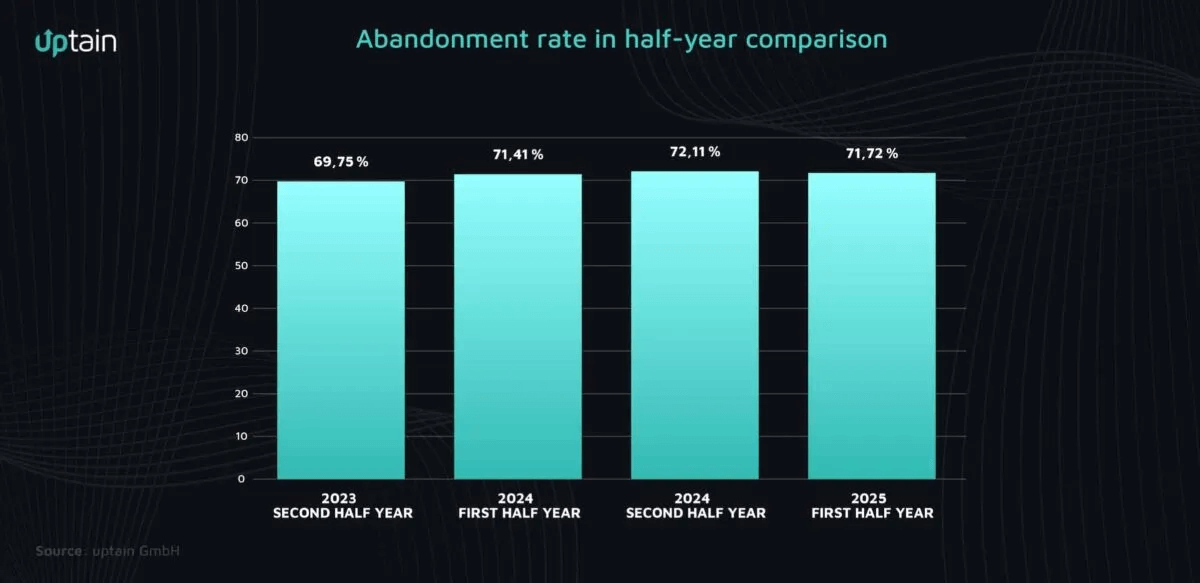
The good news? A well-timed cart abandonment automation workflow can bring shoppers back before the moment passes and set the stage for repeat purchases. It is also a great place to use some upselling techniques. In fact, 58% of marketers use marketing automation for upselling, according to Moosend’s research on marketing automation statistics.
An abandoned cart workflow starts the moment someone adds an item to their cart, but doesn’t check out:
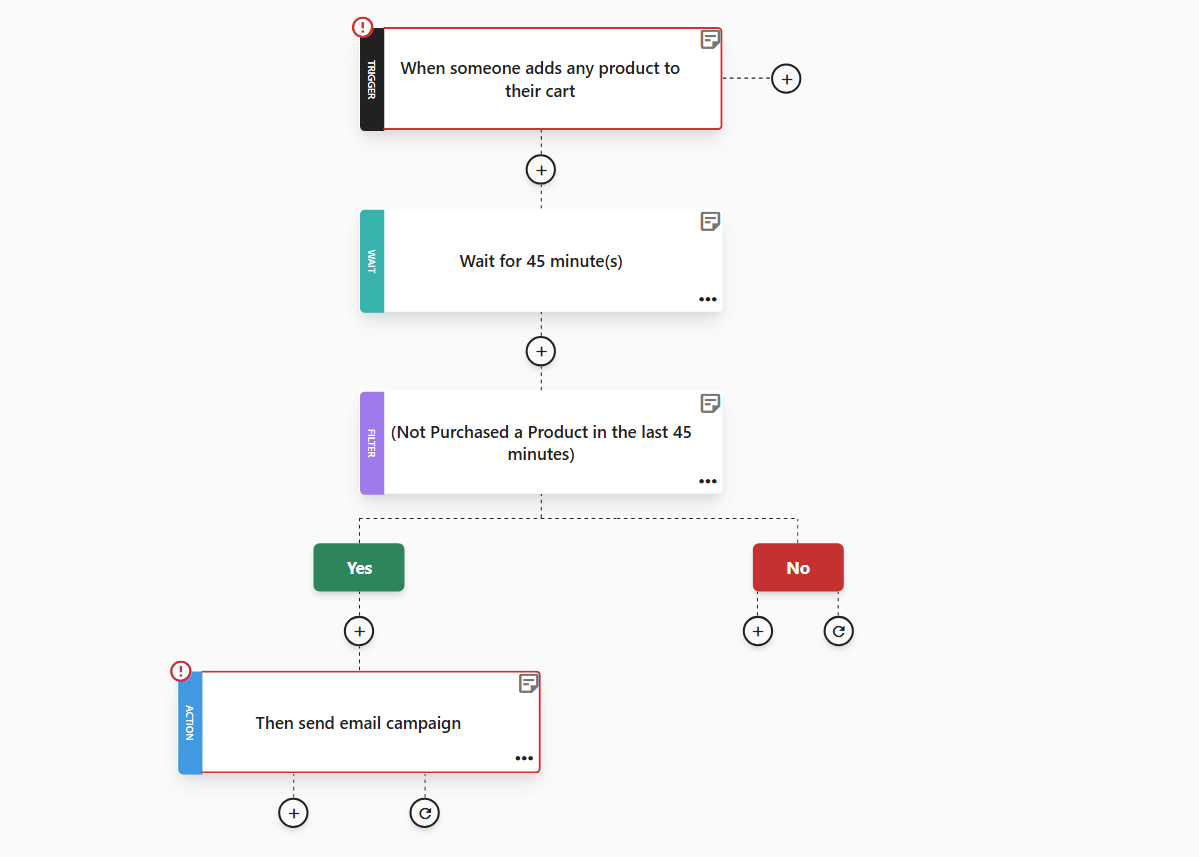
We decided to keep our example simple and straightforward. So, our potential customer would receive only one cart abandonment email and would exit the workflow if they didn’t purchase after the first reminder email. But this doesn’t mean you have to do it the same way:
- Send the first reminder after 45 minutes while the intent is still high. For the best results, keep it simple by showing the product, highlighting the value, and making the path back to checkout friction-free with a dedicated CTA.
- After 24 hours, if the shopper still hasn’t completed the purchase, add a little urgency. Some gentle nudges, like low-stock indicators or fast-selling-item notes, will do.
- At the 72-hour mark, you can decide whether to introduce an incentive. Some brands offer a small discount, others use free shipping or loyalty points. The key is to make the offer feel like an added bonus rather than a default expectation. If discounts aren’t a part of your brand’s strategy, skip this step entirely and use value-driven messaging instead.
Of course, a completed purchase doesn’t mean your work is done. Your ecommerce workflow should naturally shift into post-purchase mode. Here’s where the “Upsell/Cross-sell” recipe comes into play:
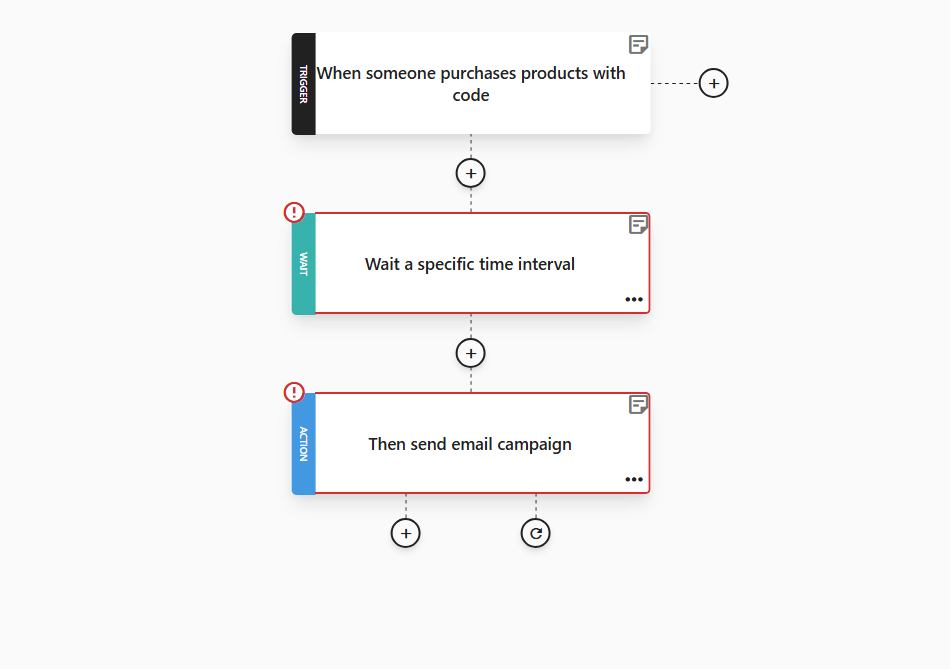
Start with a simple “You made a great choice” moment, then move on to complementary products, bundle suggestions, or replenishment cycles, depending on the category.
For brands with consumables or repeat-purchase items, add a timed reminder further down the road with a recipe like Moosend’s “Repeat purchases reminder.”
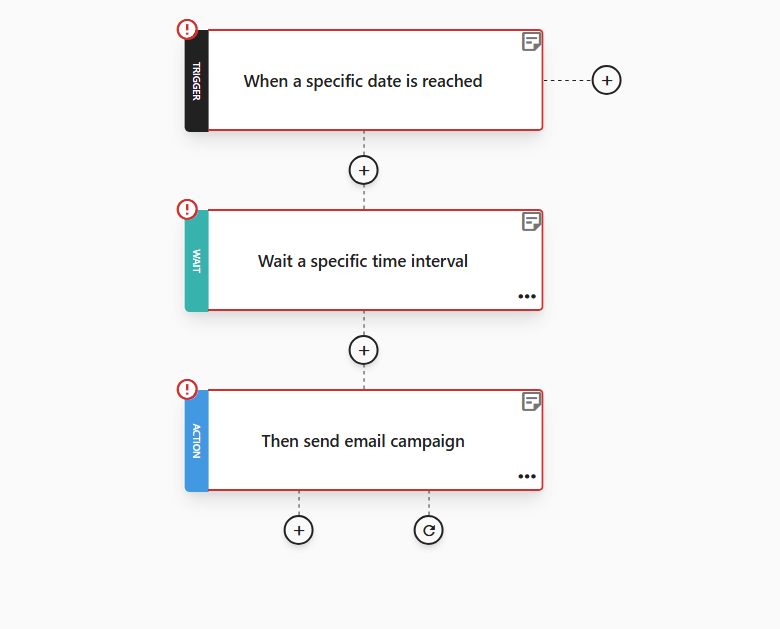
If your average customer repurchases at 30 or 45 days, schedule your nudge right before that window. This not only boosts repeat sales but also keeps customers engaged without feeling spammed.
To ensure you get the timing just right, review your ecommerce email metrics to identify the core time intervals that work for each customer segment and product.
3. Agencies and publishers: Lead nurture that converts
For agencies and publishers, content is the entry point. However, this alone rarely closes deals. The job of a nurture flow is to turn that initial interest into a meaningful next step, like a booked consultation, a demo, or a paid subscription.
This means moving people from resource consumption to action with a clear, confidence-building email workflow.
Tip: If you need inspiration for how others structure similar sequences, browsing practical email automation examples can help you visualize the flow before you build it.
Now, when someone downloads a resource or fills a form, send a simple welcome email that delivers the asset, sets expectations, and gives one clear next step:
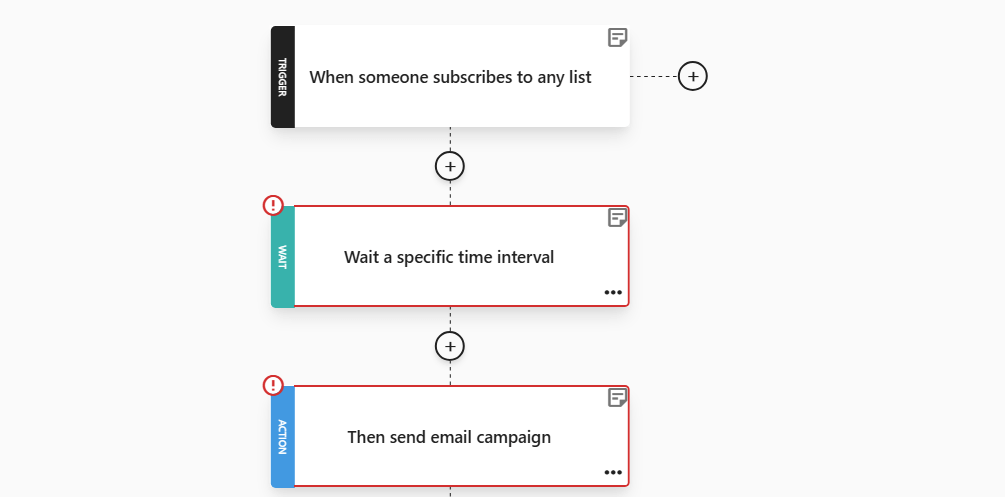
A welcome email workflow isn’t the place to sell, but to confirm value and establish your credibility.
Two to three days later, follow up with relevant content that deepens the relationship. Choose a follow-up that matches the original asset. For example, if the lead magnet was a how-to, follow up with a case study. If they grabbed a playbook, send a short checklist next. The goal is to move them from passive readers to curious prospects by showing what other clients have achieved.
Another way to lead them gently further down the funnel is to engage them with behavior-based content that reflects the pages they’ve already visited.
To achieve that, use the “Specific area of interest” automation:
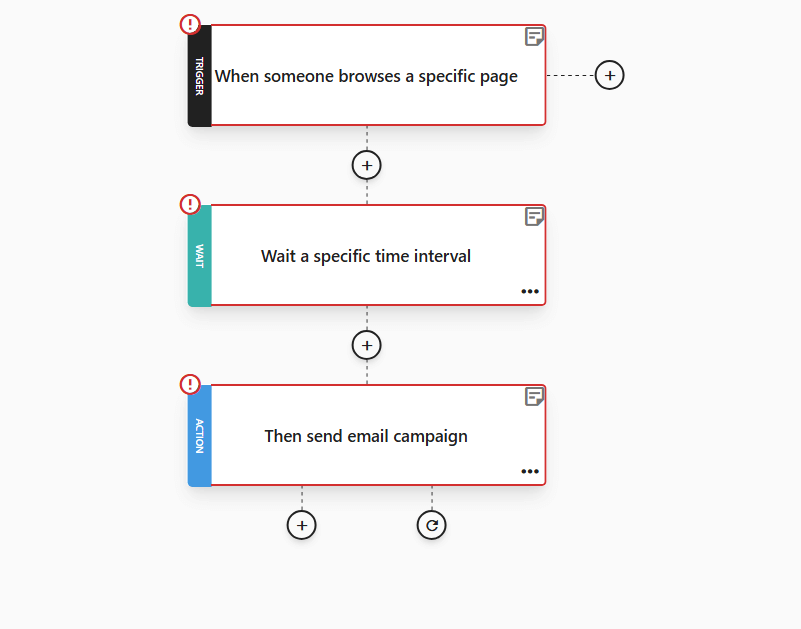
This email automation workflow will help you distinguish between segments and specific topic areas and follow up with actions accordingly: a low-friction next step, such as a short demo, or an exclusive piece of premium content.
Personalize your email using the content they consumed (industry, topic, or company size) and make the CTA trivial to complete. If they take the action, remove them from the sequence and move them to the next relevant one.
Workflows like this offer quick auto-segmentation, making your content even more powerful. Prioritize people who revisit topic pages, click multiple resources, or open more than one email. They’re hotter leads and should be routed to premium offers faster.
4. Healthcare: Patient retention and education
Keeping patients engaged after an appointment is a sensitive subject. Healthcare email marketing should focus on care, not promotions.
To nail it, craft timely, useful messages that reduce no-shows, improve outcomes, and build trust that keeps them coming back:
- Start the automation when an appointment is scheduled, missed, or completed.
- Then send a reminder 24 to 48 hours before the visit so patients have all the specifics, such as confirmation details, prep instructions, and an easy rescheduling option if needed. This alone can significantly reduce no-shows, especially for specialists or clinics with long waitlists.
- The day after an appointment, follow up with a short, reassuring care-instruction email. This is where your sequence should feel human and helpful, with next steps, links to resources, and what to do if symptoms change. Patients engage far more with clear, bite-sized info than long discharge notes.
But how can you reduce the time spent manually creating content for each patient?
This is where Moosend’s workflows make emails feel intelligent instead of generic. You can activate automations based on specific changes inside a patient’s profile with the “Custom field value change” automation for real-time care follow-up:
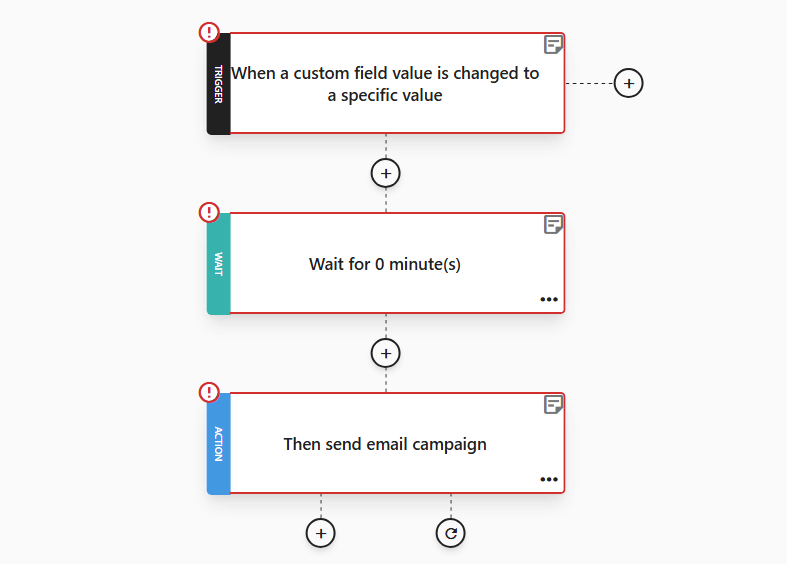
If you update a field like “appointment status” from “completed” to “follow_up_needed”, Moosend can automatically send the correct next-step email. This is perfect for cases where follow-up is conditional, like lab results pending or additional care instructions required.
Another example is when a custom field’s value is changed from “checkup due” to “treatment stage,” or “visit count.” When one of these fields changes—for example, when a patient becomes due for a screening or completes a treatment cycle—this automation can immediately send a relevant, helpful message guiding them to book their next step.
5. Hospitality: From booking to loyalty
In hospitality, a booking or inquiry goes beyond just confirming a reservation. These common actions can serve as triggers for a structured email workflow that supports the entire guest journey.
You can begin with your booking confirmation message. This one is purely a transactional email that lists the dates, room type, check-in info, and cancellation policy. By making this your starting point, you set the stage for more personalized steps that follow.
Add a trigger tied to the guest’s browsing history. For this step, it’s time to revisit the “Specific area of interest” recipe. If someone spent time browsing your spa page, family packages, or sea-view upgrades before booking, the automated email can be tailored to that interest. This one personalization layer can dramatically increase upgrade conversions.
Now, let’s assume your guests left. Once the stay is complete, send a post-departure email campaign with a thank-you message and feedback request. Here, you can use Moosend’s “Survey Buyers” recipe to send a quick survey like this:
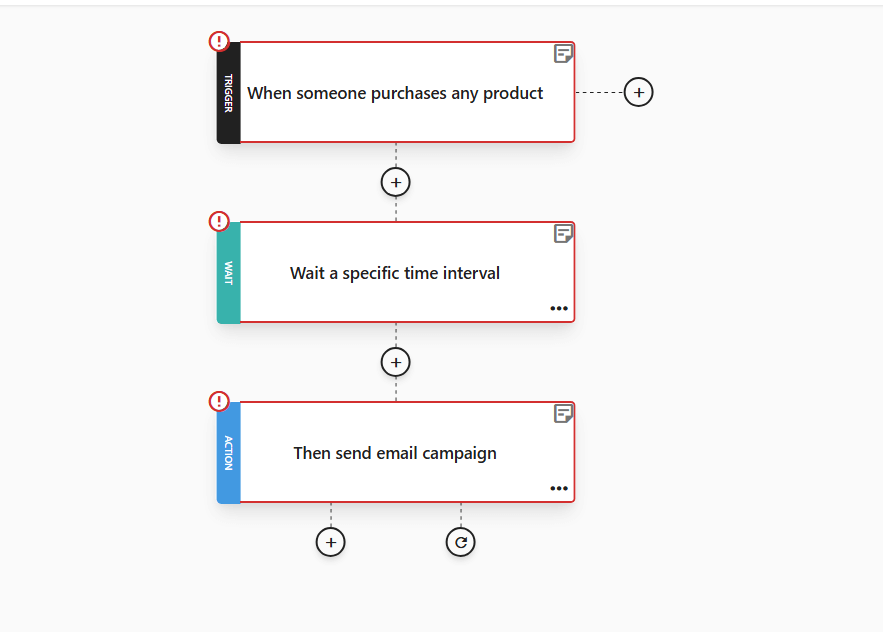
This email automation recipe can work beautifully, provided you utilize proper time intervals. It not only captures fresh impressions but also opens the door to your review request.
But nurturing guests doesn’t stop when their stay is over. To re-engage them, you can use the “Anniversary” recipe. If you have birthdays, stay anniversaries, or loyalty milestones stored, you can fire a tailored offer at the perfect moment.
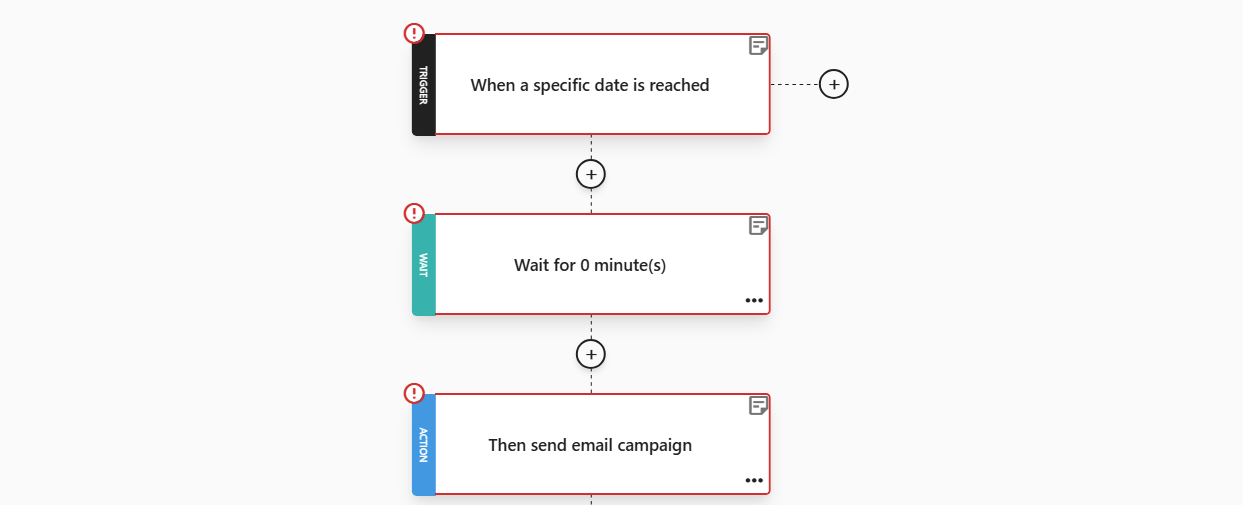
A warm “Happy Birthday! Here’s a special rate on your next stay” feels less like a promotion and more like recognition.
By connecting these automations, you can create a loop that quietly runs in the background while remaining hyper-relevant to each guest. And the travel email metrics that matter most here (upsell rate, review volume, and repeat bookings) will tell you exactly where your email automation flow is converting best.
All Industries: Welcome, Say Thanks and Boost Loyalty
For every brand, the first signup, purchase, or stay sets the tone for the relationship that follows.
The cleanest, highest-return automation strategy is a three-stage chain: a “Welcome” recipe to set expectations, a “Thank-You” recipe to reinforce the decision, and a loyalty sequence that keeps the relationship alive. Built together, they move a contact from curious to committed.
Welcome email automation
Let’s start with the welcome email automation.
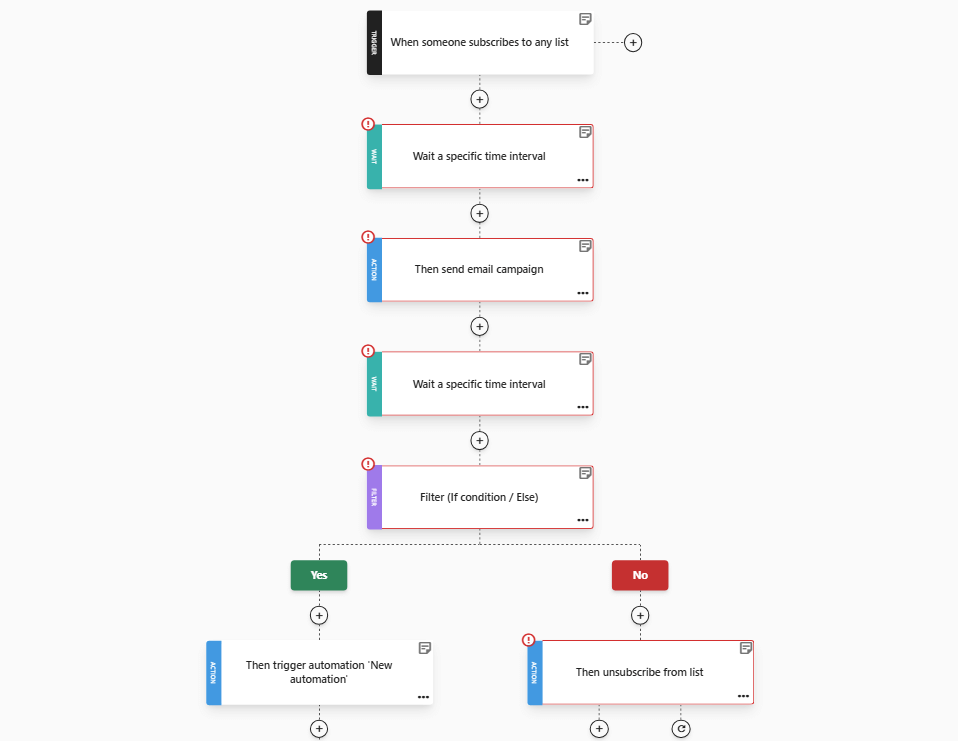
Trigger this when someone signs up, creates an account, or opts in. The first message should be instant and focused on saying hello, confirming what they signed up for, and giving one next step that is relevant to your lead magnet or the page that prompted the signup.
Wait 48–72 hours and send a second welcome touch that adds immediate value, with quick tips, a mini tutorial, or links to the most-used resources. Use a conditional split: if they completed the first step (clicked tour, opened key content), route them to a “what’s next” path; if not, send a simple incentive nudge.
Your welcome email series should look like this:
“Thank-You” email automation
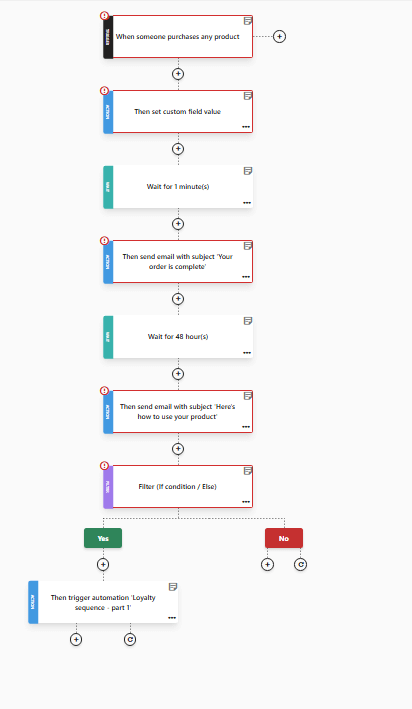
When the first transaction happens, a “Thank-You” recipe should start. This is a relationship-building moment.
Send an instant confirmation with logistics and expectations. Then, 24–48 hours later, deliver helpful content tied to that purchase, such as usage tips, care instructions, local recommendations, or downloadables.
Use behavior-based splits here as well. For instance, buyers who click product-care links enter a follow-up nurture for accessories or add-ons; those who don’t may receive a short survey to capture friction. It should look like this:
Loyalty email sequence
This is the final step. The typical trigger is “When someone completes a purchase.” Start with a value-first touch like exclusive content, members-only tips, or a small surprise coupon. Then, follow with a referral or anniversary offer later.
For subscription or repeat-purchase categories, add replenishment reminders timed to average lifecycle windows.
Built as a connected trilogy, these recipes feel personal, reduce early churn, and create the conditions for customers to become long-term advocates.
And as an added bonus, email automation templates keep your strategy consistent and scalable by providing every workflow witha proven structure and making it easy to replicate high-performing sequences across campaigns.
Best Practices to Keep Every Email Workflow Sharp
Building a workflow isn’t enough on its own. Maintaining it can come with its own set of hassles, as some audiences change, others lose interest in your offers, and small data issues can compound into big problems along the way.
A little ongoing maintenance act can keep your sequences working like a well-oiled machine and your reputation intact.
Test timing, tone, and CTA placement
Run regular A/B tests on your email copy, subject lines, sender name, and CTA verbs.
Small timing shifts or a clearer CTA can move your leads down the funnel faster than redesigning an entire flow.
Keep lists clean and suppress inactive contacts
Unengaged addresses hurt deliverability and waste budget. Use a time condition in your email automation workflow, then set off a re-engagement flow for inactive contacts.
If they remain silent, use Moosend’s “unsubscribe from list” action inside an automation to quietly remove them from specific lists. This keeps your active lists healthy without manual effort.
Refresh content every few months
Since your flows aim to engage users, there’s no reason for your content to be stale. Rotate creatives, swap imagery, and update CTAs and offers.
Even evergreen sequences benefit from new social proof, recent case studies, or updated visuals. Fresh content also gives you new A/B test ideas.
Segment beyond demographics
Move past age/location segmentation. Create segments based on product views, past purchases, time since last activity, or content downloads.
Pair these segments with dynamic content blocks to make each email feel hyper-relevant to multiple audience slices.
Track and analyze your metrics
Track primary KPIs for each workflow and surface them in a custom dashboard or exported report. Moosend can help you see the core statistics at a glance:
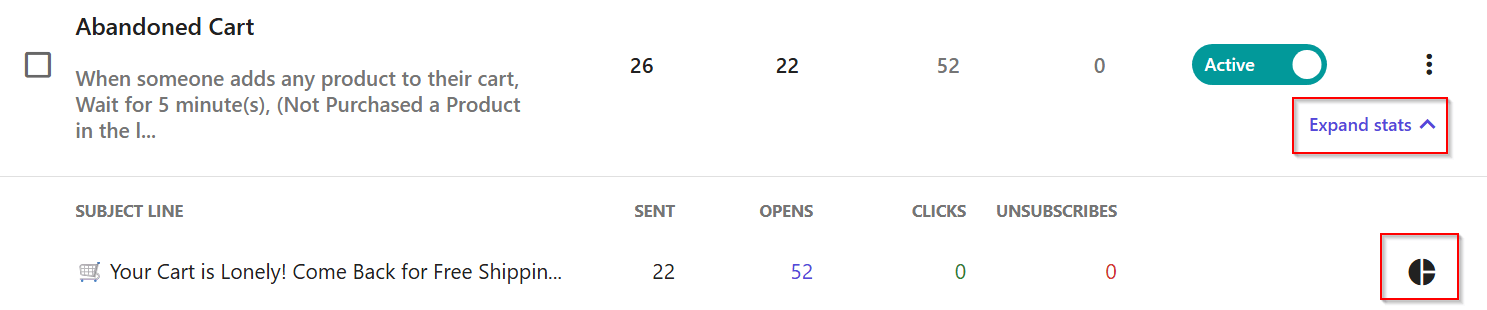
By clicking the pie chart symbol on the right side, you’ll access your workflow’s dedicated dashboard:
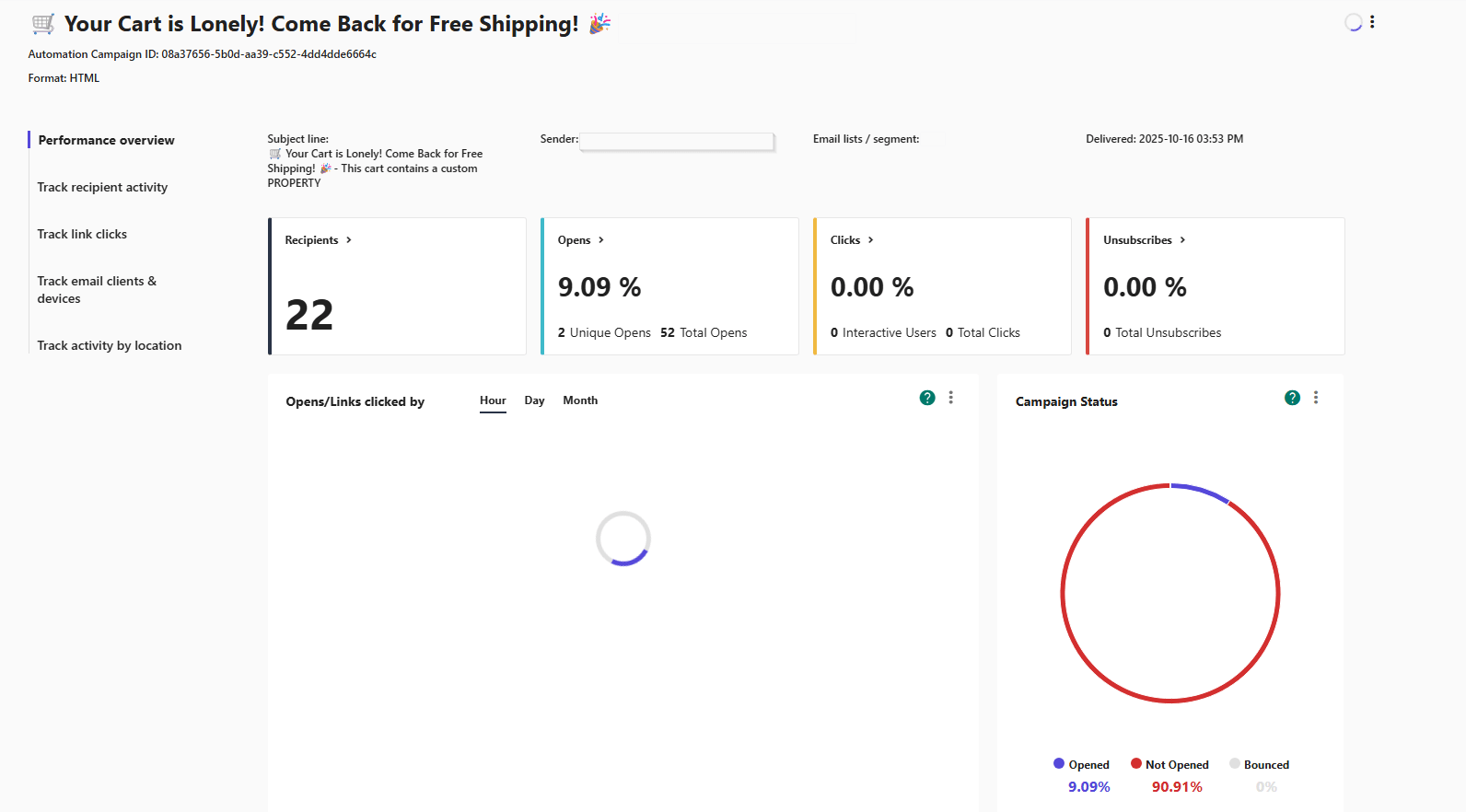
Determine what metrics work best for your—it could be your link clicks, your opens, or your unsubscribers—and move accordingly.
Small, consistent maintenance is what some marketers overlook in email automation workflows. Schedule a monthly automation health check. Test one variable, remove what doesn’t work, and refresh your content.
Over time, those tiny wins compound into major performance improvements.
Ready to Automate Your Email Marketing Campaigns?
The right email marketing automation workflow can reshape your entire customer journey. When every touchpoint fires at the right moment, with the right message, engagement stops feeling accidental and starts feeling engineered. The real power behind a well-built automation system is that it gives your brand the consistency and momentum that manual sending can’t match.
If you’ve followed the frameworks above, you already have everything you need to start. Pick one workflow and build it inside Moosend. The no-code automation builder will guide you through triggers, conditions, and actions without slowing you down.
Activate your first workflow, watch the results roll in, and let your strategy grow from there.
FAQs
Let’s answer some of the most common questions regarding email automation workflows.
1. How often should I update my workflows?
Check them every 2–3 months. Products, offers, and customer behavior change. Your email automation workflow’s components should too.
2. What’s the ideal delay between emails?
It depends on intent. High-intent email workflows, such as cart abandonment or free-trial, use shorter delays. Educational or loyalty flows perform better with a few days in between.
3. What KPIs should I track for automation?
Start with open rate, click-through rate, conversions, revenue per email, and unsubscribes. Add deeper metrics like unique links clicked as you grow.
4. What if someone enters multiple workflows at once?
Set clear rules for when contacts can enter or exit workflows to prevent overlapping messages. One journey at a time is usually more effective.
5. Do I need a huge list to start using automation?
Not at all. Email automation workflows are beneficial to businesses regardless of list size. Your workflow will do its job (and make yours easier) even with 50 contacts. It’s about relevance, not volume.
Similar Posts
 Published by
 Published by
 Published by

Create, send and optimize your email marketing campaigns