















Email Marketing vs Marketing Automation: Which Fits Your Growth? [2026]
Published By Tea Liarokapi
April 1, 2026

01/04/26
If you’ve ever heard someone use “email marketing” and “marketing automation” as if they mean the same thing, you’re not alone. This confusion often arises in debates over email marketing vs marketing automation.
While they both involve email, aim to drive conversions, and can live on the same platform, they aren’t the same. Treating them as interchangeable leads to the wrong expectations, such as relying on a newsletter tool to handle lifecycle journeys or expecting an automation platform to fix a weak campaign strategy.
In this guide, we’ll define both concepts and break down the key differences with real use cases. You’ll also learn what to prioritize first based on your goals and resources, without treating it like an either/or decision.
Email marketing or marketing automation?
The debate is over. Get the best of both worlds with Moosend.
TRY MOOSENDWhat Is Email Marketing?
Email marketing is the practice of sending targeted campaigns to a subscriber list to promote content, products, or updates, and maintain customer relationships.
The outcome should be measurable results, such as engagement, conversions, retention, and revenue. As a direct, owned channel, it gives brands a reliable way to reach opted-in audiences without paying for reach or depending on social media algorithms.
Common email marketing campaigns include newsletters, product launches, promotional sends, event invites, content distribution emails, win-back campaigns, and cart abandonment emails, to name a few.
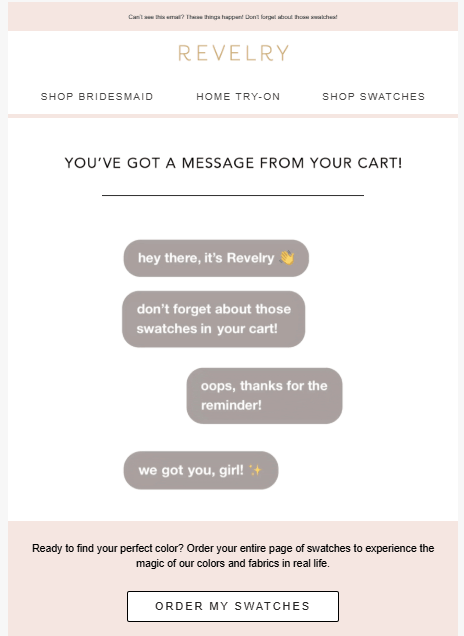
To run these consistently, most teams rely on features like drag-and-drop editors, email templates, list management and segmentation, A/B testing, scheduling, and reporting that tracks opens, clicks, and conversions.
What Is Marketing Automation?
Marketing automation is software that runs rule-based, multi-step workflows automatically, based on user behavior or predefined triggers. Instead of sending every message manually, you define the rules and update them as your offers, segments, and data change. Email is often the core channel in these workflows, but marketing automation is broader than just email campaigns.
Its goal is to nurture leads over time, personalize communication at scale, and support lifecycle marketing from first touch to repeat purchase. In practice, that means sending a welcome series when someone signs up, guiding new users through onboarding, or following up based on recipients’ activity—or lack thereof—after an email or a site visit.
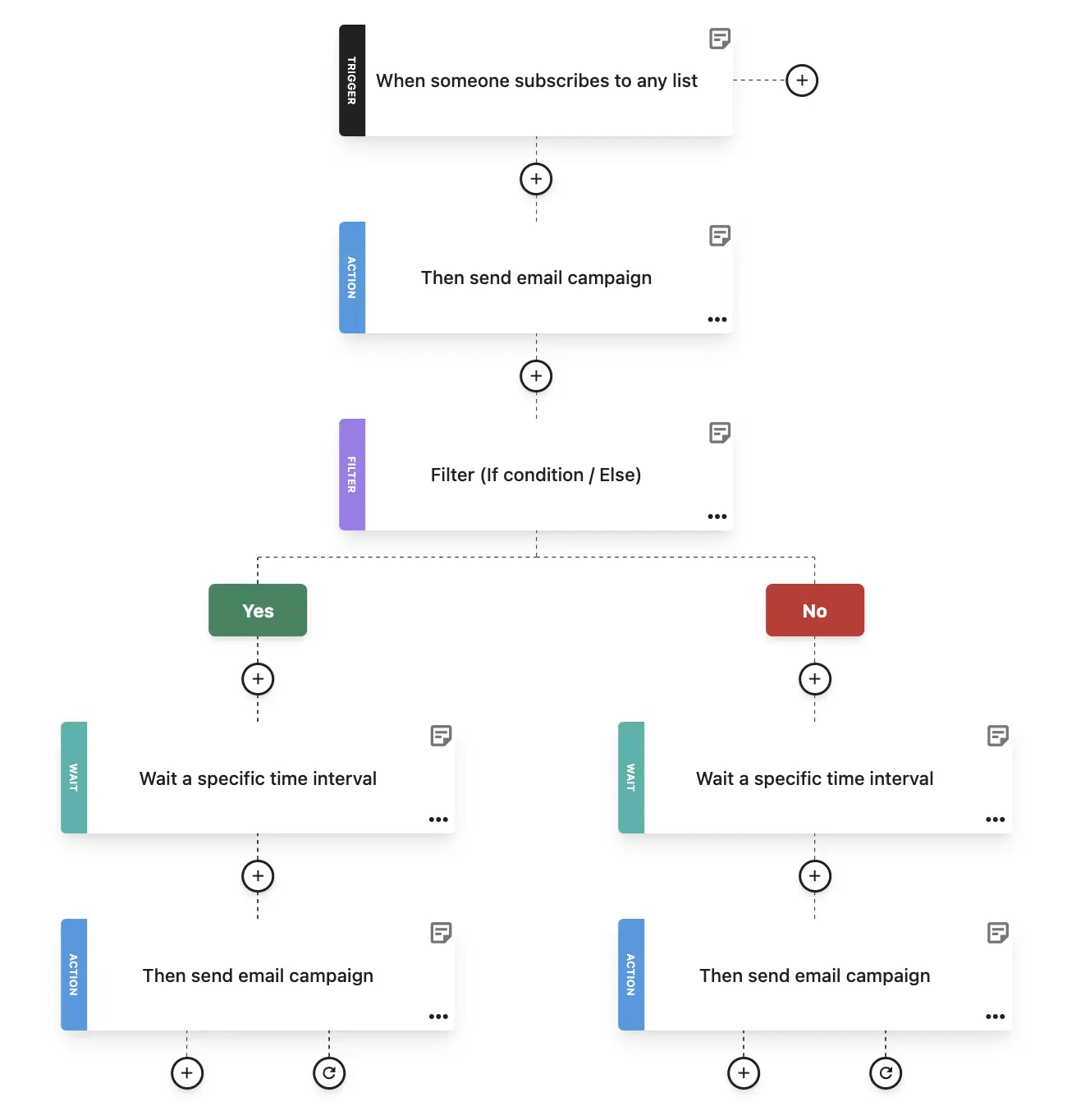
Many marketing automation platforms support these with a visual workflow builder, triggers, and conditions with simple if/then logic:
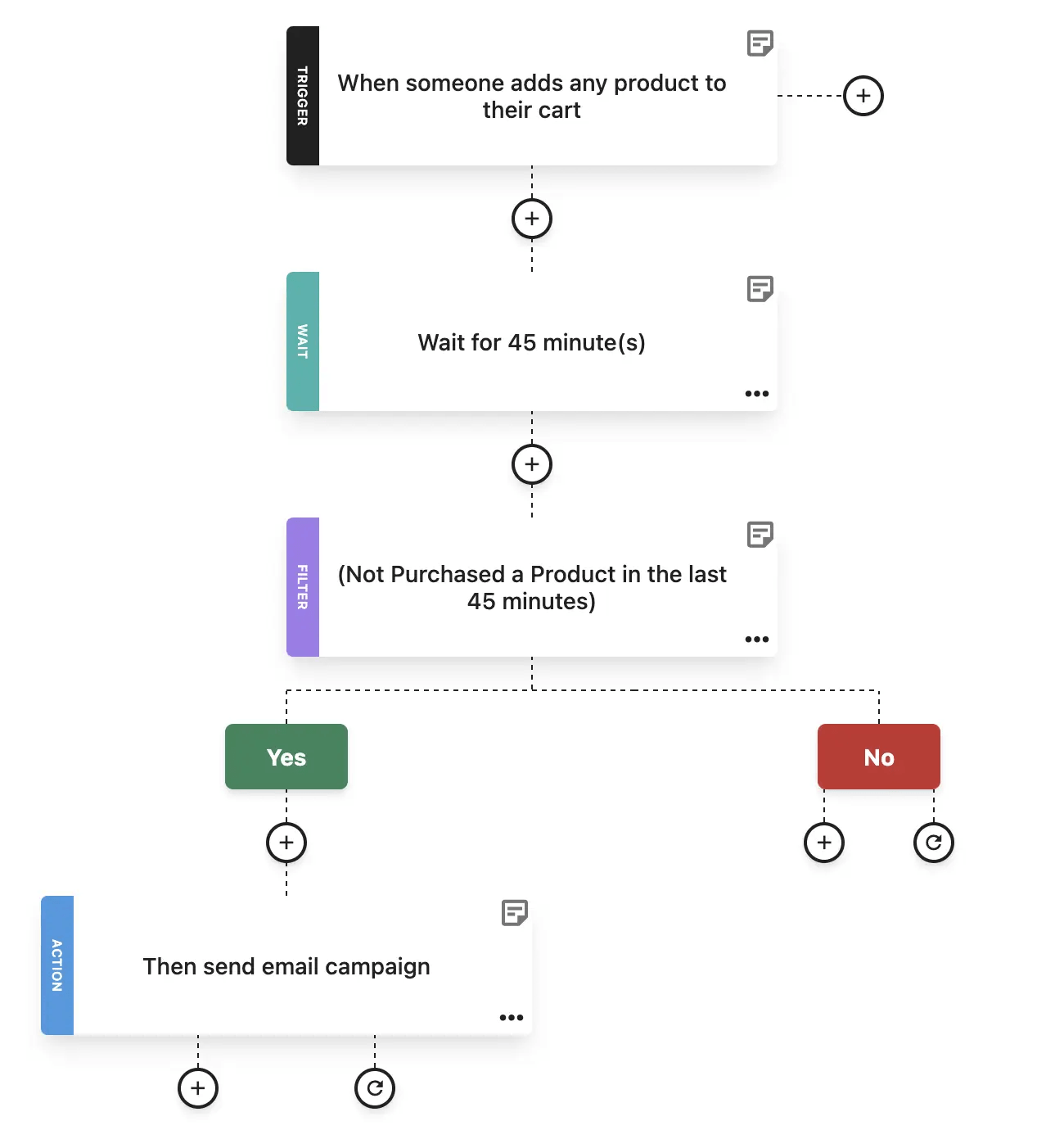
Some marketing automation tools also support behavioral tracking, segmentation rules within workflows, and integrations with tools such as Customer Relationship Management (CRM) systems or eCommerce platforms. Others, including Moosend, offer pre-built automation templates you can customize rather than build workflows from scratch.
It’s worth mentioning here that email automation and marketing automation aren’t the same thing, even though the terms are often used interchangeably. To understand how they differ in practice, let’s break down the key differences below.
Email Marketing Vs Marketing Automation: Core Differences
To separate the two, focus on how messages are planned, triggered, and measured.
Email marketing is primarily about planning and sending campaigns through one channel. Marketing automation is about building a rule-based system that decides what happens next, without manual effort, and in a way that matches where someone is in the lifecycle.
1. Scope
Email marketing lives inside the email channel. You choose your email marketing software, create a message, pick your audience, and send it to drive a specific outcome (traffic, sales, awareness, retention).
Marketing automation is broader in scope because it’s designed to manage workflows and lifecycle stages. This means it can coordinate multiple steps, timing rules, and data inputs to move a contact from “new lead” to “activated customer,” “repeating customer,” “VIP member,” etc., without you having to rebuild the process every time.
2. How messages are sent
Email marketing is typically scheduled or batch-based. A campaign is created for a specific occasion. A Tuesday morning newsletter, a sale announcement, or a webinar promotion. Then, it’s scheduled to go out to the selected segment at roughly the same time.
Marketing automation, on the other hand, is event-based. Messages are triggered by behavior or conditions (e.g., signup, purchase, page visit, inactivity), which means the “send moment” is individualized. Each person enters the flow when they perform the action.
3. Personalization level
Email marketing personalization usually happens at the audience and copy layer. You segment by attributes or interests and use personalization tokens, CRM data, or sometimes lead scoring (name, company, last product viewed, spending habits) so the same campaign feels more relevant.
What makes automation more personalized is the logic behind it. It includes conditional paths, wait steps, and dynamic timing. With marketing automation tools, two subscribers can enter the same flow and still receive different next steps based on how they behave, without you having to build separate campaigns for each scenario.
4. Customer journey coverage
Email marketing is strong at high-intent touchpoints that stand alone and can be optimized as individual sends.
Marketing automation is built for multi-step sequences (or journeys) that connect those moments into a coherent path, so follow-up doesn’t depend on someone on your team remembering what should happen after the first email.
A common use case for this is a welcome sequence.
Instead of sending a single welcome email and stopping there, automation can continue the journey with a product education email, a follow-up offer, or a different next step based on whether the subscriber clicks, purchases, or does nothing. This tactic eliminates the need to rely on a team member to manage each step manually.
5. Metrics
Each methodology reflects a different set of marketing metrics.
Email marketing measurement is campaign-centric. Opens, clicks, unsubscribes, and conversions are evaluated per send. So, marketers optimize by iterating on subject lines, content blocks, CTAs, and audience selection.
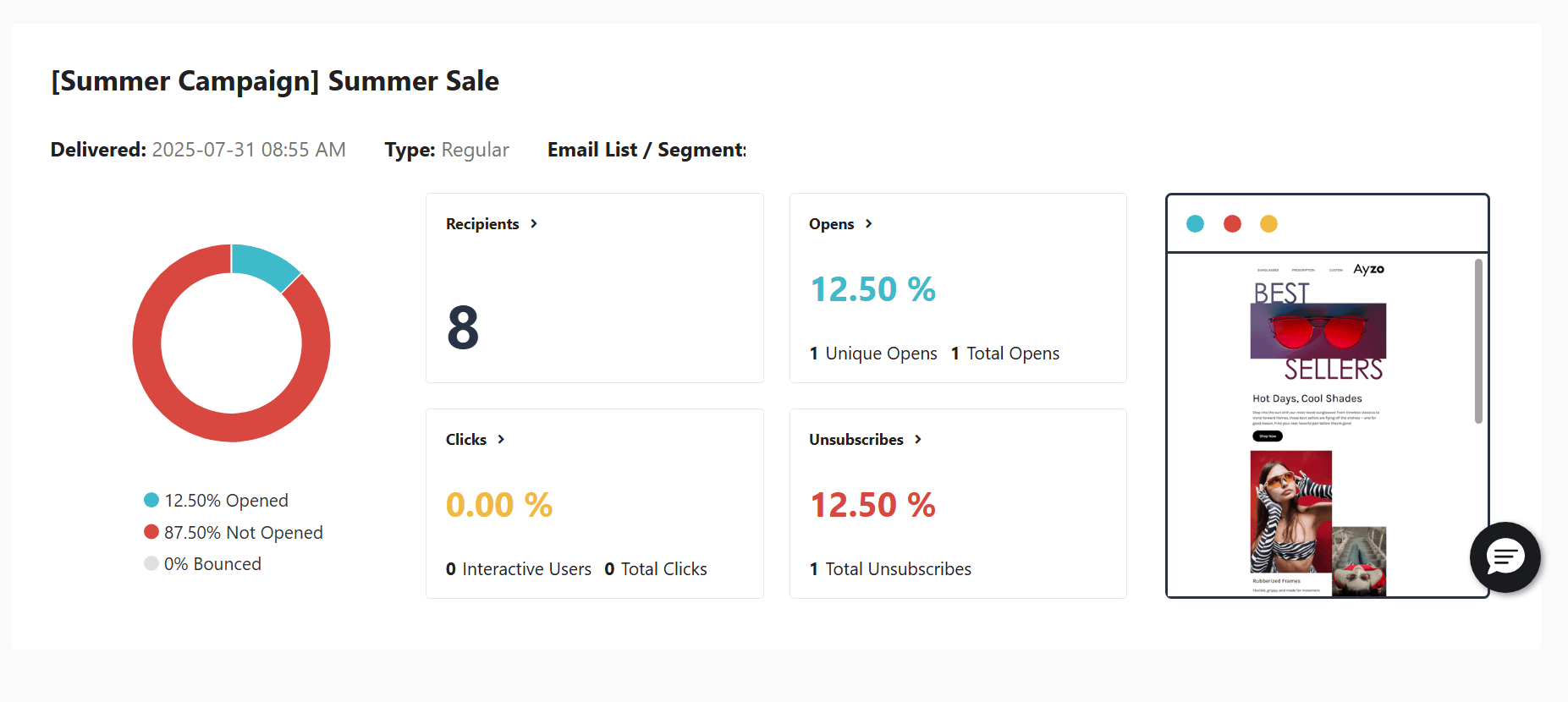
Marketing automation measurement is flow-centric. You care about progression and drop-off (how many enter, how many reach the goal, where they stall, which branch performs better), because the performance of each step affects the end outcome more than any single email does.
6. Operational effort
Email marketing is quicker to launch because the workflow is straightforward. You just build, segment, and send. However, it can become repetitive when you’re doing the same follow-ups manually (new subscriber intros, reminders, win-backs) across multiple audiences.
Marketing automation requires more upfront setup, such as mapping triggers, writing branching logic, connecting data, and integrating with other systems. Once it’s stable, it reduces ongoing manual work and keeps the experience consistent even when volume increases or the team is stretched.
Which Should You Prioritize?
Since there is no universal priority, choosing between email marketing and marketing automation is about understanding where your team is today and what problem you’re trying to solve.
The right priority depends on your volume, your resources, and how structured your customer journey already is. Use the criteria below as a decision aid to determine what will have the greatest impact right now and optimize accordingly based on your marketing strategy and goals.
When to prioritize email marketing
If you’re still building your list, email marketing is the most direct way to start creating momentum. You don’t need a complex system to get value out of email. On the contrary, you simply need consistency, a clear offer, and a feedback loop you can learn from.
A small list can still generate meaningful results if what you send is relevant and the goal is specific. In other words, email marketing is the right priority when you need a revenue-driving channel quickly, and you’re not yet ready to build journeys.
It also makes sense to focus on campaigns when you don’t have strong data to reflect customer behavior. Automation runs on data that comes from site events, purchase history, product interactions, and lifecycle signals. If your tracking isn’t in place or you don’t have enough activity to segment with purpose, you’ll end up guessing the logic and building workflows that don’t actually reflect how people buy.
Email marketing campaigns are simpler, as you can segment based on what you do know (new subscribers, customers vs prospects, interests collected at signup) and use performance data to refine your messaging.
This is especially true for small teams or small businesses. Basic email marketing campaigns have a shorter setup cycle, requiring just a single email, segment, send, and report. That makes it easier to iterate weekly, test new ideas, and adjust your timing, messaging, and cadence without being locked into a complex workflow.
When to prioritize marketing automation
Marketing automation becomes a priority when your business is generating enough leads, signups, or customer activity that manual follow-up no longer scales. If you already have lead-capture assets in place, like landing pages or content upgrades, and a steady flow of traffic and conversions, automation helps ensure those opportunities are consistently followed up on.
That matters because many leads are not ready to convert immediately. They may need education, reassurance, confirmation of product fit, or repeated exposure over time. Automation lets you deliver that through nurture sequences paced over days or weeks, based on engagement.
It also becomes more valuable once you’ve defined your lifecycle stages. When you can clearly identify onboarding, cart abandonment, post-purchase follow-up, re-engagement, or other key moments of the customer journey, you can build flows that support each stage with timely, relevant messaging.
And if you need email personalization beyond static segments, automation gives you branching logic. A customer who buys category A does not need the same follow-up as someone who buys category B, and automation allows those paths to adapt without additional manual work.
The Practical Approach
Most teams don’t choose between them upfront. They start with campaigns and adopt automation as volume grows. The “right” sequence is usually the one that keeps you moving without creating maintenance issues.
A good rule of thumb is to start with the basics that generate quick returns on investment, then automate the tasks you find yourself repeating. That way, automation can really streamline what’s already working by creating a series of emails that respond to real user needs.
Step 1: Establish email marketing campaigns you can sustain
Start by building a list you can actually use with a clear signup value exchange (discount, resource, newsletter, etc.). Create clean forms and a plan to collect consent and set expectations.
Then focus on consistency. Pick one or two campaign types you can sustain for a month. These could typically include a newsletter or content email and one promotional or product-led send. Pin down the best time to send your email to your audience and stick to it.
Tracking matters here, but keep it practical. You’re looking for signals that tell you what to do next:
- Which subject lines get attention
- Which offers or topics get clicks
- Which segments respond, and how
Use campaign results to shape your email marketing approach with targeted messages. At this stage, the goal is to build a reliable feedback loop, so you learn what your audience cares about and what really drives action.
Step 2: Add essential automations
Once you’re used to sending consistently, automate the workflows with a clear intent and repeat them constantly.
A welcome series is the obvious first step because it introduces your value while intent is high. Keep it simple by setting expectations, sharing the most useful resources or products, and giving a clear next step.
If, for example, you’re using eCommerce email marketing, cart abandonment belongs in the essentials because it catches revenue you’d otherwise lose, but only if you can reliably track add-to-cart and checkout behavior. Post-purchase follow-ups are the other high-impact flow and include order and shipping updates (transactional) plus post-purchase marketing messages like usage tips, cross-sells, and review requests:
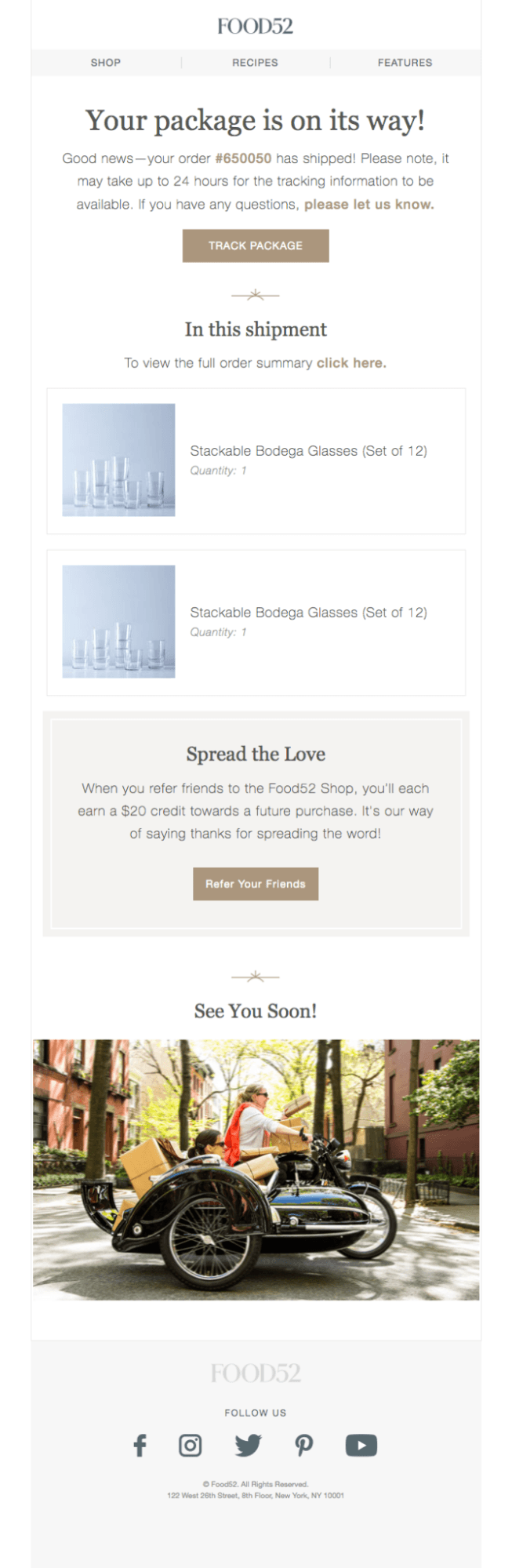
This transactional email example from Food52 is clear about what the customer will receive. To top it off, it offers reassurance through a tracking link and a discount through a referral link. The action that fired this marketing automation sequence was the purchase itself.
Don’t use workflows you can’t sustain. You’re not building a “journey map” for the sake of it; you’re trying to make sure the highest-intent moments always get a timely response.
Step 3: Personalize without overbuilding
After you’ve understood the essentials and made them work, you can start adding personalization without turning your workflows into a mess.
Conditional paths let you adjust messaging based on behavior without duplicating campaigns. For instance, re-engagement flows help you manage inactivity in a structured way, rather than sending the same “we miss you” email to everyone. Product-interest workflows let you follow up based on categories browsed, links clicked, or past purchases, so your emails start to feel tailored rather than timed.
Campaigns show you what works, essential automations cover the basics, and lifecycle automation helps you apply that knowledge in a more personal way at scale.
What to Look For in an Email Marketing and Marketing Automation Platform
An email marketing automation best practice is to focus on your day-to-day tasks and choose a tool that sustains them. Start by asking two practical questions:
- Can we build and send campaigns fast without compromising quality?
- Can we automate communications we already know we should be sending?
If the answer to either is “not easily,” then this marketing automation software won’t scale with you.
Email marketing essentials
For marketing teams to nurture leads and go beyond open rates and click-through rates, a solid email editor is non-negotiable.
You should be able to build clean, mobile-friendly emails without fighting formatting, and you should have control over spacing, hierarchy, buttons, image handling, and responsive behavior.
Email templates matter for speed and consistency, so look for a solid library that covers real campaign types that reflect your marketing needs (newsletters, promotions, announcements, etc.).
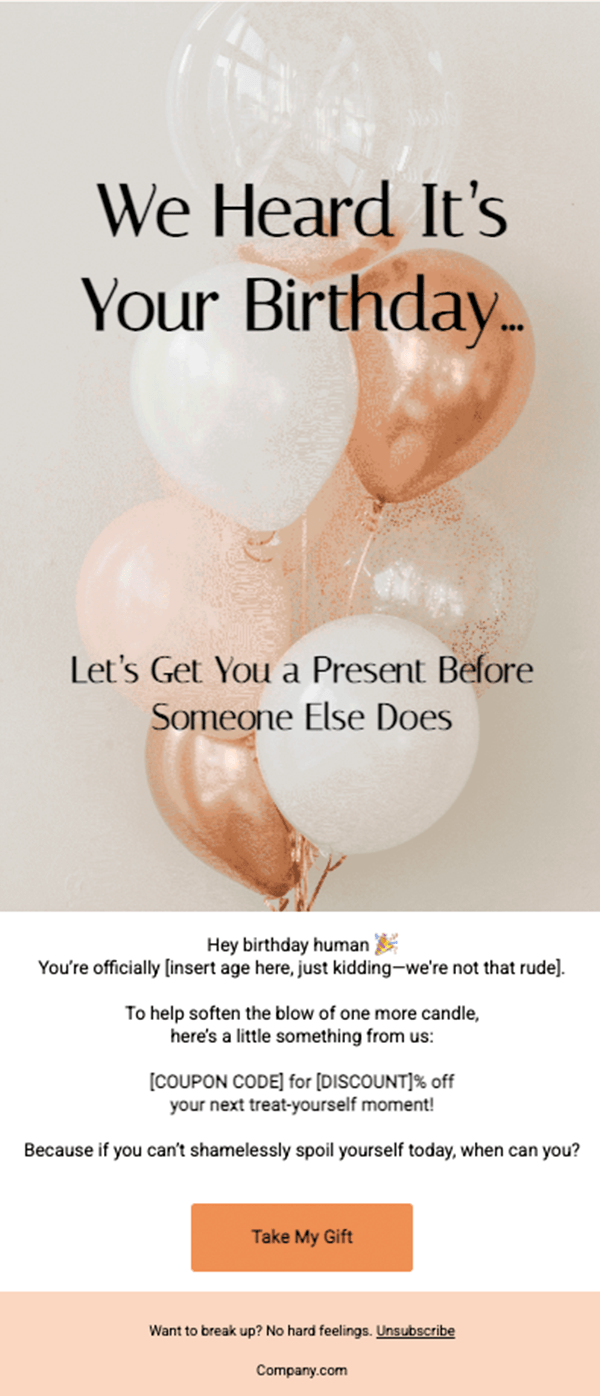
Make sure to choose a platform that carries dynamic content blocks, so you can personalize your emails without creating a version for each recipient.
Your platform should also include email list management capabilities, such as importing and cleaning contacts, tagging, preference fields, and segmentation, all built within the platform without manual exports. You want to segment audiences by attributes (location, signup source), engagement (opened or clicked), and purchase or browsing behavior.
A/B testing should be easy to launch and easy to interpret. Test one variable at a time and use a clear winner selection rule so you can quickly identify what worked. Finally, reporting needs to be actionable and reflect your business needs. Make sure it showcases delivery health, engagement trends, click performance, and conversion tracking where possible, with breakdowns by segment so you can see what’s working for whom.
Automation essentials
One of the core automation features is a visual workflow builder. You want clear steps, readable branches, and the ability to edit without breaking the entire sequence.
Trigger-based automation should cover the events you actually rely on (signup, purchase, link click, inactivity, page/category view if available). Conditional logic is what turns automation into relevance, so pick a tool that supports it:
For example, here’s Moosend’s customizable “Onboarding Email Sequence” recipe. As you can see, its logic is “If they subscribed to any list, send an email campaign; if they performed X action, send Y. If not, send Z.” It also includes wait steps.
Here, you can also add exit rules to prevent people from getting stuck on outdated paths.
Goal tracking is what separates building a flow from making informed decisions about the flow’s direction and taking metrics into account. The platform should track success events such as purchases, bookings, opens, and clicks, and surface completion rates and drop-off points at each step. Here’s an example:
In this sequence, it’s evident that the first subject line generated more opens, but the second one generated more clicks. If CTR defines success according to your business needs, the second option would be the winning one.
Finally, integrations are what make automation useful beyond email: CRM sync, eCommerce platforms, website tracking, and clean data handoffs so your segments and triggers reflect reality.
Choose a platform that supports both nurture campaigns, content email marketing, and automation well enough that you won’t need to switch tools the moment your business needs grow. The best systems let you start simple and add complexity only when it earns its place.
Email Marketing or Marketing Automation? The Choice Is Yours
The distinction between email marketing and marketing automation matters less in theory and more in practice. Campaigns help you show up with something timely and intentional. Automation ensures that what happens next doesn’t rely on memory, timing, or manual effort.
Most teams don’t choose one over the other. They start with campaigns they can execute consistently and layer in automation as things scale.
That’s why, when evaluating software, it’s worth choosing a platform that handles both well and can get you from single sends to structured journeys without rebuilding your setup along the way.
FAQs
Now, it’s time to answer the most common questions on email marketing and marketing automation.
1. Is email marketing the same as marketing automation?
Email marketing refers to sending campaigns through the email channel, while marketing automation refers to the system that runs rule-based workflows across lifecycle stages. Email marketing can exist without full marketing automation, but marketing automation often includes email as a core component.
2. Is email automation the same as marketing automation?
No. Email automation is a subset of marketing automation. It covers automated email sequences triggered by actions like signups or purchases, whereas marketing automation manages the broader logic, timing, and conditional paths that connect multiple steps into a structured journey.
3. Can small businesses benefit from marketing automation?
Yes, but only when there’s something to automate. Small teams often start with email marketing to boost conversion rates and generate revenue, then add marketing automation once manual follow-ups (like onboarding or cart reminders) become time-consuming. Marketing automation should solve a real issue.
4. Do I need marketing automation software to run email campaigns?
No. You can run effective email marketing campaigns with basic email marketing software that supports segmentation, personalization, scheduling, and reporting. Marketing automation software becomes necessary when you want triggered workflows, conditional logic, and lifecycle-based journeys.
5. What is the main difference between email marketing and marketing automation?
The main difference between email marketing and marketing automation is scope. Email marketing focuses on creating and sending individual campaigns, while marketing automation focuses on building systems that trigger, personalize, and manage communication over time based on user behavior.
Similar Posts
 Published by
 Published by
 Published by

Create, send and optimize your email marketing campaigns