















Why Is Segmentation Important in Email Marketing? [2026]
Published By Tea Liarokapi
March 13, 2026

13/03/26
You sent your latest campaign. Everything looked good, from the subject line to the design. Still, open rates, clicks, and conversions were disappointing.
So you send another campaign, but the results are the same. Why?
Inbox competition is high. Subscribers ignore emails that don’t feel relevant, and mailbox providers rely on engagement signals to decide where campaigns land.
Also, when the same message goes to everyone, relevance drops and engagement follows. Segmenting your audience helps fix that.
In this post, we’ll look at why segmentation is important in email marketing and how it can improve your strategy.
Turn segmentation into results
Create smarter segments, personalize campaigns, and send the right message at the right time.
TRY MOOSENDWhat Is Email Segmentation?
Email list segmentation is the practice of dividing your subscriber base into targeted groups based on shared attributes or behaviors so you can send more relevant messages to each group.
Those attributes can account for demographic segmentation (location, role), behavioral segmentation (opens, clicks, purchases, product usage), or lifecycle-based segmentation (new lead, active customer, inactive user).
The goal goes beyond organization. It’s aligning message, timing, and offer with intent to improve engagement, conversions, and ROI.
However, segmentation is often misunderstood or misused. Here’s what it isn’t:
- Random list splitting. Creating arbitrary sub-lists without a clear performance objective doesn’t improve results. Every segment should answer: “What outcome are we optimizing for?”
- Over-engineering your data model. You don’t need dozens of different segments to see impact. In most cases, 2–3 strategically defined behavior-based segments will outperform a complex but unused structure.
- A replacement for strategy. Segmentation doesn’t fix weak messaging or unclear positioning. It ensures the right message reaches the right audience.
The Importance of Segmentation in Email Marketing
Segmentation changes what you optimize. Instead of one message for everyone, you align messages to groups defined by intent and behavior.
This is what turns email into a performance channel with higher engagement, better list health, stronger inbox placement, and more measurable ROI.
All in all, email segmentation works when the email matches the subscriber’s current intent. When that alignment improves, metrics follow.
1. Improves metrics through relevance
Segmentation drives clicks and conversions because relevance changes how people pay attention.
They respond to timing, intent, purchase stage, past behavior, and how closely the message matches what they currently care about. When those elements align, the email feels useful instead of intrusive.
That shift affects the metrics marketers most closely monitor. Relevant emails earn more opens when the subject line reflects a recognizable need, more clicks when the content supports an existing interest, and more conversions when the offer fits the subscriber’s level of readiness.
People are less likely to ignore, delete, or unsubscribe from emails that feel selected for them. This is why segmentation is directly tied to better metrics.
2. Leads to personalization at scale
Personalization doesn’t start with a “Hi {FirstName}.” That’s surface-level.
Real email personalization begins when different members of your email list receive different messages based on their lifecycle stage. If everyone gets the same campaign with minor field swaps, it’s still generic. And generic messaging produces average engagement.
Segmentation enables personalization that actually moves metrics because it’s built around intent groups:
- New subscribers need onboarding and expectation-setting.
- High-intent users (pricing page, product view, cart) need a push to convert.
- First-time buyers need reassurance and cross-sell logic.
- Loyal customers need expansion or VIP treatment.
- Inactive users need re-engagement.
The email marketing payoff is simple: more revenue with less manual effort.
Once segments are defined, automation does the heavy lifting. You stop building one-off campaigns and start automatically responding to signals.
3. Protects email list health
Email list hygiene is about how your list behaves over time.
Unsubscribes and spam complaints increase when subscribers receive emails with no relevant content. Bulk sends accelerate that pattern by ignoring the user’s intent and engagement level, two variables that directly impact list health.
When you send the same campaign at the same cadence to your entire list, three things happen:
- Low-intent subscribers disengage first (your metrics will likely show low open and click-through rates).
- Repeated disengagement increases frustration.
- Frustration turns into unsubscribes or spam complaints.
Segmentation interrupts this cycle by aligning content and frequency with engagement level. Creating customer segments based on email engagement limits exposure to subscribers most likely to unsubscribe and reduces the risk of spam complaints from fatigued users.
4. Improves deliverability through engagement signals
Deliverability isn’t just “did the email send?” It’s where the email lands. And mailbox providers heavily weigh engagement behavior to decide that.
The chain is brutally practical. When sending the right message at the right time, you get higher engagement and a better sender reputation. This contributes to better inbox placement.
Segmentation helps here because it reduces the negative signals that quietly wreck inboxing:
- Spam complaints from people who shouldn’t have received the message.
- “Delete without reading” behavior from low-intent recipients.
- Ongoing disengagement that tells inbox algorithms your mail isn’t wanted.
Here’s the data behind this:
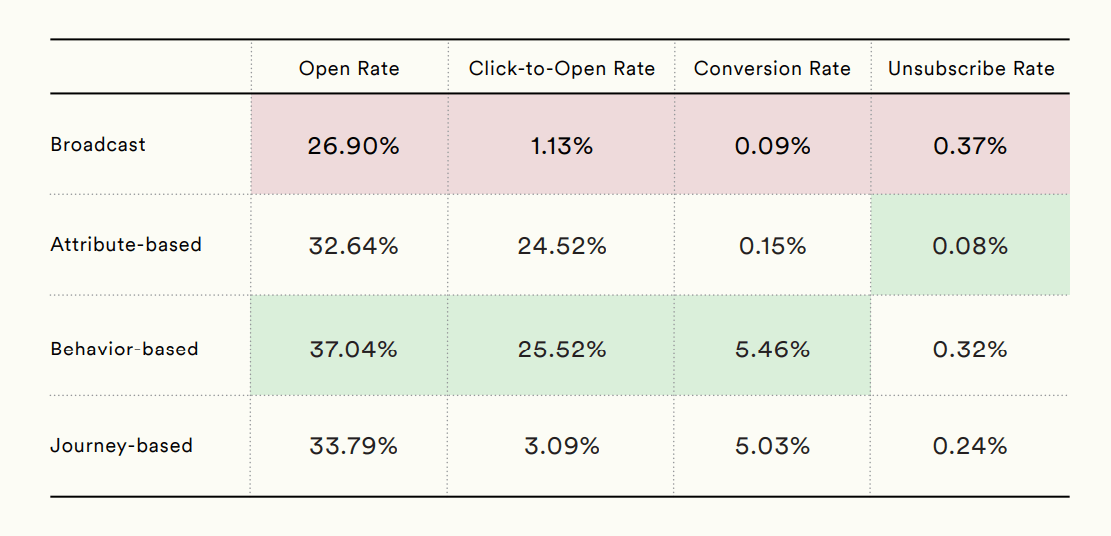
According to Moengage’s Email Benchmark Report, eCommerce campaigns that were segmented generated significantly higher engagement signals than simple broadcasts.
This makes list segmentation essential, since email deliverability best practices alone don’t create the engagement signals inbox providers rely on.
5. Increases email marketing ROI
ROI improves when you stop sending emails to the wrong audience. Non-segmented messages cause marketers to “pay”—because of higher pricing, list fatigue, deliverability risks, and opportunity cost—more for their email marketing platforms to message people who aren’t ready.
Email marketing segmentation makes performance measurable by audience. Instead of “this campaign worked or failed,” you get:
- Which segment clicked
- Which segment converted
- Which segment unsubscribed
That’s clearer attribution and leads to faster optimization because you know where the leverage is. Of course, it goes beyond that.
Segmentation brings your content in front of the people most likely to act. High-intent segments (recent product views, cart starts, pricing visits, repeat customers) get the conversion push. Everyone else gets discovery, education, or a lighter ask. Same list size, personalized content, and targeted action.
This is why targeted emails are consistently tied to better email marketing ROI in industry reports.
How to Start Segmenting Your Audience
Segmentation gets messy when it’s treated like a database project with too many rules and lists, and no clear payoff.
The clean way to do it is to build a small segmentation system tied to a single business outcome, then expand only when the numbers justify it. Your goal is to make better decisions by understanding who gets which message, when, and why.
The fastest path is a five-step loop. It’s designed to be implemented quickly, reused across campaigns, and measured without guesswork.
Step 1: Choose one outcome
Start with a single metric-related outcome like “increase revenue per recipient,” “reduce unsubscribe rate,” “lift winback conversions,” etc.
Segmentation works best when it is tied to a measurable business result. This matters because the segment you build should reflect the behavior most closely connected to that result. If the objective is retention, you may segment by inactivity or purchase recency. If the objective is to upsell revenue, product interest, or past order history may matter more.
A clear metric turns segmentation into a decision-making system with a measurable purpose.
Step 2: Pick one segmentation signal
Once the outcome is clear, choose one signal that gives you the strongest clue about subscriber intent. This is where many marketers overcomplicate things by combining too many data points too early.
Instead, look for the signal that most directly explains what someone is likely to want next. Behavioral data is often the strongest starting point because clicks, browsing activity, purchase recency, and campaign engagement reveal active interest more reliably than static traits alone.
Demographic or geographic segmentation can still be useful, but usually only when it affects relevance directly, such as language, seasonality, or shipping availability. The goal is not to collect more data. It is to identify the signal that most clearly improves message-to-audience fit.
Step 3: Build a small set of segments
Create simple segments as your starting point. Most segmentation strategies fail in execution because their structures become too complex to maintain.
Begin with two or three segments that are significantly different from one another and likely to respond to different messaging. For example, you might separate highly engaged subscribers, recent customers, and inactive contacts. That is already enough to change subject lines, offers, content emphasis, or send frequency in a measurable way.
One practical way to start is to define a few reusable intent segments based on recent behavior:
- New (joined in the last 14 days)
- Engaged (opened or clicked in the last 30–60 days)
- High intent (viewed product or pricing pages, or added to cart in the last 3–7 days)
These segments reflect different levels of readiness, which means they shouldn’t receive the same message.
Once they exist, go beyond personalizing the greeting and right into personalizing the content itself. That can include:
- Changing the CTA based on intent
- Offering incentives only to high-intent users
- Modifying content blocks based on interest or behavior
After that, automate a few high-impact triggers to keep the system running continuously. Common examples include:
- Browse or cart abandonment
- Pricing page follow-ups
- Post-purchase cross-sell sequences
- Winback flows for inactive subscribers
Finally, measure performance per segment as well as overall email metrics. Track click-through rates, conversion rates, revenue per recipient, and unsubscribes to understand how each audience group responds.
Step 4: Launch one segmented campaign before scaling
Avoid redesigning your entire email program at once. Use your chosen segments to build one campaign or one automation where relevance is likely to make a visible difference.
A category-specific campaign sent to subscribers who previously clicked related products, a re-engagement flow for inactive users, or a post-purchase sequence tailored to first-time buyers.
Starting with a single execution path helps you isolate the impact of segmentation without introducing too many variables at once. It also forces the strategy to prove itself in practice. Segmentation only creates value when it changes the message, the timing, or the offer in a way the subscriber can actually feel.
Step 5: Refine the model based on performance
After launch, evaluate performance at the segment level and use the results to improve the system. This is the step that turns segmentation from a one-time setup into an ongoing optimization loop.
Review the metrics that connect to your marketing plan, such as conversions, revenue per recipient, click-through rate, unsubscribe rate, or complaint rate. Then compare how each segment responded and identify where relevance held up or broke down.
Maybe the segment was right, but the offer was weak. Maybe the content matched intent, but the cadence was too aggressive. Treat segmentation like any other testable marketing lever: adjust one variable at a time, measure the outcome, and scale only what proves its value.
Real-World Segmentation Examples
Segmentation gets easier when you fuse personas, marketing tools, and your CRM with your next actions. Each example uses a single, simple split, a clear goal per segment, and messaging that aligns with the intent.
Please keep in mind to focus more on the customer segmentation logic than on the industry. The pattern is the same everywhere: segment by what people are doing (or where they are in the customer journey), then create relevant emails for each segment.
Trial users vs paying customers
A trial user and a paying customer are solving different problems. So, a one-size-fits-all approach to your communications with them won’t work.
As trial users are still evaluating, they need clarity and momentum. Your email should focus on reaching the first-value moment as quickly as possible. Here’s what to showcase:
- A short walkthrough
- One strong use case
- One testimonial that reduces doubt
The CTA should reflect this. Go for phrases like “Create your first [X]” or “Finish setup.”
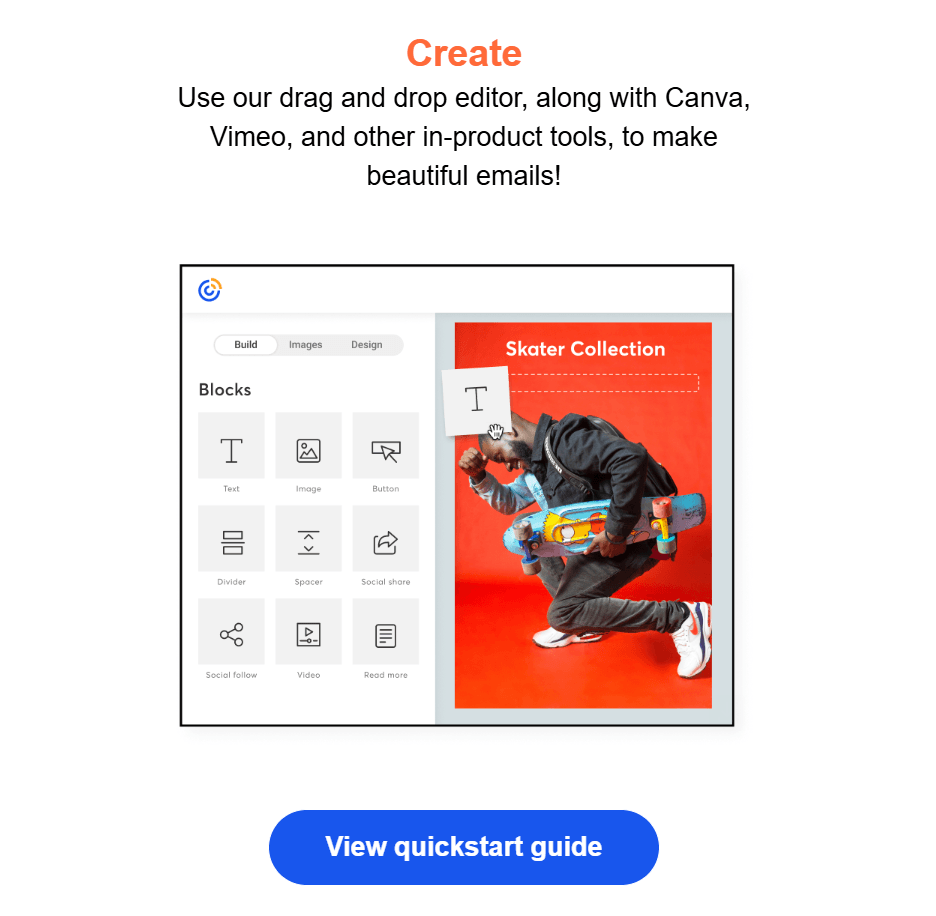
This is Constant Contact’s first onboarding email. The CTA gets straight to the first quick win.
Paying customers are the opposite, as they need depth. The message shifts toward feature adoption, workflow efficiency, or expansion. Show them something that increases ROI or saves time. The CTA becomes “Enable advanced reporting” or “Invite your team.”
What metrics to measure:
- CTR per segment
- Activation rate (trial)
- Feature adoption or expansion revenue (customer)
- Unsubscribes and complaints
Browsed vs purchased category
If someone browses a category but doesn’t buy, they’re undecided, not unaware. The email should acknowledge that context. Show the products again, add reviews, and remind your audience of the benefits.
Add urgency or a limited incentive, if needed. Remember, the tone is “Still thinking?” not “Here’s our brand story.”
Now, if someone has already purchased, pushing the same items again can come across as lazy and is clearly ineffective. Instead, engage your eCommerce audience with post-purchase emails. Show how to use or care for the item and suggest complementary products that make logical sense, not generic bestsellers.
That builds trust and increases average order value (AOV). Here’s an example of this segmented email marketing campaign method:
Subject line: We saved these and got you 20% off
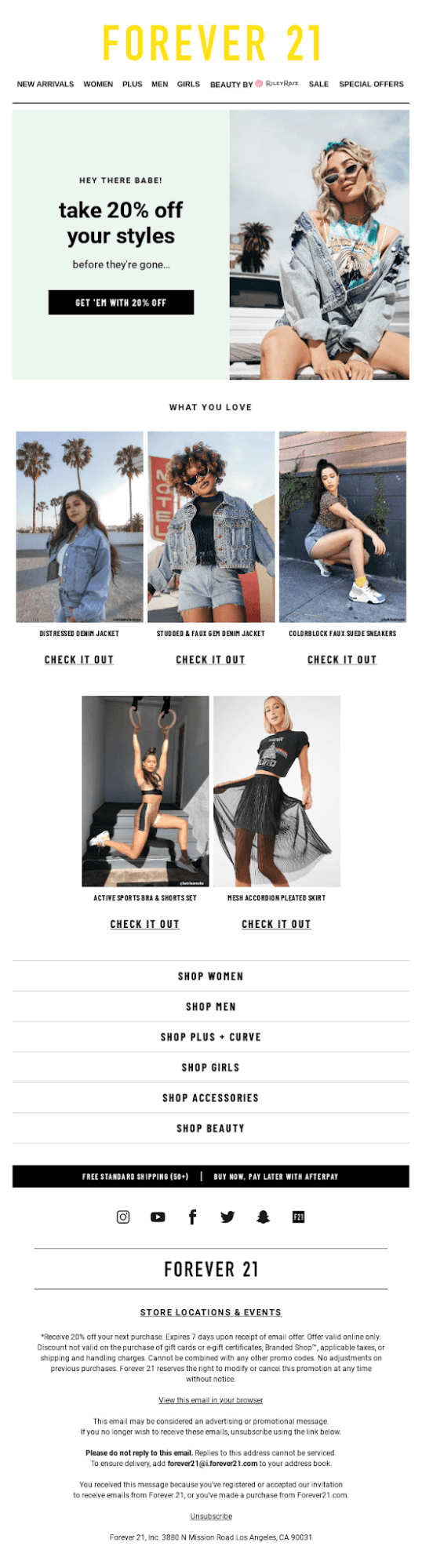
Instead of sending a generic promotion to the entire list, Forever21 followed up with subscribers who had previously viewed specific products. The subject line, “We saved these and got you 20% off,” immediately shows that the email relates to something the subscriber already explored.
The body of the email reinforces that context by resurfacing the products the subscriber viewed and pairing them with a discount incentive.
In other words, the email doesn’t try to introduce the brand or re-explain the catalog. It simply removes hesitation by reminding the shopper what caught their attention and adding a reason to return.
What metrics to measure:
- Conversion rate (browsed segment)
- Repeat purchase rate (purchased segment)
- Revenue per recipient
- Unsubscribe rate
Engagement and topic interest segments
More often than not, clicks (or lack thereof) reveal intent. Therefore, email engagement reveals the type of content they love receiving.
If a reader consistently clicks on AI-related articles, stop sending them broad newsletters that give equal weight to SEO, branding, and paid ads. Give them more AI.
Create versions of your email with dynamic content blocks. That way, AI-focused readers get deeper tactical breakdowns and tools, while SEO-focused readers get ranking frameworks and case examples.
Using dynamic content blocks doesn’t change your content calendar. You’re merely creating one version of your email with content that’s targeted, personalized, and adapted to each segment.
Let’s see an example of topic interest segmentation:
Subject line: We miss you!
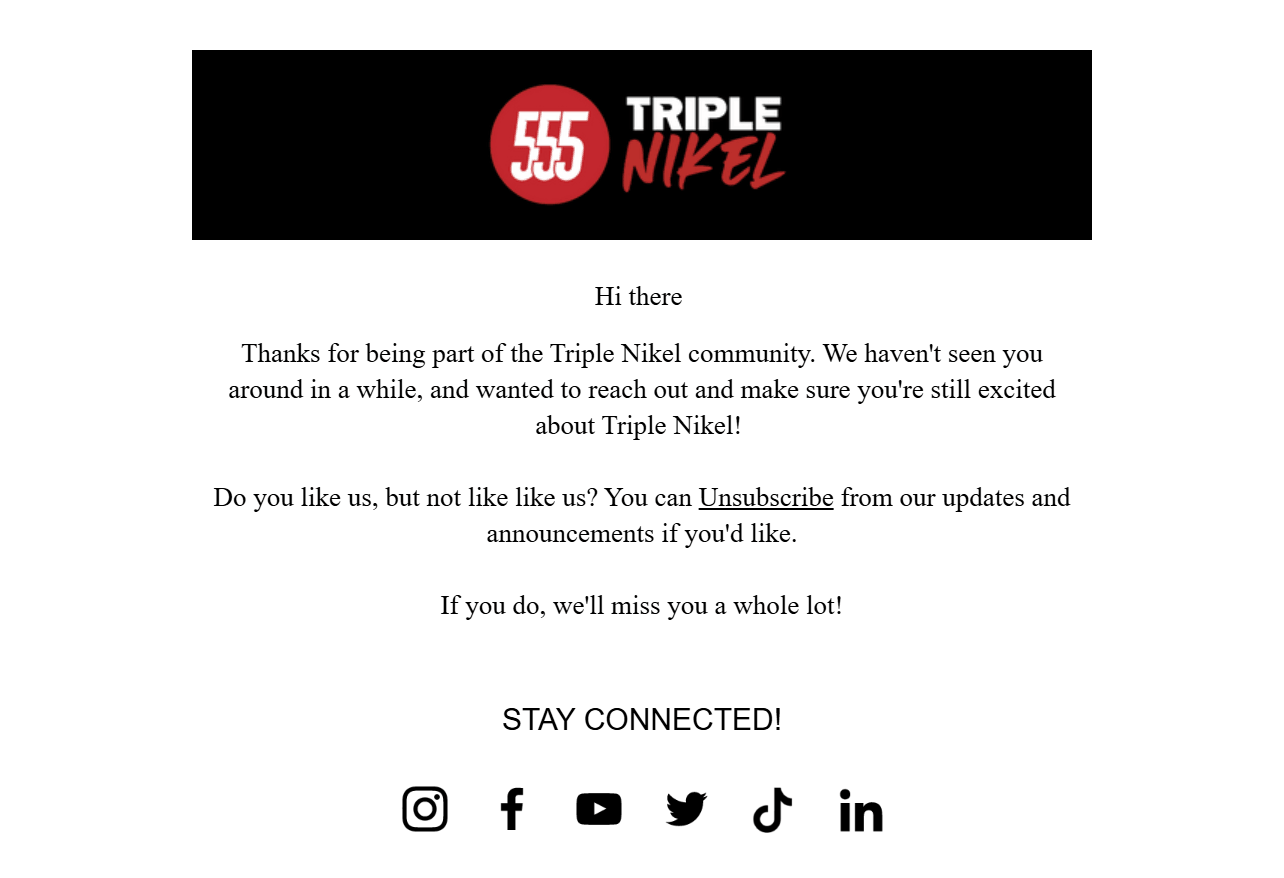
Here, Triple Nikel isolated a segment that hadn’t opened or clicked emails in a meaningful period of time.
The subject line, “We miss you!” acknowledges that disengagement directly. The tone of the email is playful and emotional, which fits the context of reconnecting with an audience that has drifted away. Just as importantly, the message includes a clear opt-out path.
Emails like the example above lower unsubscribe rates, as the audience segment that isn’t interested will organically unsubscribe. That way, they also lower complaint rates and contribute to a cleaner list with more active subscribers. Both outcomes help protect engagement rates and sender reputation.
What metrics to measure:
- CTR by interest segment
- On-site conversions (demo, signup, lead magnet)
- Revenue per recipient (if monetized)
- Unsubscribe and complaint rates
Common Segmentation Mistakes and Quick Fixes
The benefits of email segmentation can evaporate when segmentation rules create conflicting messages, wasted sends, or unmeasurable results.
Use the list below like a QA pass. If any item is true in your account today, you’ll either be losing revenue (wrong target audience, misread personas) or harming your reputation (unwanted sends). Fixing these usually improves performance without changing your email templates or body copy.
Over- or under-segmenting
Most email marketing teams tend to swing between two extremes. They either create too many micro-segments (20+ tiny groups, low volume, no meaningful insights), or they barely segment at all, keep sending to “All subscribers,” and maybe go for simple behavioral segmentation and somewhat targeted content.
Both approaches fail because they don’t influence the recipient.
What over-segmentation looks like:
- You have dozens of segments, but still default to broad sends.
- Segment sizes are too small to measure performance reliably.
- You can’t explain what business decision each segment supports.
What under-segmentation looks like:
- One campaign goes to everyone.
- The only variation is a subject line test.
- High-intent and low-intent users receive the same CTA.
To fix these, go for an intent-based structure. Start with two or three backbone segments (i.e., new subscriber, repeating customer, non-opener) and one active intent layer (e.g., high intent vs everyone else),
That’s enough to meaningfully change your messaging. The high-intent recipients are ready for direct conversion content with a powerful email CTA like Endy’s:
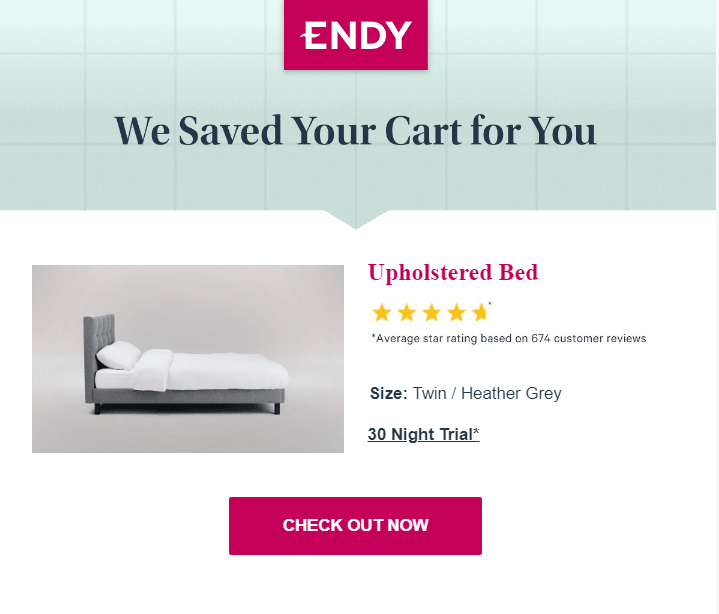
For the “everyone else” intent layer, create a CTA that aims to help recipients explore or educate them, as Guess did:
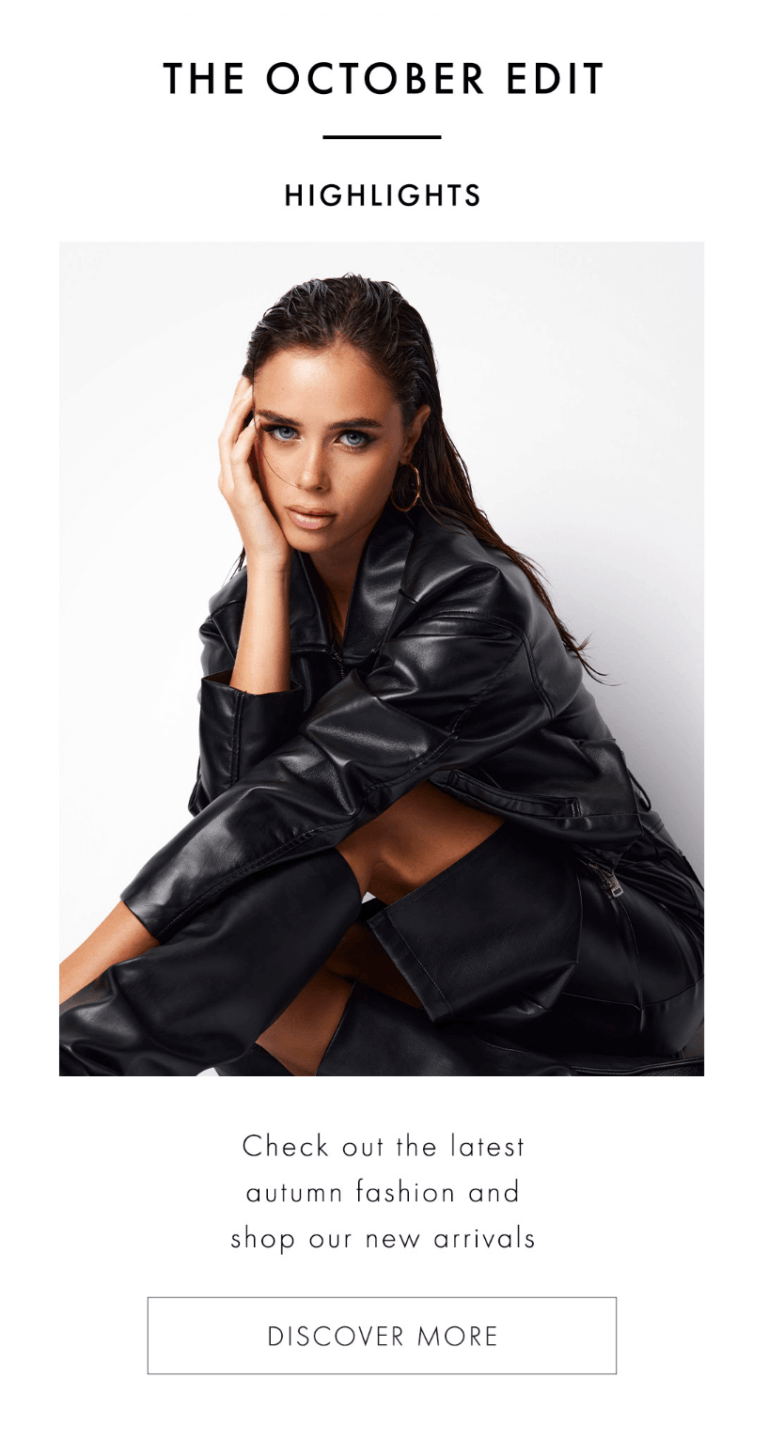
Only create a new segment if it answers a recurring decision you’ll make every month. If a segment doesn’t change the message, timing, or offer, it doesn’t need to exist.
Missing exclusions
Incorrect segmentation can actually lower your ROI. While this might not look dramatic in reporting, it accumulates over time, resulting in lost revenue.
What it looks like:
- You send a discount to someone who purchased yesterday.
- Push an upgrade to someone still in onboarding.
- Upsell while a customer has an open support issue.
- Include active trials in generic promos instead of lifecycle messaging.
To fix this mistake, create default suppression layers that apply to every campaign:
- Exclude from promos if customers purchased in the last X days.
- Exclude from heavy sales pushes if still in onboarding or trial stage.
- Exclude from upsells and aggressive CTAs if there is an open support ticket or a refund requested.
These customer segments should sit at the account level, not be recreated manually per send. So, save them once and reuse them whenever you send an email. As a rule of thumb, before launching any campaign, ask: “Who should absolutely not receive this?”
That question protects margin, experience, and long-term engagement.
Having overlapping segments
Imagine receiving a “We miss you” email and a “VIP early access” email in the same week. Or being in a nurture flow and still getting a promotional blast. Someone visits your pricing page but receives a discovery newsletter instead of a conversion push.
In cases like these, the problem isn’t segmentation. It’s the lack of a clear hierarchy.
When segments compete, the loudest campaign wins. This is why you should define priority rules in your email segmentation strategy.
Use a simple hierarchy:
- Customer lifecycle stage
- Intent behavior
- Interest affinity
Lifecycle always overrides intent, and that overrides interest.
After that, enforce one operational rule: send one email aligned with the highest-priority objective. Then let your email templates and dynamic content blocks in that message do the job for you, using content tailored to lower-priority signals. That way, you’ll minimize the number of separate sends.
If you don’t control priority, your segments will conflict. And confused messaging rarely converts.
Forgetting to update your segments
Outdated segments can lead to the wrong messaging. Imagine someone clicking “Category A” once a year ago and still getting “Category A” promos. Or a past buyer who is treated as high-intent long after their interest has cooled.
Intent doesn’t last forever. And if your segments don’t account for that, you’re personalizing based on history, not reality.
The fix here is simple. Add time windows to every behavioral rule. Time-bound segments keep your email marketing strategy sharp, your messaging aligned with current behavior, engagement stable, and reporting honest.
Make Your Next Send Smarter
Most email problems come from poor targeting, not poor creativity.
If the same message goes to everyone, performance will always plateau, no matter how strong the copy is. Segmentation changes the foundation. Instead of optimizing one message for an average audience, you align different messages to defined intent groups.
Segmentation is about sending fewer, better-timed messages that make the next action obvious. And when the next action feels obvious, results stop feeling unpredictable.
FAQs
Now, let’s answer some of the most common questions on why segmentation is important in email marketing.
1. What’s the main benefit of email segmentation?
Segmentation increases relevance, which directly improves clicks, conversions, and revenue per recipient. Instead of sending a generic message, align content and the CTA with subscriber intent. That alignment is what drives measurable results.
2. Does segmentation improve deliverability?
Yes. Higher relevance leads to stronger engagement signals (opens, clicks) and fewer negative ones (unsubscribes, complaints). Over time, that strengthens the sender’s reputation and improves inbox placement.
3. What’s the best way to segment an email list?
Start with engagement recency, purchase or usage activity, and high-intent actions (e.g., viewed product/pricing, added to cart). Add interest-based segments only after you can measure impact. Behavior first, demographics second.
4. How many segments should I start with?
For most teams, two to three segments are more than enough to start. These include new recipients, engaged, and unengaged users. If you want it simpler, split it into recent high-intent vs. everyone else and tailor the CTA accordingly.
5. What metrics prove segmentation is working?
Segmentation is working when each audience group performs better than your overall average. To confirm this, measure results per segment, not just campaign totals. Track metrics like CTR, conversion rate, revenue per recipient, unsubscribe rate, and spam complaints. If segmentation is effective, high-intent segments will convert more, while lower-intent segments will generate fewer unsubscribes and complaints.
Similar Posts
 Published by
 Published by

Create, send and optimize your email marketing campaigns