















What Makes a Good Landing Page? Tips & Examples [2026]
Published By Marilia Dimitriou
April 3, 2026

03/04/26
You’ve probably seen landing pages that look right, read well, and follow every “best practice” out there. However, for some strange reason, they don’t convert.
Knowing what makes a good landing page on paper isn’t the same as understanding why people actually take action. While most pages focus on layouts, copy, or even animations, they often overlook what matters the moment someone lands there: context, hesitation, and the need to make a quick decision without overthinking.
In this post, we’ll explore what makes a landing page work, using clear tips and examples you can apply right away.
Launch landing pages that convert
Choose a template, customize it in minutes, and start capturing leads.
TRY MOOSENDWhat Is Considered a Good Landing Page?
High-converting landing pages don’t try to educate like a homepage or support SEO like a long-form blog post. They exist to fuel marketing campaigns, drive conversions, and turn potential customers into signups or leads.
A successful landing page:
- Speaks to a specific target audience
- Communicates a clear value proposition within seconds
- Focuses on a single goal instead of multiple outcomes
- Builds trust fast through social proof or testimonials
- Removes friction instead of adding more information
In a nutshell, if users understand the message, trust the offer, and know exactly what to do next, you’re looking at a great landing page.
How to Create a Good Landing Page for Your Business
Below, we’ll cover the core aspects that influence landing page performance and conversion.
1. Make a strong first impression
When it comes to landing page creation, first impressions matter more than you think. This is the halo effect in action. Users form an opinion in seconds and let it color everything that follows.
So, does that mean the more visually stunning your page is, the better it performs? Well, no. Visitors aren’t judging your design skills; they’re asking whether the page is for them. If the answer isn’t clear right away, they leave, no matter how polished the page looks.
For example, imagine an eCommerce ad that promises “Free next-day delivery on running shoes.” The user clicks and lands on a page that opens with “Premium footwear for every lifestyle,” high-quality images and animations, followed by a generic CTA like “Shop our collection.”
The message shifts from a clear benefit to a vague brand statement. There’s no immediate value or relevance, so users either scroll without intent or leave. This isn’t a design issue, but a mismatch between the promise that brought them in and the message they see first.

Here’s a good landing page example from Skillshare that makes a strong first impression. Every element above the fold supports the same goal and reinforces the user’s expectations.
What works:
- A clear header states the offer and sets expectations right away
- The subheading explains what users get during the free trial
- The CTA reinforces the same promise and makes the next step obvious
- Reassuring microcopy removes friction by highlighting that cancellation is possible anytime
- The visuals support the message rather than overpowering it
2. Ensure your copy matches intent
At this point, you probably already have copy on your landing page, or you’re in the middle of writing it. Either way, the real task here isn’t adding more words, but stepping back and checking whether the message still matches why people are landing there in the first place.
Benefits-only messaging often assumes users are still comparing options. In reality, though, many are already ready to act. They just need a gentle push to click your CTA.
A practical way to check intent match is to read your headline, subheading, and CTA (preferably out loud) and see if:
- The copy reflects the promise that brought the user here
- It explains what happens next in plain language
- Pushes people back into “learn more” mode or not
You don’t need endless revisions or clever wordplay to get it right. Focus on intent. When your page confirms it and makes the next step feel obvious, conversion gets easier without sounding salesy.
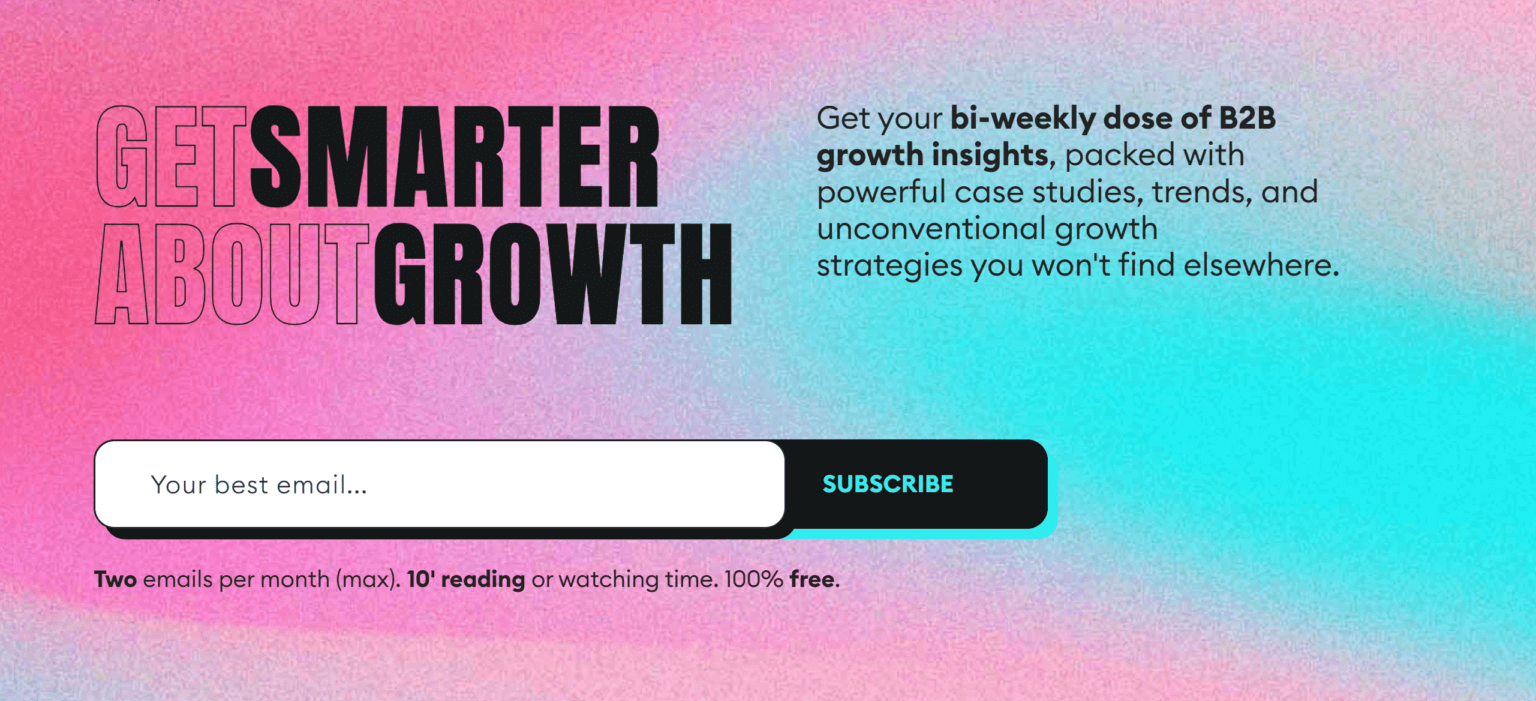
Here’s a good newsletter landing page example from GrowthWaves:
What works:
- A clear, benefit-led headline that focuses on outcome (“Get Smarter About Growth”)
- The subheading explains who this newsletter is for and what’s in store for them
- Low-friction CTA and input make the next step obvious
- The microcopy removes hesitation by addressing time, frequency, and cost upfront
3. Include one clear call-to-action
A landing page works best when it asks the user to do one thing. Adding a “pick your path” option with multiple calls-to-action leads to the opposite results, even when your second CTA is just a link to your homepage.
Extra CTAs are one of the most common silent conversion killers. A “Buy now” button next to “View pricing,” “Learn more,” and “Compare plans” usually makes them hesitate. Every additional action competes for attention, reducing the chance that any single one gets clicked.
As a result, conversion rates drop even when traffic stays the same. If you feel the need to add a second CTA, don’t introduce a new action. Repeat the same primary CTA or add a simple navigation link that points users toward it. This way, visitors who are ready to convert can act immediately without needing to read the rest of the page.
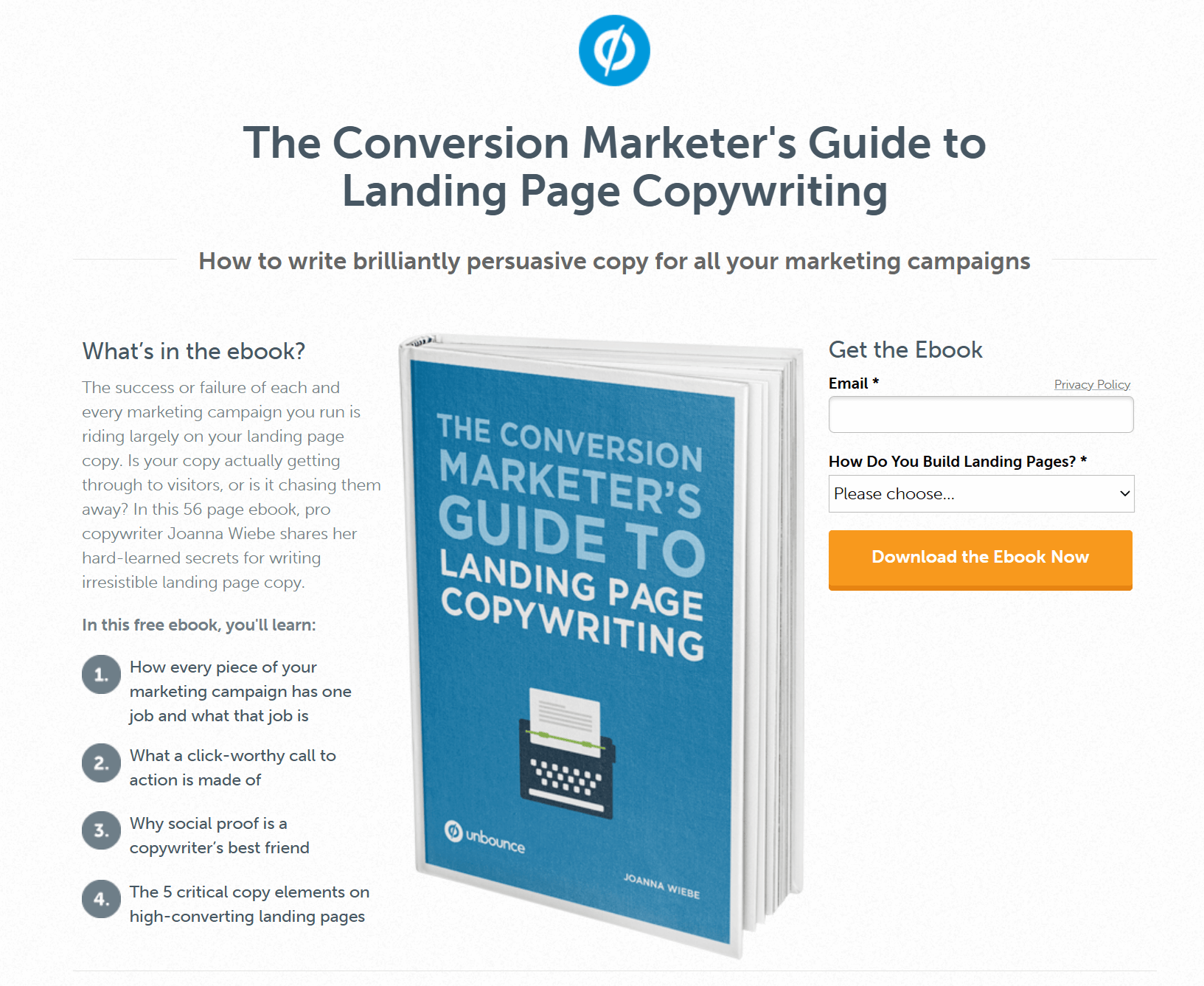
Here’s another great landing page example from Unbounce:
What works:
- The CTA copy is explicit about the outcome. “Download the Ebook Now” leaves no room for interpretation
- The action matches the intent. Users came for the ebook, and the CTA delivers exactly that
- Strong visual contrast makes the button easy to spot and hard to ignore
- Friction is kept low with minimal required fields before the click
4. Add social proof that actually convinces users
You’ve probably come across a landing page with a testimonial section copied across the site. It usually includes the same quotes, logos, photos, and vague praise. That kind of social proof looks reassuring, but it rarely helps a landing page convert.
Generic trust signals just fill space. For example, a quote like “It works great” or “Amazing product” doesn’t address any real concern a potential customer has at that moment. On a high-converting landing page, trust signals need to align with where the user is in the decision-making process.
With this in mind, you can approach social proof based on your audience’s stage in the customer journey:
- Awareness stage: Lightweight social proof works best here. A short testimonial that signals relevance is often enough. This can be a one-line quote, a usage stat, or a few recognizable logos that quietly build credibility.
- Consideration stage: Visitors need proof that your solution actually works. This is where longer testimonials, short case studies, or highlighted results belong.
- Decision stage: Aim for proof that removes any final doubt. Specific results, before-and-after snapshots, or satisfied-customer quotes are very effective, especially when placed near the CTA.
Here’s an example from Sundae’s landing page, using quotes from existing customers:
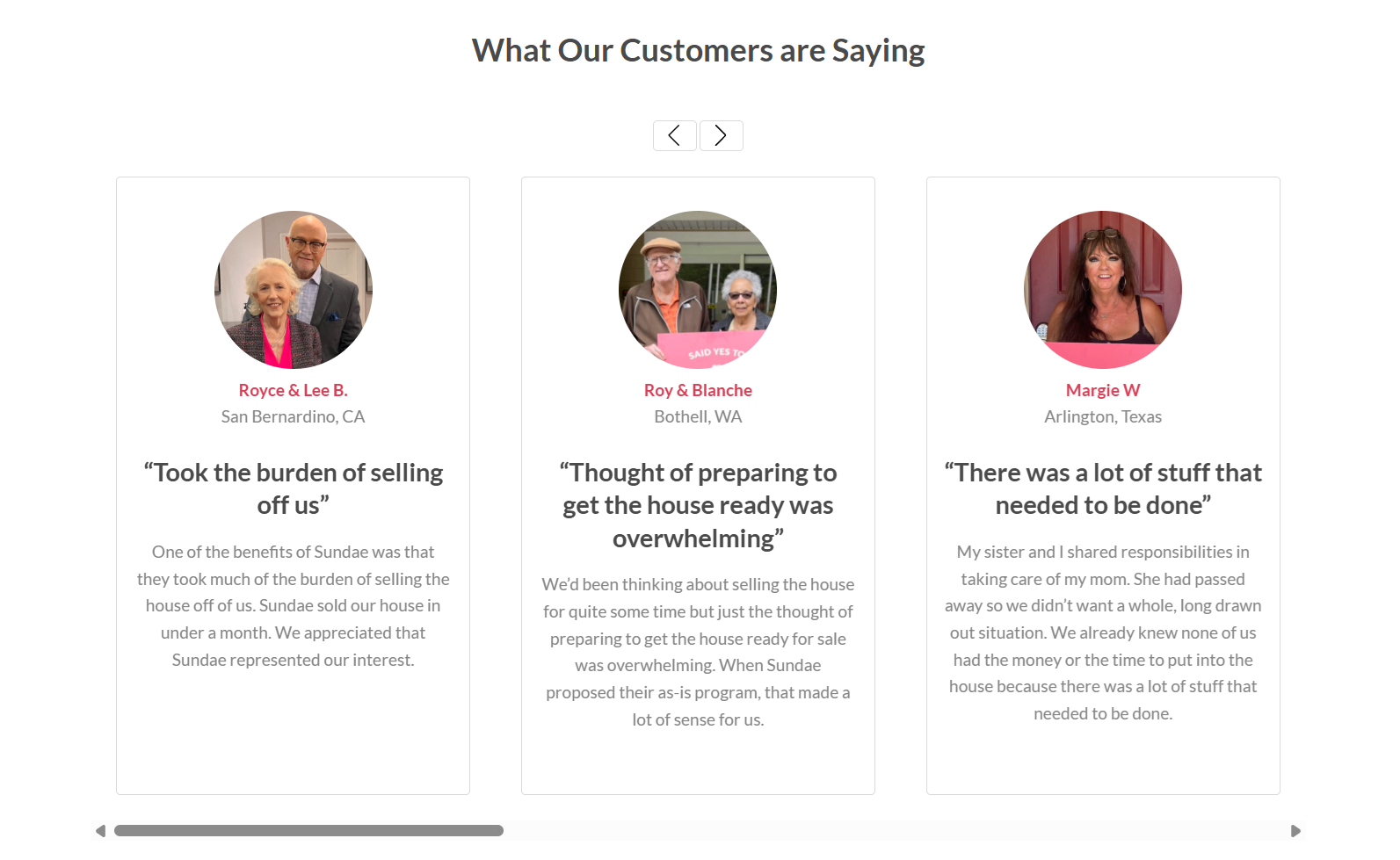
If you don’t have the right testimonials yet, collect them intentionally through email surveys after onboarding, asking for reviews after a clear win, or following up with customers who reached a meaningful milestone.
Tip: Trust signals work best when they appear near moments of hesitation, like next to a CTA or pricing section. Piling them all at the bottom of the page won’t help. So, add them where your visitor is more likely to see them.
5. Revise your page layout to reduce friction
Your landing page layout should make it easy to read, scan, and act. When design decisions add friction, users pause. That’s why a good landing page needs to favor white space, structure, and visual hierarchy.
Spacing gives the value proposition, CTA, and key benefits breathing room, helping users understand what matters at a glance. On the other hand, cramped pages force users to work harder to identify the next step, slowing momentum and hurting conversion.
What’s more, most users scan before reading your message. That’s why structure matters for improving the user experience, especially when you have a lot going on.
Here’s how to improve your page structure:
- Use bullet points to highlight benefits, conditions, or steps that need to be understood quickly.
- Add context or reassurance through short paragraphs.
- Avoid long text blocks that bury important information and push CTAs further down the page.
Lastly, fonts, color choices, and heading sizes should clearly separate what’s primary from what’s supporting. If headings, subheadings, and body copy blend together, users lose orientation and are more likely to leave.
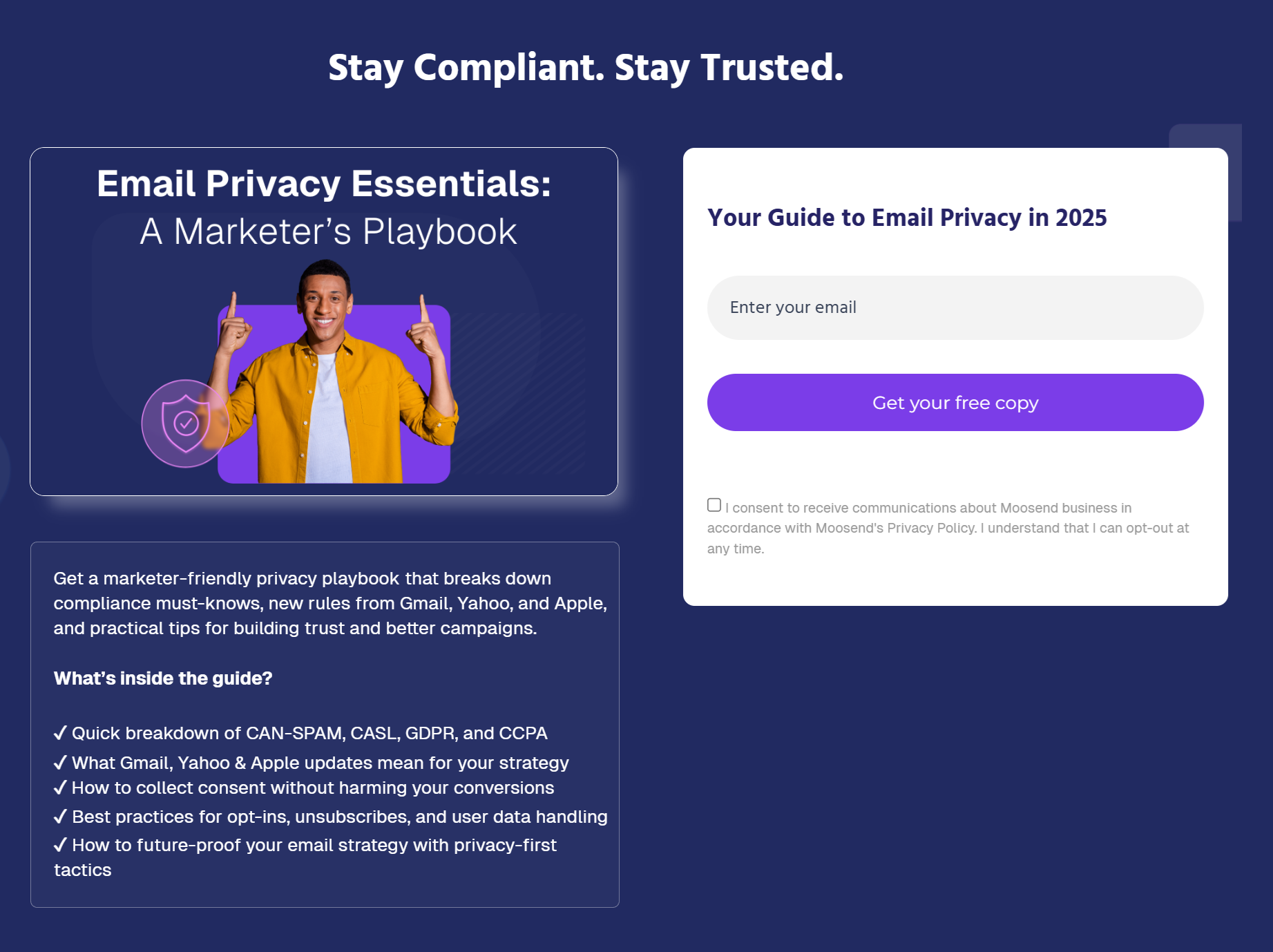
Here’s an example from Moosend’s landing page:
What works:
- The left side explains the value and builds context, while the right side focuses only on the form and CTA, reducing cognitive load
- Spacing, hierarchy, and contrast guide the eye naturally from the headline to the benefits to the action
- The CTA remains visible and easy to reach across screen sizes, especially on mobile
6. Maintain consistency across your funnel
Most users arrive at your page from an email, a PPC ad, or a social post.
When the landing page feels disconnected from the initial source, trust drops fast. This is especially obvious in email marketing.
Take this email campaign, sent to promote Moosend’s email privacy guide:
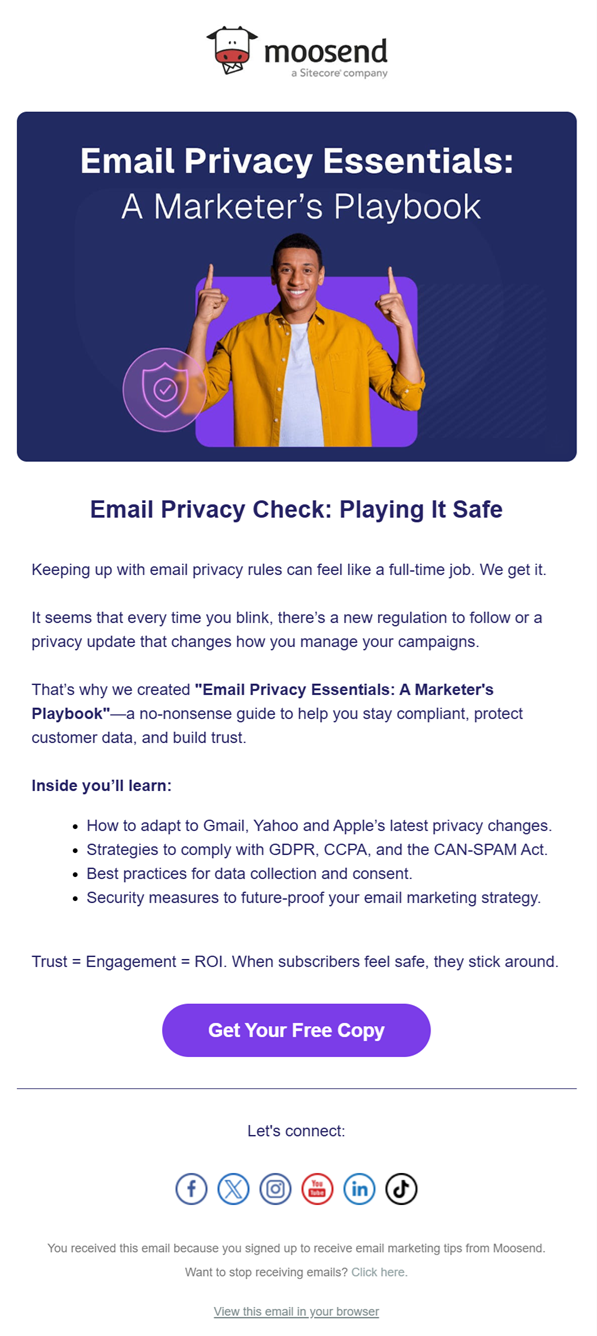
The headline, tone, and overall promise are fully aligned with the landing page we reviewed earlier, right down to the color palette, visuals, and CTA messaging.
Now, if that email linked to a landing page with a different headline, visuals, or a broader product pitch, the user experience would break.
Of course, consistency doesn’t mean copying the email word for word. You can keep the same core message, tone, and visual language. The user should feel like they’re continuing the same conversation, not starting a new one.
7. Use inclusive visuals
Images on a landing page send a quick signal about who the page is for. When visuals only show one type of person, many users subconsciously feel excluded and disengaged.
Inclusive visuals help more people see themselves in the offer. Showing diversity in age, gender, body type, ability, and background makes the page feel more welcoming and relevant to a broader audience.
This matters across use cases:
- Ecommerce: Diverse models help shoppers more accurately assess fit, comfort, and real-world use.
- SaaS and digital tools: Showing different roles and age groups helps prevent signaling that the product is only for a narrow user type.
- Lead generation: Inclusive imagery makes the offer feel applicable to more potential customers.
Inclusion also goes beyond who appears in photos. Good contrast, readable text, and clear images help users with visual impairment interact with the page more easily.
Here’s an eCommerce landing page example from Zara:

8. Rethink mobile responsiveness
When it comes to mobile devices, users often arrive mid-context from social media, ads, or messages while multitasking, commuting, or scrolling casually. That means their attention can be interrupted fast.
A good mobile landing page should be built with that in mind. Instead of asking users to explore, help them make quick decisions.
Here’s how to create more responsive pages for mobile-first users:
- Make the core offer clear without forcing people to scroll more than once.
- Write for skimming by using short lines, clear hierarchy, and plain language.
- Ensure the primary CTA is immediately visible and easy to tap without zooming or extra effort.
- Remove pop-ups and any other elements that will clutter the experience.
Here’s a great responsive landing page example:
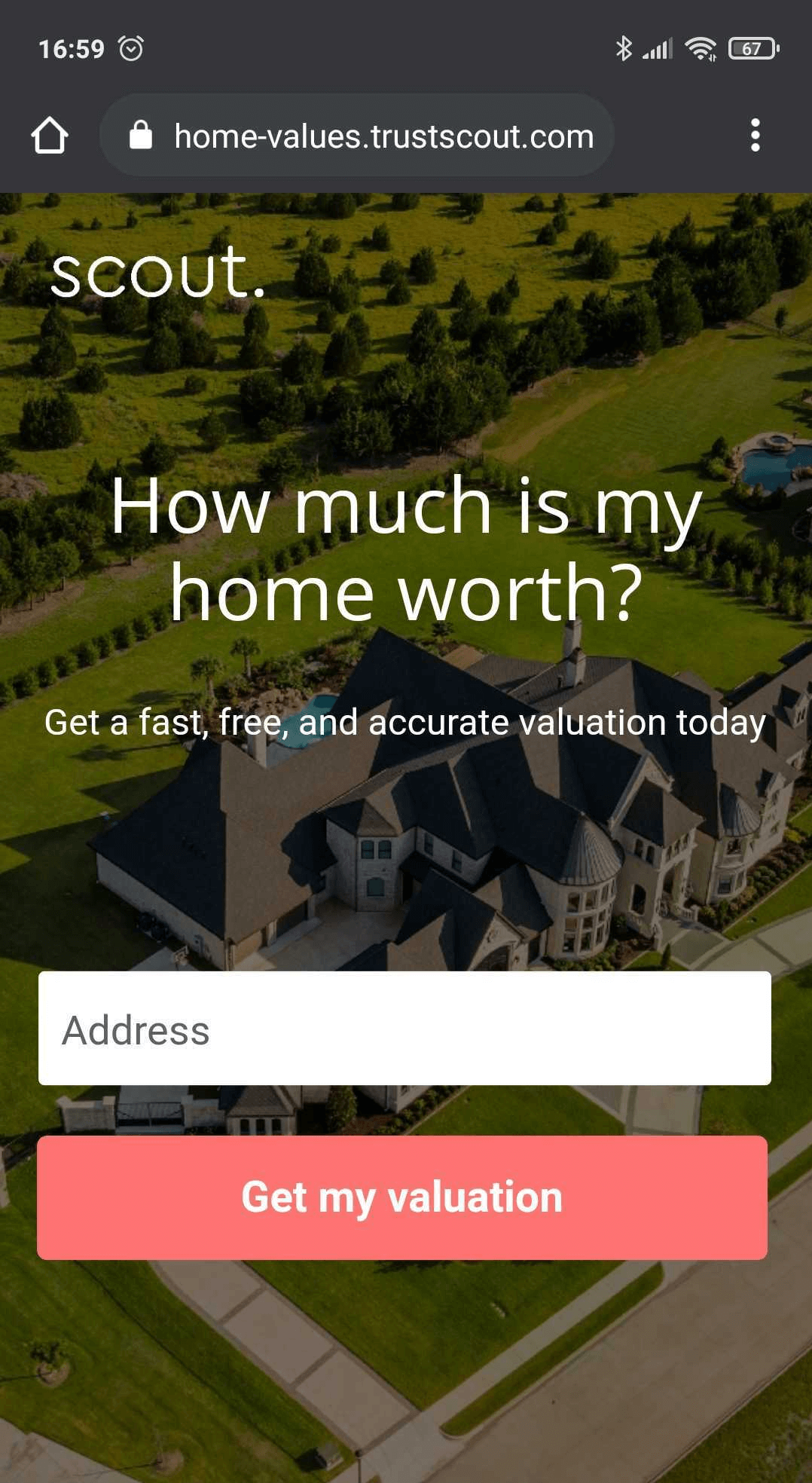
What works:
- The design is as clean as possible to minimize distractions
- There’s a single CTA to prompt immediate action
- The number of fields is limited to one to reduce friction
- The copy is direct and actionable
9. Detect page speed issues
By the time someone lands on your page, intent is already there. Now, page speed decides whether that intent survives.
Slow load times don’t just affect SEO or search engine ranking. They interrupt the flow created by your marketing efforts. If a page takes “ages” to load, users abandon it before they even see the message. At that point, no amount of good copy or design can recover the moment.
A simple way to check speed is to load the page yourself under real conditions. Open it on your phone using mobile data, not Wi-Fi. If the headline and primary CTA don’t appear almost immediately, the page is too slow.
Then validate that feeling with tools like Google’s PageSpeed Insights. Focus on the report and look at a few key signals:
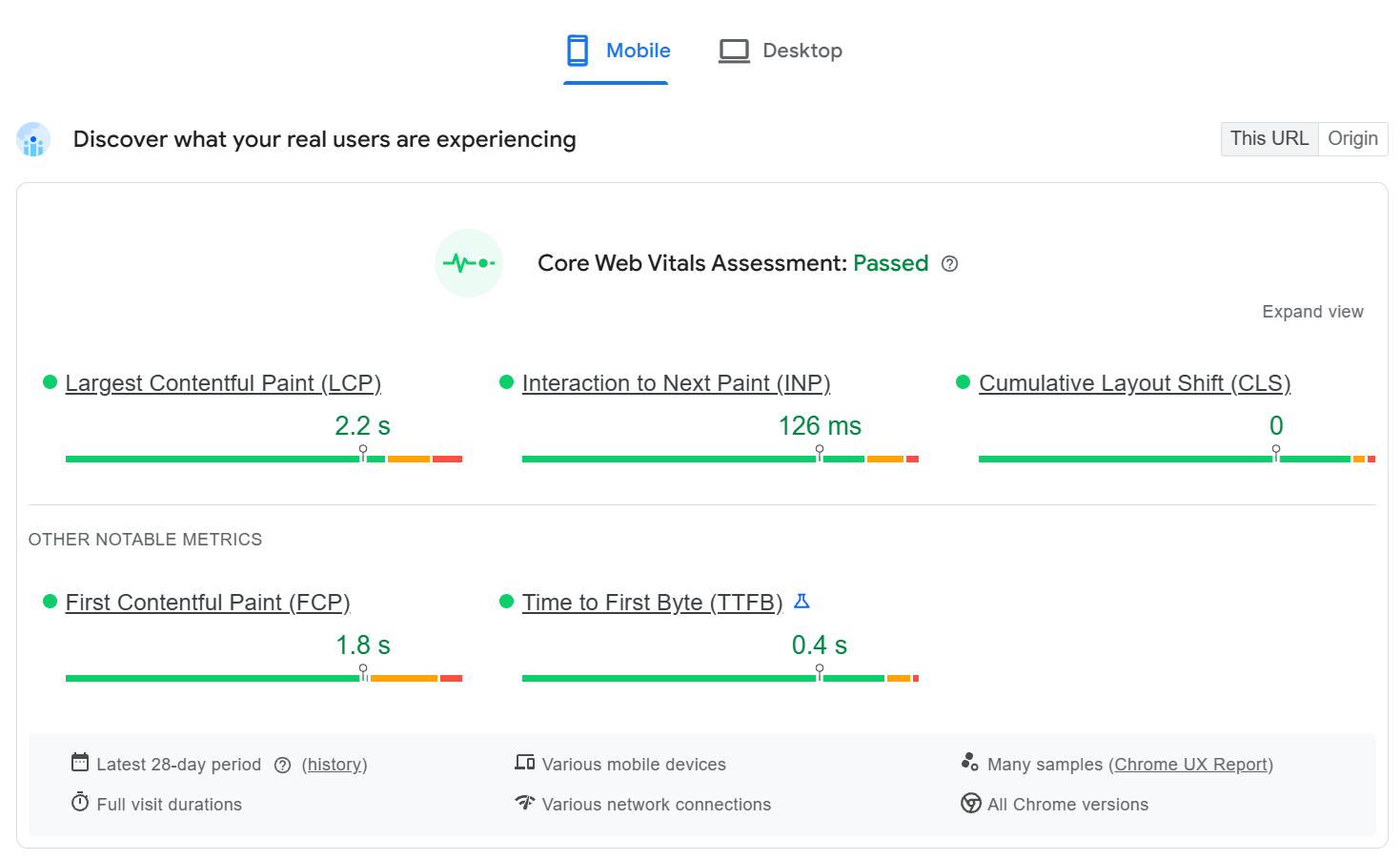
- Largest Contentful Paint (LCP) tells you how fast the main message becomes visible. If this creeps past ~2.5 seconds, users are waiting to even understand the offer.
- First Contentful Paint (FCP) shows when something appears. A fast FCP reassures users that the page is loading, even before the full message is ready.
- Interaction to Next Paint (INP) reflects how responsive the page feels once users try to click or type. High INP means buttons and forms feel laggy.
- Cumulative Layout Shift (CLS) shows whether elements jump around. Any movement near the CTA can cause misclicks or frustration.
If these metrics look healthy, but the bounce rate is still high, speed likely isn’t the problem. If they’re weak, fix speed and load behavior before changing copy or layout. Speed issues erase intent faster than any wording mistake.
10. Optimize your landing page based on user behavior
Many marketers approach optimization as a short checklist: tweak the headline, test the CTA color, move the button, etc. Those tests can help, but they rarely lead to meaningful gains on their own.
Landing page A/B testing should focus on behavior. Instead of asking “Which version looks better?” ask “Where do users hesitate?”
Good split test ideas usually surface where users hesitate or abandon your web page. Common areas worth testing include:
- Rearranging above-the-fold content, such as placing the main benefit before social proof or vice versa
- Adjusting the timing of trust signals by introducing testimonials earlier or closer to the CTA
- Clarifying the next step through more explicit CTA copy, replacing generic labels with outcome-driven actions
- Experimenting with forms, including the number and order of fields, to reduce friction
This is also where metrics matter. A raw conversion rate tells you what happened, but not why. Supporting metrics like scroll depth, time on page, form abandonment, and bounce rate help you understand how users interact with the page.
Use that behavior data to guide what you optimize next. If users scroll but don’t click, the issue is likely clarity or a mismatch in intent. If they click but don’t convert, friction often lies in the next step.
Landing page optimization works best as a feedback loop. So, observe behavior, test one meaningful change, and repeat. Over time, that’s how you increase conversion in a way that actually lasts.
Should You Use Landing Page Templates?
Landing page templates are useful when you need a solid starting point. Among others, they help you move faster by giving you a proven page layout, sensible spacing, and a clear structure to work on.
For SaaS campaigns, pricing pages, or lead generation, for instance, templates can help you build landing pages that follow conversion-friendly patterns from day one.
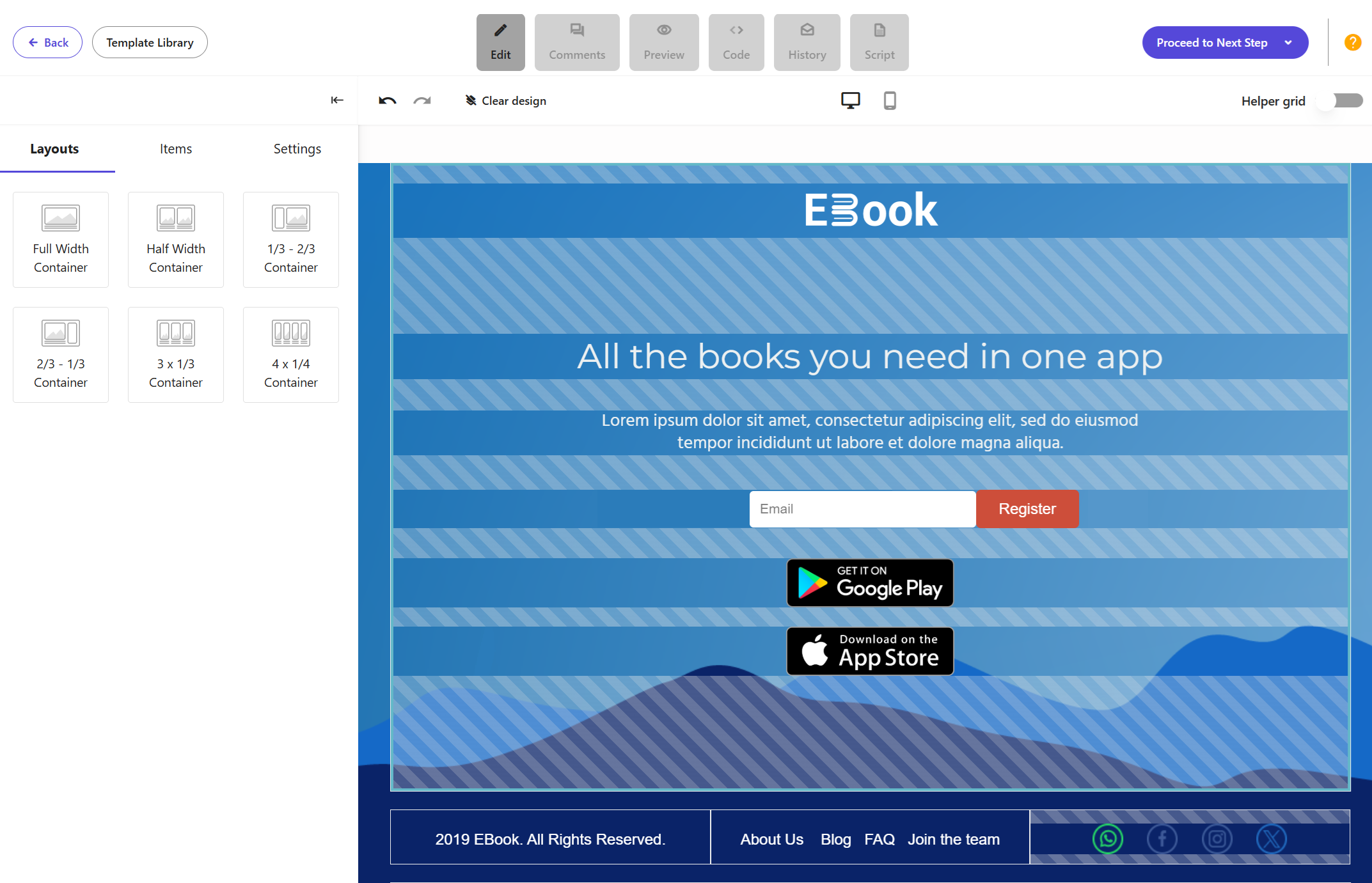
Discover Moosend’s landing pages
Where templates fall short is differentiation. Reusing the same layout, color scheme, and animations without customization can make pages feel generic, especially in competitive markets. Users recognize these patterns quickly, which makes it harder to stand out or build trust.
The key is to treat landing page templates as guides:
- Adjust the messaging to match your marketing strategy and traffic source.
- Customize the color scheme to align with your brand.
- Keep animations only when they help direct attention to the CTA, not when they slow the page down or distract from the goal.
- Add valuable copy, which you can write yourself or use the AI Writer inside your landing page tool to speed up the process.
Templates can surely save time. However, good landing page design comes from how you shape them. So, use them wisely to create an effective landing page for your needs.
Quick Checklist Before Launching Your Landing Page
Before you publish or promote your landing page, run through this checklist once. It takes a few minutes and catches most conversion issues early.
- First impression: The first screen clearly confirms the promise that brought users here, without requiring scrolling.
- Intent alignment: The headline, subheading, and CTA point to the same goal and reinforce each other.
- Single action: There is one primary action on the page, and all supporting elements guide users toward it.
- Trust and credibility: Testimonials or social proof appear near points of hesitation, such as pricing or the CTA.
- Mobile responsiveness: On mobile devices, the message is clear, and the CTA button is visible without extra effort.
- Page speed: The main content loads fast enough for users to understand the offer immediately.
- Funnel continuity: The page feels like a natural continuation of the ad, email, or post that leads to it.
Additional Resources
Take a look at our dedicated landing page guides for more tips and inspiration:
- Best Landing Page Trends To Get Your Inspo Running
- How to Create a Landing Page Without a Website
- Waitlist Landing Page: Examples & Best Practices
Creating High-Quality Landing Pages for Your Funnel
A good landing page is built by removing doubt at the exact moment someone is deciding whether to act.
To work, your pages need to respect user intent, guide attention rather than compete for it, and reduce friction across devices, channels, and load conditions. Also, don’t forget that the real work happens after the page is live. Watching behavior, spotting hesitation, and making small, intentional changes over time is what turns an average page into one that converts reliably.
If you focus less on how your landing page looks on paper and more on how it feels to the person landing there, you’ll naturally start building pages that work, not just pages that follow the rules.
FAQs
Here are some common questions around landing pages.
1. What is a landing page?
A landing page is a standalone web page designed to get visitors to take a specific action, such as signing up, requesting a demo, or making a purchase. Unlike other pages on a website, a landing page focuses on a single goal and removes distractions that could draw users away from that action.
2. What’s the difference between a landing page and a web page?
A regular web page, such as a homepage or blog post, is designed to inform, explore, or navigate. A landing page is built to convert. It usually has a single message, a strong call-to-action, and no competing links, making it more effective for marketing campaigns.
3. When should you use a landing page instead of a homepage?
You should use a landing page whenever you’re running targeted marketing efforts, such as PPC ads, email campaigns, or social media promotions. Sending traffic to a homepage often leads to higher bounce rates because users have too many choices and no clear next step.
4. What makes a landing page high-converting?
A high-converting landing page matches user intent, communicates a clear value proposition quickly, builds trust through relevant social proof, and guides users toward one desired action. Speed, mobile experience, and consistency across the funnel also play a major role.
5. Do landing pages help with SEO?
Landing pages can support SEO, but they’re not designed like long-form content pages. Their main purpose is conversion, not ranking. That said, fast load times, good user experience, and clear messaging still help landing pages perform better in search engines when used strategically.
Similar Posts
 Published by
 Published by

 Published by

Create, send and optimize your email marketing campaigns