














Trigger Emails: Types, Best Practices & Examples
Published By Maria Fintanidou
January 7, 2026

07/01/26
If you’re lucky, you have a friend who knows what to say, when to say it, and when to let silence do the talking, just by reading your expression or behavior. Now, how do you get that same level of intuition with your subscribers?
You might not have the in-depth understanding of a longtime friend, but you know their actions. And with the right trigger emails, you can give your audience what they need, when they need it.
In this post, you’ll learn how to set up triggered flows that match the recipient’s stage in your funnel but also feel more resonant and less promotional. Moreover, you can explore trigger email examples in action, along with best practices for using them strategically.
Keep your subscribers happy and the burnout away
Deliver timely emails easily with Moosend’s automation features.
Start freeWhat Is a Trigger Email?
A trigger email is an automated campaign sent to subscribers based on their activity or predefined events. Here are some examples of actions that can set a workflow in motion:
- Signing up for an email list
- Downloading a lead magnet
- Browsing product or pricing pages
- Purchasing a product or service
- Clicking a link in an email
- Abandoning a shopping cart
And the list goes on. What you choose as a trigger event depends on your objectives and the subscriber’s level of engagement or stage in the customer journey, unlike more traditional marketing emails. But that’s not their only difference.
Trigger Emails vs Marketing Emails
So let’s review the key differences between these email types:
| Characteristics | Trigger emails | Marketing emails |
| Function | Sent automatically to each subscriber based on their behavior or events |
Set in advance to target a list or segment at a set date and time |
| Timing | Reaches recipients when the trigger action or event occurs |
Delivered according to a predefined schedule |
| Use cases | Onboarding, browse and cart abandonment, customer re-engagement |
Newsletter, product or feature announcements, seasonal sales |
| Personalization | Personalized based on the subscriber’s behavior and stage in the sales lifecycle |
Might rely on basic segmentation rules but less tailored due to their broader targeting |
| Engagement | Generally high due to their alignment with the recipient’s behavior |
Usually average but depends on list quality, content value, and email practices followed |
| Objectives | Prompting timely interactions, nurturing lifecycle stages, boosting customer retention |
Informing about announcements and updates, building brand awareness, increasing seasonal revenue |
Why Should You Deliver Automated Campaigns?
It might feel like a lot to handle, but the benefits of automated emails outweigh any effort required to set them up:
- Enhanced personalization: Unlike generic email blasts, automated campaigns allow brands to target subscribers with relevant content like onboarding, birthday offers, or post-purchase follow-ups.
- Improved engagement: Triggered emails follow an action or event that subscribers instantly recognize. They can find value in the message and engage with it, whether that’s a cross-sell promotion or a loyalty reward.
- Optimized experience: When timed properly, these emails feel like real-time customer support recipients get without moving a finger. Like in the case of a replenishment email that lands in their inbox just before they run low on a favorite product.
- Better retention: Consumers are loyal to brands that fulfill their needs and show up when it matters. Keeping customers in the loop with regular updates, tailored solutions, and exclusive perks lies at the heart of customer retention and loyalty.
- Scalability: With a single workflow, you can guide many subscribers throughout their customer journey at once, with messages that feel crafted just for them. And it keeps working as your list grows, helping you send hundreds of emails without hiring more people or spending more time.
Top Trigger Email Examples for Each Sales Funnel Stage
How can you know which emails to send and when? Here, you’ll find the most effective trigger email types based on the subscriber’s stage in your funnel, and real-life examples from popular brands.
Awareness
This is the stage of first impressions. You’ve gained your audience’s attention, and they’re open to learn more about your products or services and how they may serve them.
Welcome emails
A welcome campaign is typically triggered when someone signs up for a newsletter or creates an account.
Why they work:
As the first touch point between your business and new subscribers, they can make or break your relationship. Focus on making your audience feel valued right off the bat and setting expectations on what’s to come.
How to use them:
- Thank people for joining your list or share a note from your founder to make it more special.
- Introduce your brand’s values, mission, or key team members.
- Offer a rundown on what to expect next, including the email frequency.
- Highlight best sellers, new product lines, or core features.
- Give subscribers a first-time discount.
- Prompt them to complete their profile.
Welcome emails work for every industry since their main purpose is to start building real connections. But, depending on your business type, you may use different tactics to get there.
For a retailer, an effective way to get off on the right foot is to offer a promo code on the recipient’s first order. A non-profit could do so by briefly sharing their mission and impact stories.
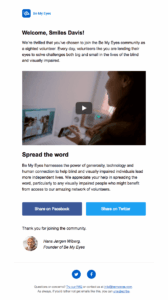
Be My Eyes, for instance, added a video to this simple yet powerful welcome email to showcase how volunteering for their cause makes a difference.
Subject line: Welcome to Be My Eyes
Onboarding sequences
This kind of trigger emails are set in motion once someone signs up for a SaaS product, whether it’s a free trial or free version.
Why they work:
Onboarding sequences are designed to help users get started with your product or service. When you remove potential frustration through clear, digestible instructions, they feel confident about the next steps. Which, in turn, increases early adoption and customer satisfaction.
How to use them:
- Share resources to help prospects familiarize themselves with your products.
- Walk them through with demo videos since this content format is easier to consume.
- Include customer support options, plus links to your Help Center, webinars, or product tours.
- Take the step-by-step approach when navigating through different features to avoid information overload.
- Invite them to join social media groups so they can connect with other users and become part of the community.
Although onboarding sequences are associated with SaaS tools, other industries may use them to show common use cases for their products or help people get instant value from their services. For example, a fitness studio could guide new members through their first month.
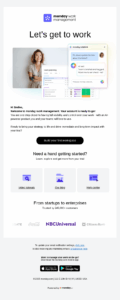
In their onboarding sequence, monday.com invests in action-oriented copy to motivate subscribers to build their first workspace. There’s also a visual list of resources to choose from to explore what they can do with the product.
Subject line: Welcome to monday work management
Consideration
Now your prospects are more aware of your brand and offers. But usually they also want to check other solutions before making their final decision.
Browse abandonment campaigns
Brands send browse abandonment emails to visitors who view product or pricing pages and leave without taking further action.
Why they work:
Browsing shoppers are likely engaging in product comparison or thorough research. With a well-timed and value-packed browse abandonment email, you can redirect their attention back to your offers and highlight why they stand out.
How to use them:
- Mention their action to ensure your email feels relevant and subscribers feel seen.
- Segment your audience so first-time visitors and returning customers don’t get the same offers.
- Throw in a free shipping incentive to reignite their interest.
- Add scarcity to the subject line and copy for limited-edition products that sell fast.
- Share downloadable resources like reports or case studies to keep them engaged.
- Show your willingness to help or guide them if they have questions.
These trigger emails are effective for businesses with longer buying cycles like premium items or services that require more consideration.
For example, a real estate company could offer a virtual tour to re-engage visitors, while an automotive business might include an exclusive insurance deal to prompt action.
Wuffes combines two tactics in the following browse abandonment email: social proof in the form of expert reviews and scarcity to highlight that the products are selling out quickly.
Subject line: We noticed you had your eye on this…

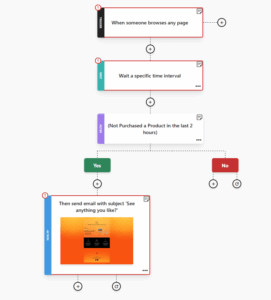
Wish to get those visitors back to your website with a targeted workflow? You can use Moosend’s built-in automation recipes to save time. Find the website re-engagement sequence and start tweaking it.
You can select the time interval to perfect your timing, customize the campaign through the email editor, and narrow down subscribers based on certain filters.
Decision
At this point, your prospects are seriously considering your products or services. Now it’s time to give them that gentle nudge that will persuade them to buy.
Abandoned cart campaigns
These automated emails are triggered every time a visitor adds one or more items to their cart but doesn’t check out.
Why they work:
With 71.72% of consumers leaving their cart behind, this is a revenue leak that you have to address. A cart recovery email sent shortly after visitors leave their cart is the perfect way to remind them of your products and why they wanted them.
How to use them:
- Send an automated sequence including at least two emails to gradually nudge people back.
- Add product images and descriptions to jog their memory.
- Use a second email to send a time-sensitive incentive like free shipping or a small discount.
- Ensure your CTA is clear and visible, bringing them directly to the checkout page to remove friction.
- Add social proof like customer testimonials to boost credibility.
Trust signals aren’t limited to testimonials or star ratings, though. For a B2B it might be security and compliance badges or logos of reputable companies trusting its services. For an online store, something as simple as a 30-day free return policy or “X customers bought this” could do the trick.
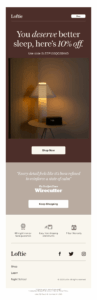
Loftie, for example, builds trust with a clear refund policy, free shipping, and free returns. They also make the offer more appealing by giving a discount code.
Subject line: Still not sure?
Purchase
The stage where dreams come true. Prospects turn into customers, and you should continue to inform and engage them, guiding them toward the ultimate goal: customer retention.
Confirmational emails
Automated confirmation emails are triggered when someone reaches your conversion point, whether that’s placing an order or scheduling a consultation.
Why they work:
Their main purpose is informational, helping businesses remove any transaction-related anxiety and let customers know that everything goes as it should. For this reason, they’re essential for making them trust you, offering a flawless experience.
How to use them:
- Deliver them within a reasonable time frame so customers don’t start worrying if something went wrong.
- Include all the order and payment details, along with an expected delivery date, or send a second email when it’s finalized.
- Add product or service images as visual reminders to build anticipation.
- Thank customers for their preference, letting them know that you value their trust.
- Wait for a few days after they receive the products or use your services to send a feedback request email.
These emails may take different forms depending on your industry. In healthcare email marketing, for example, they serve to confirm and manage appointments. On the flip side, a travel company uses these trigger emails to inform customers about their booking and provide stay or itinerary tips.
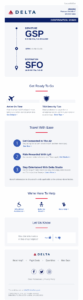
Just like Delta Air Lines does in the email below, displaying the flight details while sharing resources on the departure process, flight security tips, and travel optimization options.
Subject line: Your GSP > SFO Trip Details
If you need more ideas on how to design confirmational emails and other transactional messages, check out these transactional email templates to find the one that suits your needs.
Retention
The purchase isn’t the end of the journey, but rather the beginning of customer retention. In this stage, you should focus on turning one-time buyers into repeat customers.
Post-purchase follow-ups
Post-purchase follow-ups are triggered emails sent after a conversion to ensure satisfaction, encourage reviews, and bring future purchases.
Why they work:
Consumers appreciate brands that stay in touch after-sale. Sending post-purchase emails demonstrates that you care about offering value beyond the transaction. This interest may take the form of helpful content or tailored product recommendations. It’s also the perfect time to ask them to rate their experience.
How to use them:
- Invite subscribers to leave a review or offer feedback after they’ve received the product.
- Follow the “penny-for-your-thoughts” approach, offering an incentive like a small discount in return for their input.
- Include product usage resources like maintenance tutorials or warranty registration to improve satisfaction.
- Send personalized cross-sell promotions to suggest complementary products to enhance your customers’ experience.
- Invite them to join your loyalty program, ensuring you mention all the exclusive perks included.
For example, a cosmetic brand may leverage a post-purchase replenishment email to remind customers when they’ll probably run low on a product and suggest a refill. Similarly, a food brand can give out relevant recipes or storage tips.
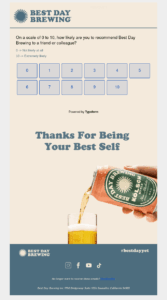
Best Day Brewing’s email is as simple as it gets, with a straightforward subject line, an NPS survey, and a clever thank-you note.
Subject line: Can We Ask You One Question? 🙏
Milestone emails
Milestone emails are triggered when a certain important date is reached (e.g., a subscriber’s birthday or business anniversary) or when a customer completes a goal using your product or service.
Why they work:
With these emails, businesses acknowledge subscriber achievements or special days. They’re even more effective when combined with tailored deals, for example personalized birthday offers that 84% of consumers love receiving.
How to use them:
- Make sure the subject line mentions the occasion and any incentive involved.
- Start with heartfelt wishes if it’s a birthday or anniversary email.
- Use festive emojis or GIFs to get subscribers into the celebration mood.
- Remind your customers of their starting point to highlight how far they’ve come in their goal-setting journey.
- Leverage the opportunity to get recipients excited about what comes next with early access to new products or exciting events.
Regardless of the industry, it all comes down to rewarding your customers with highly personalized messages. For example, a subscription-based business might share detailed insights about the user’s activity and progress.
On the other hand, an online store could deliver a BOGO deal or freebie that matches their past purchase behavior.
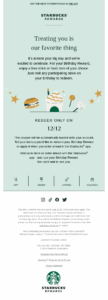
Starbucks does everything right in this birthday email, using a relevant subject line, positive language, and clear instructions on how to claim the birthday offer.
Subject line: Open on your birthday 🎁 (Actually, you can open now)
Advocacy
After customer retention comes advocacy. You can get there by encouraging loyal customers to become brand ambassadors or simply satisfying them to the maximum.
Referral program emails
These triggered campaigns encourage loyal customers to refer their friends in return for a mutual reward. They may have different triggers, such as customers reaching a product usage milestone or filling out a post-purchase survey.
Why they work:
Consumers prefer products or services their friends or peers recommend or rate high. You won’t find better marketers than those who’ve tried and loved your offers. So, referral emails can contribute to a loop where a satisfied customer brings in new people.
How to use them:
- Clearly explain the action required, displaying all the details on what both the referrer and referred person will get out of the offer.
- Make sure the incentive is relevant to the customer’s preferences and buying behavior.
- Consider making the reward time-sensitive and highlight it with elements like urgency-focused copy or countdown timers.
- Feature referrer testimonials talking about the benefits of joining your program.
- Let customers know that you won’t spam their friends with too many or irrelevant messages.
You might think that eCommerce referral programs are the only ones that bring results, but that’s not the case. For instance, an airline could reward their loyal customers with points for each successful referral, whereas a SaaS business could add credits to their accounts.
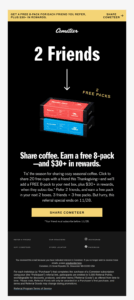
In this referral email, Cometeer communicates the benefit with a bold headline and a relevant image so recipients instantly know what’s in it for them. The generous and time-limited offer is front and center, naturally guiding subscribers to the CTA.
Subject line: One week only: Share Cometeer, earn a free pack
Re-engagement
What about those customers who are at the doorstep, ready to turn away from you? They aren’t necessarily a lost cause. You can reignite their interest through targeted re-engagement emails.
Win-back emails
Businesses deliver win-back emails after a specific period of inactivity to gain back dormant customers’ attention. These may be people who stopped purchasing or engaging with your content after a specific period of time.
Why they work:
Re-engagement emails allow you to share relevant deals and content to remind inactive subscribers why they preferred your products. If you don’t hear back, you can remove them from your lists to secure a good deliverability rate and allocate your resources to subscribers who bring back value.
How to use them:
- Share rundowns of what you’ve been up to during their inactivity (e.g., new product lines, features, collaborations, awards, etc.).
- Reintroduce your offers with fresh content like case studies.
- Incentivize them with a freebie, a discount, or other special deals.
- Ask subscribers to adjust their email preferences so they receive fewer or more relevant emails.
- Don’t be afraid to get emotional, using phrases like “we miss you” or “we want you back” (just keep it balanced).
Let’s say that you own an online course platform. You can send a re-engagement email with a promo code on the next course your customer signs up for. On another note, an online magazine could target recipients with fresh content tailored to their browsing habits.
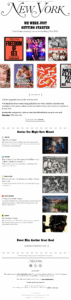
Here’s how New York Magazine handles it, centering the uncluttered design around their latest articles. The email copy highlights the subscriber-only perks, and, in case this doesn’t work either, there’s a generous discount for those who resubscribe.
Subject line: What You Missed at New York Magazine
Trigger Email Best Practices
Inspiration isn’t enough to build effective triggered campaigns. Here’s how to use the data at your disposal to its fullest potential to ensure that your trigger emails work:
Personalize the message
About 74% of consumers expect better personalization when they share more data with brands. Your audience wants one-on-one conversations that feel relevant and perfectly-timed.
Create trigger email content that speaks to them directly and helps them understand why you asked for their information. For instance, if your subscription form required their job role, you should deliver emails with offers, content, and solutions that match their profile.
Referencing their recent actions will also make them think: “This was written just for me.” Besides behavioral insights from your website, use data sources like your signup forms, email or social media interactions, and customer support insights.
Dynamic content is another way to put the right offer in front of each recipient. This powerful tool adjusts the content blocks shown to subscribers based on specific characteristics like their location or preferences.
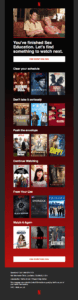
Just like Netflix does in its emails, sharing tailored recommendations using the user’s viewing history.
Subject line: What to watch after Sex Education
Deliver clear value
A trigger email campaign serves multiple goals, such as guiding, educating, and rewarding subscribers with compelling content and promotions. To win them, start your message with short and engaging email copy that answers the question: “Why should I care?”
Value doesn’t always come from freebies or discounts. It might also look like:
- A free resource like a template or report that makes a professional’s day-to-day easier.
- A dietary, workout, or skincare routine that matches subscriber preferences and habits.
- A personalized product or service recommendation.
- A customer testimonial or case study that analyzes how other consumers are using your product or service.
- An interactive trivia quiz where subscribers discover themselves and your value proposition through fun questions.
To decide what brings the most value, marketers should consider parameters like their subscribers’ lifecycle stage, behavioral patterns, and stated preferences (e.g., in surveys).
You could look at the resources they download or read, the products and services they explore, or the goals they set during account creation.
Mind your call-to-action
When you ask your audience to perform an action, your top priority is to make things easy for them. That’s what your call-to-action represents.
Place your email CTA prominently, preferably within the first scroll, to catch the reader’s eye immediately. If it makes sense, you can repeat it later on so skimmers won’t miss it. Surrounding it with white space or using color contrast is another way to make it pop.
It’s also better to keep your email focused on a single call-to-action. For example, if you want shoppers to return to their cart, it’s not the perfect time to invite them to your referral program, as well.
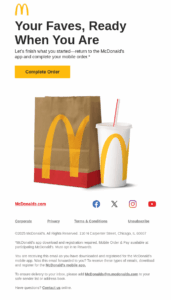
Just like in this email by McDonald’s that focuses on reminding subscribers of their order and urging them to go back to their app to place it.
Subject line: Your order is ready to place 👍
Craft email sequences
A single email isn’t always enough to reach your objective. In some cases, you should engage your audience gradually and keep the conversation going until they’re ready to convert.
This includes occasions where the process is multi-step, the information seems complex, or subscribers need more time to get from point A to point B. That’s when an email sequence makes more sense than a single message.
For example, onboarding users as a feature-rich SaaS platform takes more than one email. First, you’ll need to start with the basics like configuring settings, then create an educational loop to help your audience grasp advanced features and tackle challenging tasks.
Regardless of the unique goal, email follow-ups increase the chances of recipients noticing your emails and keeping your offer top of mind.
Deliver timely campaigns
In triggered emails, timing is of the essence. Send them too early, and you might come across as pushy. Send them too late, and the subscriber will have forgotten all about the trigger event.
So, a website visitor that checks out a product page and leaves should get a reminder after a few hours, not a week later. But to consider a customer disengaged, you have to decide on a longer timeframe (like 30 days or more) to trigger a win-back email.
Triggered emails aren’t the only messages you send to your audience, so it’s important to time automated emails with marketing campaigns when needed. Let’s say you run a flash sale. You might consider excluding people in the onboarding phase from the sale list, as they’ve just converted.
Don’t go overboard
While some triggered campaigns call for an email sequence, brands still need to mind their email frequency to avoid overloading subscribers.
First, make sure you schedule your emails to reach customers at thoughtful intervals. Which means you should space them out by at least one day, or more, depending on the campaign type.
Setting caps on your trigger emails within a specific timeframe lets recipients digest your messages, whereas emails that land one after another in their inbox may cause email fatigue. Which, in turn, results in disengagement, or even worse, unsubscribes and spam complaints.
Test, monitor, and pivot
Spray and pray doesn’t bring results in email marketing, which is why you should always consider A/B testing. Start by creating a second email version that differs in one element. This may be the subject line, sender name, email copy, or send time.
Then, monitor performance to determine which variant performed better and optimize your workflows based on the findings. Make sure to do this process regularly to avoid missing opportunities for conversions.
Also, you need to constantly check email metrics like opens, clicks, conversions, and unsubscribes to measure the effectiveness of your trigger emails. If you find tactics, content, or offers that don’t work, it’s time to pivot and experiment with new strategies.
How to Set Up a Trigger Email with Moosend
You may have the inspiration but lack the time or expertise to create a trigger email. Fear not! Moosend comes with a visual automation builder and an easy-to-navigate interface that lets you create your own email automation templates in a few minutes.
Once you select to build a custom workflow, you’ll land in the builder. Using the left-side menu, you can edit the automation name, check its status, and see a list of all pending tasks.
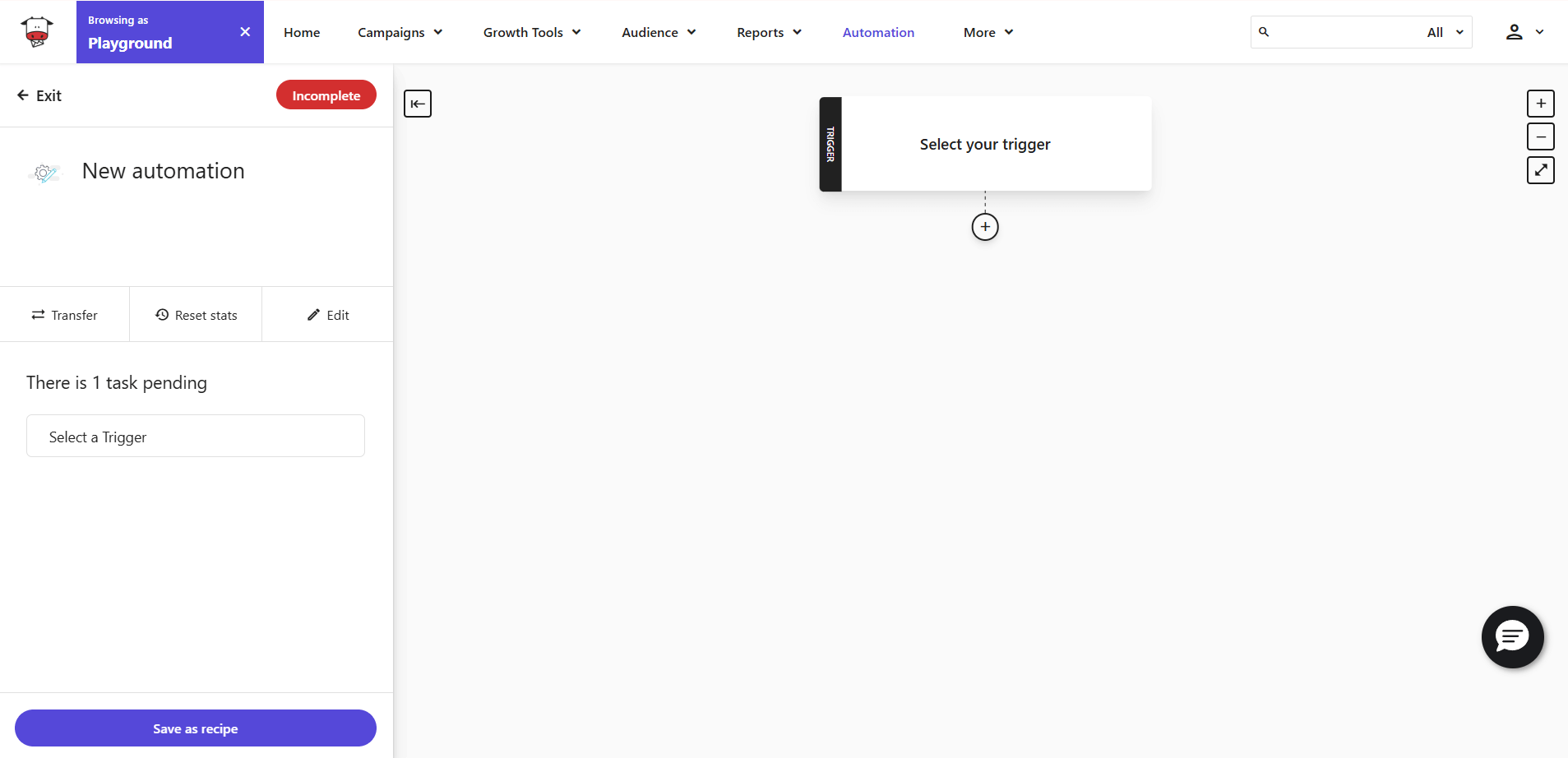
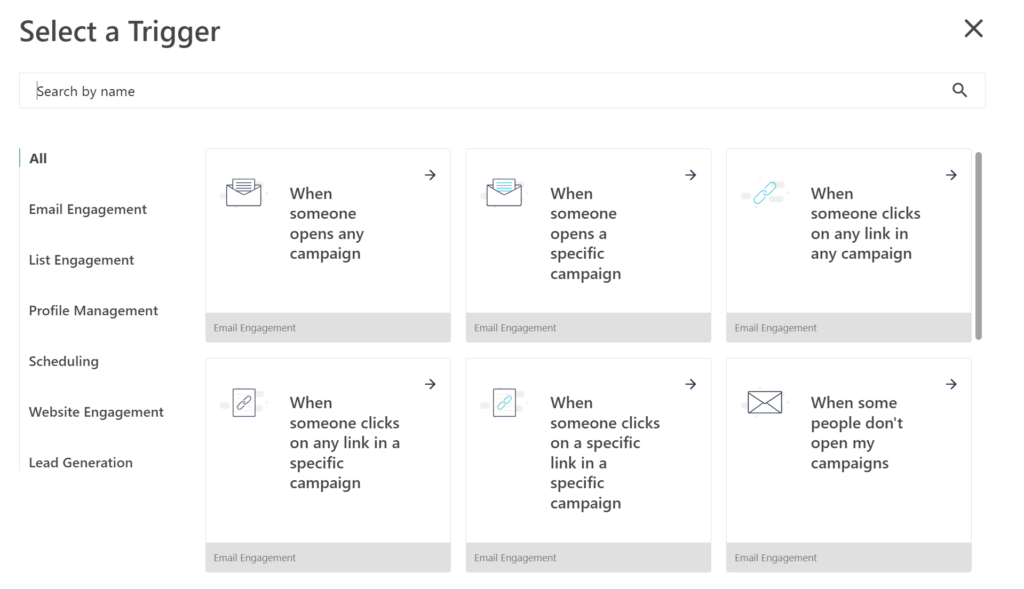
The first step is to set the right trigger, choosing from a variety of interactions on your website, email campaigns, list, and more.
After that, add the conditional steps that control which subscribers will receive your emails and when. For instance, you can choose to break up your workflow and display different content based on the weather conditions in the recipient’s location.
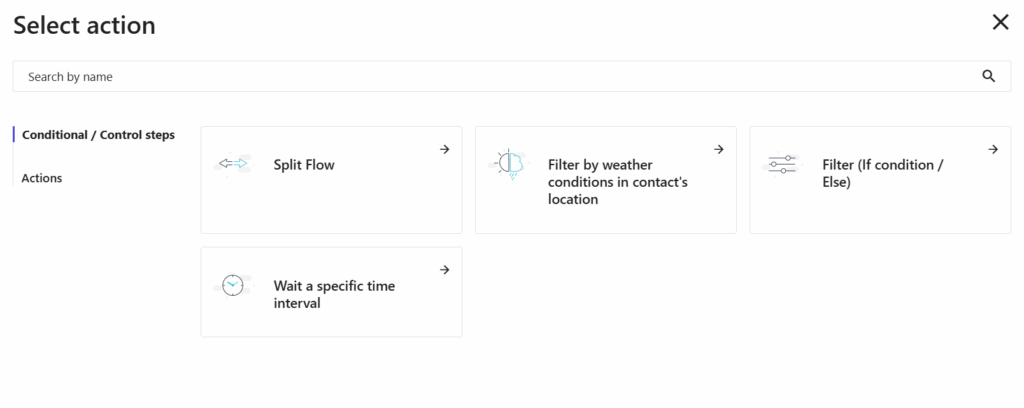
Then, it’s time to define the action you want to take. These include (among others):
- Sending email campaign
- Adding member tags
- Triggering another automation
When you choose the “Send email campaign,” you can either use the text editor or the HTML editor. In the second case, you have the option to visit the template library and choose one of the predesigned layouts as the foundation of your campaign.
Here’s an email automation template example we created using Moosend’s automation designer:
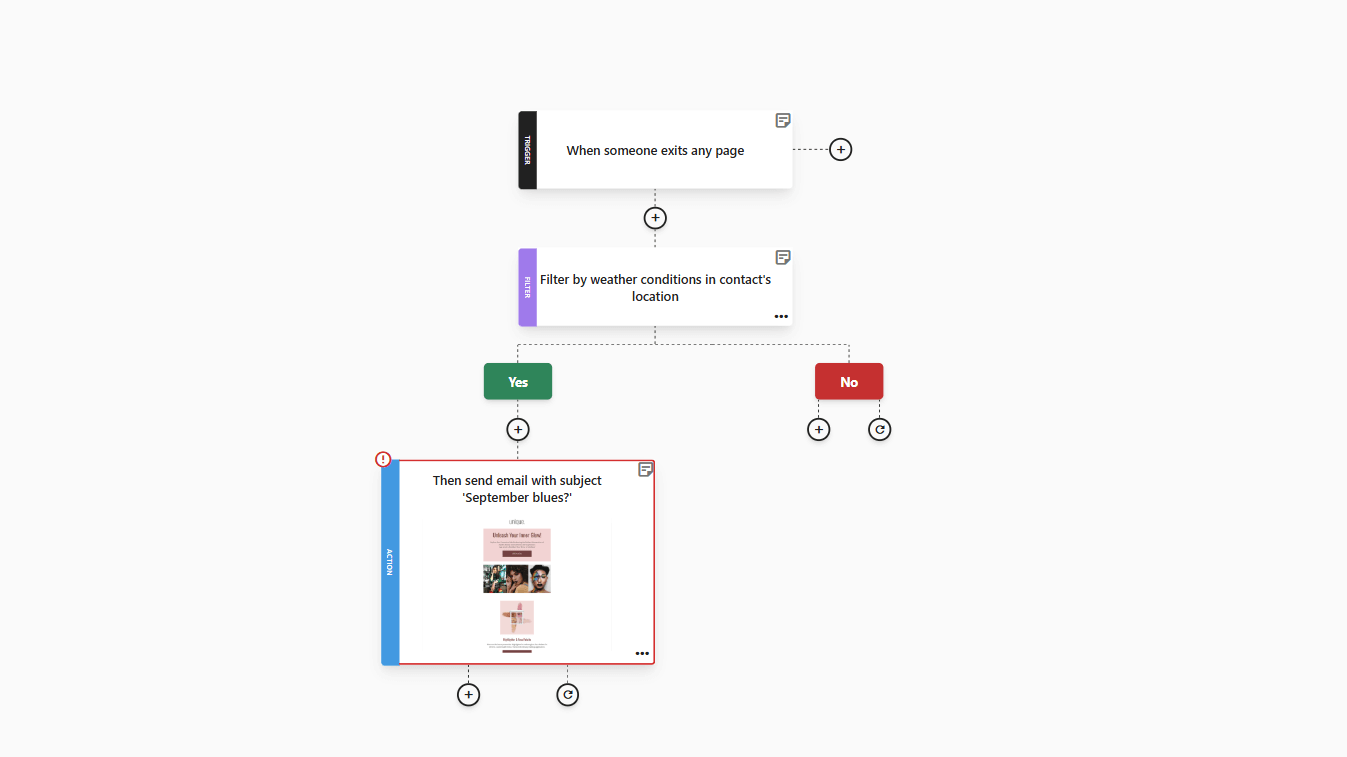
You can edit it by adding or removing triggers, duplicating or deleting steps, or including notes for seamless collaboration with other team members.
Does it look exactly like you wanted? Then, you can save it as a recipe so it’s ready to use for future campaigns.
In case you don’t want to start from scratch, just select one of the platform’s built-in automation recipes for every occasion and tweak it as you please.
All you need to do is sign up for a Moosend account and you’ll instantly access ready-made automation recipes, the flexible builder, A/B testing, and email preview features.
Trigger Conversions with Minimum Effort
Your customers don’t need more emails, they need the right ones. Meaning messages delivered at the perfect moment they can’t say no to. That’s exactly what triggered emails do.
By responding to each customer with content that meets their needs in real-time, every conversion feels like the next logical step, not a hard sale.
Of course, inspiration and effective strategies are just the starting point, as a reliable email automation tool is what will put your ideas in motion.
From there, you can build, monitor, and refine your workflows effectively while freeing up time to dive deeper into what drives your audience, when their interest shifts, and how to stay ahead.
FAQs
Let’s review some frequently asked questions about trigger emails:
1. What do you need to automate your emails effectively?
You should have an email automation platform with a user-friendly email and automation builder to design your campaigns. It should also offer ready-made workflows, email reporting, A/B testing, plus excellent deliverability and support. Look for a wide list of integrations, so you can combine data from other sources like your CRM or social media.
2. How can you ensure that trigger emails and regular campaigns won’t overlap?
If you send other campaign types like newsletters or seasonal deals, carefully plan when they land in inboxes and who receives them. For example, a subscriber shouldn’t receive both a cart abandonment email and a newsletter within an hour. Create an email hierarchy, set proper caps and intervals, and consider segmenting certain subscribers out of some regular campaigns to avoid email fatigue.
3. Why do you need to audit automated campaigns?
Brands should audit their automated workflows to catch bottlenecks before they turn into revenue leaks. Make sure that your segmentation, triggers, and messaging are still on point. Regular audits also help you keep trigger emails up to date with industry trends, consumer preferences, or changes in your branding.
4. What’s the right audit cadence for your workflows?
For most campaigns, a biannual audit cadence works fine. But you could consider quarterly audits for campaigns with ongoing promotions. You must also check how your campaigns are performing outside the regular cadence if needed; for instance, in case of spikes in spam complaints and unsubscribes or technical issues like broken links.
Similar Posts
 Published by
 Published by
 Published by

Create, send and optimize your email marketing campaigns