















8 Important Landing Page Metrics & How to Improve Them [2026]
Published By Tea Liarokapi
December 5, 2025

05/12/25
Your landing page is the medium that turns curiosity into leads and conversions. And conversions need to be tracked so you can fine-tune your overall marketing strategy.
That’s why you need to track your landing page metrics, the data points that reveal how effectively your page attracts, engages, and converts visitors. From bounce rate to conversion rate and time on page, these metrics can show you how to turn your landing page from a digital brochure into a growth engine.
In this guide, we’ll explore the most important metrics for measuring landing page success, why they matter, and how to improve each one to drive better performance.
Optimize your landing pages smarter
Track your results and turn your insights into real conversions with Moosend.
Start for freeWhat Are Landing Page Metrics?
Landing page metrics are the performance indicators that help you understand how effectively your page turns visitors into leads or customers. Metrics like conversion rate, bounce rate, or cost per conversion show which types of landing pages perform better, but also which elements of your landing pages attract attention, drive engagement, and prompt people to take action.
These performance metrics cover every stage of the user journey, from how visitors arrive on your page to what they do once they get there. Therefore, tracking them gives you a complete picture of your page’s strengths and weaknesses, allowing you to make data-driven improvements.
Metrics vs. KPIs: What’s the Difference?
While the terms are often used interchangeably, metrics and KPIs (Key Performance Indicators) serve slightly different purposes:
- Metrics are individual data points that measure specific aspects of your landing page’s performance.
- KPIs are strategic goals tied to broader business outcomes, such as lead generation or revenue growth.
This means that your metrics can shape your KPIs. You might track dozens of metrics, but only a few directly indicate whether you’re achieving your goals. For example, a high click-through rate may be a positive metric, but your KPI might be the overall conversion rate or customer acquisition cost.
Are vanity metrics reliable?
Not all numbers tell the full story. Vanity metrics like total page views or impressions might look impressive, but they show visibility, not impact, and can’t help you with landing page optimization.
You could have thousands of visitors landing on your page, but if they don’t engage or convert, the page isn’t doing its job. So instead of focusing on how many people show up, focus on how they interact. That’s where real visitor engagement and performance insights live.
Tracking actionable data like conversion and bounce rates, and average session duration gives you clarity on how users behave, what holds their attention, and what drives them to take the next step.
Why You Need to Track Landing Page Metrics
Landing page metrics can help you stop guessing and start improving. Now, let’s see how metrics reveal campaign effectiveness, the real benefits they unlock, and the common mistakes teams make when they ignore the data.
Metrics reveal campaign effectiveness
Metrics let you connect outcomes to causes. In other words, they can get you from saying “this page didn’t work,” to understanding why it didn’t work.
To do it correctly, map metrics to the various stages of the funnel. Some metrics point to issues with customer acquisition (e.g., low CTR), while others pinpoint interest or engagement issues (e.g., short average time on page), or conversion frictions (e.g., high form abandonment).
After that, try to distinguish traffic quality from page quality. If your conversion rate is low but CTR and time on page are high, you might be attracting non-qualified leads. Another example is having strong traffic but high bounce rates. This suggests issues with the anatomy of your landing page, like page messaging or poor UX.
You can also break metrics down by source, device, geography, or campaign. For example, if your desktop audience converts well but your mobile audience doesn’t, your mobile UX or load speed is likely the issue.
Measuring properly boosts your efforts
Tracking landing page metrics translates directly into smarter, faster growth. Here’s what that means:
- Improved conversions: When you know which elements are underperforming, you can test targeted fixes and reliably increase conversion rate.
- Audience insights: Metrics reveal who responds to what, which headlines pull certain segments, which offers resonate, and which messaging needs localization. That feeds product messaging and campaign targeting.
- Better resource allocation & ROI tracking: With accurate cost-per-conversion and funnel metrics, you can decide which channels deserve more budget and which experiments to pause. That turns marketing from a cost center into a measurable revenue driver.
- Risk reduction: Data prevents costly mistakes, such as scaling a campaign with high impressions but near-zero conversions.
Of course, tracking landing page metrics is not a one-off chore, but an ongoing operational task that can save you resources. Measure the right things, segment them, and use the results to prioritize tests that generate more leads and, eventually, revenue.
The Most Important Landing Page Metrics
Now that we’ve seen that not every number in your analytics deserves your attention, let’s see which metrics really tell the truth about your landing page performance.
1. Conversion rate
Your conversion rate measures the percentage of visitors who complete a desired action on your landing page. Whether that’s signing up for a newsletter, downloading a resource, or making a purchase, this metric reflects how effectively your page guides visitors to take the next step.
Across industries, the median landing page conversion rate is 6.6%, according to Unbounce’s report. Of course, this number depends on industry, targeting, offer type, and traffic quality. A free-trial SaaS landing page, for example, can achieve higher conversion rates than an eCommerce product page, mainly because it requires less commitment.
Improving your conversion rate starts with optimizing every element that influences user decisions.
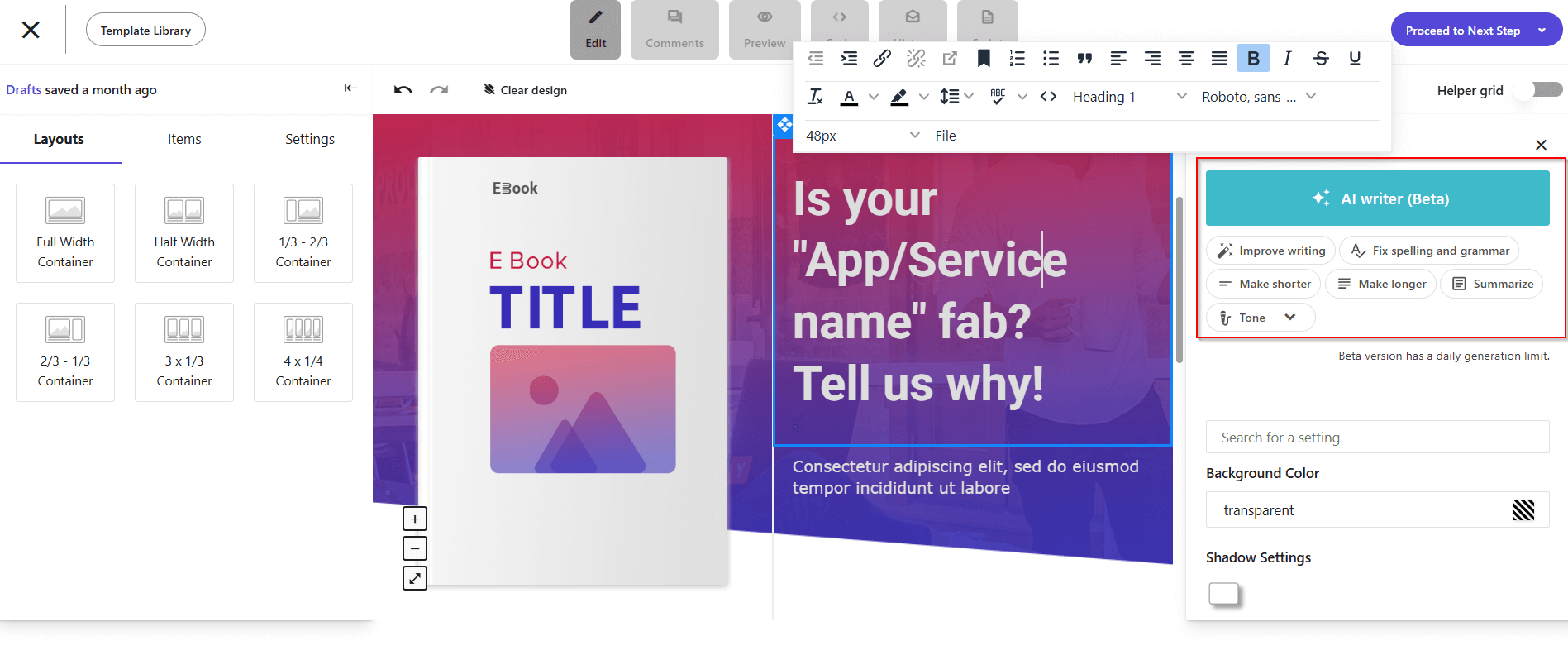
To understand what works for your audience, run A/B tests to compare headlines, visuals, and CTAs and identify what drives more actions. To write landing page copy that aligns with visitor intent through clear, benefit-driven messaging, you can use a targeted AI writer for brainstorming and copy-check sessions.
Reduce friction by simplifying your forms and asking only for the necessary details. After users convert, you can request additional information as you go. Fewer fields can lead to higher conversion rates.
Finally, align your offer with traffic sources so expectations match what users see after the click. For example, a subscriber will already know your brand, so make sure to show them content that matches your relationship.
2. Bounce rate
Bounce rate measures the percentage of visitors who land on your page and leave without taking any further action. In essence, it shows how well your landing page captures immediate interest and motivates engagement.
A high bounce rate doesn’t always mean failure, but it often signals a disconnect between a visitor’s intent and your landing page’s offer. It tells you that users found your content irrelevant, confusing, or slow to load, and that they left.
But what are the most common causes for bounce rates?
- Slow page load times: Even a two-second delay can dramatically increase abandonment rates.
- Weak message match: If your source promise doesn’t align with your landing page content, users bounce almost instantly.
- Cluttered or unfocused design: Overwhelming visuals, pop-ups, poor hierarchy, or simply using the wrong landing page template can cause visitors to lose focus or, even worse, trust.
- Lack of above-the-fold clarity: When the core offer or CTA isn’t visible right away, users fail to see the value proposition.
- Low-quality or mistargeted traffic: Irrelevant audiences driven from broad campaigns rarely engage deeply.
The ideal bounce rate varies depending on traffic source and offer type. However, the average bounce rate for a landing page spans between 60-90%, as Custom Media Lab’s study, referenced by Backlinko, suggests:
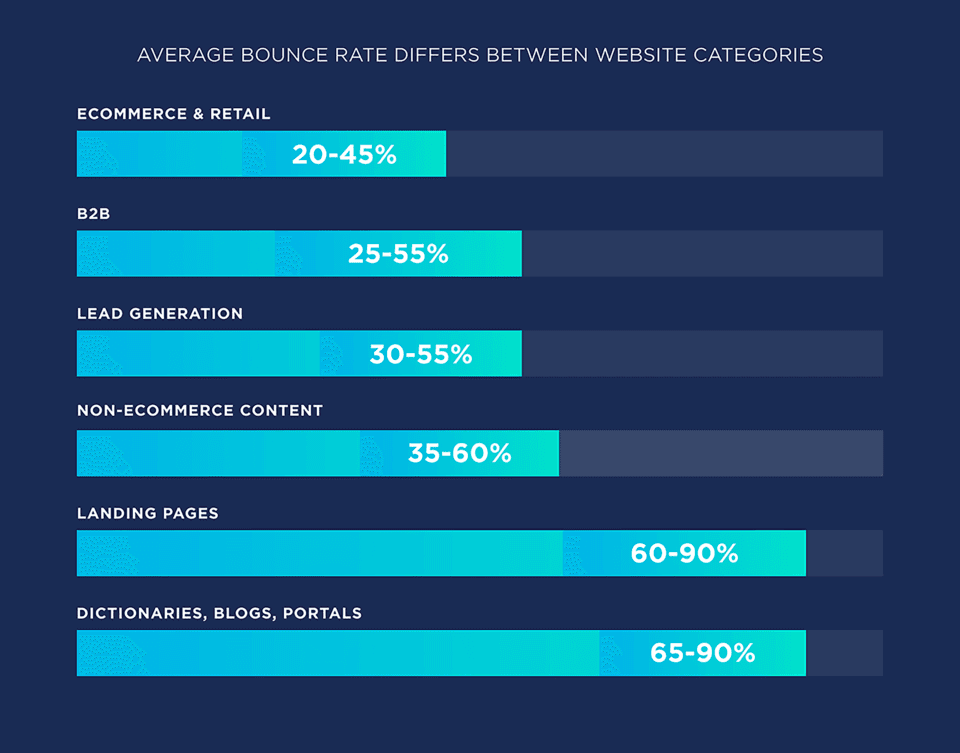
More than half of your prospects won’t make it to your CTA. The key to understanding your bounce rate is context. A high bounce rate combined with strong conversions from the remaining visitors can indicate high-quality traffic. Always pair this metric with others, such as average session duration and conversion rate, for an accurate assessment.
To fix a bad bounce rate, the first step is to improve load times. Compress images, minimize scripts, and use a landing page builder that’s preferably no-code. Every second counts.
Secondly, tighten medium-to-page alignment. Ensure your landing page headline, visuals, and offer mirror your original message down to a tee.
Next, you need to strengthen above-the-fold content. Make your value proposition and CTA instantly visible and benefit-focused. Lastly, add interactive or visual cues. Videos, short animations, or directional design elements can subtly encourage scrolling and exploration.
The steps above can fix common landing page mistakes that lead to failure. But they’re not the only steps to take. Make sure to refine audience targeting by using analytics and filters to focus on visitors with the right intent and demographics.
A well-optimized landing page doesn’t just lower bounce rate. It also increases engagement depth and conversion efficiency across the entire funnel.
3. Average time on page
Average time on page reveals how long visitors stay before leaving. More importantly, it shows how engaged they are with your content. While bounce rate shows whether users stay or go, time on page indicates the quality of their attention once they’ve decided to stay.
A higher average time suggests your messaging resonates, your structure flows logically, and your content keeps users curious enough to read or explore further. On the other hand, users leaving your page quickly can mean your value proposition isn’t clear, your page feels overwhelming, or your design doesn’t guide the eye effectively.
This metric is essential for story-driven or information-heavy pages, where engagement equals persuasion. If users spend enough time reading, they’re far more likely to convert.
As we saw above, benchmarks vary widely depending on your landing page type, purpose, and industry. To make better sense of your landing page’s metrics, you can track your time on page data with various tools like Google Analytics or Hotjar that help you visualize with heatmaps. This will give you a full picture of where users focus and where they drop off.
After measuring the average time on page, it’s time to correct any errors. Here’s how to achieve better results:
- Use narrative flow: Treat your landing page like a mini story with a problem-value-proof-action structure. A clear emotional arc increases reading time naturally.
- Balance visuals and copy: Break text with images, icons, or short explainer videos that reinforce your message. Visual pacing reduces fatigue and improves comprehension.
- Guide readers with design: Contrast, spacing, and elements like arrows that point towards the CTA subtly keep attention moving downward.
Average time on page measures how persuasive and enticing your message is. When users linger, it means your page doesn’t just inform them, it also convinces them.
4. Click-through rate (CTR)
Click-through rate (CTR) measures the percentage of visitors who click your primary CTA button, whether that’s a form submission, a download, or a button that leads to the next step in your funnel. It’s the clearest indicator of how compelling and trustworthy your offer feels when prospects stumble upon it.
A healthy CTR means your value proposition, design, and CTA placement work together seamlessly. A low CTR, on the other hand, usually indicates unclear messaging, a weak visual hierarchy, or friction between the promise and the next action.
You can think of it as a health check. If it’s low, users aren’t yet sold on your offer. However, if the conversion rate is low but the CTR is substantial, your form or follow-up process might be what’s harming your marketing plan.
To boost your CTR, you can go through the following steps:
- Craft stronger CTAs: Use active, benefit-oriented language (“Get my free demo,” “Start building now”) instead of generic verbs (“Submit”).
- Clarify the offer instantly: Visitors should understand what they gain and what happens next before clicking.
- Test CTA placement and frequency: Secondary CTAs above the fold and a primary one at the conclusion often maximize visibility.
- Build trust near the CTA: Add micro-proof like testimonials, security badges, or reassurance copy, like “No credit card required”
When optimized correctly, CTR bridges curiosity and commitment. It’s the moment your landing page stops talking to the user and starts moving with them toward conversion.
5. Form abandonment rate
Form abandonment rate tracks the percentage of visitors who begin filling out a form but leave before submitting it. It’s one of the clearest indicators of friction in your landing page experience, showing where interest turns into hesitation.
This metric points to the most important issues in user experience, trust, or timing. If people click your CTA but don’t complete the form, the offer itself isn’t necessarily the problem. The issue could lie in what happens between intent and action.
High abandonment rates usually signal that users hit resistance. Common causes could include:
- Lengthy or intrusive forms: Every unnecessary field increases cognitive effort, decreases trust, and leads to drop-offs.
- Lack of clarity on data use: When users don’t trust where their information goes, they hesitate to share it.
- Poor mobile optimization: Tiny input boxes or awkward layouts on smaller screens quickly deter completion.
- No immediate value: If the form doesn’t clearly promise a benefit—like a free trial, demo, or exclusive content—users lose motivation halfway through.
- Technical glitches or validation errors: Hidden bugs, broken autofill, or vague error messages lead users to quit.
Understanding where people drop off helps pinpoint the exact moment friction occurs. And, of course, understand how to deal with it.
One step towards reducing that friction could be to ask only for essential information, as each extra field adds friction. If more data is needed, you can collect it progressively. If, for example, you’re creating a SaaS landing page for a demo booking, you can’t use just a name and email address field:

This is Userpilot’s landing page for demo bookings. And since it’s meant to inform and convince, sales will need more data, such as the company’s name or size. That info will help them promote the best solution for their prospect.
On the other hand, if your landing page promotes a specific piece of information, like a pricing page, you can have zero fields. Like this:
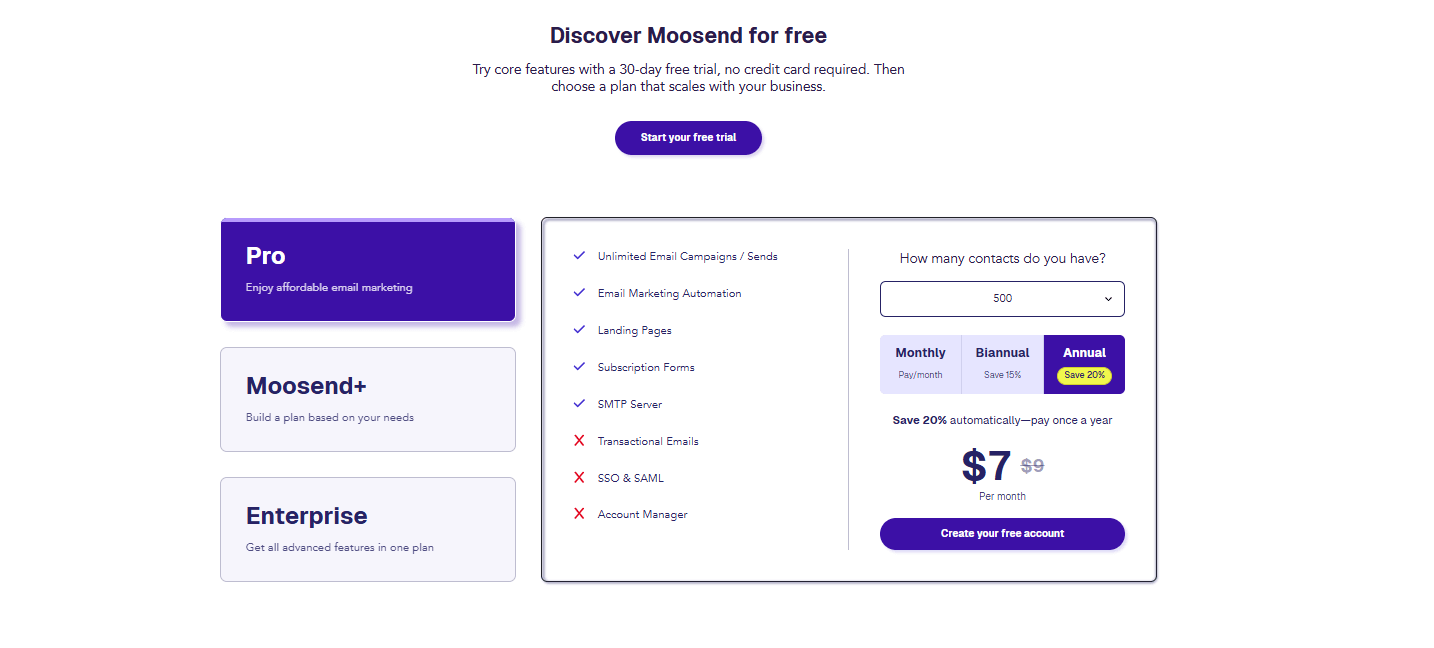
Moosend’s pricing page has no forms because there is no need for them on this type of page.
The second step towards minimizing form abandonment is to enable autofill and smart defaults. This will reduce user effort by leveraging browser data and predictive text. And less effort means less friction, and a smoother experience overall.
Another trick you could implement would be to build instant trust with privacy reassurances (“We’ll never share your info”) and trust badges or security icons near the form. And don’t forget the huge part social proof plays as well.
6. Page load time
Page load time measures how quickly your landing page fully renders and becomes interactive. It’s one of the most important metrics of conversion potential. The best copy, design, and offer can collapse under the weight of slow performance. In other words, if your page doesn’t load quickly, nobody will see it.
Studies consistently show that every additional second of delay can lower conversions:

This study from Portent shows that a page that loads in 1 second has a conversion rate 3 times higher than a site that loads in 5 seconds and 5 times higher than a site that loads in 10 seconds. This places the ideal benchmark at around 3 seconds or less, and ideally between 1.5 and 2.5 seconds.
To monitor speed and vitals, you can use tools like Google PageSpeed Insights, which provide actionable insights on bottlenecks and rendering delays.
But how can you optimize page loading times and ensure nothing goes amiss? Here are some ways to ensure your landing page doesn’t literally fail the test of time:
- Compress and correctly size images and keep all necessary information above the fold.
- Serve static assets from geographically closer servers to cut load times for global visitors.
- Reduce the weight of code you need to use or opt for a no-code landing page builder.
- Limit third-party widgets, popups, and analytics tags that often bloat performance.
- Avoid heavy templates and opt for simple, plug-and-play ones. Simplicity loads faster and converts better.
When it comes to your landing page, loading speed is not to be taken lightly. The faster your landing page loads, the sooner interest piques and action begins.
7. Cost per conversion (CPC)
Cost per conversion (also known as cost per acquisition, or CPA) measures how much you spend to get one user to complete a desired action, such as filling out a lead form, taking a free trial, or making a purchase. It’s one of the clearest indicators of efficiency in your marketing funnel, showing how well your landing page turns marketing budget spend into measurable results.
When paired with metrics like conversion rate and ROI, cost per conversion helps marketers understand not just how well their campaigns perform, but how cost-effectively they do it.
Lastly, measuring CPC reveals opportunities to cut spend from underperforming actions and reallocate budget to better-performing campaigns.
To optimize this metric, instead of comparing absolute values, focus on trend direction. If your CPC drops over time without reducing lead quality, your efficiency is improving.
Here’s how to optimize it over time:
- A/B test landing pages and CTAs: Identify which versions deliver higher conversions for the same spend.
- Refine audience targeting: Exclude unqualified segments and optimize your efforts for high-intent visitors.
- Align ad messaging with landing page content: Consistency reduces confusion and improves click-to-conversion rates.
- Track performance by channel: Compare CPC across platforms to invest more where ROI is highest.
- Reduce friction in the conversion process: Simplify forms and speed up page load times to improve completion rates.
A healthy CPC can help you spend smarter. The goal is to generate conversions at a sustainable, profitable rate while maintaining user quality.
8. Return on investment (ROI)
ROI is the holy grail of your marketing efforts. From email marketing ROI to ad campaign ROI, this metric measures the profitability of your marketing actions and how much revenue they generate compared to what you spent. Unlike CPC, which looks at efficiency, ROI focuses on financial performance and long-term value.
ROI shows whether your landing page is driving actual business growth, not just activity. It connects landing page performance directly to business outcomes and justifies scaling campaigns or increasing budgets based on proven profitability. Lastly, it helps prioritize high-value customer segments that deliver the greatest long-term returns.
Now, how can you optimize ROI for your landing pages and turn them into profitable lead generation and conversion engines?
- Calculate ROI by channel: Track which traffic sources yield the most profitable conversions, not just the most conversions.
- Improve conversion quality: Focus on qualified leads rather than volume.
- Enhance post-click experience: Personalized content, email marketing follow-ups, fast load times, and seamless forms improve both conversions and customer satisfaction.
- Consider lifetime value: Measure ROI over the full customer journey to identify channels that contribute long-term profit.
ROI is the ultimate validation of marketing success. A landing page that converts well is good, but one that delivers measurable financial growth is what can truly help you scale your business.
Now that you know which metrics define landing page success, it’s time to see how to measure them.
How to Track Your Landing Page Metrics (+Tools)
Besides implementing various landing page trends to ensure quality, you can use tools to track your landing page metrics and explore a wide variety of methodologies.
The first tool in your toolbox should be Google Analytics (GA4), which remains the backbone of web analytics and offers a comprehensive overview of your landing page performance. It tracks data such as page views, bounce rate, average engagement time, and sessions by source, giving you clarity on who’s visiting, how they arrived, and what actions they take.
To get the most out of GA:
- Set up conversion events for button clicks, form submissions, or downloads.
- Use UTM parameters to track the performance of campaigns leading to your landing page.
- Segment visitors by source/medium to identify your most valuable traffic channels.
You can combine GA with your email platform to see the full customer journey, from email opens to landing page engagement and conversions.
For example, let’s see what happens when setting up a landing page in Moosend’s platform. You can track it by toggling the “Track with Google Analytics” button on the “Track your conversions” section of the creation process:
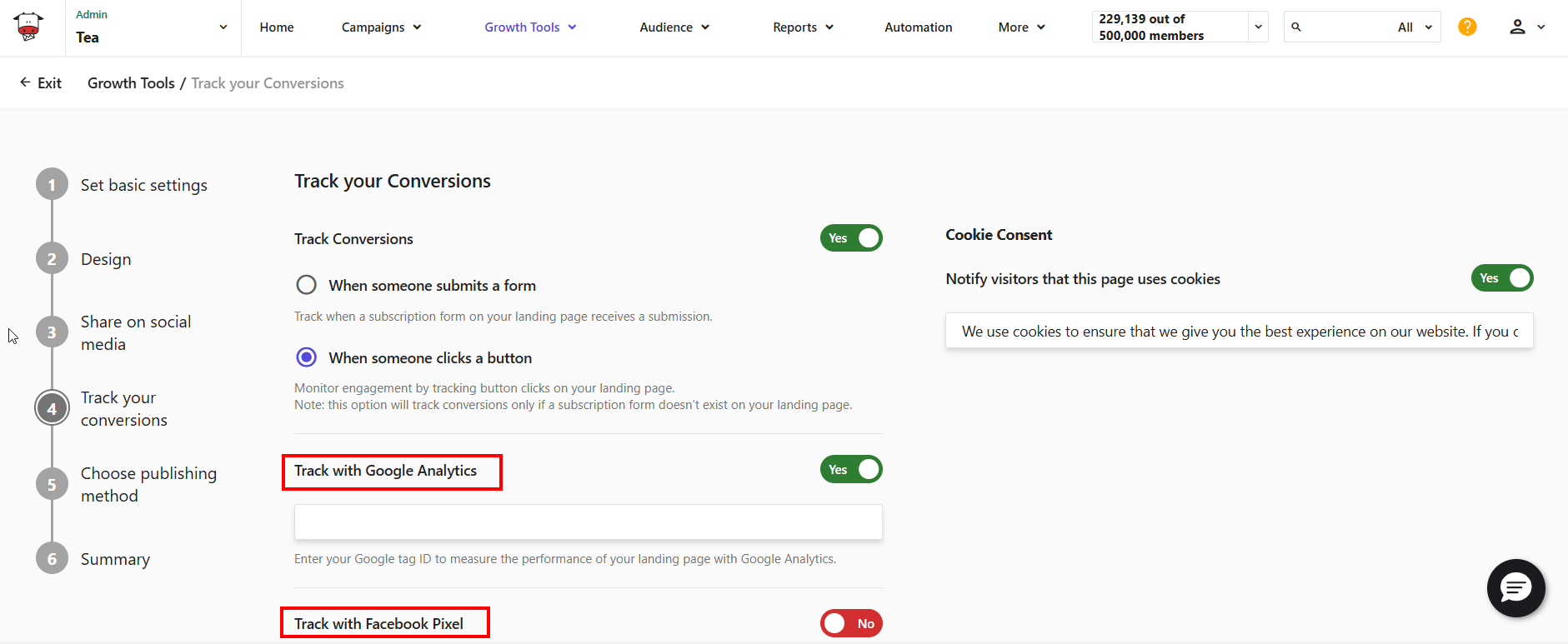
In addition to the Analytics option, you can also use Facebook Pixel if you share your landing page on social media.
Another tool that can help you track and analyze how your email campaigns send recipients to your landing page is Moosend’s built-in Analytics Dashboard.
Moosend’s analytics suite provides marketers with a unified view of performance across both landing pages and campaigns. You can access key landing page metrics like visitors, views, conversions, and conversion percentage. You can also sort and tag landing pages with status and labels. Here’s an example:

This landing page was visited by 146 people. It had 205 views and 89 conversions, for a 61% conversion rate. Its status is published, indicating it’s still up and running. If we press the “+” button, here’s the pop-up that will appear:
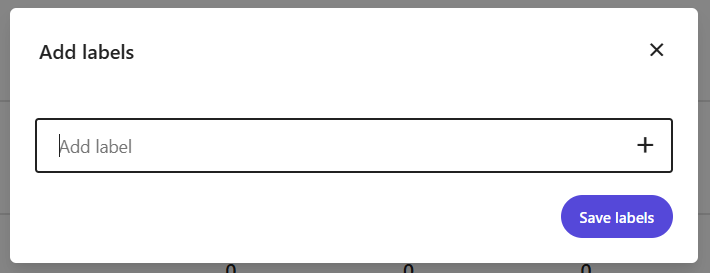
This allows users to add labels and categorize their landing pages by audience, action, location, etc. Down the line, this allows users to categorize their landing pages and filter and sort through them effortlessly.
Now, while analytics give you the “what,” behavioral tools reveal the “why.” Tools like Microsoft’s Clarity let you visualize user interactions through heatmaps, scroll tracking, and session recordings. These insights highlight how visitors move through your landing page, which buttons they click, how far they scroll, and where they lose interest.
Lastly, tools like Unbounce allow you to run experiments on page elements. Integrating these results with Moosend’s analytics helps you refine both ends of your conversion funnel.
Of course, apart from the tools, there is the methodology of setting up metric tracking. Here’s what to keep in mind:
- Add tracking codes (GA4, Moosend tag, or Clarity script) to capture performance data.
- Define goals for each page, such as signups, downloads, or purchases.
- Distinguish between one-off campaign pages (like waitlist landing pages or promotional offer landing pages) and ongoing website pages (such as pricing pages) to get more accurate insights.
How to Improve Your Landing Page Performance
Tracking your landing page metrics is only half the equation. The real magic happens when you turn insights into action. Once your data reveals what’s working (and what isn’t), it’s time to test, refine, and optimize.
Identify friction points
Start by isolating the metrics that signal friction. A high bounce rate may indicate poor first impressions or irrelevant targeting. A low CTR could mean your CTA isn’t visible, precise, or persuasive enough.
A short average time on page might point to weak storytelling or a disjointed offer. Use your analytics to pinpoint where users drop off, what they interact with, and how they move through the page.
Optimize copy, layout, and CTA
Once you identify weak spots, experiment with targeted changes, starting with your copy. Adjust headlines or value propositions for clarity and urgency. Simplify your phrasing, lose complex words, and make it short and value-driven.
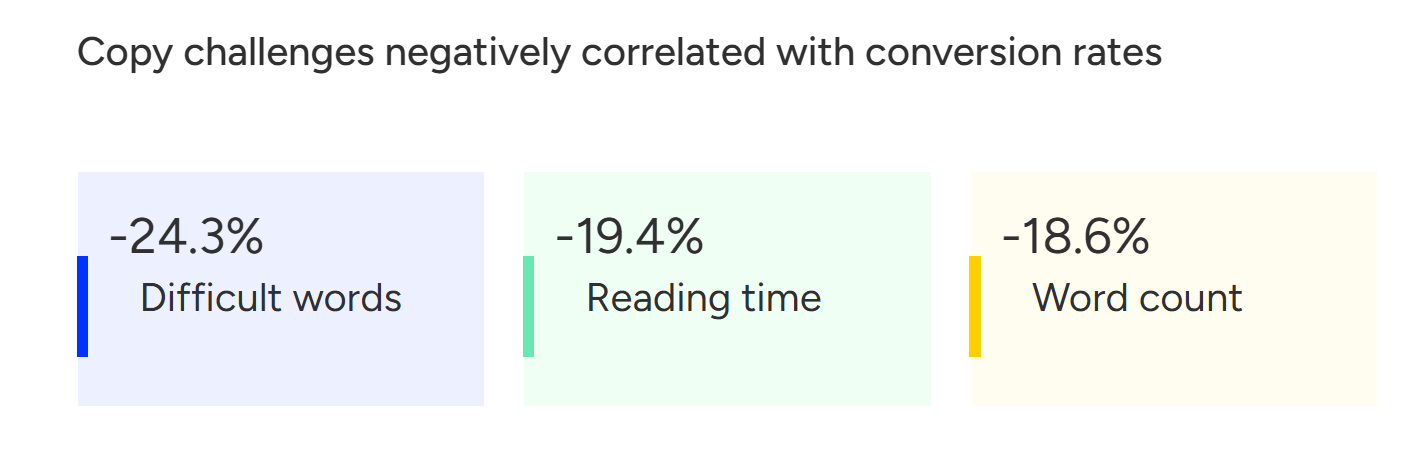
As evident by Unbounce’s conversion benchmark report, copy can make or break your landing page’s conversions.
The same can happen to your layout. Simplify the visual hierarchy and ensure your design flows naturally from your landing page’s heading to your CTA. Also, never forget about mobile responsiveness:
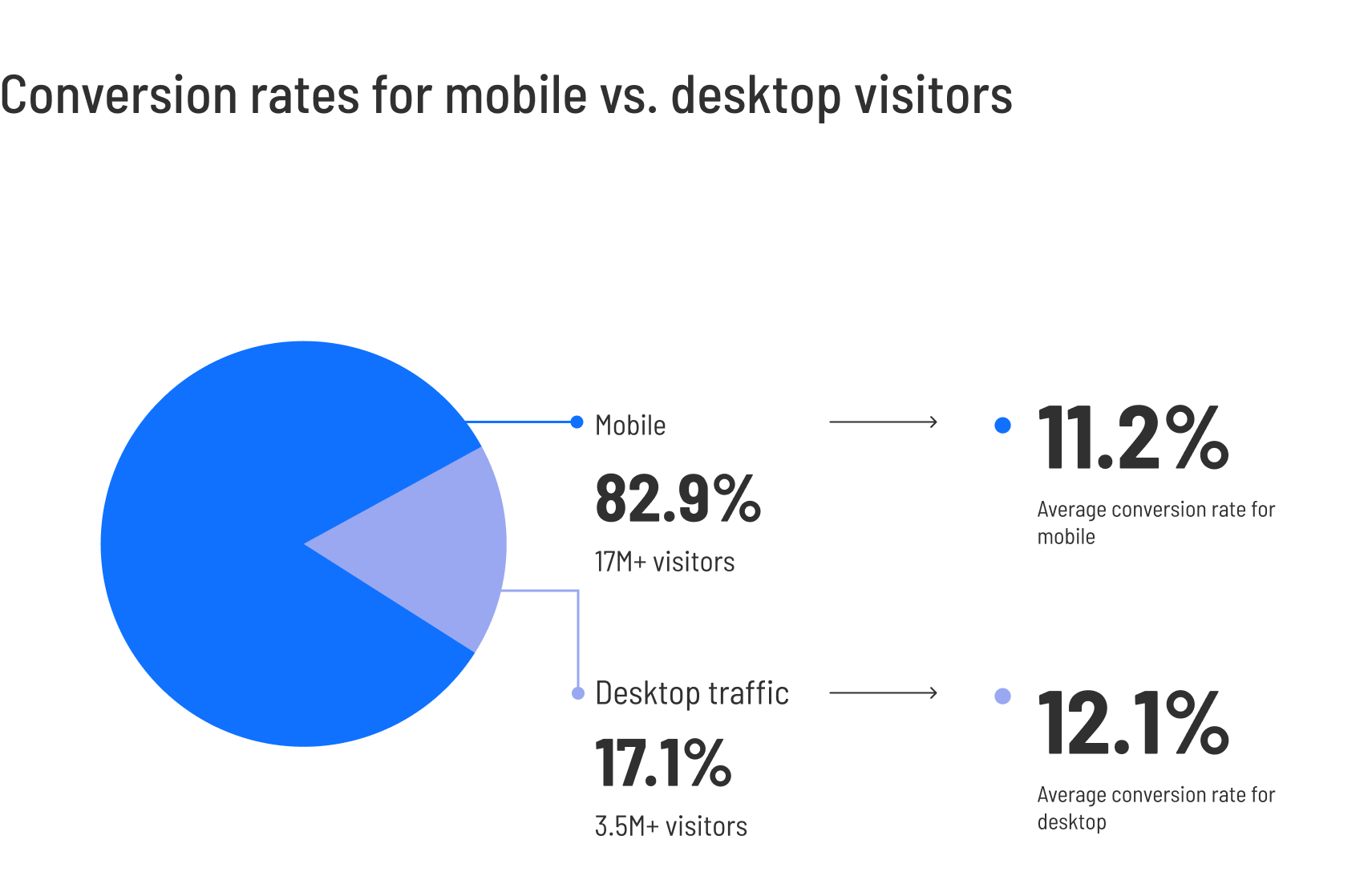
The same study reveals that desktop converts better, but mobile drives more traffic. Take into account that the difference is less than 1%, and you’ll understand how a non-responsive landing page can break your conversions.
Another thing to keep in mind is CTA placement. Move your main CTA button above the fold or duplicate it across sections for better visibility.
Experiment and retarget
Since a landing page can be a place to experiment with creative or unconventional ideas to grab attention, especially if your product or audience responds well to bold moves.
For example, try adding unexpected microcopy, interactive visuals, or time-limited offers inspired by guerrilla marketing tactics. These strategies can reignite engagement when your page feels “stuck” in familiar patterns.
Also, don’t forget to test different CTAs and subject lines in your email campaigns and apply those learnings to your landing page. This will help you maintain consistency across the user journey.
Keep testing
Optimization isn’t a one-time process. After every test, measure results against your benchmarks. Did the bounce rate drop? Did conversions rise? Feed those findings back into your workflow and continue testing. Even minor adjustments (such as a headline change or reduced-form fields) can yield compounding improvements over time.
Focus on one or two metrics at a time. Trying to improve everything at once muddies your data. Target a single issue (e.g., low conversions) and isolate the variables that most affect it.
Always A/B test one variable. To ensure clean results, change one variable at a time in each experiment. For example, the CTA wording, not the CTA and the form simultaneously.
Use automation to win back non-converters. For example, if your landing page aimed to promote your new webinar, you can retarget attendees by setting up a workflow that sends follow-up emails, offers a freebie like the webinar’s recording, and personalized incentives based on the data they provided upon signup. This will nurture attendees and create a more personal relationship between you and your brand.
You can also segment audiences by engagement level for smarter remarketing. For example, if someone visited your pricing page but didn’t sign up, create a workflow that triggers an automated email with a “Need help choosing a plan?” message or a limited-time discount. This can turn a missed conversion into a second chance.
Common Landing Page Metric Mistakes To Avoid
Tracking landing page performance is essential. But interpreting the numbers correctly is where real optimization happens. Here are some common pitfalls to avoid to keep your data meaningful and actionable:
- Chasing vanity metrics: High impressions, long scroll depth, or big traffic spikes might feel encouraging, but they don’t guarantee engagement that makes a difference or the conversion rate you want. Prioritize metrics tied to actual outcomes rather than noise.
- Treating industry benchmarks as universal truths: Benchmarks provide direction, not rules. Your audience, offer, and channel mix are unique. Therefore, a “below average” conversion rate might still be healthy for your niche. Use benchmarks as context, not commandments.
- Skipping context behind the numbers: A dip in conversions may have nothing to do with the landing page itself. Seasonality, changes in traffic sources, or an audience mismatch can all impact results. Always pair your metrics with situational context to avoid misdiagnosing the problem.
- Running A/B tests without hypotheses: Making random changes (e.g., a new headline, a different button color, or a shorter form) without a clear hypothesis leads to scattered results. Let data guide what you test and document why you’re making a change, not just what you’re changing.
- Customizing templates but forgetting your branding: Templates are great starting points, but failing to infuse them with your brand’s visuals, tone, and messaging can make your page feel generic. Weak branding confuses users and erodes trust, ultimately affecting conversions.
- Treating all landing pages the same: A page designed for lead generation doesn’t work the same way as one meant for webinar registrations, product trials, or content downloads. Each page type has a unique user intent. Adapt your structure, messaging, and success metrics accordingly.
By avoiding these common traps, you keep your analysis grounded, your optimizations intentional, and your landing pages aligned with what your audience actually needs.
Turning Metrics into Actions
Rome wasn’t built in a day, and the best-performing landing pages aren’t built overnight. They’re built through observation, iteration, and intent. Every data point tells a story about your audience: what attracts them, what confuses them, and what ultimately convinces them to take action.
When you connect those stories, you’re optimizing your landing pages. Each minor adjustment moves you closer to a landing page that truly works for your business and your audience. Data is the map. Insight is the compass. And with the right tools, you’re always one step ahead.
FAQs
Here are some frequently asked questions about landing page metrics and how to track them.
1. What are the most important landing page metrics to track?
The key metrics include bounce rate, conversion rate, average time on page, click-through rate (CTR), form abandonment rate, and page load time. These collectively show how engaging and effective your landing page is at converting visitors.
2. How do I know if my landing page metrics are “good?”
Benchmarks vary by industry. Therefore, you shouldn’t rely on benchmarks alone, but see what performs for your niche and your audience, both in terms of absolute numbers and quality of leads. Always compare results within your niche, not against universal averages.
3. Why is my landing page bounce rate so high?
A high bounce rate often signals slow load time, unclear messaging, or irrelevant traffic sources. Optimize your above-the-fold content, improve page speed, and ensure your ad or email targeting matches the page’s intent.
4. How do I connect my landing page performance with ROI?
Track how many conversions come from each campaign. After that, divide total spend by conversions to find your cost per conversion, then compare revenue against cost to calculate ROI.
5. What’s the difference between CTR and conversion rate?
CTR measures how many users click your CTA button, while conversion rate measures how many complete the intended action. High CTR but low conversion often means your CTA is appealing, but the post-click experience needs work.
Similar Posts
 Published by

 Published by

Create, send and optimize your email marketing campaigns!