















Email Whitelisting: A Practical Guide to Better Inbox Placement [2026]
Published By Tea Liarokapi
January 23, 2026

23/01/26
Picture this: you launch a new newsletter. The automation fires, the welcome email looks perfect, and everything seems fine. Then support starts getting messages like “I never got it” or “It’s not even in spam.”
Your ESP may show the email as delivered, but inbox providers still decide where it lands. First-time or bulk emails often end up in Promotions, Updates, or Spam. That’s where whitelisting matters. Adding you to contacts or marking you as safe signals trust, and when enough subscribers do this early, inbox placement improves fast.
This guide shows why email whitelisting matters, when and how to ask without being pushy, best practices, and how to embed it into your flows without disrupting your message.
Turn whitelisting into lasting inbox trust
Create and send email campaigns that strengthen engagement and boost deliverability.
Try MoosendWhat Happens if Subscribers Don’t Whitelist You?
Even if your infrastructure is perfect, inbox providers still try to be safe rather than sorry when it comes to bulk senders. When subscribers don’t add you as a trusted sender, their mailbox has no extra reason to favor your emails over the dozens of other newsletters they get every week.
So what actually happens when subscribers don’t take that small step to mark you as trusted?
Reduced inbox placement
If subscribers don’t take any action to mark you as a trusted sender, your emails are far more likely to land in Promotions, Updates, or Spam. This happens to solid brands and reputable senders with clean domains, especially when you’re new to someone’s inbox or when you send email blasts.
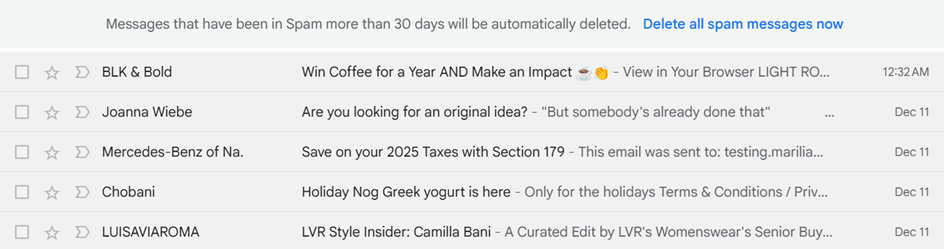
From a mailbox provider’s perspective, your message checks all the “bulk email” boxes: marketing language, multiple links, images, tracking, and scheduled delivery.
Inbox algorithms look for signals of genuine engagement like replies, forwards, contact additions, and tab movements. Without those early cues, mailbox providers treat you like any other bulk sender, which usually means secondary tabs or filtered placement.
And the impact shows up quietly in your metrics:
- Welcome emails get less visibility.
- Lead magnet follow-ups get buried.
- Carefully timed onboarding nudges compete with dozens of other promotional messages instead of showing up where people actually act.
Over time, that lower visibility leads to lower opens and clicks, which feeds straight back into worse placement for future campaigns.
Of course, that is not to say that whitelisting replaces good deliverability practices. Still, it gives inbox algorithms a clear, human signal that your emails belong in the inbox, not behind a tab or a filter.
Lower engagement and worse sender reputation
Deliverability is brutal with first impressions. When someone joins your list, they’re at peak interest. If your first emails land in the Promotions tab or are filtered away, they don’t open or get clicked.
From the inbox provider’s point of view, that looks like zero interest. Couple that with a complaint rate higher than 0.01% from recipients who forgot they signed up in the first place, and you have the recipe for slowly training the algorithm to treat your messages as background noise.
Even when you send something genuinely valuable, like an offer, a feature launch, or a time-sensitive update, your email campaign is now trying to fight its way out of the “unimportant” bucket.
Whitelisting helps you avoid that cold-start spiral. If you can get even a small slice of new subscribers to add you to their contacts or mark you as safe right away, your first emails will land in a more favorable place. That early engagement tells mailbox providers that your emails are wanted.
Over time, this small action protects your sender reputation and keeps your average performance from sliding downhill.
Broken or delayed workflows
The painful part is when key workflows quietly break because emails never surface.
Think about where your program depends on timely email:
- The welcome email that delivers a lead magnet or next steps
- Trial onboarding sequences that nudge people towards activation
- Password resets, verification codes, billing, or renewal notices
- Product updates that explain changes before support tickets start flooding in
If those messages are delayed, buried in the Promotions tab, or dumped in spam, the experience on the other side could be disappointing. This disrupts the flows people rely on, leading to expired codes, missed activation steps, and lost value.
This then turns into more support load, slower conversions, and more churn than the numbers alone suggest.
In that case, whitelisting acts as a small but powerful safety net. A simple prompt to trust your emails early on can make the difference between a workflow that works and one that quietly fails.
When and Where to Ask Subscribers to Whitelist You
Asking people to whitelist you is a bit like asking for a favor. The “when” matters as much as the “where.” The sweet spot is to ask in moments and locations where subscribers are already expecting something from you (like you would do with UX copy) and clearly see the value of getting your emails reliably.
In your welcome email
Your welcome email is the most natural place to introduce whitelisting. Subscribers have just signed up, they’re actively expecting your message, and they’re still in a high-intent mindset.
The key here is placement. You don’t want to lead with whitelisting. So, start with a standard welcome structure. Greet the subscriber, explain what they’ve signed up for, and set expectations around content and frequency.
Once that context is established, add a short, friendly line near the end of the email or just above the footer. One sentence is enough. You can also surface it as a subtle “pro tip” block under your main CTA if that better fits your layout.
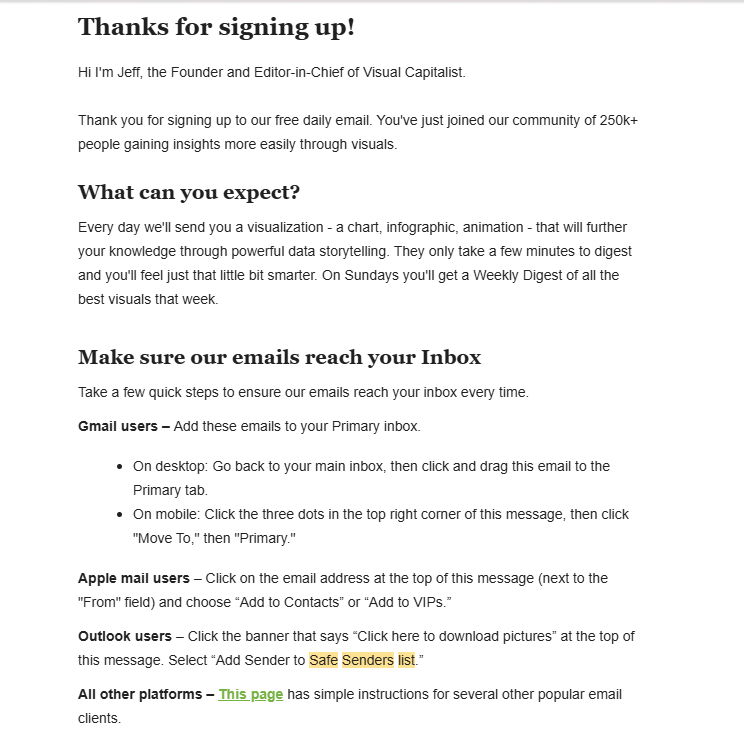
This is the welcome email I received upon signing up for the Visual Capitalist’s newsletter. You can see that the structure has a greeting, and then shows what I could expect to receive and how to receive it.
At the end, the email is pointing to a short guide section and an instructions page. The tone feels like they’re helping me get full value from what I signed up for.
If your onboarding includes a follow-up to the welcome email, this is where you can recover subscribers who may have missed the first one. At this point, some people realize they never saw the initial message or that it landed in Promotions or spam.
A short line near the top acknowledging that, followed by a link to your whitelisting instructions, gives them a clear fix without blame. It also reinforces that whitelisting is a normal part of the experience, not a one-off request.
After delivering a lead magnet
Lead magnets are a key lead generation tactic and a natural point to introduce whitelisting, as value has already been exchanged and follow-up is expected.
Someone signed up for a resource, a multi-part series, or a follow-up sequence. The delivery email naturally sets expectations for what comes next.
This is why the whitelisting request works best when it’s directly tied to follow-up content. Instead of a generic deliverability message, reference what the subscriber can expect next and position whitelisting as the way to make sure it arrives on time.
Then, ensure you:
- Place the whitelisting prompt right after the download link or in a small “don’t miss the next part” block.
- Use explicit timing language (e.g., “You’ll receive part two tomorrow” or “The next template arrives in 24 hours”). This will help subscribers connect whitelisting with a specific outcome they care about.
This approach works especially well for ebook series, template packs, and educational email courses, where missing one email breaks the experience. It turns whitelisting into the practical step that ensures the rest of the series arrives on time. When timing is clear and the sequence is obvious, the request feels logical, helpful, and easy to act on.
Inside the email footer or the preference center
For existing subscribers, whitelisting should never interrupt the main message. At this stage, it works best as something that’s available when people are already managing their relationship with you.
Email footers are a natural fit for this. A single line placed near unsubscribe or preference links keeps the request visible without hijacking attention. You could add a single line under the unsubscribe/preferences links of your email footer.
Here’s what Adobe did:
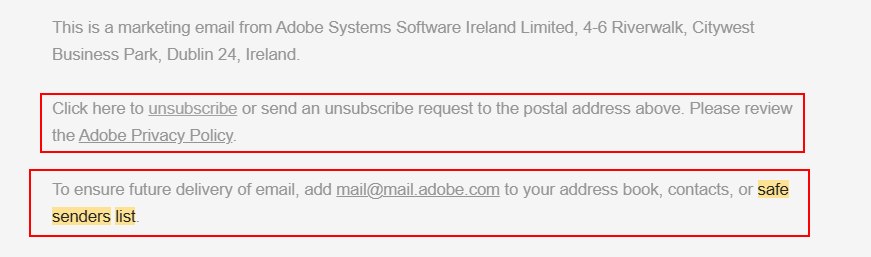
The brand takes it a step further by linking to their Privacy Policy before asking to be added to the safe senders list. This ensures consistency and trust that the brand won’t spam recipients.
The preference center is another effective placement. When subscribers are choosing topics or frequency, they’re already thinking about control and inbox management. Adding a small prompt or link to your whitelisting guide here feels relevant and self-serve, especially for subscribers who are actively trying to fix missing emails.
In both cases, the goal is availability. You’re giving people a clear option to improve delivery when they’re ready, without forcing the issue.
On a thank you page
Thank-you pages are high-attention moments in your funnel. The action is complete, expectations are set, and users are ready for the next step.
That makes them ideal for a short whitelisting prompt. Here’s how this can look after a whitepaper request:
“We’ve sent your whitepaper to your inbox. To make sure you get it and future updates don’t end up in your spam folder, take 10 seconds to add us to your contacts. Here’s how to do it in Gmail, Outlook, and other mailbox providers.”
If you have jump links, put them right there on the page. You’re catching people at the exact moment they’re waiting for an email, which makes the whitelisting action feel perfectly natural and logical.
Re-engagement or win-back emails
Re-engagement flows are where deliverability and trust are already fragile. Some people stopped opening because they lost interest, others stopped opening because your emails slid into Promotions or spam, and simply disappeared from view.
You can’t fix everything with whitelisting here, but you can give still-interested subscribers a way to pull you back into their inbox.
Keep it simple and make sure to highlight the optional nature of the action:
“If you’d like to keep hearing from us but haven’t seen our emails in a while, it might be your filters, not you. Adding us to contacts or marking this as ‘Not spam’ helps your inbox recognize us again. Here’s a quick how-to guide.
Of course, in this case, the whitelisting request isn’t the hero of the message. Your main focus is your re-engagement sequence to answer the core questions:
- Why should I stay on this list?
- Are your emails worth a place in the inbox?
For the segment that wants to stay but hasn’t been seeing you, this gives them a concrete fix instead of relying on them to figure out they need to whitelist your emails in the first place.
For this email flow, here’s where to place your whitelisting request:
- Near the bottom of the email, after your main “stay subscribed” CTA
- As a PS: line. For example, “P.S. If you haven’t seen our emails lately, here’s what could be wrong.”
Overall, to make whitelisting work, add it where natural consumption points occur, like a welcome, delivery, or value moment. Keep it short, benefit-led, and optional. Create a simple, clean whitelisting guide rather than cramming steps for every client into every email.
How to Get Subscribers to Whitelist You without Sounding Pushy
Timing may be half the game, but how you ask is what decides whether people actually do it.
You don’t want to sound scared (“please whitelist us or we’ll die”) or demanding (“go do this now”). Instead, treat whitelisting as a small, optional “pro tip” that helps them get more of what they already said they wanted.
1. Lead with value
Fear-based copy puts your problem at the center, not your recipients’. It doesn’t speak to their needs or offer real value. Using email copy like “You might not get our emails” can also feel a bit pushy.
What you can do instead is to flip the narrative. Phrases like “Want to receive our emails to your inbox?” or “Know all the industry secrets by adding us to your safe senders/contact list” propose a suggestion or an action based on a small “yes” on the recipient’s end.
Some creative ways to adapt your email copy are the following:
- “Get all our updates without delays by adding us to your contacts.”
- “A quick add to your contacts keeps future emails easy to find.”
- “Want the next email to land straight in your inbox? Add us to your address book.”
- “To make sure our emails show up right where you expect them, add us to your contacts.”
- “Want us to stop playing hide-and-seek with your inbox? Add us to your contacts.”
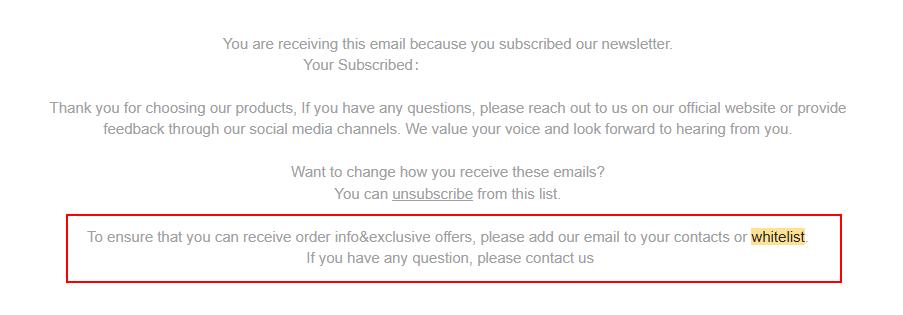
The example above is from Iron Panda, an eCommerce fitness brand. The value here is evident, as it’s not just about receiving a campaign. The whitelisting practice here is tied to order information and exclusive offers.
Also, urging the recipient to contact your brand if any questions arise gives the email a nice touch and positions the brand as one that cares about customers.
All in all, value-led copy promotes whitelisting as an email practice that provides a type of upgrade for recipients, not an action that saves your email campaigns.
2. Keep the ask short and casual
With attention spans dwindling and busy schedules becoming the norm, recipients don’t have the time or energy to read a mini-post about whitelisting inside your email. Therefore, there’s no need for you to give a full guide on it. In most cases, one simple sentence can do the job.
Make sure to use great openers that feel light and human:
- “Quick tip:”
- “One small favor:”
- “Before you go, a 10-second tweak:”
Openers like this give recipients an idea of what your next sentence will be about. When you follow up with the actual request, make sure to use clear and short instructions:
“Quick tip: Add us to your contacts so the rest of this series can be delivered straight to your inbox.”
If you need more details, don’t cram them into the email body. Just use an email CTA with a link that the user can follow to understand exactly what to do next:
“Here’s how to do that in Gmail, Outlook, and more.”
Keeping the ask short and cohesive helps your email copy stay clean and makes it easier to collect interested leads, as people who care about your campaigns and brand will click through for instructions.
3. Use clear microcopy
Most subscribers don’t know what “whitelisting” means. And they probably won’t care to find out, either. “Whitelisting” sounds technical and makes the action seem complicated and time-consuming.
To avoid making your request sound like a knowledge base article, turn it into educational email content that recipients can understand.
Use direct language that shows an everyday email action. Instead of only saying “Whitelist our email,” you can say “Add us to your contacts or whitelist our email.”
Or, you can do it like Eddy Shleyner’s Very Good Copy:
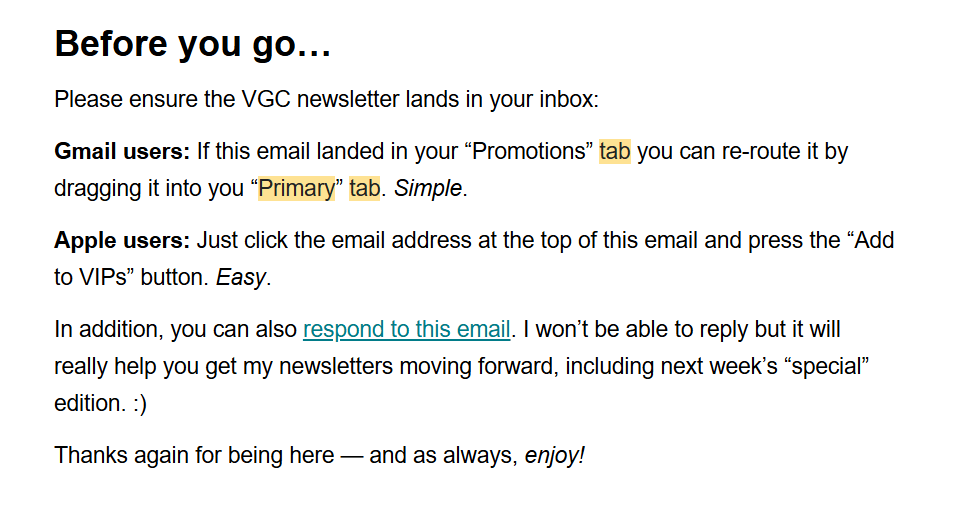
This is a great example of creating clear and digestible whitelisting copy without sounding too technical. It’s giving recipients a clear action-to-outcome flow while keeping the copy jargon-free.
It also creates a hidden benefit by showing users exactly how to perform the action while they’re reading the email and are already engaged.
4. Consider visual cues
A tiny bit of visual structure can make your request feel easier and more skimmable. Of course, you don’t need to create a dedicated email design for whitelisting.
All you need is a content block with skimmable content that makes whitelisting look effortless to users unfamiliar with the practice.
Here are some methods you can use:
- A 3-step mini checklist:
- Open this email
- Click our name at the top
- Tap ‘Add to contacts’
- A small arrow/emoji pointing to the instruction:→Quick tip: Add us to your contacts so you don’t miss the next whitepaper.
- A boxed “Pro tip” block in your welcome email: Pro tip: Tell your inbox you want to hear from us by adding us to your contacts.
Here’s an example by the Generative AI Newsletter that nails the visual cue approach:
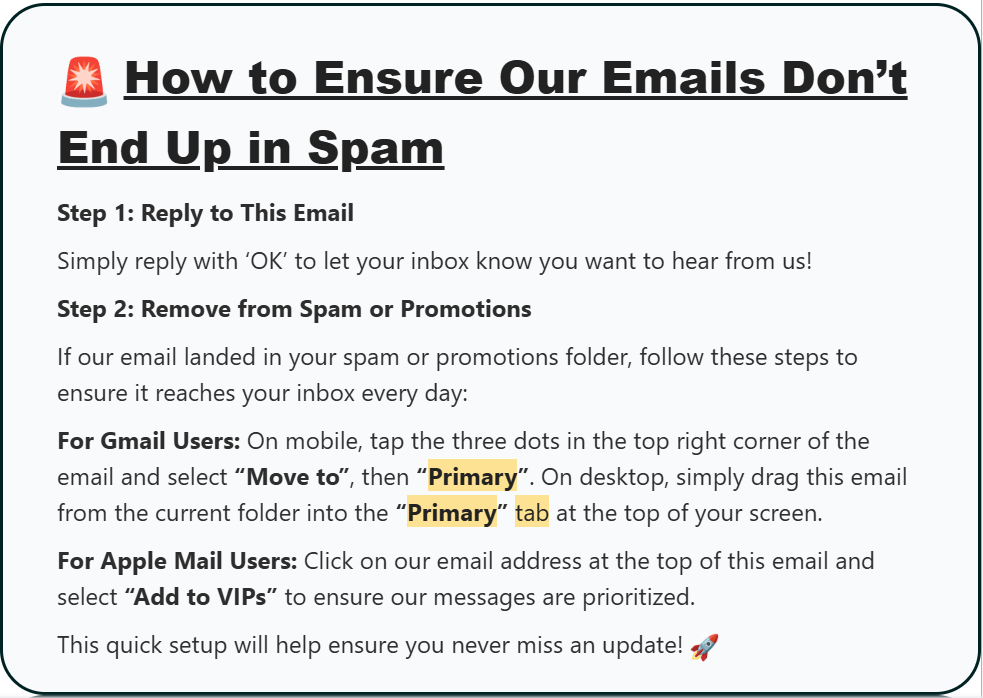
This is the welcome email I received upon signing up. The combination of a dedicated visual cue and emojis captured my attention when skimming this email.
The mini checklist, on the other hand, is a very handy tool for readers who want to remember the information while performing the task at hand.
5. Provide options
Different inboxes and user behaviors mean there isn’t one single “whitelisting action.” But does this mean you have to explain every client in every email?
Not really. What you need to do is give people a couple of easy options in the email copy—especially if you’re using zero-click campaigns—or an easy way to do it through a dedicated link at your email footer.
For example: “If this email landed in Promotions or Junk, drag it to your main inbox or add us to your contacts or safe senders list.”
Or, if you want to send users to a separate page with a step-by-step guide, you can do it like this:
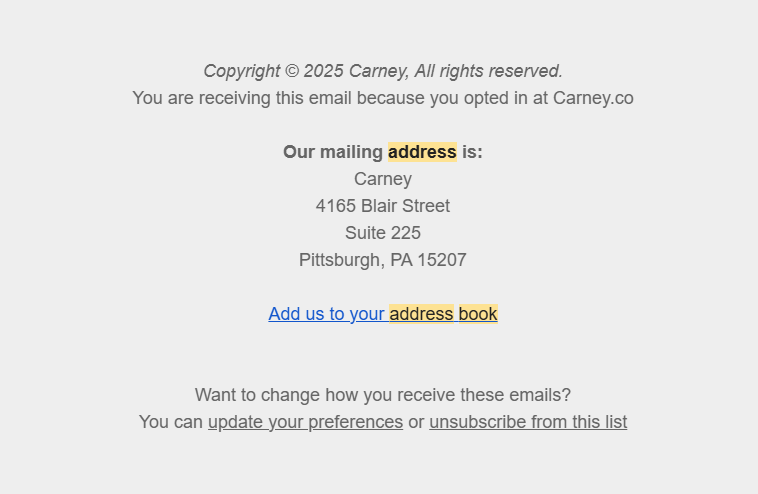
This whitelisting example by Carney keeps the in-email copy universal and short. Providing a link with clear whitelisting options gives readers who click through more precise guidance.
Put together, these principles give you a powerful combination of actions. Use value first, then follow with a short line of copy and actionable language that leads to an optional link to a client-specific guide.
Mini Whitelisting Guides for Popular Email Clients
Your subscribers don’t experience your email campaigns as a single unified system. They have Gmail, Apple Mail, Outlook, Yahoo, or some default app on their phone or computer, each with its own filtering behavior, quirks, and ways of interpreting trust.
Giving people simple, client-specific instructions increases the likelihood that your messages land where they should.
Below are short guides you can use for your welcome emails, thank-you pages, or onboarding flows.
For Gmail
Gmail is the most popular email provider. With around 1.8 billion active users worldwide, it accounts for a huge slice of daily email traffic, especially among consumers and professionals.
Adding to its popularity, Gmail features some of the most sophisticated filtering systems. Promotions tab, auto-categorization, and behavioral weighting make it seem like Gmail sees everything. Giving subscribers a way to signal you’re not just another sender is genuinely valuable here.
To urge Gmail users to whitelist your emails, here’s what you can tell them:
- Add us to your contacts:
- Open our email in Gmail.
- Hover over our name at the top.
- Click “Add to contacts” in the little card that appears.
- Help future emails hit the inbox:
- If this email is in Promotions, click and drag it into Primary.
- When Gmail asks if it should always do this for our emails, click “Yes.”
Gmail uses contact lists and actions like dragging to Primary as strong signals of personal relevance. That puts your emails in a better position than relying solely on algorithmic categorization.
This action takes only a moment, but it ensures important content shows up where people actually look.
For Apple Mail
Apple Mail consistently shows up at the top of global email client usage lists, especially because it’s the primary email client that comes pre-installed on Apple devices. Since the iOS 15 update introducing Mail Privacy Protection (MPP), marketers have changed how they interpret engagement.
Apple now preloads images, meaning opens can appear higher than they actually are. That makes it harder to tell who genuinely interacts with your emails. And that’s exactly where subscriber trust signals like whitelisting pick up the slack.
When someone manually adds you to their contacts, that’s a real, deliberate action that MPP can’t mask. And mailbox providers treat those actions as stronger indicators of genuine interest than inflated open rates.
Here’s how you can explain whitelisting to Apple Mail users:
- What to do (on a Mac computer):
- Open our email in Mail.
- Right-click our sender name at the top.
- Choose “Add to Contacts.”
- What to do (on an iPhone/iPad)
- Open our email in Mail.
- Tap the sender’s name.
- Tap “Add to Contacts” or “Create New Contact” and save.
With MPP blurring the line between “opened” and “actually engaged,” adding a sender to contacts becomes one of the clearest signals that a subscriber really wants your messages. It also helps Apple Mail treat your emails more like personal communication and less like automated bulk.
Once someone saves you to their contacts, future messages are treated more like personal mail than generic bulk sends.
Outlook (desktop and web)
Outlook powers personal inboxes, corporate accounts, and large-scale business environments.
That means stricter spam filtering, additional security layers, and a higher likelihood that bulk emails will be deprioritized unless the user explicitly marks the sender as safe.
Here’s how to tell an Outlook user how to whitelist your email:
- Add us to your contacts (on Outlook Desktop):
- Open our email.
- Right-click the message.
- Hover over “Junk”, then select “Never Block Sender.”
- What to do (on Outlook Web)
- Open our email in your browser.
- Click the three dots (•••).
- Choose “Add to Safe senders.”
Outlook’s safe-sender designation bypasses several layers of filtering. This is especially important in workplace environments where IT policies can otherwise down-rank unfamiliar senders.
This means a quick click keeps important onboarding emails and updates out of the Junk folder.
Yahoo Mail
Yahoo Mail may not dominate as it used to, but it still serves a percentage of the population. Its filters can be aggressive, sending your email to spam when they detect repeated marketing-style formatting. Adding a sender to contacts gives Yahoo clear confirmation that your messages are wanted.
Here’s the guide to include in your next campaign for Yahoo users:
Add us to your address book:
- Open our email in Yahoo Mail.
- Click the three dots (•••).
- Select “Add sender to contacts.”
If you find us in Spam, open the email and click “Not spam.”
Yahoo strongly weighs the distinction between “unknown sender” and “saved contact.” This simple action helps keep future emails out of spam entirely.
Android Mail Apps
Android doesn’t have a single default mail client, but many: Gmail, Samsung Mail, Outlook for Android, etc.
The universal constant across almost all of them is the contact list. Most Android mail apps treat “saved contacts” as the strongest trust signal, regardless of email app type.
Here’s how to urge Android users to whitelist you:
Add us to your safe senders list:
- Open our email.
- Tap the sender name or email address.
- Select “Add to contacts” or “Create contact.”
If the email hits Promotions or Spam, move it to your main inbox or tap “Not spam.”
Across Android apps, being in the user’s contacts is one of the most reliable signals that a sender is legitimate and welcomed, especially when different apps interpret bulk mail differently. It’s the quickest way to ensure users see follow-ups and access links without digging through folders.
Whitelisting Best Practices for Better Deliverability
Whitelisting is one piece of a bigger deliverability puzzle that involves recognition, trust, consistency, and technical hygiene. If the rest of your setup is a mess, whitelisting can’t save you. If your foundations are solid, it becomes the extra nudge that gets you into the inbox faster and more often.
This is where you connect the dots between a subscriber’s action (add you to contacts, mark “not spam”) and what you and your platform do behind the scenes (authentication, reputation, list quality).
1. Keep your “From” name consistent
Your “From” name is the first trust signal people see. If it keeps changing from “Marketing Team,” to “Company Newsletter,” to “Alex from X Brand,” you’re making recognition harder for both humans and filters.
Using a clear, consistent sender name that includes your brand makes it easier for subscribers to recognize and trust your emails. This supports higher open rates and long-term engagement.
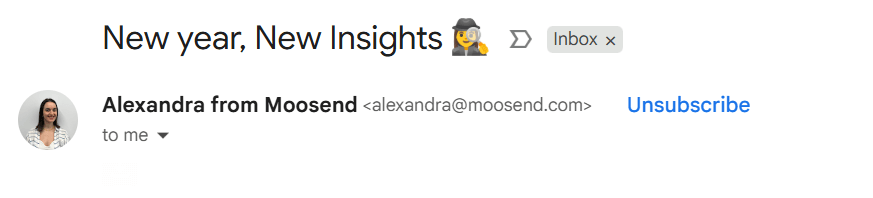
Pick a “From” name format and stick to it. You can use your brand name for product updates, transactional, all-business stuff, and the “Name from Brand” format for more conversational or content-led emails.
The key is to not make people or algorithms wonder whether you’re the same sender they opted in to.
2. Use a recognizable sender address
Similarly, constantly hopping between sender addresses like info@, no-reply@, newsletter@ reduces familiarity and can raise flags.
Choose a primary sending domain and address for your marketing emails. For example, [email protected] or [email protected].
Keep it tightly tied to the brand on your site and in your ESP account. This helps mailbox providers link your sending behavior, authentication, and engagement history to a single identity, rather than scattering your reputation across multiple addresses.
Not to mention that it also makes your whitelisting instructions simpler, as all you have to say is “Add [email protected] to your contacts.”
3. Send predictable content early in the relationship
The first few emails after signup are where inbox providers decide whether you’re actually wanted in the customer’s inbox. If your early content is erratic, spammy, or wildly different from what you promised at signup, you’re burning that trial period.
Use your first 2-3 emails to:
- Deliver exactly what recipients signed up for
- Keep formats clean and lightweight
- Reinforce your value proposition and expectations
Content relevance and engagement can address core deliverability issues, as engagement signals signal to mailbox providers that your recipients want to receive your campaigns.
If people open your emails, click through your links, and interact with your content, your inbox placement improves. Whitelisting then amplifies those early positive signals.
4. Maintain a clear sending schedule
Filters love predictability. If you go from radio silence to blasting every day during a sale, don’t be surprised if engagement drops and your deliverability follows.
Choose a cadence that your team can sustain, in terms of quality. If it’s a weekly digest, for instance, send it weekly; if it’s a quarterly product update campaign, send it quarterly, and so on.
Sending patterns and habits are a key factor that inbox providers track over time. In this case, whitelisting helps make sure those regular touches land where they should. However, consistency itself trains inboxes to view you as legitimate, not as sporadic noise.
Tip: If you’re sending from a new domain or IP, keep your cadence steady, especially during the warm-up stage. Gradually increasing volume helps inbox providers build trust, and whitelisting reinforces those early positive signals.
5. Remove inactive users before major sends
Nothing tanks sender reputation faster than repeatedly emailing people who never open, click, or even see your messages. High volumes of non-engagement and bounces are classic warning signals for filters.
Before big campaigns like product launches, Black Friday promos, or announcements, make sure to perform a thorough list cleaning. Exclude chronically inactive segments or place them into a separate re-engagement flow, not the main blast.
Whitelisting shines when it’s layered on top of a healthy list. If only your most engaged subscribers see “add us to contacts,” their behavior will reinforce strong engagement signals instead of being diluted by thousands of cold addresses.
6. Combine whitelisting with SPF, DKIM, and DMARC
Finally, the technical backbone. Proper email authentication is non-negotiable if you care about inbox placement.
- SPF tells inbox providers which servers are authorized to send emails on behalf of your domain. If someone else tries to spoof your domain, SPF helps block it.
- DKIM is a “digital signature” added to each email that proves the message really came from your domain and wasn’t altered in transit. Providers use it as a trust and authenticity check.
- DMARC provides a policy layer that specifies what inbox providers should do when an email fails SPF or DKIM (quarantine it, reject it, or allow it). It also sends back reports so you can see if anyone is trying to impersonate your domain.
- BIMI stands for Brand Indicators for Message Identification. It builds on DMARC by adding a visual trust signal. When set up correctly, it allows inbox providers to display your verified brand logo next to your emails. While it doesn’t directly affect delivery, it strengthens brand recognition and helps recipients quickly identify legitimate messages.
Of course, you don’t need to talk about any of this with your subscribers. So, handle the above quietly in the background.
Whitelisting and using authentication protocols show mailbox providers can verify you’re a legitimate sender. And recipient interaction shows that subscribers can confirm they actually want you in their inbox.
That combination turns whitelisting from a tiny “nice if it happens” action into part of a robust deliverability strategy that consistently gets your emails in front of real people.
Go Straight to the Inbox
Whitelisting is one of those small steps that delivers outsized results. It takes subscribers seconds, but it can dramatically improve inbox placement, especially in those early, high-stakes moments of your relationship.
The key is to make your ask feel natural. Place it where it fits, tie it to real benefits, and give people clear instructions so they never have to guess what to do.
Whitelisting works best when it supports a solid deliverability foundation. It amplifies good signals but can’t repair bad ones. Pair it with authentication, consistent sending habits, and healthy list management, and it becomes a simple, reliable lever that helps more of your emails land exactly where they should.
FAQs
Now, let’s answer some of the most common questions regarding whitelisting emails and the reasons behind the practice.
1. What does email whitelisting actually mean?
Email whitelisting is when a subscriber manually signals that they trust your emails by adding you to their contacts, marking your message as “not spam,” or moving it to their main inbox, so future emails are less likely to be filtered.
2. Does whitelisting guarantee inbox placement?
No. Whitelisting doesn’t override poor sending practices or broken authentication. It works best as a reinforcement on top of solid deliverability fundamentals like engagement, consistency, and proper setup.
3. Does whitelisting matter for transactional emails, too?
Absolutely. Password resets, verification codes, and billing notices rely on timely delivery. Whitelisting helps ensure these critical messages aren’t delayed or buried.
4. Is whitelisting useful if you already have SPF, DKIM, and DMARC set up?
Yes. Authentication proves you are who you say you are. Whitelisting proves subscribers actually want your emails. Together, they create a much stronger trust signal than either alone.
5. How many times should you ask someone to whitelist you?
Once or twice is usually enough. Repeating the request too often can come across as pushy. After the initial ask, keep it available in the footer or the preference center rather than resurfacing it constantly.
Similar Posts
 Published by
 Published by
 Published by

Create, send and optimize your email marketing campaigns