














Email Spam Filters: How to Use Their Rules to Craft Better Emails
Published By Maria Fintanidou
December 1, 2025

01/12/25
If email marketing were a movie, email spam filters would be the villain. At least, that’s what many guides suggest. But are spam filters really the bad guys? Or helpful tools that show you how to become a better email marketer?
We’re standing for the second case. Spam filters are there for a reason: to protect users from low-quality, suspicious, or unsolicited messages.
From a marketer’s perspective, they set boundaries that help you create relevant, trustworthy, and authentic content for your audience.
So, this isn’t a post on how marketers (or potential spammers) can outsmart these systems. Instead, we’ll look at how they work.
We’ll also focus on how real senders can comply with best email practices and anti-spam requirements by investing in clarity, relevancy, and transparency.
Win your subscribers’ hearts
Ensure inbox placement with Moosend’s deliverability features
Start freeHow Email Spam Filters Work
In short, spam filters analyze each message that tries to reach the inbox. The legitimate ones get through, whereas unwanted emails like phishing attempts end up in spam or are rejected.
Email service providers, such as Gmail, Outlook, and Yahoo, use spam-filtering technology to keep malicious emails out of recipients’ inboxes. They rely on multiple signals to decide whether to deliver or block a message.
Here are the most common types of spam filters for email:
- Content filtering: These filters analyze everything within the email to determine whether it’s legitimate. These include spelling errors, spam trigger words, text-to-image ratio, links, and layout.
- Rule-based filtering: Inbox providers or users set predefined rules, like blocking certain keywords, senders, or attachments, to allow email delivery. If an email matches any of these, spam filters don’t let it through.
- Blocklist filtering: Before delivering a message, providers check the sender’s reputation against a known blacklist. If the sender has been flagged as spam in the past, email clients will block any messages from them.
- Engagement signals: ESPs track how subscribers interact with a brand’s emails, including both positive and negative signals. For example, a negative action may be an unsubscribe or spam complaint. On the contrary, a subscriber opening or moving an email from spam to the inbox is an indicator of trust and interest.
- Authentication protocols: Authentication filters check whether the sender’s domain is verified using authentication systems like SPF, DKIM, and DMARC. If these protocols aren’t properly configured, the campaign will likely land in spam.
- Language and country filtering: When subscribers receive an email written in a foreign language (and this doesn’t match their preferences), these filters may move it to spam. The same goes if recipients want to filter messages from certain countries.
Keep in mind that inbox providers won’t rely on just one method. Instead, they combine several filtering systems to detect and block threats.
Also, there’s no way of knowing the specifics of each spam filter. Because if we did, it would allow spammers to adjust and bypass their rules in no time.
So, the key isn’t to trick spam filters for email. Rather than that, you must focus on creating emails that align with your subscribers’ preferences and ISPs’ standards.
Spam Filter Best Practices to Get Emails into Inboxes
Sometimes, email spam filters will send even trustworthy emails to spam folders. But it’s also true that the more your subscribers engage with your campaigns, the more servers trust you as a sender.
Therefore, instead of working against or around spam filtering, you should learn from their rules and avoid any tactic that triggers them or annoys your audience.
1. Invest in a trustworthy email platform
Everything starts with your sending infrastructure. A reliable solution comes first because it directly affects your email deliverability and sender reputation. That’s why you need to review the features of any email software before committing.
This is what to look for:
- High deliverability: Read user reviews and visit tool testing platforms to check how each solution scores in terms of deliverability. Also, check if there are deliverability experts who may guide you if needed.
- IP and domain management: Email platforms should provide a pool of trustworthy IP addresses that you can use to send emails. Make sure they have options for dedicated IPs when required, for example, for time-sensitive campaigns.
- Email authentication protocols: Look for a tool that helps you configure SPF, DKIM, and DMARC authentication, offering records, built-in setup, and helpful resources.
- List building and hygiene: Ensure GDPR-compliance when adding subscribers to your list with processes like double opt-in and easy unsubscribe. The software should also handle spam complaints and bounces so your list stays clean.
- Performance reporting: It’s important to have access to detailed email analytics to keep track of inbox placement and engagement. These give you a clear picture of your campaign performance, helping you identify bottlenecks and optimize.
- Compliance and certifications: To ensure inbox placement, use an email tool that complies with regulations like GDPR and the CAN-SPAM Act. Also, certifications such as CSA and M3AAWG verify that senders meet technical standards for inbox placement.
- Spam testing: Some platforms allow you to run spam checks before sending. Spam testing warns you if your email content is likely to trigger spam filters, catching errors before they become deliverability issues.
2. Authenticate your domain
Security checkpoints in airports verify who you are and that you’re there just to travel. Similarly, email clients use authentication protocols to confirm that an email comes from a legitimate sender.
With email authentication, you prevent cybercriminals from using your domain and reaching users. That way, you keep your sender reputation intact, subscribers are protected against scams, and your emails fulfill their purpose.
Let’s take a look at the main email authentication protocols:
- Sender Policy Framework (SPF): SPF tells filtering systems which IPs are authorized to send emails from your domain. Adding an SPF record to your domain’s DNS helps mail servers confirm that your brand owns that domain and can deliver emails from it.
- DomainKeys Identified Mail (DKIM): This method adds a digital signature to the email header, associating the message with a specific sender. Email providers check the signature before delivering emails to verify the sender and protect users from spam.
- Domain-based Message Authentication, Reporting, and Conformance (DMARC): DMARC adds an extra layer of security by setting policies for handling emails that fail SPF and DKIM checks, allowing servers to block fraudulent messages.
Each platform has a unique process for email authentication. For instance, Moosend users can set up these records directly through their account settings: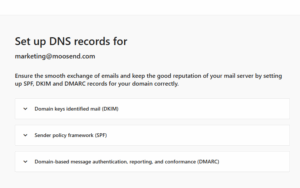
As mentioned, though, your email solution shouldn’t just require authentication, but also offer help. So, make sure to browse their Help Center documentation to ensure proper configuration.
No matter which software you use, you can use free tools to check your DMARC authentication records in a few seconds.
3. Send to people who’ve given you consent
What’s a surefire way to trigger a spam complaint? Emailing people who haven’t given you consent. Buying contacts might sound like a quick growth hack, but it only brings distrust and a damaged sender reputation.
Your brand could even end up on a blocklist, as most of them flag IPs involved in unsolicited messaging. Besides that, purchased lists often contain spam traps, which, once hit, may get your domain blacklisted.
Instead, invest in growing your list organically. Organic lists are more engaged because people who give you permission to contact them want to see what you offer. So, they’ll be eager to open, read, and act on your emails.
Plus, organic lists offer clearer performance insights. When all you have are contacts you bought, you can’t know if your content is the reason for low engagement.
But if opt-in subscribers don’t open your emails, your safest bet is to improve your subject lines, not question the list quality.
Now, how can you grow your list organically? Here are some effective strategies:
- Include visible yet not intrusive newsletter signup forms on your website.
- Ask for people’s email addresses in return for giveaway and contest entries.
- Incorporate “Sign Up” buttons into your social media pages.
- Capture email addresses through a webinar registration form.
- Collect email addresses offline, e.g., at industry conferences or your physical stores.
- Offer downloadable resources that people get for free by sharing their email address.
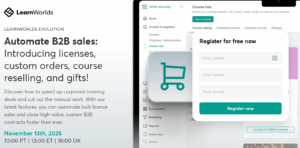
In this event registration form, LearnWorlds keeps things simple by asking for the essentials: the visitor’s full name and email address. The copy is clear and short focusing on the event’s takeaways and the outcomes expected when using their latest features.
4. Make your opt-in confirmation email count
Let’s start by stating the obvious: a double opt-in process is a must-have for clean, high-quality lists. With it, people confirm their registration by clicking on a link in a dedicated email.
Passing through this step shows genuine interest on their part. So, if your emails meet audience expectations and needs, you’ll get interactions and show mailbox providers that your emails are relevant.
You might think it’s a typical email, but it doesn’t have to be plain. Minimalistic and straightforward is the way to go with signup confirmation emails.
Also, they can serve more purposes than this one, such as increasing brand awareness or amplifying your reach.
Let’s see some examples of what you can do with them:
- Remind people of the perks of being a subscriber
- Let them know what’s coming next
- Inform them about the email frequency
- Include a short mission statement to help them understand what your brand stands for
- Share contact information or links to customer support and FAQs so they can reach out in case of questions or issues
- Add links to recent and popular blog posts
- Invite subscribers to join your social media channels
Whatever you choose, make sure it doesn’t distract them from the main campaign objective, which is to confirm their email address. Keep any additional information or action subtle, ensuring it’s the supporting actor, not the email protagonist.
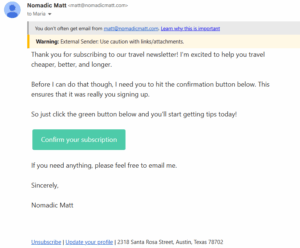
Nomadic Matt’s subscription confirmation email centers on a clear, prominent CTA. A few short phrases are enough to set expectations and open the door to a two-way conversation without overwhelming the reader.
Subject line: Please confirm your email!
5. Segment your audience to send personalized emails
Opens, clicks, forwards, and conversions tell email clients that your audience cares about your campaigns.
To get this kind of engagement, you need to deliver relevant and valuable content that resonates with each subscriber’s interests and behavior.
The thing is that one out of four SMBs struggle with sending the right messages to their customers. That’s because not every subscriber has the same needs or preferences, so one-size-fits all emails rarely resonate.
List segmentation is the missing piece of the puzzle, helping marketers match each message to the right recipient.
With it, you build small audience groups using different rules, like demographics, likes, psychographics, patterns, etc. There’s no limit to the data points you can combine to create hyper-personalized email campaigns.
Let’s explore Asana’s website, where users can download a free social media calendar template after filling in their role, job function, and intended use.
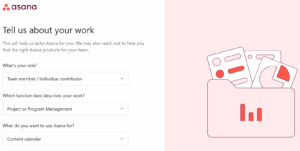
If the visitor selects individual contributor, project management, and content calendar, how can the brand use that data to create segmented campaigns?
They could follow up with targeted emails featuring step-by-step content calendar guides, premade project tracking templates, and collaboration tips.
This approach helps Asana start the relationship on the right foot, adding value and solving pain points with tailored, practical resources. The result? Increased satisfaction. And satisfied subscribers don’t hit “unsubscribe” or “mark as spam.”
6. Keep your email list healthy
We talked about how to grow your subscriber base the right way. It doesn’t end there, though. A high-quality list is like a tree in need of regular pruning to stay healthy. By taking away what no longer serves the tree, you leave room for the healthy parts to flourish.
Just like unproductive branches weigh down a tree, disengaged subscribers who ignore or delete your emails may damage your sender reputation and affect your relationship with active subscribers.
And as this builds up, email clients start filtering your campaigns out of those inboxes. Here’s where email list cleaning works like pruning, preventing the decay from spreading to healthy branches.
Let’s see what you should do to keep your list clean and growing:
- Use email verification tools to ensure all email addresses on your list are valid.
- Set a list-cleaning schedule (like quarterly or biannually) and stick to it.
- Decide on what counts as an inactive subscriber and create a dedicated segment.
- Monitor email analytics regularly to identify disengaged recipients.
- Leverage email automation to send a re-engagement email campaign after a certain period of inactivity.
- Add a compelling incentive to win dormant subscribers back using insights like their browsing or buying history.
- Ask inactive contacts if they prefer to unsubscribe or update their email preferences.
- Make it easy for them to unsubscribe and respect their choice.
- Remove inactive recipients from your database in case they take no action.
7. Write informative and clear subject lines
A great subject line offers context, so recipients know what your email is about. But it’s not just about email open rates. Vague, deceptive, or salesy subject lines are a threat to your overall email strategy.
Under email laws such as the CAN-SPAM Act, marketers aren’t allowed to use subject lines that don’t reflect the email content. Those who don’t comply may face consequences, including penalties.
On top of that, mailbox services filter your email’s subject, looking for spam trigger words, phrases, or tactics. If it seems suspicious, they’ll send your campaign to spam, and so will your subscribers if something feels off.
Wondering what a spammy or deceptive subject line looks like? Let’s find out:
- Writing in all caps or adding excessive punctuation, especially exclamation marks
- Using spammy phrasing, such as “cheap,” “buy now,” “no fees,” etc.
- Misleading subscribers with false promises or anything irrelevant to the campaign goal
- Making your subject line more than 50 characters long
- Neglecting personalization, for example, not including the recipient’s name or an action they took
- Sounding pushy without conveying value
- Using jargon and confusing language that your recipients can’t relate to
- Not performing A/B tests to see which tactics drive engagement
Still unsure whether your subject line will make it past spam filters? No worries, just pick a subject line tester and check how your subject lines perform.
Some of these tools compare them across industry averages or offer optimization suggestions, too. The best part? You can use most of them without creating an account.
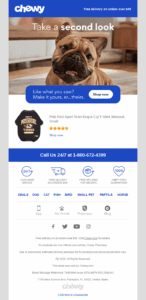
Chewy’s browse abandonment email uses the recipient’s history to target them with a relevant promotion.
The subject line communicates the email objective, reminding subscribers of their action and prompting them to order. Simple, short, personalized, and informative, just like the email itself.
Subject line: Your browsed items are order-ready
Other Common Pitfalls to Avoid
Besides following these email tactics, you also need to avoid certain mistakes that may damage your relationship with ESPs and your audience. Let’s see the checklist:
- Warm up your IP: When you have a new IP address, you can’t just send bulk emails from day one, since email clients will treat it as a red flag. Instead, start small and gradually increase the email volume over time, giving ESPs the time to trust you.
- Keep a consistent sending schedule: Regular, consistent email sends help you maintain a positive sender reputation. On the flip side, delivering emails too often or too rarely, or changing your email frequency too frequently, may affect your deliverability.
- Consider text-to-image ratio: Adding too many images to an email or sending all-image emails are tactics associated with spammers and may raise red flags with spam filters. So, keep a balance between text and images, aiming for a 60:40 ratio.
- Sound confident: Remove words or phrases that sound pushy or desperate. Opt for clear and persuasive language that explains what’s in it for your audience instead of tricking them into acting, just like a spammer would do.
- Keep formatting clean: Structure your email content for readability, using white space, short paragraphs, clear headings, and scannable sections.
- Use links wisely: Links are usually essential to direct subscribers to your website or a dedicated landing page. Having too many of them, though, looks spammy. Stick to a few URLs that align with your email purpose. Also, always check for broken links since they hurt the email experience.
- Send from a reply-to address: With a reply-to email address, you offer people a way to respond to your emails. Subscribers don’t send back to spammers, so mailbox providers can instantly tell you’re a legitimate sender that they want to hear from.
- Avoid attachments: Spammers use them to send malware, so email filters are likely to reject emails with attachments. If you want to share helpful tips with subscribers, include links leading to the resource or incorporate the advice in the email copy.
- Test and preview your content: Before hitting send, use your email platform’s spam testing and preview tools to ensure your campaigns don’t trigger filters and render correctly across devices and email clients.
Turning the Enemy into an Ally That Wins You the Inbox
Email spam filtering isn’t the enemy. Spammers are. What spam filters do is set rules so that subscribers and businesses can engage in transparent, meaningful conversations.
Therefore, you’d be better off adjusting your strategy to comply with spam filtering restrictions rather than trying to bypass them. Some of the actions might sound time-consuming or technical.
However, you’re halfway there by investing in a reliable email solution with high deliverability and all the tools you need to send trusted messages.
Ultimately, it’s not more complicated than adhering to email best practices, as you probably already do. And what’s behind every email practice in the book? The subscribers. As long as your audience is satisfied with your messages, so are email providers.
So, make subscriber experience your top priority, stick to delivering value, and your email campaigns will keep finding their way into the inbox and into your audience’s hearts.
FAQs
Now it’s time to answer some common questions on spam filters for email:
1. What are email spam filters?
Email spam filters are systems that identify emails containing unsolicited or potentially dangerous content. They protect users from malware, scams, and deceptive messages by using a variety of factors to classify emails based on the filter type or server used.
2. Why are spam filters important?
Spam filters act as gatekeepers, helping inbox providers sort incoming emails. They allow legitimate emails from trusted senders to reach their destination while keeping harmful ones out. Passing spam tests is the first step in getting your emails in front of recipients; therefore, it is a prerequisite for positive results.
3. Is using shared email addresses a potential spam risk?
Several parties use shared email addresses. So, if any of the senders abused them, they might come with a poor reputation. But when you partner with trustworthy email marketing software, it’s highly unlikely to face that since they take proactive measures to ensure shared addresses aren’t associated with spammy practices.
Similar Posts
 Published by

 Published by
 Published by

Create, send and optimize your email marketing campaigns