















Custom Email Domain: What It Is And When You Need It [2026]
Published By Tea Liarokapi
February 20, 2026

20/02/26
Once you move past occasional newsletters and start running promotions, onboarding, and lifecycle campaigns, email becomes a growth channel with real risk.
Misconfigured authentication, rising complaints, or sudden volume spikes can push even strong flows into the spam folder. And when customers can’t trust what shows up in their inbox, they won’t trust what you’re selling.
This is where a custom email domain comes into play. In this guide, you’ll learn what it is, why it affects deliverability, when it’s worth having one, and how to set it up in Moosend.
Own your sending identity
Connect your domain, publish authentication records, and monitor status from one place.
Try MoosendWhat is a Custom Email Domain?
A custom email domain is a personalized email address that can point users and email providers directly to your brand.
Let’s imagine that your domain is the letterbox in your front yard that you own. Your letterbox is tied to your home address. To send or receive letters, people need to know where it is.
The same applies to a custom email domain. When you send emails from yourbusiness.com, you clearly show who the sender is and where messages come from:

Going from [email protected] to [email protected] can give your brand credibility. But the bigger win is control over deliverability.
Once you use your own domain name for campaigns, you’re automatically choosing which domain will bear the consequences of your sends.
This includes bounces, spam complaints, and engagement signals that mailbox providers use to decide whether you belong in the inbox or the spam folder. A custom email address becomes the identity you build sending trust with.
Custom Email Domain Vs Free Email Domain: Key Differences
A custom email domain looks more legitimate than a free address. An email account like @yourdomain.com usually reads as “this is a real business,” while @gmail.com or @yahoo.com can feel personal, temporary, or even intrusive, especially when the same sender is running promotions, automations, and lifecycle sequences.
However, what subscribers see is often different than what harms deliverability. Mailbox providers don’t “rank” your message based solely on how professional your address looks. They evaluate whether your sending identity is stable, authenticated, and behaves like a sender people want in their inbox.
Free email providers can be fine for internal communications, such as vendor back-and-forth, HR, or simple operational emails. They can also be fine when you’re operating at a tiny scale, and the stakes are low.
However, free email domain providers that don’t come with custom domain abilities are weak for scaling businesses because they don’t give you the same level of control over:
- Authentication and alignment (your sending domain being properly authorized and consistent)
- Brand consistency across teams, campaigns, and automation touchpoints
- Long-term reputation building that’s tied to your domain
What “Domain Reputation” Means in Email Sending
Domain reputation is the credibility score (formal or informal, depending on the provider) that mailbox providers associate with the domain name you send from. This is a deliverability input that influences whether your emails land in the inbox, promotions tab, spam folder, or get rejected altogether.
Every campaign, automation email, and “blast” you send adds more data to your domain’s history. Providers look at patterns over time, including:
- Spam complaints: If recipients mark your emails as spam, your domain reputation takes a direct hit.
- Bounces (especially hard bounces): High bounce rates suggest poor list hygiene or sketchy acquisition.
- Authentication posture: SPF, DKIM, and DMARC are the basics that help providers confirm you’re authorized to send and not being spoofed.
- Sending consistency: Sudden volume spikes, erratic schedules, or major changes in sending behavior can look suspicious, especially on a newer domain.
- Engagement signals: Overall interaction patterns (reads, forward emails, clicks, unsubscribes) influence how your future sends are treated.
Setting up a custom email domain places your domain front and center when you send. This action shapes your reputation over time.
Custom Email Domains and Deliverability
The real reason serious senders move off free inbox domains is because mailbox providers want proof that your domain is authorized, consistent, and accountable.
That “proof” entails authentication (SPF, DKIM, DMARC), alignment, and behavior over time.
Microsoft, for example, joined Gmail and Yahoo in imposing new requirements on high-volume senders and tying compliance to actions such as verifying alignment with the “From” domain. At the same time, Yahoo emphasizes alignment between the domain in your “From” header and your authenticated identity (a DMARC requirement).
Inbox placement and trust signals
Mailbox providers don’t evaluate your emails or email accounts the way a human reader does. They do it with signals. Now, the strongest ones come from a domain that can be authenticated and consistently tied to the same sender identity.
A custom email domain makes two deliverability fundamentals possible:
- Authentication and alignment at the domain level. When your “From” domain aligns with the domain used for SPF or DKIM, you’re giving providers a coherent identity they can verify. Gmail explicitly calls out alignment for DMARC passing and treats authentication as a baseline requirement for reliable delivery.
- From-domain consistency that helps filters “learn” your habits. Filtering systems build confidence from predictable patterns, such as a stable “From” domain, sending behavior, and list practices. If your identity is constantly shifting, you’re making it harder for inbox providers to build trust.
This is also why “branding-only” setups fail in email marketing. A pretty “From” name can’t compensate for an unauthenticated or misaligned domain, especially once you’re sending campaigns and automated flows at a substantial volume.
Sender reputation and control
With a free inbox domain, you’re essentially operating on borrowed real estate. You can send emails, but you’re not building a reputation asset you fully control. You’re also constrained by provider rules that aren’t designed for scaled marketing.
A custom domain flips that dynamic. First, you own the sending identity. Your brand’s domain name becomes the basis for campaign sending, lifecycle automation, and growth experiments without being tied to a single mailbox provider’s “personal inbox” context.
Secondly, you build a continuous reputation. If your team changes tools, mailbox hosts, or workflows, your sending identity doesn’t have to reset. You’re not dependent on the quirks of a free provider account or a single mailbox environment to remain consistent.
Lastly, you can implement the controls that mailbox providers expect. Gmail’s sender guidelines treat authentication as a prerequisite for sending to personal Gmail accounts, and call out that authenticated messages are less likely to be rejected or marked as spam.
DMARC alignment, spoofing protection, and security
On the deliverability side, DMARC is the mechanism that tells mailbox providers that only legitimate, authenticated sources are allowed to send campaigns.
On the security side, DMARC reduces the surface area for domain impersonation.
The Anti-Phishing Working Group reported 989,123 phishing attacks in Q4 2024, with phishing trending upward in the second half of 2024. Of course, DMARC won’t end phishing, but it does make it harder for attackers to spoof your domain convincingly.
Segmentation of sending identity (subdomains)
A common deliverability practice is to separate corporate and marketing emails using a subdomain. Many brands keep their business email on @yourbusiness.com and send marketing from a subdomain such as [email protected] or [email protected]. The goal here is to contain risk.
Marketing emails inherently have higher volatility due to list churns, occasional complaint spikes, seasonal volume surges, or even experiments with subject lines and offers. Keeping that activity on a subdomain helps isolate reputation impacts from core business communication.
Additionally, a dedicated marketing subdomain allows mailbox providers to evaluate that stream consistently, without “cross-noise” from unrelated mail sources, leading to more predictable reputation building.
What’s more, subdomains provide cleaner operational boundaries. You can separate authentication and sending infrastructure for different types of email (transactional, marketing, and business), making troubleshooting and governance much easier.
If you’re sending serious volume, running lots of automations, or operating multiple mail streams, subdomain segmentation is one of the simplest ways to keep your domain strategy resilient.
When to Set Up a Custom Email Domain
If you’re sending a high volume of marketing emails, a custom email domain will help you build a deliverability asset you can protect, measure, and improve. Let’s see the most common instances when you’ll need to set it up—not just for branding purposes.
You’re sending marketing or lifecycle emails
Even when everything is working, not every email reaches the inbox. Validity’s State of Email report states that 1 in 6 emails never reach the inbox. This one email could either land in the recipient’s spam folder or get filtered out by providers altogether. When you’re sending high-volume campaigns, monitoring sender reputation, list quality, and subscriber engagement matters, as they directly affect deliverability.
Therefore, if you care about inbox placement, complaint rates, and long-term sending stability, you need domain control through authentication and consistent identity.
Your list is growing
As your audience grows, small configuration and hygiene issues compound quickly. A deliverability dip reduces actual reach, as more emails end up in spam than are delivered.
If you’re investing in subscriber acquisition through landing page builder tools, subscription form creation, or promotional actions, poor placement turns that spend into waste because your email marketing efforts can’t reliably reach what you paid to build.
Furthermore, if onboarding and retention emails miss the inbox, the cost shows up later as lower activation and higher churn risk. Lifecycle email campaigns are often the safety net that catches your “nearly there” customers.
When discussing email marketing ROI, one stat keeps popping up: roughly $36 in return for every $1 invested. So, when ROI is that strong, losing deliverability is basically turning down a high-margin lever.
You’re investing in automation and personalization
Automations multiply your sending footprint through onboarding sequences, behavior-based campaigns, product education, and winback flows. As a result, you’re sending more messages overall, each triggered at the right time.
But automated workflows also multiply your exposure:
- A misconfigured domain or weak authentication affects every triggered message.
- A small mistake in segmentation or frequency scales instantly.
- Inconsistent “From” domains across flows make it harder for mailbox providers to build stable trust signals around your identity.
To keep your triggered email campaigns safe and maintain a secure email account, treat your own domain as part of the automation infrastructure. You wouldn’t trigger a revenue-critical flow without picking the right personalized email template, or without checking your custom fields, fallback values, and brand identity. Running the same flow on an unstable sending identity carries the same risk.
This is where your operational stack matters. If your acquisition flow relies on a website builder, web hosting forms, or integrations that feed leads into your ESP, small issues can scale quickly once templates and automations are live. A stable sending identity helps you distinguish between workflow issues and deliverability issues when performance drops.
You need a consistent brand and trust layer across touchpoints
At scale, email isn’t an isolated channel. On the contrary, it’s part of a system that includes your website, landing pages, checkout process, onboarding efforts, and support team. All these actions lead to retention. The domain is the common thread that makes the whole system feel legitimate.
A custom email domain supports that trust layer in two ways:
- User trust: recipients can connect the email to the same domain they’re browsing, buying from, or logging into.
- Mailbox trust: consistent domain identity makes authentication, monitoring, and long-term reputation building easier.
If your emails are intended to drive revenue (promotions), activation (onboarding), or retention (reactivation), you want the same level of brand consistency and technical accountability you expect from your website.
That consistency matters even when the customer journey starts elsewhere, like social media or paid ads, because email is often the first place subscribers look for branded details (outside your website).
When Not to Set Up a Custom Email Domain
So far, we’ve mentioned that a custom email domain is a strong move for marketing deliverability. However, it’s not automatically the right first move for everyone.
In some cases, the smarter decision is to keep things simple until there’s a clear reason to invest in domain setup and authentication.
You only send internal communication messages
If your email use is primarily for internal communications and revolves around team coordination, vendor back-and-forth, HR, invoices, or operational updates, you’re not solving the same problem as a marketing sender.
Of course, you could still use a custom domain for professionalism and control (e.g., @yourdomain.com for the team), but you don’t necessarily need to set up the infrastructure around it yet.
Marketing sending introduces different constraints that include list quality, complaint risk, volume variability, unsubscribe compliance, and reputation management. If you’re not running marketing campaigns or lifecycle flows, you don’t need to optimize for inbox placement at scale.
You’re an early-stage marketer
If you’re sending early creator newsletters, small community updates, or personal project communications once a month to 50-100 people who already know you are, the deliverability risk profile is different. Here, you’re not dealing with volume spikes or complex automations, and you’re not running the same risk as a full-fledged marketing campaign does, where one bad send can tank performance for weeks.
That said, it’s important to secure your domain early, even if you don’t use it for sending yet. Domain choice is a brand asset, and you don’t want to build recognition around a name you can’t lock down later.
Acquiring the domain and setting up the basics, such as your website, redirects, or perhaps a simple landing page, gives you ownership. After that, you can move email sending onto it when your list size and frequency justify the operational overhead.
You aren’t ready to maintain & authentication hygiene
A custom email domain won’t magically improve deliverability if it’s misconfigured.
Mailbox providers increasingly treat authentication as table stakes. For example, Google’s Email Sender Guidelines include domain authentication (SPF and DKIM) and recommend DMARC (which is required for higher-volume senders). As a result, Google explicitly links compliance to delivery outcomes such as rate limiting or spam/rejection.
If you’re not prepared to publish and maintain SPF, DKIM, and DMARC correctly—and keep them accurate as your sending sources change—you can do more harm than good. Especially if you accidentally set up conflicting SPF records or enforce DMARC before you’ve validated all legitimate senders.
In that case, the better move is to keep marketing sends to a minimum, or even delay them until you can implement the setup properly. After all, nothing hurts deliverability faster than damaging a domain’s early reputation with authentication mistakes and inconsistent sending.
How to Get a Custom Email Domain
If you want to get your own custom email domain for marketing use, there are two paths to take.
The “fast path” is buying a domain and creating an address. The “smart path” is choosing a sending structure you can scale without repainting your letterbox later.
Step 1: Buy your domain
Pick a domain that the inbox can live with for years. Keep it short and pronounceable. If someone hears it once on a podcast, sees it once on a referral form, or bumps into your website, they should be able to remember it and type it correctly.
Secondly, ensure your brand and website match. Your email identity should reinforce the same level of trust as your site and landing pages.
After that, keep an eye out for friction points. Hyphen-heavy domains and “too-clever” spellings increase typos, support tickets, and fake-look risks.
Also, be practical with your Top Level Domains (TLDs). The TLD is the last part of your domain (i.e., .com or .io). Less familiar extensions can create hesitation when recipients scan your custom email address. This, in turn, can introduce unnecessary doubt that can hurt initial trust and engagement, especially in promotional or lifecycle emails.
At the practical level, domain registration is handled by a domain registrar (e.g., GoDaddy or Hostinger). If your domain is bundled with web hosting, a website builder, or another hosting service, double-check that you still have full control of your domain settings.
Pricing is often low for the first year but can increase on renewal, so it’s worth checking long-term pricing before committing, especially if the domain is tied closely to your business name or will be used across all customer-facing communication.
Step 2: Decide between the root domain and the subdomain
Root domain (e.g., @yourbusiness.com) is your primary identity. It’s often used for business emails and customer-facing communications. Subdomains (e.g., news.yourbusiness.com, mail.yourbusiness.com) let you separate streams and contain risk.
A clean, scalable pattern looks like this:
- Business email: @yourdomain.com
- Marketing sending: news.yourdomain.com or mail.yourdomain.com
Choosing between a root domain and a subdomain for marketing email comes down to risk tolerance and operational maturity. Sending from the root domain keeps everything under one identity, which can strengthen brand recognition and simplify setup. There’s also only one domain to authenticate, monitor, and maintain. For smaller programs with controlled volume and clean lists, this can work well. However, the trade-off is exposure. Any marketing-related deliverability issue (like complaints, spikes, or misconfigurations) affects the same domain used for core business communication.
Subdomains, on the other hand, introduce separation. They give marketing its own reputation surface, making it easier to isolate experimentation and volatility without risking business emails. The downside is more DNS records to manage, additional monitoring, and a longer setup path.
The choice ultimately depends on how important email is to your business today, and how much margin for error you’re willing to accept as you scale.
Step 3: Choose how your domain will be used
When you get a custom email domain, you’re deciding which systems are allowed to send email on behalf of that domain, and for what purpose.
This matters because the same domain can power very different types of email, each with its own technical and reputational requirements. Treating them as a single entity is how teams end up with broken authentication, conflicting DNS records, and deliverability issues that are hard to trace.
In practice, most businesses use their domain in two distinct ways:
Inbox hosting (human-to-human email):
- Used for day-to-day communication (internal emails, partners, support).
- Sending volume is low and one-to-one.
- Your inbox provider (e.g., Google Workspace, Microsoft 365) handles authentication for these messages.
Marketing sending (one-to-many email)
- Used for campaigns and automations (newsletters, promotions, lifecycle flows).
- Sending volume is high and system-generated.
- Requires explicit DNS authentication (SPF, DKIM, DMARC) through your ESP to protect deliverability and domain reputation.
When you get a dedicated ESP, like Moosend, Constant Contact, or Mailchimp, you don’t replace your inbox provider. Your ESP connects to your domain at the DNS and authentication level, allowing you to send campaigns and set up automations using your custom domain, regardless of where your team’s inboxes are hosted.
Both inbox hosting and marketing platforms can (and often should) use the same domain, but they must be configured deliberately so each system is properly authorized and aligned. That coordination is what protects your domain’s reputation as your sending grows.
Making this decision before you touch DNS prevents conflicts later and sets you up for a clean authentication and deliverability setup when you move into the next steps.
How to Set Up Your Custom Email Domain
Once you’ve decided what domain you’ll send from (root or subdomain), the next decision is which email service provider (ESP) will send on its behalf and how that connection is implemented.
In the steps below, we’ll walk through this process on Moosend’s platform, showing what to configure, what to double-check, and where teams typically get it wrong. The steps are platform-specific in execution, but not in logic.
Confirm DNS access, sending domain, and ownership
First, you’ll need direct access to your domain’s DNS settings through your hosting provider. This is where authentication records are published and verified. Without DNS access, you can’t authorize any ESP to send email on behalf of your domain, so the setup can’t proceed.
You should also decide which domain to use for sending. Whether you choose the root domain or a subdomain, the key requirement is consistency. Domain reputation accumulates over time, changing domains later resets that history.
At the same time, define a sender policy. Decide which “From” addresses are allowed for campaigns and automations, and keep them stable. Constantly introducing new sender identities weakens recognition and trust signals.
Finally, clarify ownership. Moosend provides the SPF, DKIM, and DMARC records, but you’re responsible for adding them to your domain’s DNS and keeping them up to date over time.
Add and verify a sender
Adding a custom email domain with Moosend is simple.
First, you need to insert a sender address. This is what triggers the DNS/authentication instructions.
To do so, log on to your Moosend account and go to “More.” Click on “Settings” and then “Senders.”
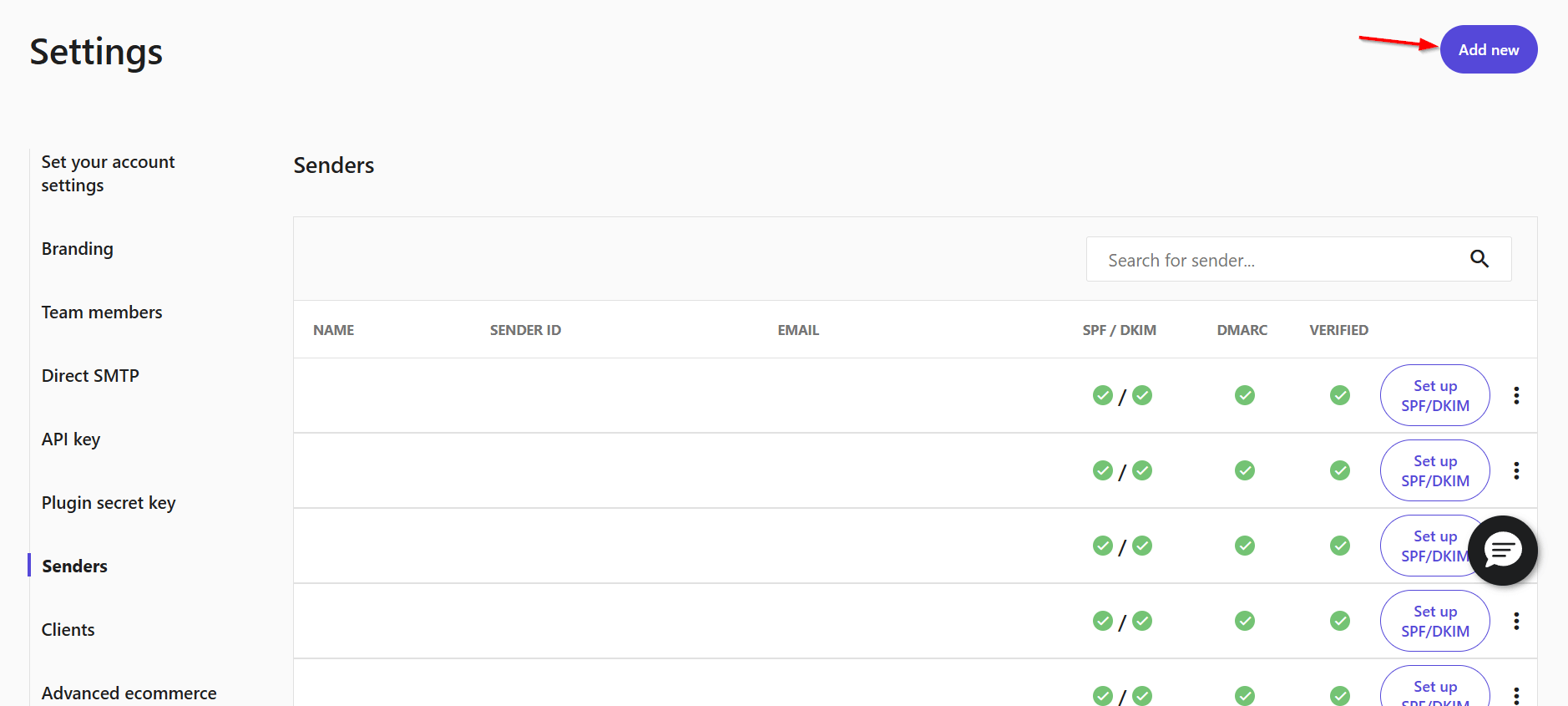
Next, select “Add New” and enter your sender details:
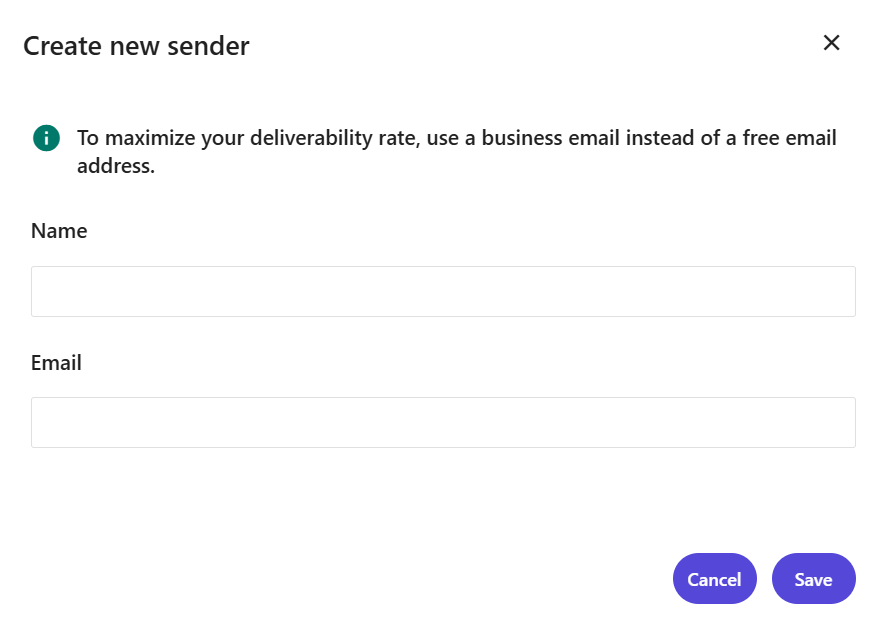
Keep in mind that, for deliverability reasons, prefixes like “no-reply,” “admin,” and so on aren’t allowed in sender email addresses. You can use an email address that you have assigned for a specific cause, like [email protected].
Once the sender is added, stay on the Senders page. This is where Moosend verifies that your domain is properly authenticated.
If the required DNS records are configured correctly, the SPF and DKIM checkboxes will be marked as complete.
After adding the sender, Moosend sends a verification email to confirm you control the address. Separately, SPF and DKIM status will update once you publish the required records in your domain settings.
If the sender doesn’t pass verification, the “Verified” checkbox will remain empty. This usually happens for one of the following reasons:
- You’re using a free inbox address (such as Gmail, Outlook, Yahoo, or Hotmail)
- There’s no active website associated with the sender’s domain
- The domain or sender address doesn’t meet Moosend’s deliverability standards
At this stage, it’s important to remember that adding and verifying a sender does not yet authorize Moosend to send emails on your domain’s behalf. To do that, you need to authenticate your domain at the DNS level.
Authenticate your domain (SPF, DKIM, DMARC)
Domain authentication is what mailbox providers use to verify that Moosend is allowed to send emails using your domain. This happens through DNS records (SPF, DKIM, and DMARC).
Now, let’s locate your DNS records in Moosend. From the “Senders” page, find the sender you just added and click the “Set up SPF/DKIM” button. This opens the DNS configuration view, where Moosend displays the SPF and DKIM records required to authenticate your domain:
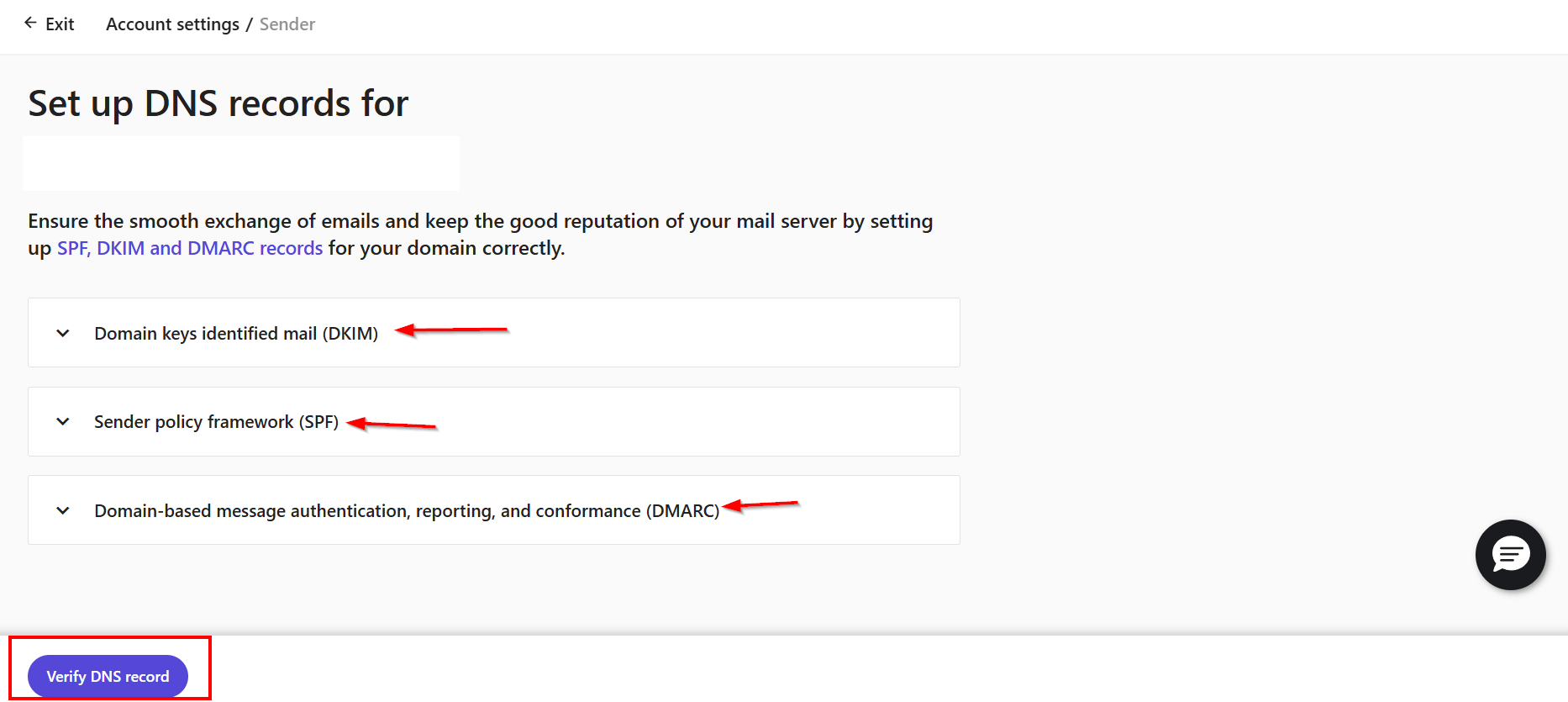
Copy the DNS record values shown by Moosend and add them to your domain’s DNS settings. For each record, make sure the type, host, and value match exactly. Once the records are published, allow some time for DNS propagation. Moosend will automatically detect the changes and mark the records as verified once they’re visible.
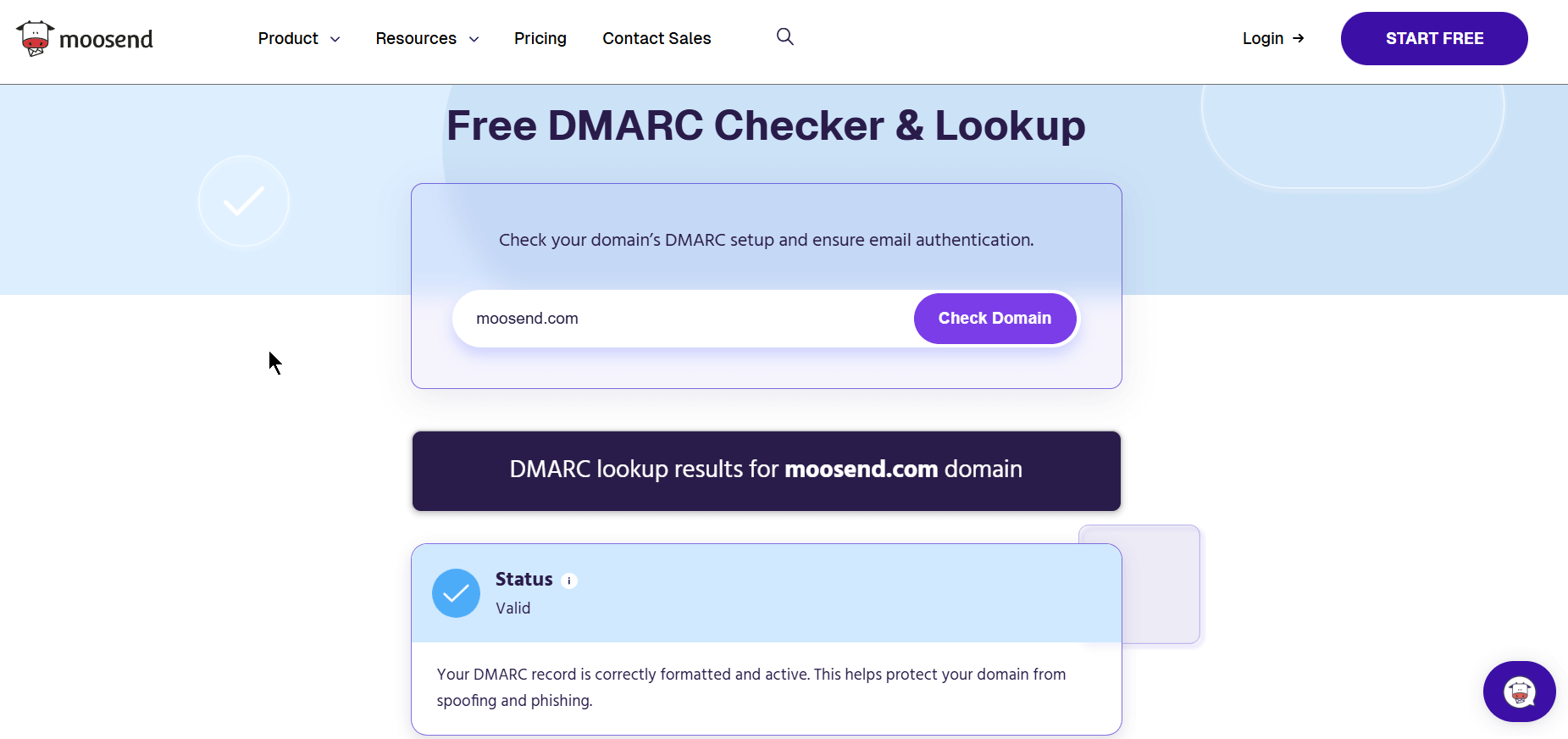
Unlike SPF and DKIM, DMARC isn’t configured in Moosend. Instead, it’s added directly to your domain’s settings. Moosend doesn’t generate a DMARC record for you; it simply expects one to exist.
If you don’t have DMARC yet, start with a monitoring policy to see what’s being sent on behalf of your domain before enforcing stricter rules.
What Moosend does is offer a free DMARC Checker that lets you verify whether a DMARC record exists for your domain and whether it’s correctly configured. It’s a quick way to confirm your setup before moving on or tightening your policy:
You can monitor the verification status of SPF and DKIM from the “Senders” page. Once Moosend successfully detects the records, they’ll be marked as verified, confirming that your domain is authenticated and ready for sending.
What to Do after Setting Up Everything
Once authentication is in place, alignment keeps deliverability stable over time and helps you avoid deliverability killers by ensuring the pieces you’ve already configured don’t drift apart.
Here’s what to check:
- The domain in your visible “From” email should be the same domain you authenticated. If you’ve authenticated a subdomain but send campaigns from the root domain (or vice versa), you create unnecessary confusion for mailbox providers and weaken trust signals.
- Your “Reply-to” addressshould be real, monitored, and consistent with your sending identity. A functioning reply-to supports engagement and reduces the likelihood that frustrated recipients default to marking your emails as spam.
- Links and tracking domains should be kept on-brand and consistent. Sudden switches to unfamiliar domains can introduce hesitation for recipients and complicate filtering decisions.
Warming up your custom email domain
But what happens if your domain or sending identity is new? Here’s where we introduce a warm-up plan.
Start by sending to your most engaged contacts. These would be people who have opened or clicked recently. Gradually increase volume over time, instead of blasting your entire list at once. This allows mailbox providers to observe positive engagement patterns and build confidence in your domain.
As you warm up, keep an eye on the following:
- Hard bounces
- Spam complaints
- Engagement trends (like opens, forward emails, and clicks)
If you notice spikes in bounces or complaints, pause and adjust before increasing volume further. Ignoring these issues early on is one of the fastest ways to damage a new domain’s reputation.
Once everything is aligned and warmed up, your work is done. From here on, deliverability becomes a matter of consistency. Send regularly, keep your lists clean, and monitor performance as you scale.
If you add new tools later (CRMs, support systems, invoicing platforms), remember to revisit authentication and alignment. Your domain is a shared asset, and every new sender affects it.
Best Practices to Maintain a Healthy Custom Email Domain
A healthy custom email domain is an ongoing asset. Once you’re authenticated, your reputation is shaped mostly by who you email, how consistently you send, and how recipients respond.
List hygiene, consent, and sending behavior directly impact deliverability. If your lead generation efforts aren’t optimized, every action that follows gets harder with higher email bounces, higher complaints, and weaker engagement. To keep your domain trusted:
- Define a clear consent strategy: Double opt-in isn’t mandatory in every case, but you must know how subscribers enter your list and what they agreed to receive.
- Remove negative signals: Hard bounces, spam complaints, unsubscribes, and persistently unengaged contacts should be suppressed without delay.
- Align content with expectations: Keep subject lines honest, maintain consistent sender identity, and keep content aligned with the original signup intent.
- Keep your sending cadence stable: Sudden volume spikes to large segments raise risk because they don’t resemble normal subscriber-driven behavior.
- Monitor reputation signals proactively: Don’t wait for a spam-folder crisis. Track bounce rate and complaint rate as leading indicators, and monitor engagement trends to catch issues early.
Do You Really Need a Custom Email Domain?
If email is part of your growth strategy, a custom email domain gives you control over deliverability, sender reputation, and long-term trust with mailbox providers.
You might get away without one early on, but as your audience grows and your sending frequency increases, relying on a free inbox domain quickly becomes a constraint rather than a shortcut.
The good news is that setting up and maintaining a custom email domain doesn’t have to be complicated. With the right authentication in place and a clear sending strategy, you can build a reputation that supports your campaigns instead of working against them.
FAQs
Now let’s answer some of the most common questions regarding custom email domains.
1. How can I get a custom email domain?
You start by buying a domain, then decide whether you’ll send from the root domain or a subdomain. From there, you publish the required authentication records (SPF, DKIM, and optionally DMARC) in your domain’s settings and verify them in your email service provider. Once authentication is complete, you’re ready to start sending.
2. Should I use a subdomain for marketing emails?
In many cases, yes. Sending from a dedicated subdomain (for example, news.yourdomain.com) helps isolate marketing traffic and reduces risk to your primary domain if something goes wrong. It’s a common approach for brands that rely heavily on email marketing.
3. How long does domain verification take?
Verification depends on DNS propagation. Once records are published, they may be visible anywhere from a few minutes to 48 hours. Moosend verifies the domain as soon as the records are publicly accessible.
4. What happens if authentication is misconfigured?
Misconfigured authentication can lead to emails being marked as spam, rejected outright, or taking much longer to build a positive reputation. Fixing authentication early is far easier than recovering a damaged domain later.
5. Do SPF, DKIM, and DMARC guarantee inbox placement?
No. They’re required to send reliably, but they don’t override poor sending practices. Inbox placement still depends on factors like engagement, complaint rates, bounce rates, and sending consistency.
Similar Posts
 Published by

Create, send and optimize your email marketing campaigns