















Subscription Form Analytics: Why & How to Track Them [2026]
Published By Tea Liarokapi
December 17, 2025

17/12/25
Subscription forms are often the first touchpoint between your brand and a potential customer. So, why treat them as a checkbox rather than a strategic channel?
For marketers who already understand what subscription forms are, the real question is how to turn them into a measurable, optimizable part of their overall marketing strategy.
A signup only matters if it leads to something, whether that’s an engaged reader or a sale. Subscription form analytics help connect user experience with real results by showing who engages, where subscribers come from, and how long it takes for a signup to deliver value.
This guide will show you which metrics to track, practical ways to capture engagement signals, and the business decisions you can make from them.
Go from analytics to action
Track, analyze, optimize and get more leads in with Moosend’s subscription form analytics.
Start for freeWhy Subscription Form Analytics Matter
For many marketing teams, subscription forms are just a way to boost their newsletter signups or gather information on their leads. This is why you can often find them tucked into a footer or embedded on a landing page. They quietly collect emails, but the “real work” happens while nurturing leads, segmenting users, creating your newsletters, and sending your campaigns.
However, if you’re not tracking how your subscription forms perform, you’re making your lead generation strategy harder than it needs to be. Form analytics can help you understand the users you’re attracting, why they convert (or don’t), and how those users ultimately impact revenue.
But what do subscription form analytics do for your marketing plan, exactly?
They tie form performance to marketing success
Subscription forms mark the moment someone goes from an anonymous visitor to a known contact. When you analyze how each form performs, you’re essentially mapping your traffic and which pages, campaigns, and channels contribute real value.
This is where metrics like conversion rate, acquisition source, and cost per lead start to matter. If forms on blog posts convert better than forms on product pages, or if traffic from LinkedIn yields higher-value subscribers than traffic from Instagram, that’s a strategic shift. Analytics help you redirect time, spend, and creative energy toward what actually works.
They reveal friction points that hurt conversion
A form doesn’t need to be long or complicated to be difficult. Sometimes, a single unclear label or an extra field can cause your conversions to drop, as each added step creates extra friction.
Of course, the above doesn’t mean that all subscription forms perform the same. Tracking friction points is important because it reveals why your audience doesn’t convert.
Maybe shorter forms will perform better for you, or maybe you’re not leading prospects further on their journey because your copy is unclear. The objective here is to create a smoother, more intuitive user experience.
They power better segmentation and personalization
The information you collect upon signup is often the foundation for your nurture strategy. But to use it effectively, you need to understand how it ties to engagement and shapes your demographic segmentation strategy.
For example:
- Do people who select “Informational content” on your preference center’s drop-down menu respond better to case studies?
- Do subscribers from webinar signups convert faster than those from blog CTAs?
- Do prospects from X country display a different buying behavior than those from Y region?
- Does job title influence activation?
Analyzing patterns like these allows you to send the right content to the right people. That’s what leads to higher engagement and faster funnel progression.
They inform your content strategy
Not all content attracts the same type of subscriber. A tutorial might bring in readers looking for practical how-tos, while a deep-dive industry article might attract strategic decision-makers who are closer to buying.
By tying content source to signup, engagement, and, ultimately, conversion, you learn which content actually attracts the right audience. This is how you can go from making more content to creating content that impacts your bottom line and attracts high-value subscribers.
They connect top-of-funnel performance to revenue
This is where subscription form analytics become genuinely powerful. When you track what happens after the signup (opens, activations, conversions, upgrades), you can answer the question that drives investment decisions: “Is this form generating subscribers who eventually become customers?”
Answering this question allows marketing teams to:
- Prioritize forms and placements that lead to paying users
- Eliminate unnecessary friction (like verification or qualifying questions)
- Scale channels that reliably produce profitable subscribers
That way, your form analytics can turn lead capture into a valuable source of prospective customers.
Subscription forms might seem small, but they can influence engagement, segmentation, conversions, and generate revenue in a way that’s more predictable, more efficient, and far more profitable.
Most Important Subscription Form Analytics to Track
Before you start on your metrics journey, think about what you need to track. A small set of reliable analytics that map directly to your strategy can be a lot more effective than tracking everything at once.
Sometimes, tracking your core metrics with Moosend, like Impressions, Conversion, and Conversion percentage, is all you need:

Below, let’s see some other important metrics that can make a difference for your subscription forms, grouped by the problem they help you solve.
Performance Metrics
As the name suggests, these metrics tell you whether the form is doing its basic job: converting visitors into subscribers. They can indicate issues with placement, offer, and user experience.
1. Views or impressions
This is how many people see the form. If impressions are high but everything else is low, your form might have a weak CTA or relevance. A high view count indicates healthy traffic volume. If, on the other hand, views/impressions are low, but your conversion rate is healthy, it means you’re targeting the right audience.
Let’s see an example. A blog post attracts 8,000 pageviews in a month. You use a floating box form that gets 160 impressions. That gap suggests your form’s design could be bland or that you need a different type, like an inline or full-page form.
2. Submissions or signups
This is the count of completed form submissions, which shows your form’s success. The ground zero for volume and the start of any lead-quality analysis. Let’s use the same blog example. Your form generated 240 submissions in one month. That’s the raw list growth you’ll compare across channels and content pieces.
3. Conversion rate
This metric measures how well the form converts visitors. It normalizes performance so you can compare forms across pages and traffic sources.
If you have, let’s say, 240 submissions out of 8,000 page views, your conversion rate would be 3%. If similar posts convert at 6%, the value proposition or CTA likely needs work.
4. Form abandonment rate
This signals the number of people who start the form but do not finish it. High abandonment indicates a poor user experience or friction within the form, rather than a placement issue.
If 600 people opened the form and only 240 submitted, your form abandonment rate would be 60%. This means you need to take some time to inspect fields, invest in a better form builder, or create a more powerful CTA.
5. Time to complete
This metric shows how long it takes users to complete your form after they start interacting with it. Long completion times sometimes reveal complexity, confusion, or unnecessary friction. All of those harm your conversion rates.
Let’s assume that your median time-to-complete on desktop is 18 seconds, but jumps to 55 seconds on mobile. That suggests that your form’s layout needs mobile-related fixes, like fewer fields or a responsive form template
Engagement Metrics
Once people see and start your form, engagement metrics tell you how they behave, where they stall, and whether the experience works across devices and page types. These are the signals that let you move from “my forms don’t perform” to “I know why I lost leads.”
6. Field drop-off rate
This metric shows which fields cause the most exits or the share of users who stop filling out the form at a specific field. Identifying a single problematic field is often one of the fastest fixes. Change one label or make one field optional, and you can get a large uplift.
How to spot it: Look at the percentage of users who reached field X and didn’t continue to field Y. For example, on a lead form of 1,000 starters, 600 reach the “Company size” field, but only 360 proceed. This signals a 40% drop-off in that field. Making it optional and adding a “Prefer not to say” option could increase overall completions.
7. Error rate
This is the proportion of submission attempts that fail due to client-side or server-side validation (invalid email, password rules, required fields). Confusing or unclear validation often creates distrust. You can fix this quickly with clean and precise error microcopy. To identify the issue, count validation errors per type and per field. A good idea would be to prioritize frequent errors first.
For instance, if a signup flow shows 180 email-format validation errors out of 900 submission attempts, that’s a 20% email error rate. Adding placeholder text like [email protected] and inline live validation helps minimize those errors and improve the user experience.
8. Device and page insights
This metric shows your conversion performance segmented by device (mobile, tablet, desktop) and page type (blog post, landing page, pricing page). You need it to understand the subtle design differences that work across different types of devices and pages. A desktop form can appear broken on mobile; a CTA that fits a landing page’s intent may fail in a blog context.
To understand it, compare view-to-submit and abandonment across device and page segments.
For example, let’s say a newsletter form converts at 4.5% as an inline form on your home page’s header, but only 1.1% on your blog. This means you need to adjust your messaging to better align with your blog post content.
9. Scroll depth or visibility
Are people seeing the form? This is the question this metric answers: whether visitors scroll far enough or have the form in their direct field of vision. Low visibility can masquerade as poor conversion. And sometimes, this subscription form mistake can hide the form. The fix here is placement. To spot it, use heatmaps or scroll tracking to show where reading drops off. Then, compare impressions to pageviews to check explicit visibility.
For instance, your homepage footer form records 10,000 pageviews but only 500 form impressions. This shows that most users never reach the footer. Moving the CTA above the fold could boost impressions and multiply newsletter signups.
Quality and Outcome Metrics
Quality and outcome metrics tell you whether your signups can turn into real relationships, revenue, or pointless list noise. These are the signals you use to decide whether to optimize for volume or for value.
10. Lead quality
It shows the percentage of valid or engaged subscribers. Essentially, lead quality is a simple way to separate “real” subscribers from low-value signups like bots, disposable emails, or people who never engage. You can measure this as the share of new signups that pass basic validation checks like an email opt-in process and show initial engagement.
A high volume of low-quality leads damages sender reputation and can inflate your email marketing platform’s costs, especially since most platforms charge subscription-based pricing. Better-quality leads improve conversion, and reduce churn and costs.
You can measure it by taking the number of new subscribers who either pass your email verification checks or interact with your welcome email, and compare it to your total number of signups. If most new subscribers are valid and engage early on, your lead quality is strong.
Let’s see an example: Of 1,000 new subscribers in a month, 850 pass email validation, but only 300 open the welcome email. So, 85% is technically valid, but 30% is initially engaged. The team decides to add a simple double opt-in to improve lead quality.
11. Email engagement
This metric shows early engagement metrics (opens, clicks) for the welcome series and your first campaigns sent to your new signups. First-touch engagement is the most predictive behavioral signal for long-term value. Subscribers who open and click early are far likelier to convert to trials or purchases. So, look at the open and click behavior for the first one to three emails that new subscribers receive. If subscribers engage early, they’re more likely to stay active long-term.
Example: Segment A comes from webinar signups. It shows a 45% open rate and 12% click rate on the first email. Segment B comes from site footer signups and shows 18% and 2% respectively. What should your course of action be? Since Segment A is more active and more likely to provide long-term conversions, you can route Segment A into a short, conversion-focused sequence. As for Segment B, create a more gradual nurture email workflow.
12. Source or channel performance
This metric shows which channels drive the best signups. It’s essentially comparing conversions by acquisition source (organic blog, paid social, SEO, webinars, etc.). Raw lead volume doesn’t equal value. Channel-level outcome metrics let you allocate budget toward channels that produce higher LTV per lead.
To measure it, review where your signups are coming from. Is it your blog, paid ads, social media, or referrals? After that, compare how those groups behave after signing up. Channels that produce subscribers who actually open, click, and convert are worth investing more in. Channels that deliver low-engagement subscribers should be reconsidered.
Let’s consider this scenario: A paid social campaign delivers 4,000 signups at $5 cost-per-lead (CPL), but produces a 0.7% trial rate. On the other hand, organic blog CTAs deliver 800 signups at $1 CPL but produce a 6% trial rate. Despite the lower volume, your blog delivers far higher conversions. This would mean you’ll need to shift your efforts and optimize high-performing blog CTAs.
How Insights Translate into Action
So, you know what to track. Now what? This is the part where your metrics become your roadmap. Let’s see some practical ways to turn signals into immediate wins.
Improve user experience
There are three golden rules for improving subscription form UX: shorter forms, simplified design, and clear, concise CTAs.
Minor UX fixes often produce the biggest returns. If your analytics show high abandonment or that users take a long time to complete the action, treat the form like a conversation. Make it short, obvious, and easy to finish:
- Remove non-essential fields or make them optional.
- Replace free-text with dropdowns where possible.
- Use clear, benefit-led CTAs like “Get weekly insights” instead of “Subscribe.”
- Optimize for mobile with large touch targets, single-column layout, and numeric keyboards for phone fields.
In short, your form design and copy need to be simple and beneficial to users. Like this:

Some additional steps you can take are:
- Reordering fields by effort. You can start with the easiest question (like email) to build momentum.
- Adding microcopy and pinpointing mistakes, like “No spam” or “This is a required field.”
- Using visual cues to clearly separate required and optional fields.
- Testing various form types. A full-page form may perform better on marketing pages, while a floating bar could be the wise choice for a content-heavy page.
After you design your form, start measuring your submission and abandonment rates, your field-level drop-offs, and the time it took to complete the form by device.
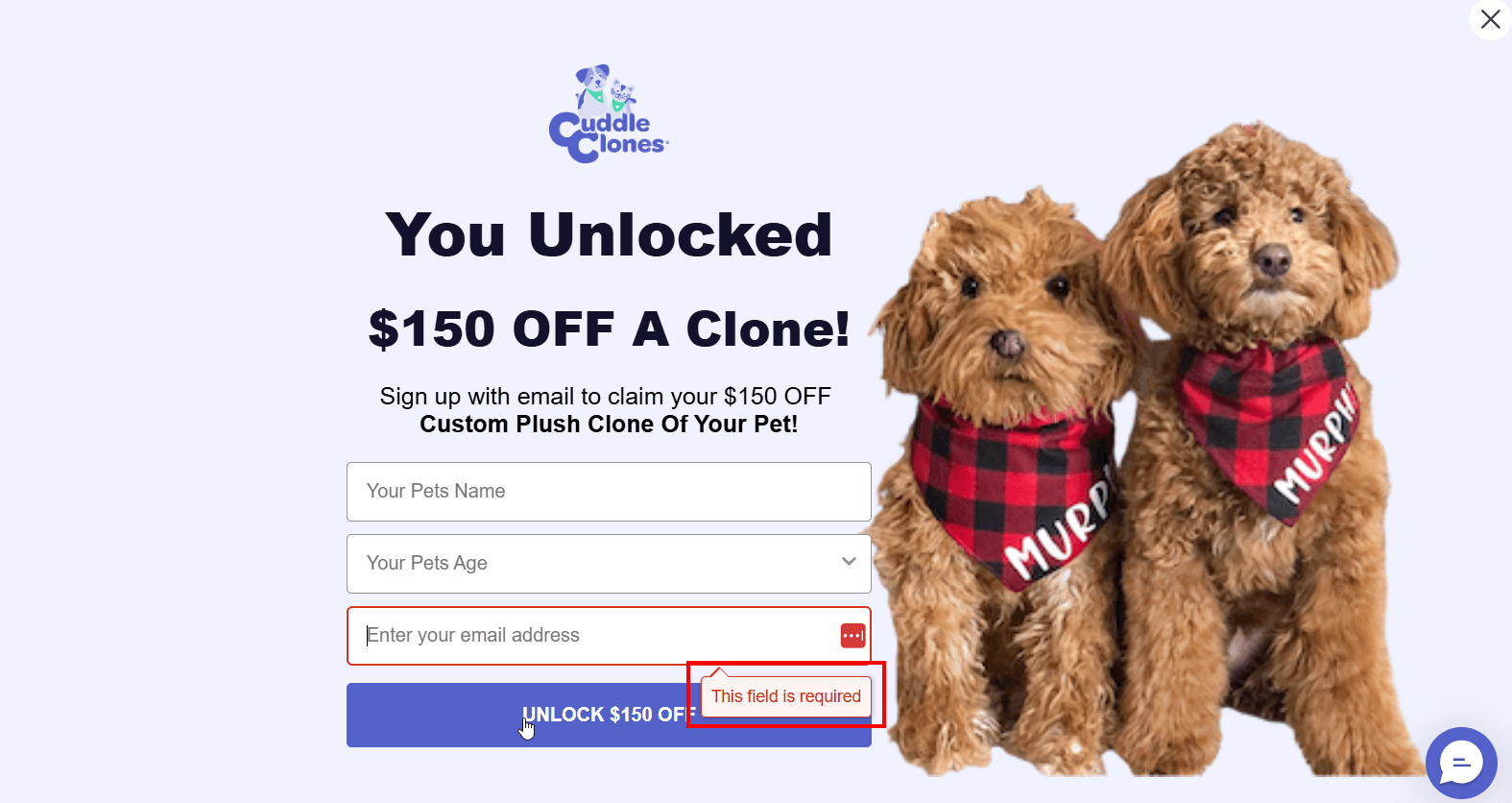
Here’s a great example where each field includes helpful placeholder text to help with entering information. What’s more, the required fields are clearly marked. This means that prospects who want to be a part of Cuddle Clone’s promotion will know what information to give right off the bat.
Optimize targeting
This is where you could identify your best-performing channels and audiences. Not all traffic is equal, after all. Use your form metadata and post-signup behavior to see which channels deliver the subscribers who actually engage and convert.
Here’s what you can do:
- Tag signups with source (or use UTMs) and segment by campaign.
- Create high-priority segments (e.g., webinar, paid social, blog, email, etc.) and compare conversions by channel or campaign.
- Reallocate your budget or tweak messaging toward channels with higher LTV per lead.
- Match form messaging to the traffic source. For example, LinkedIn visitors may need a different CTA than blog readers.
- Add a short “why subscribe” near the form to clearly show what the subscriber gets. This way, you’ll attract leads interested in a specific value proposition.
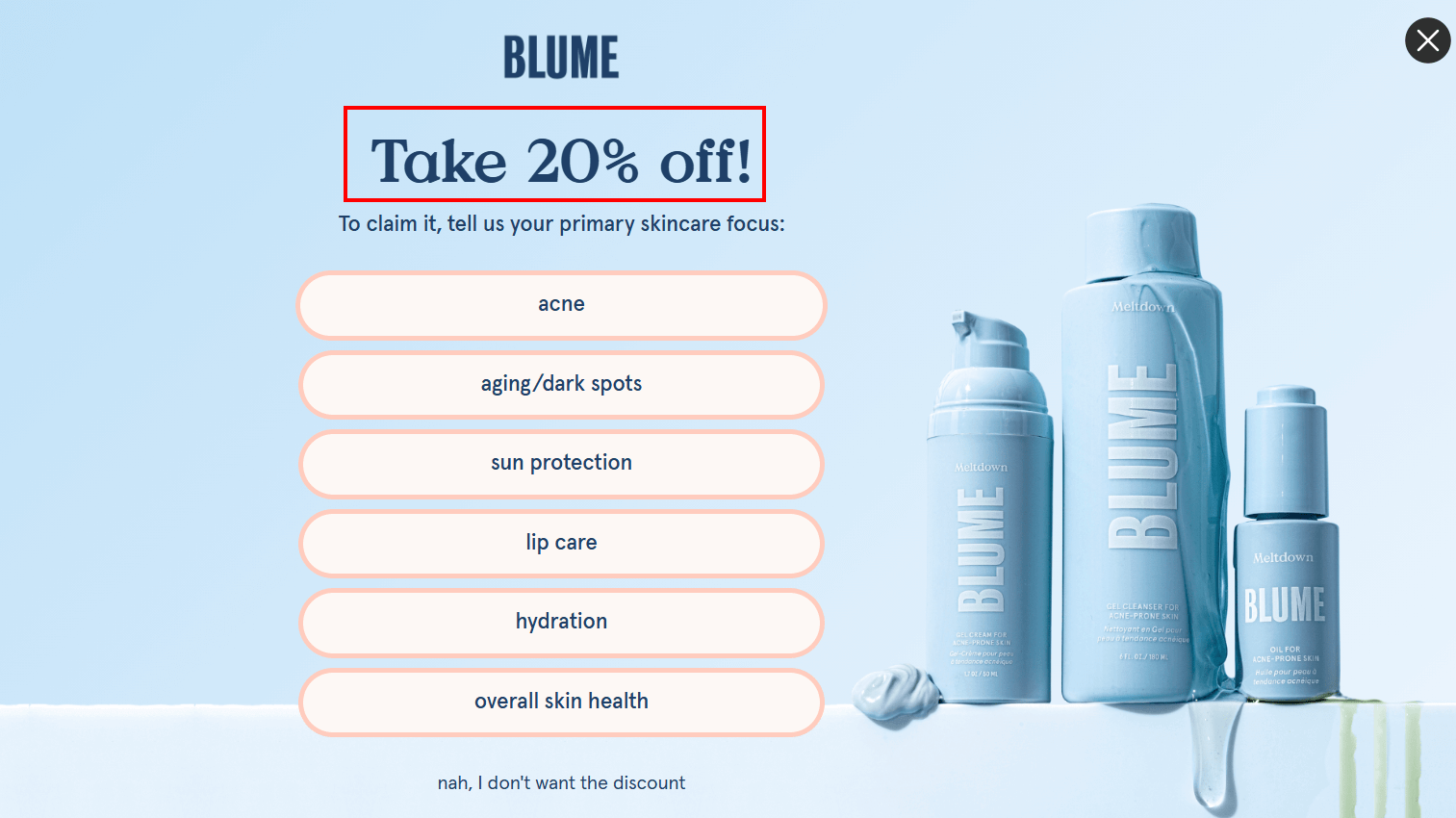
Blume does a great job of showing why a prospective subscriber should follow through with the action, which means getting 20% off their first order.
Once you follow through with those actions, measure which actions converted best by source, and your engagement rates per channel. If, for example, email leads convert faster than paid social, shift spend to your email campaigns and refine the CTAs based on that audience’s behavior.
Enhance lead quality
This is where you need to filter bots, use double opt-ins, and track post-signup engagement. Volume is useless if your leads are not qualified. Here’s how to improve the quality of leads without killing conversions:
- Add simple email validation to block disposable domains and invalid email addresses.
- Use CAPTCHA. They might increase friction, but they’ll filter out the bots.
- Ask for minimal data initially, then gather more info later. An email address, a name, and perhaps a location would do.
- Trigger welcome sequences based on page or channel source.
- Use lead scoring for new subscribers from the start with behavior signals like early opens or page history.
- Segment “silent subscribers” quickly and start nurturing them to lead them down the funnel smoothly, and protect your campaigns from the “Mark as spam” button.
Let’s see an example: Enabling email validation on email campaigns helped measure hard bounces. This, in turn, increased the percentage of users who open the welcome email. This is a clear win for sender reputation and ROI.
How to Track Subscription Form Analytics
Knowing which subscription form analytics matter is one thing. Knowing which ones matter is another. Actually capturing them is another. Tracking subscription form performance doesn’t have to be complicated, but using the right tools ensures you’re not just creating and hoping your form works.
You can start with native tools in your email platform, layer in external solutions for deeper insights, and then combine all data for a complete view.
Using Moosend’s native subscription form analytics
Moosend’s built-in analytics go beyond email metrics, giving you a clear view of form performance without needing extra setup. Each form automatically tracks Impressions, Conversions, and Conversion Percentage, helping you measure visibility and effectiveness at a glance:

- Impressions show that our form was displayed 5,000 times.
- Conversions show that we had 200 successful Halloween submissions.
- Conversion Rate ties it together. It’s the percentage of impressions that turned into signups—in our case, 4%.
The status shows that our form is still published. You can also use labels on your forms to easily filter and sort them according to action, audience, or any other label necessary for internal use.
Now, back to our analytics. Impressions, conversions, and conversion rate can already tell you a lot. As we mentioned before, high impressions but low conversions suggest issues with your form copy, CTA, or layout.
Low impressions but a high conversion rate indicate that your placement is working, and you just need to increase visibility.
Lastly, low impressions and conversions mean you need to revisit where the form appears and whether it aligns with user intent.
While Moosend doesn’t offer native A/B testing for forms, you can still compare performance by creating variations manually. For example, using one form on blog post A and another on blog post B. Over time, you’ll see which design, message, or placement consistently drives higher conversion.
The tool’s simplicity can help you spot whether your audience sees your form and whether they act on it quickly and easily. That’s enough to guide smart, data-backed adjustments before moving on to more advanced tracking.
Using dedicated tools
Dedicated forms analytics tools help you understand why you see the numbers you see, and what happens next. Use lightweight, marketer-friendly tools to add behavior, funnel, and downstream value signals.
Google Analytics 4
Using GA4 can help you determine and understand event tracking (form views, starts, submissions). Use it to capture three easy events:
- The form_view (when the form became visible)
- The form_start (when the user focuses or clicks into the form)
- The form_submit (completed submission).
Those events let you measure visibility versus intent versus completion across landing pages, blog posts, webinar pages, and other traffic sources.
GA4 can help you see which campaign performs best by using UTMs, spot pages where many prospects start completing your form but drop off at some point (signaling field friction or bad UX), or which forms people view but don’t start completing.
Heatmaps like Hotjar and Microsoft Clarity
Heatmaps and session recordings help you visualize behavior and drop-offs. Tools like Hotjar and Microsoft Clarity can help you understand where users hesitate, which fields they ignore, and whether the form is actually visible on mobile.
Look for scroll depth before the form to understand if it’s too low or too high on the page, or if there is frequent abandonment right after a specific field. These visual signals are the fastest way to decide if the fix is copy, placement, or user intent.
CRM or ESP reports
CRM tools like HubSpot can help you link signups to lead quality and campaign engagement. Export or sync form signups into your CRM—or use your email marketing service—and track early signals of quality, such as welcome-open rates, click-throughs, trial starts, or assigned lead score.
You can perform practical checks, like identifying which source produces the highest 7-day open rate. Or which form (or form variant, if you’re performing A/B checks) generates the most qualified leads. This is where you stop optimizing for volume and start optimizing for value.
Best Practices for Accurate Tracking
Good subscription form analytics start with predictable data. Small mistakes like inconsistent naming or broken events produce misleading signals that lead to bad decisions. Below are focused, practical rules to keep your tracking honest and useful.
- Use consistent tagging and naming conventions: Pick a simple, team-wide taxonomy for UTMs, form IDs, and event names. Consistency makes it trivial to compare forms, channels, and campaigns across tools. If your naming is messy, you’ll spend more time cleaning data than optimizing. Pick one format, document it on one page, and require it in every campaign brief.
- Test forms across devices and browsers: Forms behave differently on mobile browsers, older browser versions, and small viewports. A change that looks fine on a desktop can break the submit button on smartphones. Test the subscription form across both and do a quick smoke test after any copy or embed change.
- Validate that analytics tools capture submissions correctly: Ensure your numbers match reality. Small divergences are normal, but large gaps usually show an implementation issue.
- Track performance over time, not just per campaign: Short-term spikes or dips mislead. Use frequent and seasonal comparisons to tell if a change is real or noise. Track core trends like impressions and conversion rate monthly. Look for sustained uplifts, not just one-off gains.
- Respect privacy and ensure GDPR compliance: Tracking must be compliant and respectful. Only collect data you need, show explicit consent when required, and persist consent records. If you use behavioral tools like heatmaps, make sure they anonymize personal data and run only after consent where required.
Following these simple, repeatable best practices keeps your tracking reliable and makes your optimization work efficient. Clean, trusted data makes a huge difference and helps you lose between tactical guesswork and move towards clear, repeatable marketing wins.
Track Smarter, Not Harder
Form analytics can help you understand how early interactions shape your audience and, ultimately, your revenue. Treat your subscription forms as measurable, optimizable assets, and you’ll see how less guesswork leads to data-backed improvements that drive consistent growth.
Start simple: track impressions, submissions, and conversion rates in Moosend to spot quick wins. Then layer in external tools for deeper insights like user behavior or post-signup engagement. The more complete your view, the better your strategy. Keep testing, refining, and let your data show you where your best subscribers are coming from.
FAQs
Let’s take a look at some frequently asked questions on subscription form analytics.
1. What’s the most important metric to track for a subscription form?
Conversion rate is your primary performance metric that shows how efficiently visitors turn into subscribers. But don’t look at it alone; pair it with impressions and post-signup engagement for real context.
2. How often should I review my form analytics?
This depends on your industry and your goals. A good rule of thumb is weekly for active campaigns and monthly for evergreen forms. Regular reviews help you catch drops early and understand if changes you made (like copy or placement) are actually working.
3. How do I know if low conversions are a placement issue or a UX issue?
If impressions are low, it’s likely placement. If impressions are fine but conversions drop, you’re looking at a UX or copy problem like unclear CTAs, too many fields, or poor mobile layout.
4. Should I remove underperforming forms or try to fix them?
This is up to you, but generally it’s best to fix first. Start by adjusting CTA copy, placement, or form length. If a form stays flat after several tweaks and its traffic is low-quality, it’s better to retire it.
5. How do I balance data tracking with privacy compliance?
Collect only what you need (usually an email and name), include clear consent language, and ensure any behavioral tools you use mask personal information. Finally, always follow GDPR or local privacy laws.
Similar Posts



 Published by

Create, send and optimize your email marketing campaigns