















Bounced Email: Definition, Types & How to Prevent [2026]
Published By Marilia Dimitriou
April 5, 2024

05/04/24
So, you poured hours into crafting the perfect email campaign. You selected engaging visuals, wrote compelling email copy, and designed converting CTAs, all tailored to your audience’s needs. Then, you hit send, eagerly anticipating impressive open and conversion rates.
But your initial excitement quickly fades when you realize that your message doesn’t reach recipient inboxes.
Why is that? One of the most common and simplest answers is that your emails bounced back.
In this post, we’ll see the definition and the reasons behind bounced emails. We’ll also show you how to lower your bounce rates so your future campaigns land where they’re meant to: in the inboxes of your potential customers.
Make friends with inbox providers
Access real-time email reports to take control of your campaign performance.
TRY MOOSENDWhat Is a Bounced Email?
A bounced email is a message that failed to reach the recipient’s inbox due to a delivery error or failure.
Here’s what happens: you hit “send,” and your mailbox provider tries to deliver the message by connecting with your recipient’s server. If their ESP detects an issue during delivery, your message gets rejected and returned.
Now, what could that issue be? Common email bounce reasons include a misspelled or outdated email address, a full mailbox, and spam filtering by the recipient’s server.
When an email bounces, your email provider will notify you about the delivery failure. Reliable email solutions like Moosend or Constant Contact offer reports that help you figure out why a bounce occurred and take steps to prevent it in future communications.
Soft Bounce Vs. Hard Bounce
There are two types of email bounce, soft and hard.
A soft bounce indicates a temporary hiccup in the email delivery process. It typically occurs due to a full inbox, a temporarily unavailable server, or a message that’s too large. In your non-delivery report (NDR), the soft bounce code begins with ‘4’ and consists of three digits.
A hard bounce, on the other hand, the nature of the problem is usually permanent. The most common reason is an invalid or non-existent email address. It can also happen due to strict email filtering on the recipient’s side.
For hard bounces, you’ll see a three-digit code starting with ‘5’. You can check the code in the following hard bounce example from Gmail:
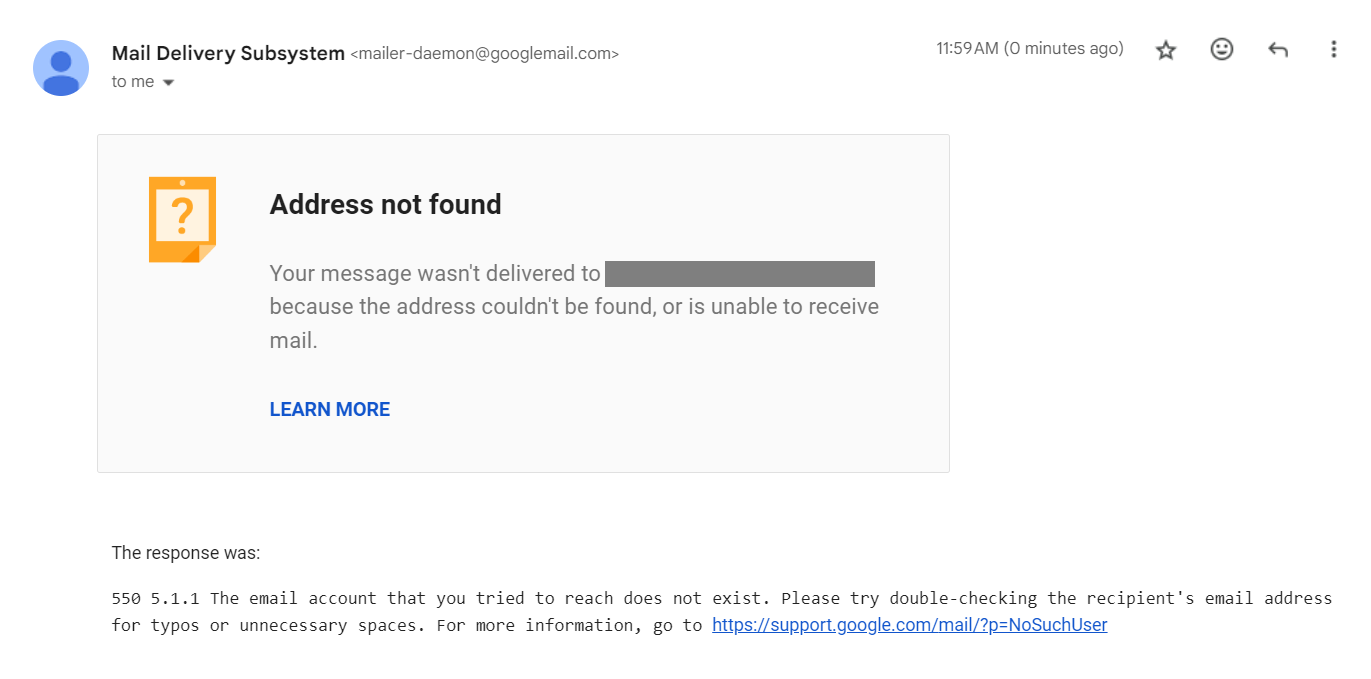 Soft and hard bounces require different management. Your email provider may automatically resend a soft-bounced message, for example when the issue is a full mailbox.
However, this isn’t the way with hard bounces; like in the case of an invalid contact, where the best course of action is to remove it from your list.
Generally, your bounce rates greatly affect your email deliverability. So, keeping them low, especially when hard bounces are involved, is crucial for maintaining a strong sender reputation and boosting conversions.
Blocked vs. bounced emails
A blocked email is a message that never makes it to the inbox because the recipient server’s security filters prevent delivery. Basically, blocks occur due to policy restrictions and result in a bounced email, thus affecting your deliverability in a similar way.
Here’s why a block might happen:
- Your reply-to address is on an email blocklist.
- One of the IP addresses used by your ESP is temporarily blocked.
- One of your domains is temporarily blocklisted.
- The receiving server rejects every email coming from unfamiliar senders.
- The email content looks suspicious, triggering spam filters.
Whether your email has bounced back, or been blocked, it harms your sender reputation and reduces your chances of successfully delivering future emails.
While it may seem like a serious and permanent issue, there are steps you can take to get unlisted, such as contacting the blocklist operator and cleaning your email list.
Common Reasons Why Emails Bounce Back
As mentioned, email bounces can hurt email deliverability, leading servers to see your messages as spam and possibly blocking them automatically.
Emails may bounce for a variety of reasons. We saw some of them above. Here’s the full list to keep in mind:
- Invalid email address due to typos during signup.
- The recipient’s mailbox is full.
- Authentication failure from missing or misconfigured DMARC, SPF or DKIM.
- Email accounts no longer exist or have been suspended.
- Email message size (or attachments) exceed the server limits.
- Message flagged as spam by user’s server or email spam filters.
- Issues with the recipient’s mail server, such as outages or temporary unavailability.
- The sender’s domain or IP address is blocklisted or has a poor reputation.
- User is on vacation or out of office and has set auto-replies.
How to Calculate Your Email Bounce Rate
The bounce rate is among the most important email marketing metrics to monitor, standing for the percentage of undelivered emails.
You can calculate it by dividing the number of hard bounces by the number of emails sent, and then multiplying that number by 100.
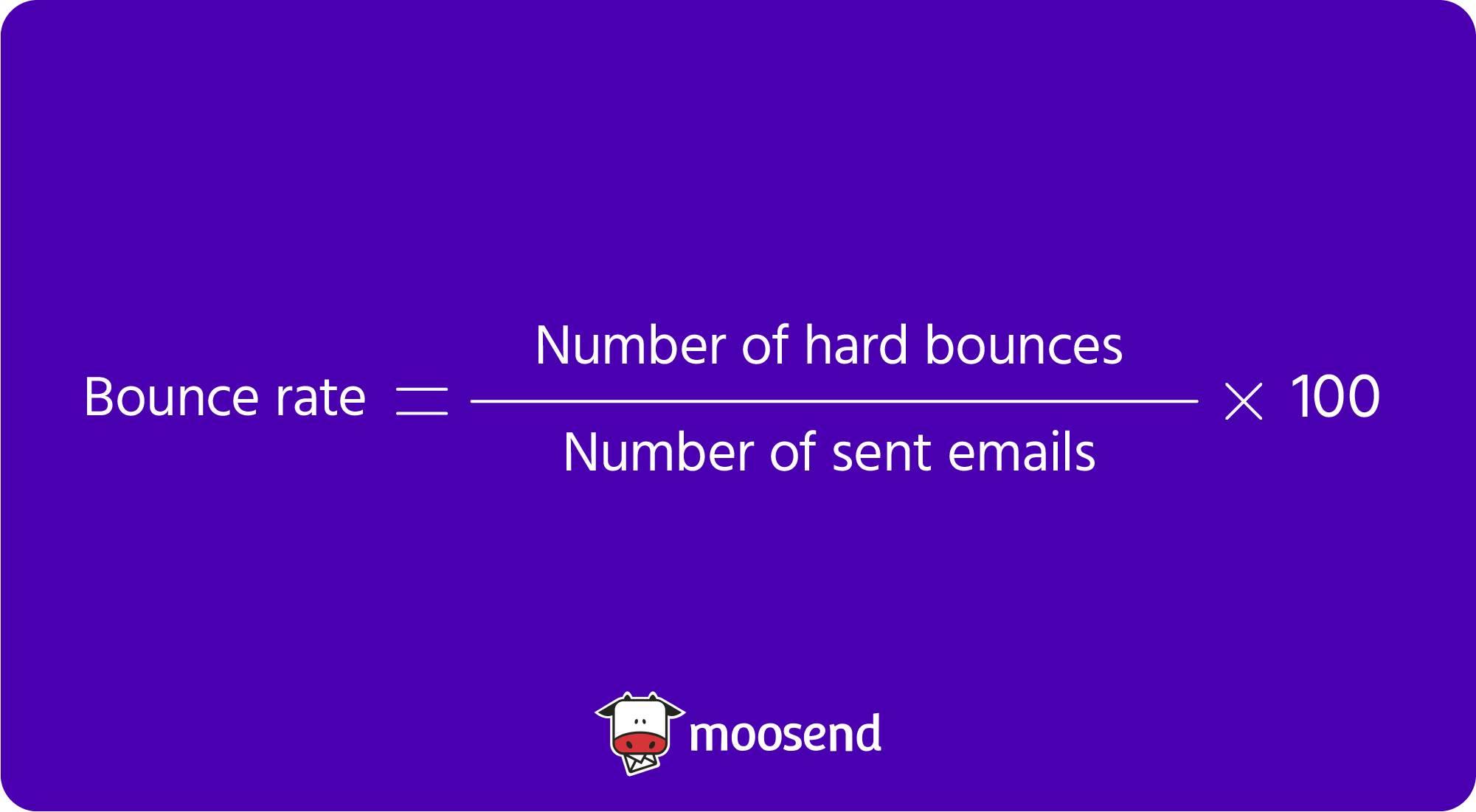
Unfortunately, there are some bounced email types that you can’t control or avoid, like in the case of an inactive account or a full inbox. However, for email marketers, monitoring this KPI helps determine how effective their campaigns are.
Most email marketing platforms provide you with detailed bounce and other email tracking reports. Moosend, for example, offer insights to help you identify the issue behind bounced emails:
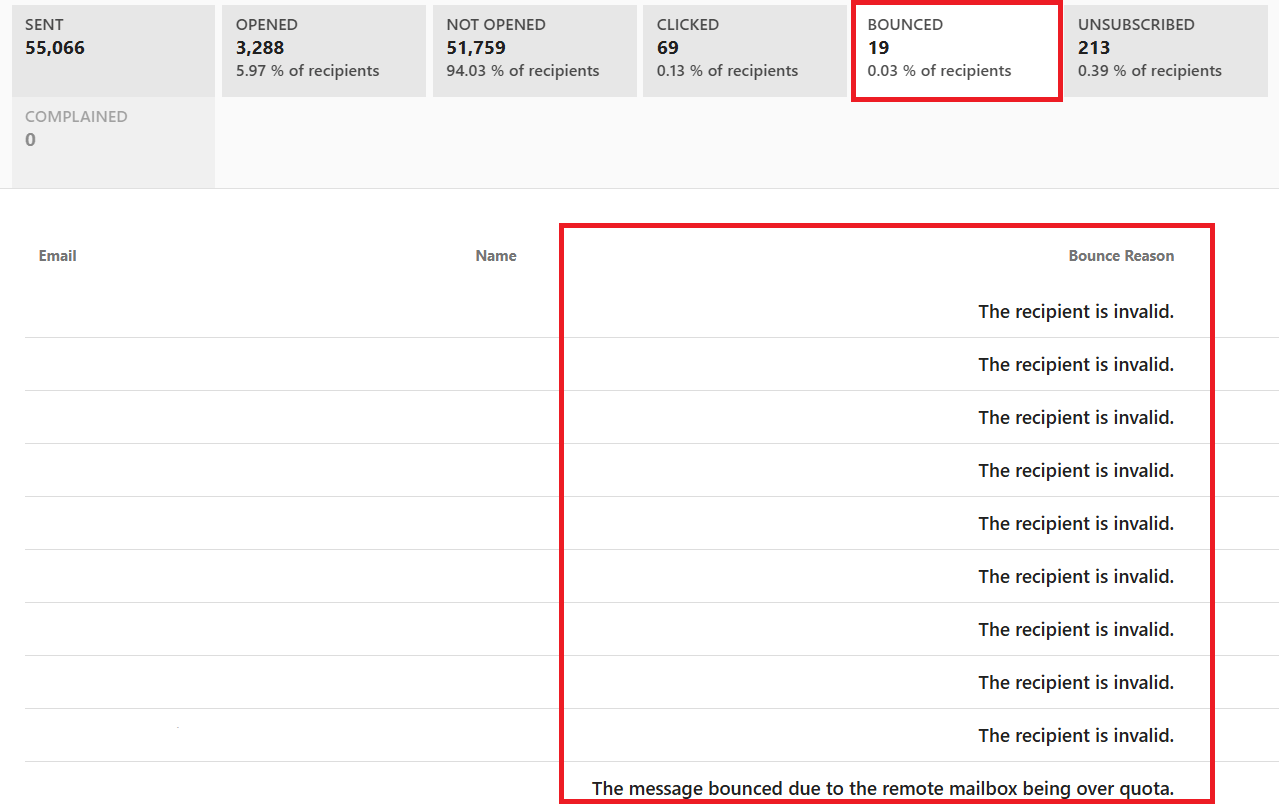
If you want to have complete control over your performance, consider registering for a Moosend account. With detailed reporting and analytics, you can monitor all important email metrics in clean, easy-to-read dashboards and focus on optimizing your strategy based on the results.
What is a good email bounce rate?
Ideally, your email bounce rates should be below 2%, which generally counts as a good benchmark.
A bounce rate higher than your industry benchmark could signal issues with your email list quality. Or it could mean your emails don’t resonate with your audience or aren’t properly optimized for deliverability.
Whatever the reason, bear in mind that most email service providers might penalize your email sender reputation if your bounce rate exceeds 5%, directly impacting subscriber engagement and campaign ROI.
But even if that rate is below average, addressing the factors that may cause bounces is important to keeping your email deliverability intact.
How to Prevent Emails from Bouncing
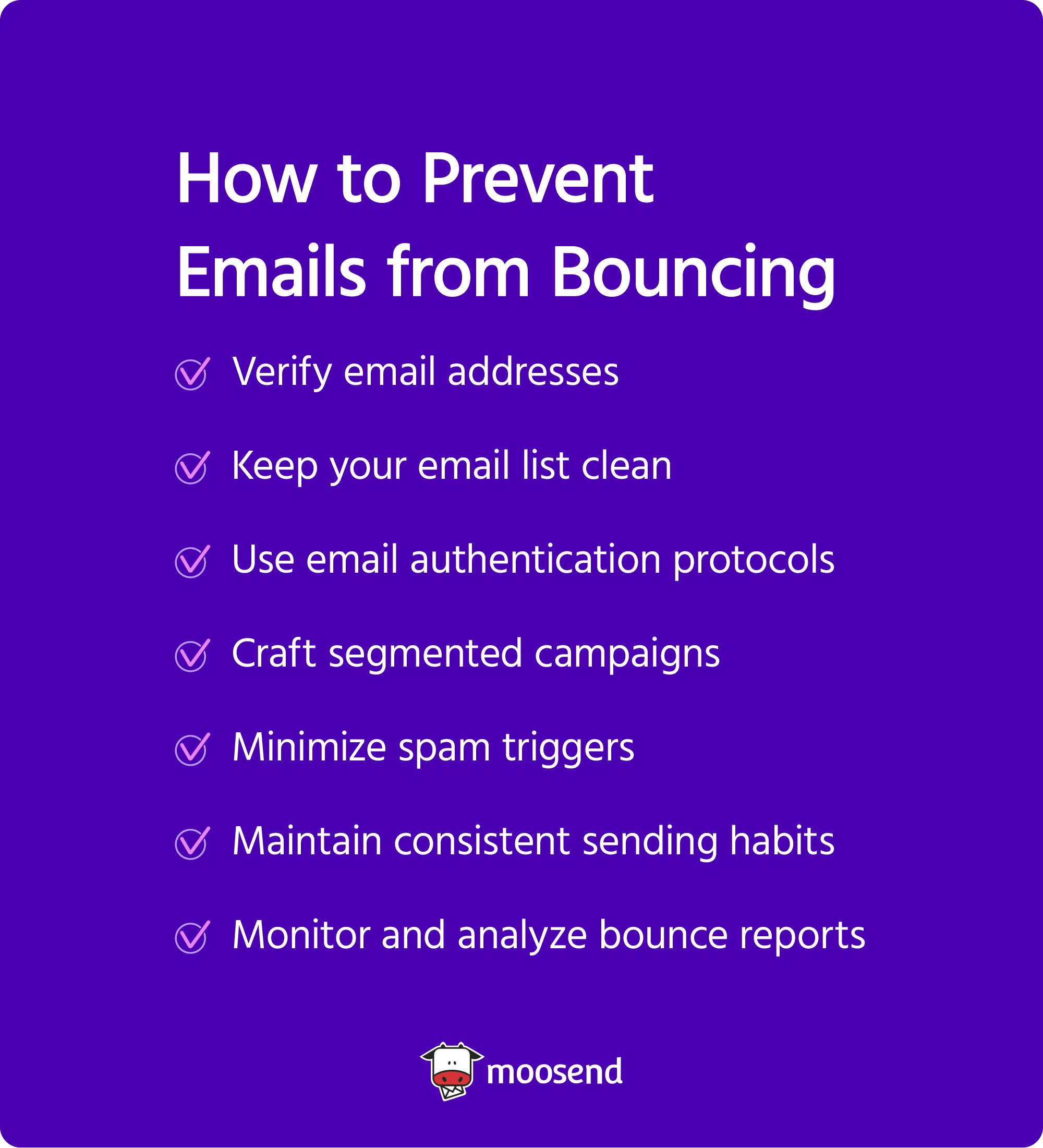
Achieving zero bounces isn’t a realistic goal. But keeping bounce rates as low as possible is. To get there, here are some best practices you should follow:
1. Verify email addresses
According to ZeroBounce’s findings, 24% of contacts in the analyzed email lists were invalid. What can you do to fix that? Cut the problem off at the source by preventing those addresses from entering your subscriber database in the first place.
It all starts with implementing a double opt-in process during signup. With double opt-in, users receive an authentication email and must verify their email address by clicking the confirmation button.
So, if the address is fake or mistyped, they won’t receive the confirmation link. As a result, they won’t be added to your list until they resubmit a valid email.
Here’s an email verification example from Lyft, asking recipients to verify their address:
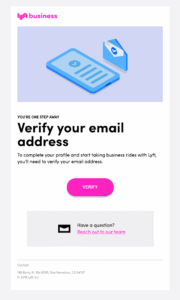
This ensures that you have accurate contact information, and that your email campaigns reach real people who want to hear from your brand. This, in turn, results in a lower bounce rate and a healthier email list over time.
2. Keep your email list clean
Having a clean email list doesn’t end with double opt-in. To be on the safe side, you should regularly remove invalid, outdated, or inactive email addresses from your subscriber database.
With time constraints in mind, it may not be practical to handle this manually, especially since best practices call for doing it at least biannually.
To protect your sender reputation and save time, use an email verification tool to check for non-existent or invalid accounts in your list.
But even legitimate accounts can become inactive when subscribers lose interest. So, consider segmenting dormant recipients and targeting them with a re-engagement campaign. You could keep it simple and ask if they still wish to receive your emails or if they’d prefer to change their email preferences.
This is how Blue Apron does it, enticing disengaged subscribers with suggestions for quick meals and a generous discount:

Another approach is to remind them of the perks of being an active subscriber or even offer a small incentive, like a helpful resource.
If they still don’t engage, remove them from your list since they consume resources that would be better allocated to subscribers who are interested in your content. More importantly, inactive contacts could eventually turn into a deliverability headache.
3. Use email authentication protocols
Maintaining a low bounce rate isn’t just about whether the email addresses in your list are legitimate. It’s also about proving to email providers that you are a legitimate sender. That’s where email authentication comes into play.
Email authentication protocols signal to email clients that your messages come from a trustworthy domain, and haven’t been tampered with during transit.
If your domain isn’t authenticated, you risk having your emails rejected as a security policy precaution. And there you have it: a hard bounce.
So, here are the protocols you need to set up to avoid this:
- SPF (Sender Policy Framework) verifies that the IP address sending the email is authorized to deliver messages on your behalf.
- DKIM (DomainKeys Identified Mail) adds a digital signature to each email you send, confirming that the content hasn’t been modified in transit.
- DMARC (Domain-based Message Authentication) uses SPF and DKIM to give mailbox providers instructions on how to handle emails that fail authentication (e.g., send them to spam or reject them entirely).
Email marketing platforms like Moosend or Mailchimp offer both the infrastructure and guidance to properly configure email authentication. You could start by reviewing your domain’s DMARC record with Moosend’s free DMARC checker.
4. Craft segmented campaigns
Based on recent findings, 24% of respondents say that 30-50% of the daily emails they receive are spam. Half of users choose to delete such messages, which is the best-case scenario since 29% of them mark these emails as spam while 9% block or report the sender.
Now, you don’t want your emails to receive the same treatment. This is why creating compelling and relevant content, from subject lines to CTAs, should be your top priority.
Segmented campaigns that reflect each subscriber’s needs and preferences have fewer chances of ending up in spam.
Email segmentation is a prerequisite for sending personalized content that responds to your subscribers’ expectations and interests. Group them based on shared characteristics like demographics, location, engagement level, and behavioral patterns.
For example, you could use location-based segmentation to announce promotion or events in the subscriber’s region. Or, you could target new customers with first-time discounts and loyal customers with rewards that match their buying history.
When subscribers can tell that you are using their data to deliver better offers, they have no reason to mark your emails as spam or block your domain.
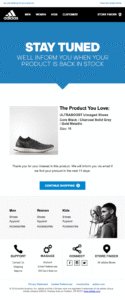
Here’s how Adidas ensures a memorable experience, using the subscriber’s history to ensure they’re notified when their favorite product is back in stock:
5. Minimize spam triggers
Another factor that affects whether your emails end up in spam is the email content itself. Certain punctuation marks, language choices, and tones trigger email spam filters.
That’s why you should be aware of these risky tactics and avoid them, as they may hurt your sender reputation and your relationship with your audience.
Here’s what to stay away from when creating email content:
- Salesy and aggressive language that overpromises results and uses buzzwords to grab attention.
- Spam-related words in your subject lines and email copy, such as “free cash,” “last chance,” “buy now,” etc., or any phrasing associated with violence or gambling.
- Too many emojis, punctuation marks (like multiple exclamation points), or all caps.
- Suspicious or broken links that will likely get flagged by inbox providers.
- Excessive urgency that makes every email feel like a limited-time deal.
- Lack of personalization with messages that feel like generic mass blasts.
- Misleading subject lines that don’t represent the email purpose.
- Email attachments, as they’re usually associated with phishing attempts.
It may sound like a lot to keep in mind. However, reliable email software takes some of this weight off your plate.
For example, Moosend offers AI-powered tools, including a built-in subject line generator and AI writer, to help you create engaging content in minutes. You can also use spam testing to ensure your emails pass through filters and reach your subscribers.
6. Maintain consistent sending habits
How and when you send your email campaigns plays an integral role in whether they get delivered or bounced since most ESPs monitor your sending patterns and use them to determine if you’re a trustworthy sender.
Let’s say you haven’t emailed your subscribers for a while, and then decide to bombard them with messages. Such a sudden spike in your email volume might prompt inbox providers to temporarily block your campaigns.
But even if inbox providers don’t intervene, unpredictable sending behavior could annoy your subscribers and lead them to block you themselves.
So, it’s best to set expectations about how often you’ll email your subscribers from the start. Then, stick to a consistent email frequency to meet these expectations and help email clients recognize you as a reliable sender.
By doing so, you gradually build up trust with both recipients and email clients, reducing the risk of bounces.
7. Monitor and analyze bounce reports
To improve your email performance, you must first know exactly what to improve. When diving into your email analytics, keep a close eye on your bounce rates.
Look for patterns and inconsistencies and use any insights provided by your email provider to understand why your emails are being rejected.
By reviewing bounce types, you can determine if the issue is temporary or permanent and take the necessary action.
For example, retrying delivery might be enough for a soft bounce caused by a full mailbox. Alternatively, you could segment soft-bounced contacts to monitor whether the issue persists.
A hard bounce, on the other hand, indicates that you have to add that address to a suppression list to prevent further damage to your reputation.
Over time, your bounce reports can help you identify patterns, such as repeated bounces from certain domains, which could point to a poor sender reputation.
However, if you see increased bounce rates in a specific campaign, it may indicate issues with the quality of your content or segmentation.
So, rather than guessing and making unnecessary changes, your bounce reports will help you prioritize and fix only what needs to be fixed.
Lower Your Email Bounce Rates
To get the most out of your email campaigns, you should stop wasting resources on sending emails that might ultimately bounce.
But, before you go off to calculate your email bounce rates, make sure you stay away from poor email practices like purchasing email lists or sending spammy content. Also, don’t forget to monitor your sender reputation and check blocklists to ensure your domain doesn’t end up there.
One last thing to keep in mind is that your email platform greatly influences bounce rates. A reliable platform will provide you with detailed bounce reports, spam testing, and email authentication resources to help you prevent issues, all crucial for successful campaigns.
At Moosend, hard-bounced email addresses go to a suppression list. That way, they won’t receive future campaigns and you’ll safeguard your sender’s reputation while saving time to focus on engaged contacts.
You can take control of your email metrics by registering for the 30-day free trial and test Moosend’s user-friendly tools firsthand.
FAQs
Here are some simple answers to common questions about email bounce.
1. What is an email soft bounce?
An email soft bounce occurs when the recipient’s email server temporarily rejects the email, often due to a full inbox or server issues.
2. What is an email hard bounce?
An email hard bounce happens when the email is permanently rejected by the recipient’s server, typically due to an invalid email address or policy restrictions.
3. How will you know if your email bounced?
You will get a non-delivery report (NDR) from your email server, specifically an email informing you of delivery failure and the reason your email was rejected. NDRs will provide clues about what might be wrong with your email deliverability, enabling you to fix any issues.
4. How do you handle an email bounce?
You can start by reviewing the bounced email for details, updating the recipient’s contact information if necessary, and retrying delivery. For hard bounces, consider removing the email address from your list as it may not exist or the recipient may have blocked your domain.
5. Should I delete bounced emails?
No, you shouldn’t delete them. Instead, use suppression lists to protect your sender reputation and update your CRM to avoid problems. Identify patterns and monitor bounces to take prompt action and maintain a clean list for optimal deliverability.
6. What is email reputation?
It refers to the perception of an email sender’s trustworthiness and reliability by email service providers (Gmail, Yahoo, etc.). It’s determined by factors such as your sender score, email engagement, spam complaints, and adherence to email marketing best practices.
Similar Posts

 Published by

 Published by

Create, send and optimize your email marketing campaigns