















Out-of-Office Email Examples & Templates to Get Inspired [2026]
Published By Alexandra Marinaki
April 27, 2026

27/04/26
Ever wondered if your out-of-office reply could do more than just tell people you’re gone?
OOO messages aren’t just “nice-to-have” autoresponders. They’re essential tools to keep your inbox organized while you’re away without risking important business opportunities. These messages act as temporary gatekeepers, managing expectations and even relationships in real time so you don’t have to.
In this guide, you’ll find out-of-office email examples and templates for different occasions to keep recipients happy and engaged. You’ll also find best practices for what to include and what to avoid.
When to Use an OOO Email and Why
While many professionals only associate out-of-office emails with extended periods of absence, you should actually set them up whenever you’re unable to reply within your usual response time. Common scenarios include:
- Vacation or seasonal leave
- Parental leave (maternity/paternity)
- Sick or medical absence
- Offsite meetings or conference travel
- Workdays with limited or no email access
But why should you be so deliberate about these automatic replies? Failing to set an OOO can lead to professional misconceptions or operational bottlenecks. When used correctly, these messages help you:
- Manage expectations: Customers, partners, and colleagues often reach out with specific needs and expect a timely response. An OOO message eliminates the disappointment or frustration that arises from silence.
- Prevent bottlenecks: By providing alternative contacts or helpful resources (like an FAQ page), you ensure that projects keep moving in your absence. Even if a task must wait, you offer reassurance that it’ll be addressed upon your return.
- Reduce inbox clutter: Out-of-office emails discourage recipients from sending multiple follow-ups that only add noise to your inbox. This ensures that when you’re back, you can focus on high-priority matters rather than “just checking in” threads.
The next time you consider skipping an automated OOO email, take the few minutes needed to set it up. Your “future self” will thank you for the organized inbox you return to.
What to Include in an Out-of-Office Message
What should an out-of-office message include to inform and reassure recipients? Here are the key elements to consider:
- A clear subject line: Inform readers of your absence immediately. Including your return date in the subject line can save them from even needing to open the email.
- Return date: Clearly state when you’re leaving and when you’ll return to help recipients decide on their next steps.
- Alternative contact information: Provide the details of a colleague who can assist in your absence. Ensure they’re prepared to handle incoming requests.
- Response expectations: Explicitly mention that the sender can expect a response upon your return to maintain a positive professional rapport.
- Professional signature: Close your message with a standard email signature to add a personal, professional touch to the automated communication.
Optional additions
Reason for absence: You may choose to mention why you’re away if it feels relevant. This is common for extended leaves, such as a sabbatical or parental leave.
Strategic links: Boost traffic and lead generation by including links to your website, recent marketing resources, or a brief FAQ document.
Keep in mind that most out-of-office messages use a simple plain-text format. You may occasionally see HTML-based OOO emails, often used for marketing initiatives to feature products or services during peak holiday seasons. However, plain-text remains the standard for individual professional use.
Common Mistakes to Avoid When Crafting Your OOO Emails
There are certain things you should avoid including in your out-of-office auto-responses. First, think twice before disclosing your personal phone number for “urgent” matters. Since everyone has a different definition of what’s urgent, it’s best to protect your peace and privacy by sharing a colleague’s name and contact details to handle these requests instead.
While it’s tempting to provide context for your absence, avoid oversharing personal details. For example, instead of mentioning a specific doctor’s appointment, simply state that you’re away for personal reasons. This keeps the focus on the most critical information, such as your return date.
Additionally, while adding a sense of humor can be on-brand for some, it’s usually safer to stick to a professional tone that caters to all types of recipients. Whatever style you choose, proofread the message a few times to ensure it flows well and is free of typos.
Finally, don’t promise something you might not be able to deliver. Avoid claiming you’ll respond “immediately” upon your return, as it’s hard to predict your workload or the volume of emails awaiting you. A more sincere and realistic choice is: “I will respond as soon as possible once I’m back.”
Out-of-Office Email Templates and Examples to Get Inspired
Explore real-life out-of-office email examples from our inbox and ready-made templates for different scenarios to save time.
1. Professional out-of-office message
A professional OOO example should be both simple and effective. Provide the essential start and end dates of your absence, include a brief thank-you note, and clearly identify a point of contact for urgent matters. It’s the perfect ‘all-rounder’ for maintaining a polished image while you’re away.
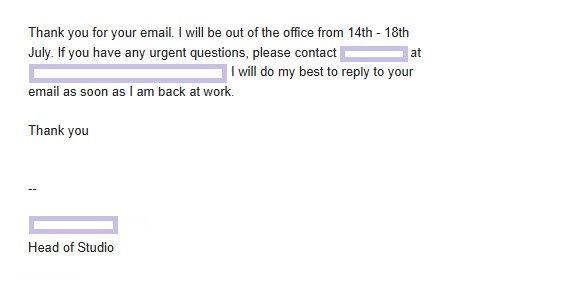
Here’s a similar pre-made template to customize:
Template
Hello,
Thank you for your email. I’m currently out of the office and will have no access to my inbox until my return on [Date].
I’ll be responding to all messages in the order they were received as soon as I’m back.
If you need immediate assistance, please reach out to [Colleague’s Name] at [Colleague’s Email Address].
Best regards,
[Your name]
2. Vacation OOO email
A vacation auto-reply is perhaps the most common type of out-of-office message. While many prefer a buttoned-up, professional style, others take the opportunity to be more creative when their brand voice allows.

Check out these two pre-made templates and choose the one that best reflects your company culture:
Template 1
Hello,
Thank you for reaching out. I’m currently out of the office for vacation and will have no access to my email until [Date].
I’ll be catching up on all emails in the order I received them once I return. If you need an immediate response, please contact [Colleague’s Name] at [Colleague’s Email Address].
Otherwise, I look forward to connecting with you when I’m back at my desk.
Kind regards,
[Your Name]
Template 2
Hi there,
Thanks for reaching out! I’m currently taking some time away from my screen to ride on some beach waves.
I’ll be back in the office at [Date]. I want to make sure I give your email the attention it deserves, so I’ll be tackling my inbox chronologically as soon as I’m back.
Need help right away?
No problem. [Colleague’s Name] is holding down the fort while I’m gone and can be reached at [Colleague’s Email].
Talk to you soon!
Best,
[Your Name]
3. Business trip OOO emails
Whether you’re traveling for a conference or visiting a client, an automated response is a great way to inform recipients of your absence. This not only manages their expectations but also indirectly showcases your professional development and industry engagement.
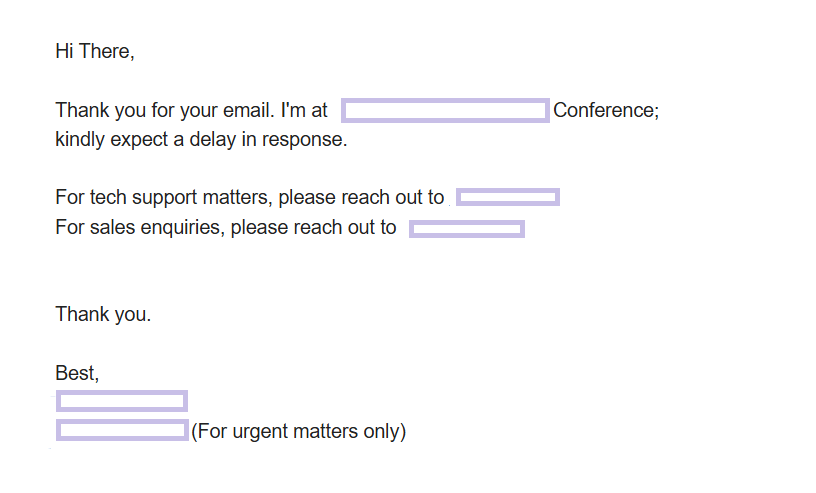
Here’s a template you can customize to craft your own out-of-office message:
Template
Hello,
Thank you for your email. I’m currently away from the office on a business trip until [Date].
While I’m working, I’ll have limited access to my inbox and may respond more slowly than usual. If you have an urgent matter that cannot wait until my return, please contact [Colleague’s Name] at [Colleague’s Email Address], as they’re assisting with my projects in the meantime.
Otherwise, I’ll do my best to get back to you as soon as I’m back at my desk.
Best regards,
[Your Name]
4. Holiday out-of-office emails
Setting an OOO message during popular holiday seasons is highly important. During these times, recipients are often looking for urgent assistance or end-of-year support, so it’s essential to provide alternative points of contact or a helpful FAQ section.
Don’t forget to include a “Happy Holidays” or seasonal greeting to give your message a warm, festive touch.
Feel free to customize this sample:
Template
Hello,
Thank you for your message. Our office is currently closed for the holiday break, and I’ll be away from my desk until [Date].
I’ll be spending this time with my family, so I’ll respond to all messages once I return to the office. If you have an urgent request, please contact our general support team at [Support Email].
Wishing you a wonderful holiday season!
Kind regards,
[Your Name]
5. Parental leave OOO message
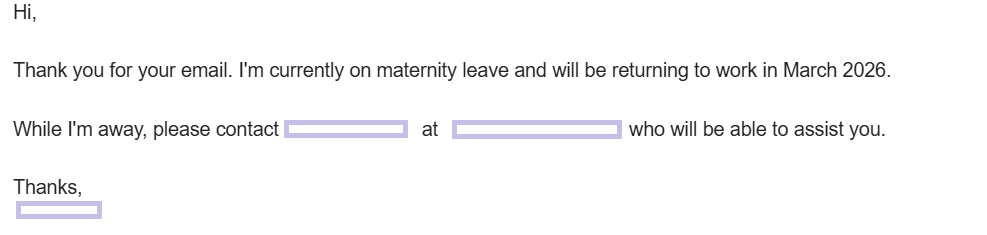
Whether you’re away on extended parental leave or just stepping out for a few hours to meet with your child’s teacher, it’s important to let people know about your unavailability. There’s no need to dive into personal details; just ensure that the essential information we covered earlier is included.
Here’s an example followed by a ready-made sample for these occasions:
Template
Hello,
I’m currently away on parental leave and expect to be out of the office until [Expected Return Month/Year].
To ensure your needs are met while I’m away, the following team members are stepping in to help with my typical responsibilities:
- For [Department/Task Name]: Please contact [Colleague Name] at [Email].
- For all other urgent matters: Please reach out to [Manager Name] at [Email].
I look forward to catching up with you when I return.
Best regards,
[Your Name]
6. Lead generation OOO email
Why not turn your out-of-office email into a growth opportunity? If it aligns with your brand, you can use your auto-responder to promote a new feature, a resource, or a flash sale.
The key is to ensure the announcement flows organically. If a direct promotion feels too pushy for your specific role, you can simply include the link or offer in your email signature instead.
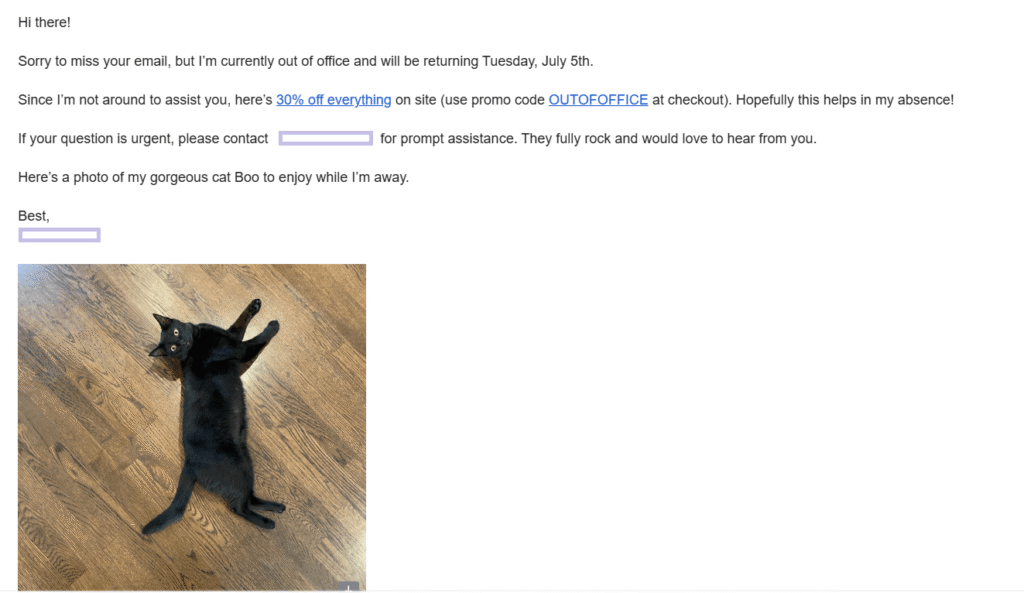
Use this template to create your own email:
Template
Hello,
Thanks for your email! I’m currently out of the office and will be offline until [Date].
While I’m away, I didn’t want to leave you empty-handed. If you’re looking to [Solve a pain point], you might find our latest [Guide/Whitepaper/Webinar] valuable.
Download it for free here: [Link]
I’ll be responding to all messages in the order they were received once I’m back at my desk on [Return Date]. If your request is urgent, please contact [Colleague’s Name] at [Email Address].
Best regards,
[Your Name]
7. Sick leave out-of-office email
Medical leave is a unique case because it’s often unplanned, making it difficult to provide a definitive return date. In these instances, it’s best to maintain a professional, helpful tone while being firm about your absence so you can focus entirely on your recovery.
In the example below, the email recipient can find alternative contacts to reach out based on the nature of the request and a WhatsApp number in the footer for urgent matters.

Here’s a helpful sick leave out-of-office message template to save time:
Template
Hi there,
Thank you for your email. I’m currently out of the office on medical leave. I expect to be back at my desk by [Date], and I’ll respond to all messages in the order they were received.
If you have an urgent request, please reach out to [Colleague’s Name] at [Colleague’s Email Address]. For all other inquiries, I appreciate your patience.
Kind regards,
[Your Name]
8. Humorous OOO email
Many startups and creative agencies embrace a more lighthearted brand voice. If yours is one of them, you can turn your OOO message into a well-orchestrated joke that gives recipients a good laugh. Just be sure to double-check that the humor aligns with your specific company culture.
Check out this sample for a bit of inspiration:
Template
Hello!
Since you’re reading this, you’ve hit my autoresponder. I’m officially on vacation and couldn’t be happier!
I’m out of the office until [Date] and will have no access to my inbox. I’ll be back and ready to work once I’ve finished [mentioning a fun goal, like “tasting every taco in the city”].
If you need help immediately, please reach out to [Colleague’s Name] at [Email Address]. They’re much better at work than I am right now.
Talk to you when I’m back!
[Your Name]
9. Internal-only out-of-office message
Beyond informing partners or customers, it’s just as important to notify your teammates. Since internal communication often happens on platforms like Slack or Teams, your autoresponder should be quick and direct. Sharing your return date and a link to documentation allows for “self-service” while you’re away.
Feel free to tweak this sample:
Template
Hi there 🙂
I’m out of the office starting today and will be back on [Return Date].
I won’t be checking email or Slack while I’m away, so if something urgent comes up regarding [Project Name], please check the [Link to Shared Folder/Documentation] first. [Colleague’s Name] is the point of contact for my tasks.
Otherwise, I’ll catch up with you when I’m back!
Best,
[Your Name]
Out-of-Office Email Subject Lines for Different Intents
Most people simply write “OOO” in the subject line to let recipients know they are away straight away. Others prefer to enhance them with a return date or an emoji. For example, 🏝️ and 🏖️ are great additions to vacation responders.
Here’s a list of subject lines categorized by style and intent:
Professional & direct
- Out of Office: [Your Name] | Returning [Date]
- Traveling for Business: [Your Name] Out of Office
- Extended Absence: [Your Name] – Please see details
Creative & engaging
- Away on vacation! Back on [Date]
- Currently recharging. I’ll be back on [Date]! 🏖️
- I’m OOO, but our [Resource Name] isn’t!
- Knock, knock! (I’m not home…)
Holiday & internal
- OOO for the [Holiday Name] festivities! 🎄
- Internal OOO: [Your Name] is off the grid
Try to keep your subject line under 40 characters. This ensures it’s optimized for mobile devices, where longer titles often get cut off. If you’re unsure which style to use, always default to a professional, direct approach to stay on the safe side.
Is Your Next OOO Email Getting Closer?
If so, you now have the tips and inspiration needed to craft your next out-of-office message. Simply choose a tone that fits your brand and clearly communicate your return date, whether you’re stepping away for a few hours or an extended period.
If you’re ready to explore other types of automation to power up your marketing initiatives, sign up for a Moosend account and explore all our features with a 30-day free trial.
FAQs
Here are a few quick answers to frequently asked questions regarding out-of-office emails.
1. How long should an effective out-of-office email be?
An effective OOO message should be brief and digestible, ideally under 100 words. Ensure that all essential information, such as your return date and alternative contact details, is easy to spot. If recipients encounter a wall of text, they may skip the message entirely and miss the most important details.
2. When should I turn my OOO on?
It’s a good practice to schedule your OOO email about 30 minutes before you actually leave. This gives you a buffer to finish those last few tasks and head out without the stress of leaving an email unanswered.
3. Do I need a different OOO for internal vs. external recipients?
If your email provider allows it, it’s highly recommended to create two versions. You can use a more casual or fun tone for colleagues while ensuring they have the specific resources they need to keep projects moving. For external contacts, use a more polished, professional tone.
4. What if I don’t have a “back-up” person to cover for me?
If no one’s covering your tasks, focus on setting clear expectations. State clearly that you won’t be checking your email and will respond to all inquiries upon your return. This prevents recipients from expecting a follow-up before you’re back at your desk.
Similar Posts

 Published by



Create, send and optimize your email marketing campaigns