














Flodesk Review: Pros, Cons & New Pricing [2026]
Published By John Desyllas
February 2, 2026

02/02/26
For years, Flodesk has stood out among email marketing services by offering beautifully designed email templates and keeping pricing simple with one flat fee for unlimited contacts. That has made it especially attractive to small businesses, creators, and solopreneurs who want professional-looking newsletters without complex tools or high scaling costs.
But that promise has recently changed. As of December 2025, Flodesk introduced audience-based pricing, moving away from the model that defined its early appeal. For many users, this raises an important question.
Does Flodesk still deliver enough value to justify the new pricing structure?
In this Flodesk review, we’ll take a close look at Flodesk’s features, strengths, and limitations. We’ll also examine whether it remains a smart choice for small teams and independent businesses after its pricing changes.
Disclaimer: The information below is accurate as of February 2026.
Looking for an alternative?
Save $$$ of your marketing budget by switching to Moosend today!
Flodesk Overview & Ratings
Flodesk has a unique approach to email marketing, prioritizing design, clarity, and ease of use. It’s built for creators and small businesses who want emails that look polished by default, without spending hours inside a cluttered editor or learning advanced marketing logic.
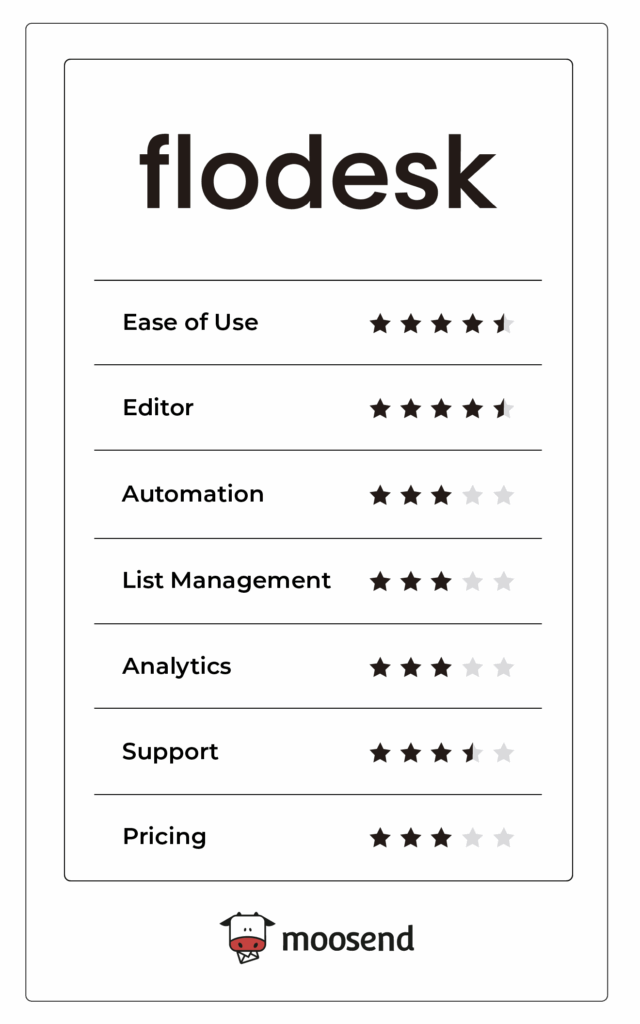
That focus comes with trade-offs. Flodesk intentionally limits advanced automation, segmentation, and reporting to provide a smoother experience. Below, we’ll break down where the platform excels and where it falls short, followed by a quick visual rating of Flodesk across key areas.
Flodesk Feature Breakdown
In this section, we’ll explore Flodesk’s main features and their pros and cons, so you can identify whether the platform fits your business needs.
Email Builder & Templates
My experience with Flodesk’s email builder was hands-down one of the best I’ve had. Even compared to the best email marketing services, Flodesk’s editor makes campaign creation effortless and enjoyable.
Although it doesn’t support drag-and-drop, it lets you select from various content blocks and pre-designed layouts to build your campaigns. For example, you can add images, countdown timers, polls, products from your online store, and your Instagram stories/posts.
Using the available layouts, you may never have to design anything from scratch. That’s because all layouts are modern, and customizing them is intentionally simple.
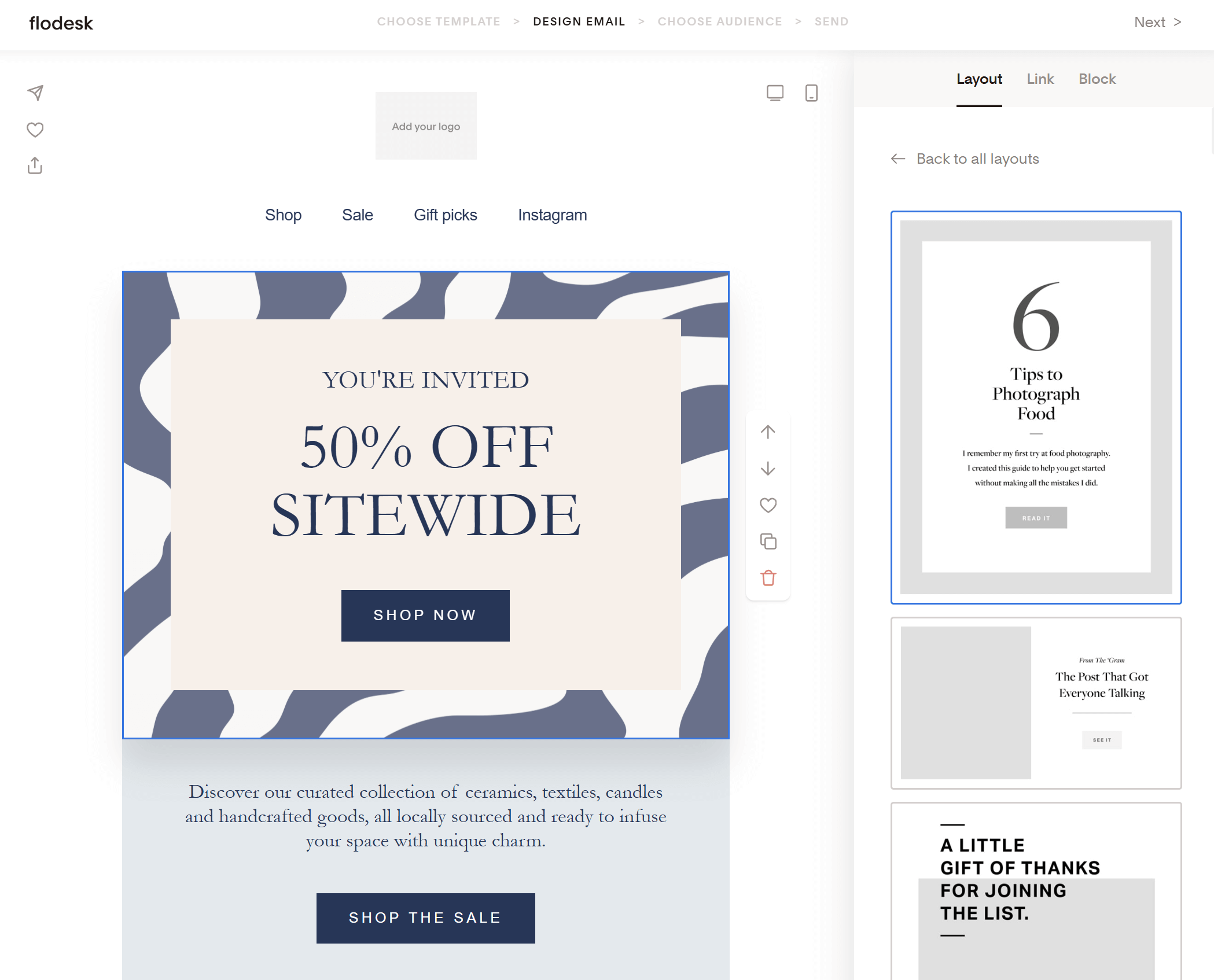
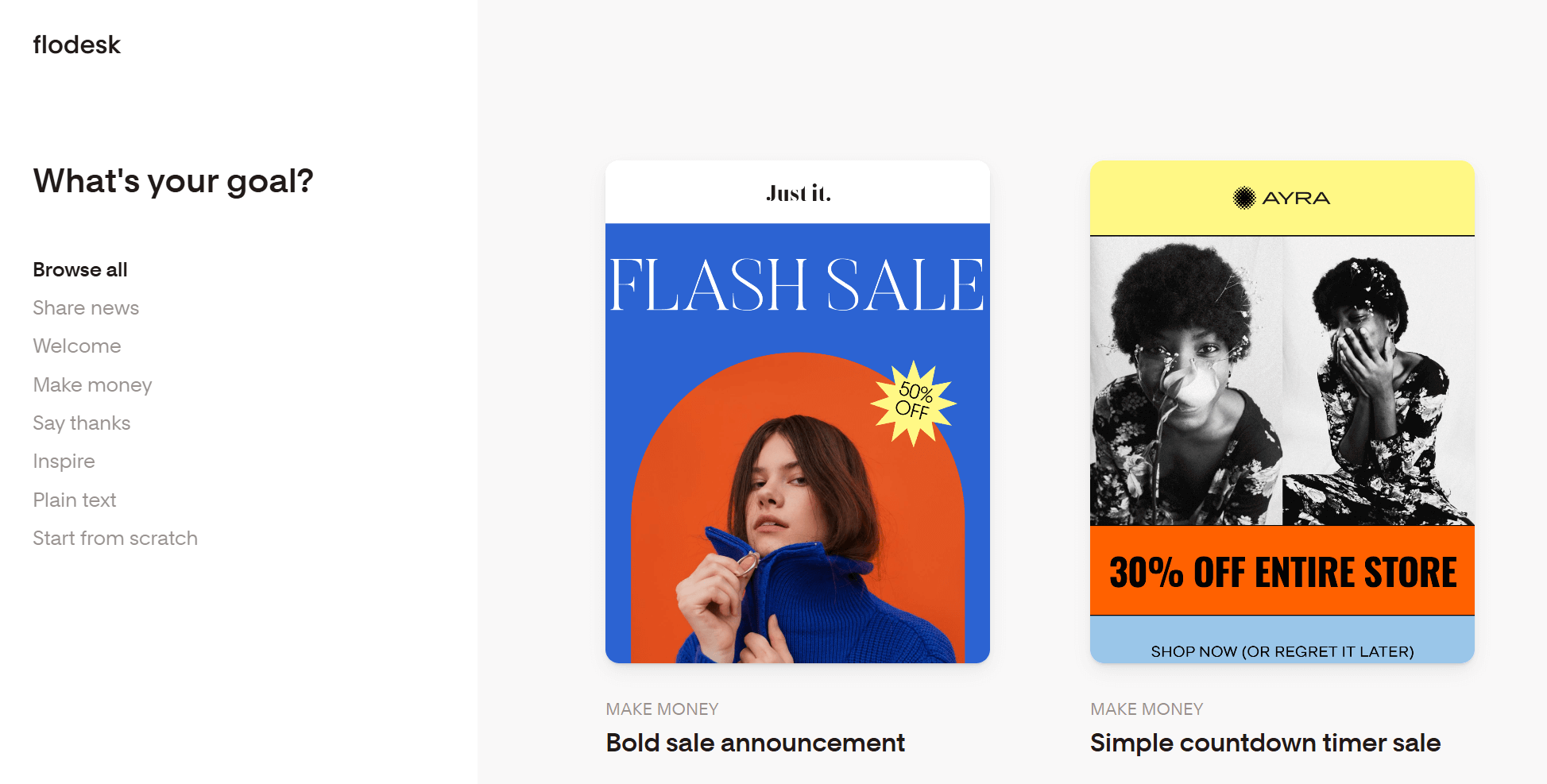
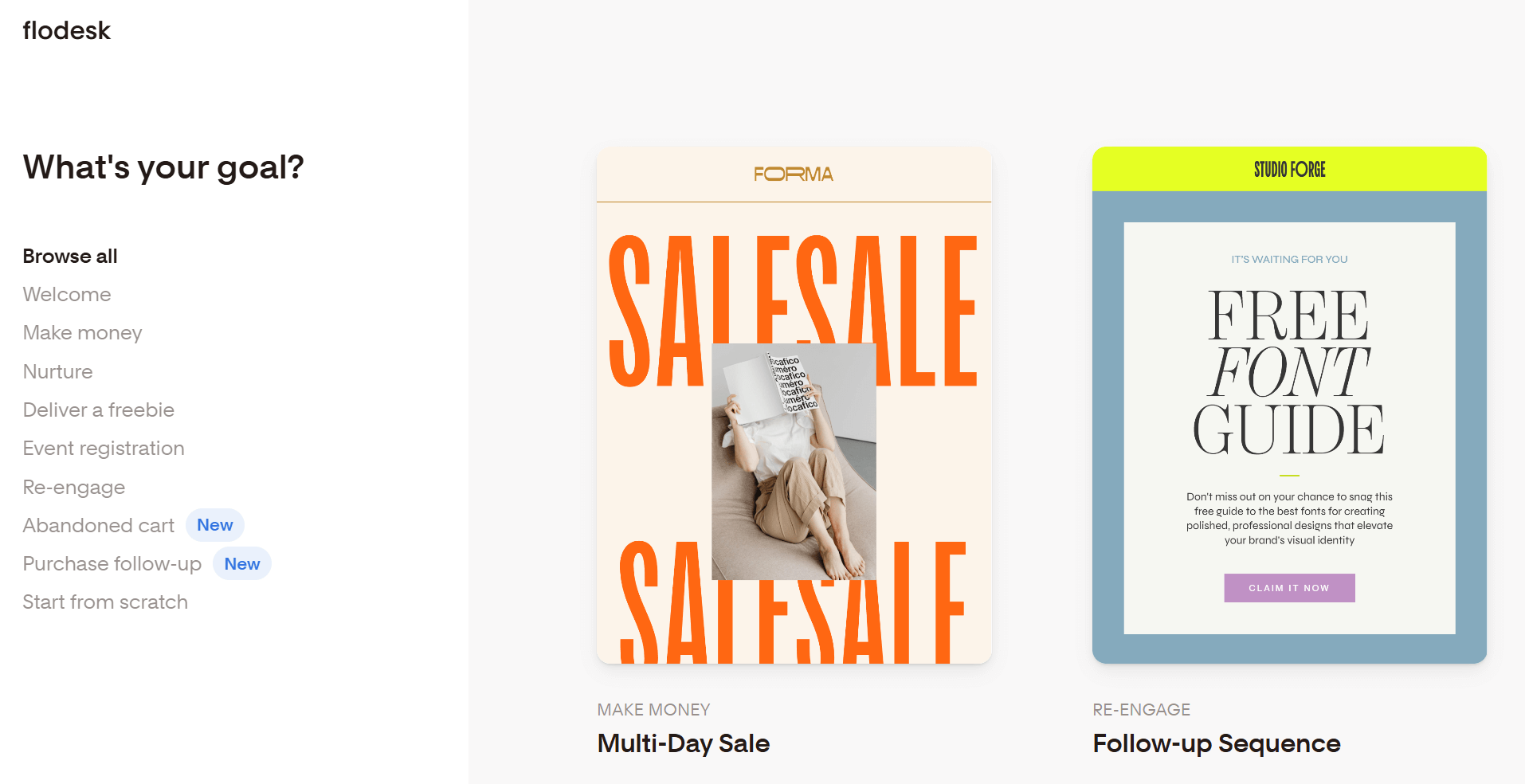
We also noticed that it’s surprisingly easy to familiarize with the editor through experimentation and master it, even in a short time. Furthermore, Flodesk does a great job at guiding new users by asking them what their goal is and providing relevant email designs.
There are 80+ aesthetically pleasing templates that you can customize to match your brand, even if you’re an email marketing newbie.
The builder supports basic personalization, letting you add a subscriber’s name or custom details to your message feel more human.
A negative thing I found is that it’s impossible show different content blocks to different people (conditional visibility) using Flodesk’s email editor. In this email marketing service, conditional visibility is applied to entire emails within a workflow, not blocks within an email.
So, you need to create separate emails for those different groups of people and use a Yes/No condition in a Workflow to determine which email each subscriber receives.
Automations
Flodesk’s automation keeps things simple, following the same philosophy as its email editor.
You can create automation flows for common use cases, such as welcome sequences, lead magnet delivery, drip emails for courses or content, product follow-ups, and basic nurture campaigns.
Triggers are straightforward and include adding a subscriber to a segment, submitting a form, making a purchase, and abandoning their cart. While this simplicity can work for many users, it probably won’t meet the needs of business owners who could use more advanced triggered emails and sequences.
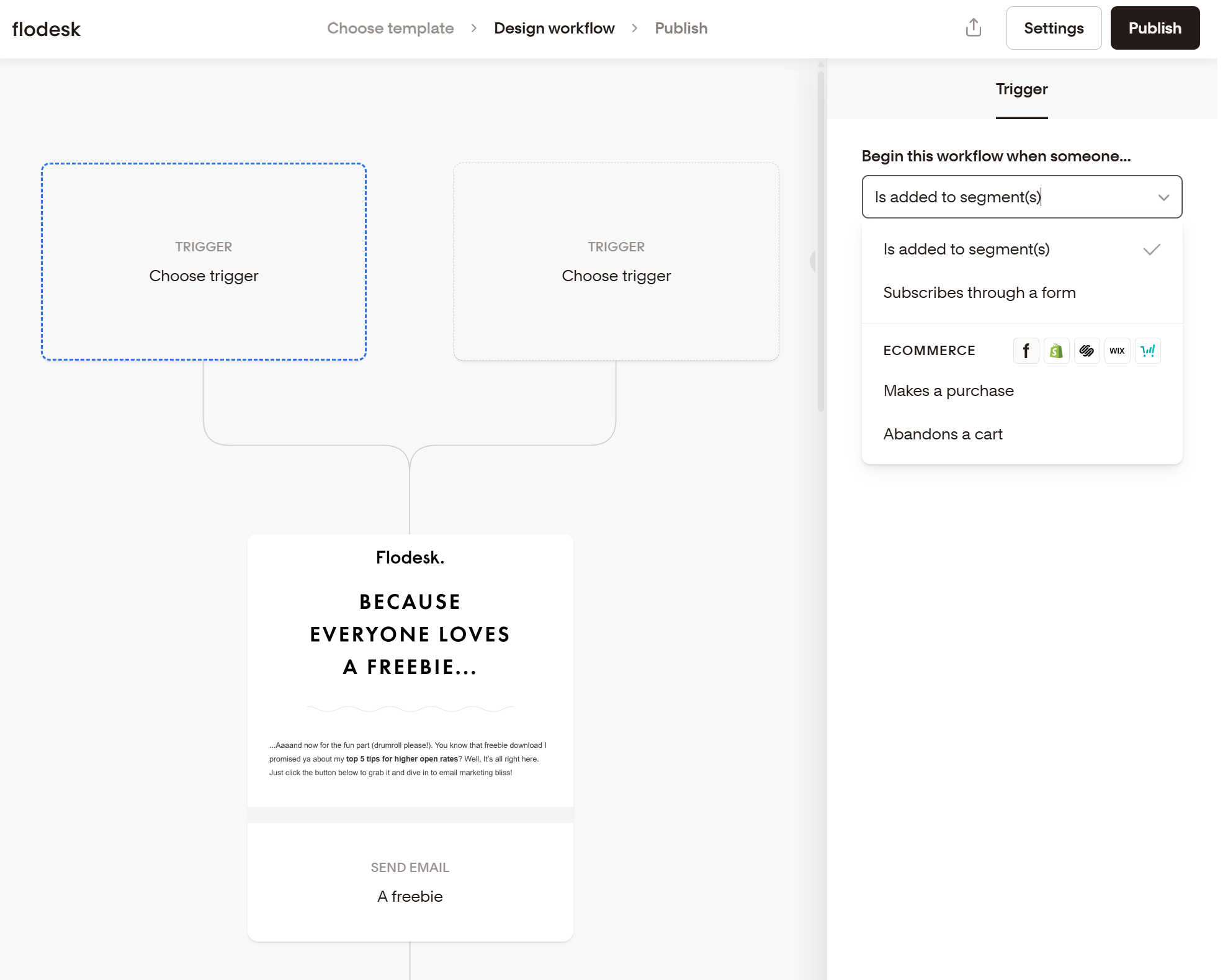
The workflow editor itself is beginner-friendly. Each step is clearly defined, and adding emails, delays, or yes/no conditions feels natural rather than technical.
Recently, Flodesk also introduced Link Actions, which allow you to define what happens when a subscriber clicks on any link, whether it’s a text link, image block, layout block, or eCommerce block. This allows you to trigger workflows, tag subscribers, and add or remove them from segments.
Despite this, experienced marketers will notice some limitations. Conditional logic is applied at the email level rather than within individual content blocks (as we saw above), and options for behavioral triggers or multi-layer segmentation are limited compared to more advanced platforms. As a result, Flodesk’s automations are best suited for simple, goal-driven journeys rather than complex, highly personalized customer flows.
Segmentation (List Management)
After reviewing Flodesk, we found that it offers basic segmentation and list management options. The system is built around segments and custom fields, so it’s easy to understand instead of endlessly customizable.
You can segment subscribers based on common criteria such as form submissions, email engagement, purchases, link clicks, and custom field values. Segments update dynamically, which means subscribers automatically move in and out as they meet the defined conditions.
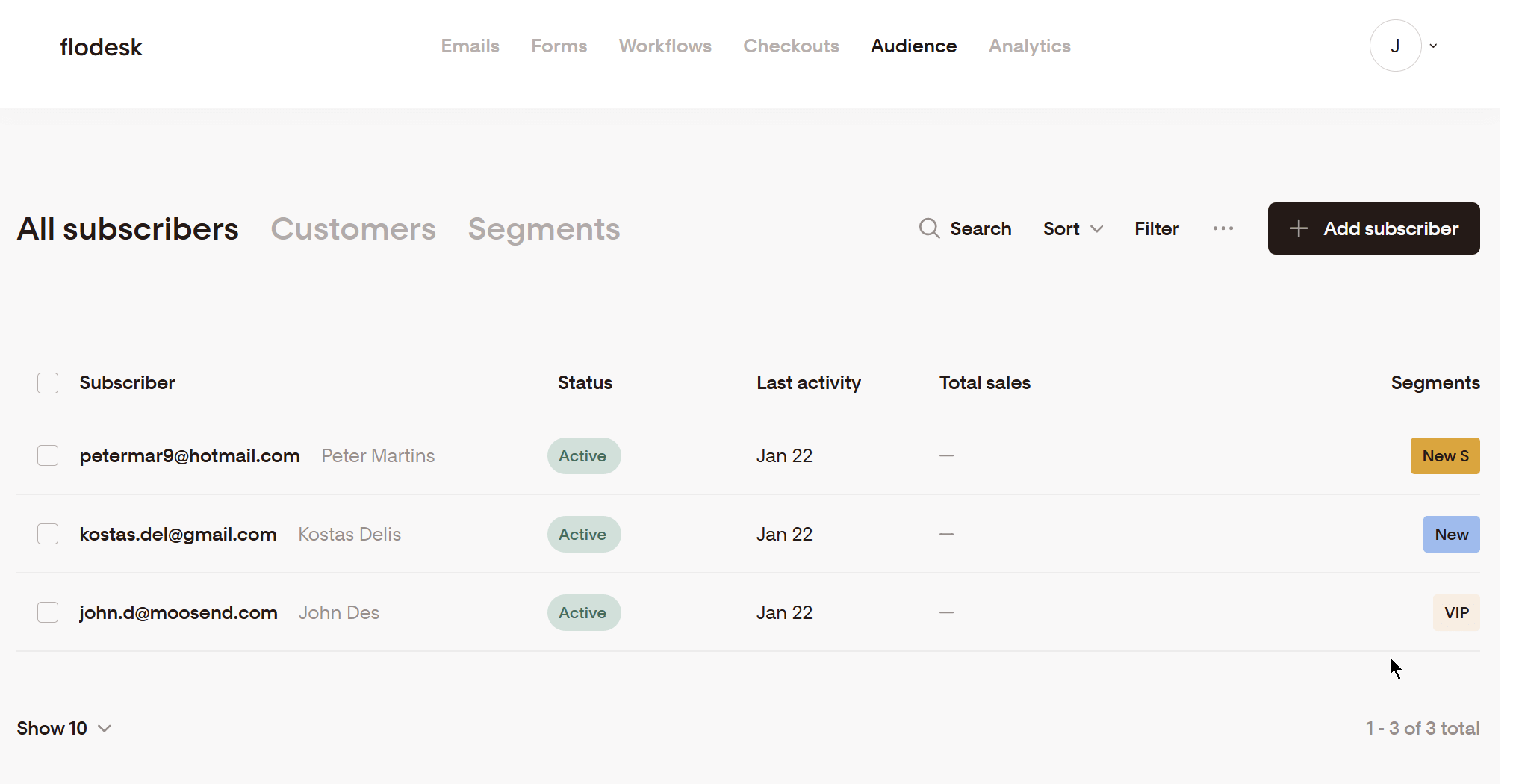
Custom fields also allow you to store additional subscriber data, such as preferences, lead magnet sources, or quiz results. These fields can be populated via forms, Link Actions, or workflows, enabling gradual enrichment of subscriber profiles without manual effort.
However, you won’t find advanced segmentation options like organizing your list based on subscribers’ behavior or lead scoring. Additionally, it’s harder to find and remove inactive contacts in Flodesk compared to other Flodesk alternatives, since this is a manual task.
Forms & Landing Pages
Flodesk offers several form types, including inline forms, pop-ups, link-in-bio, spinner (wheel of fortune), and full-page opt-in forms. All form templates look stunning out of the box, with layouts that prioritize clean typography and mobile responsiveness.
The form editor lets you adjust colors, fonts, images, and copy to match your brand, but it doesn’t offer much customization when you try to change the layout.
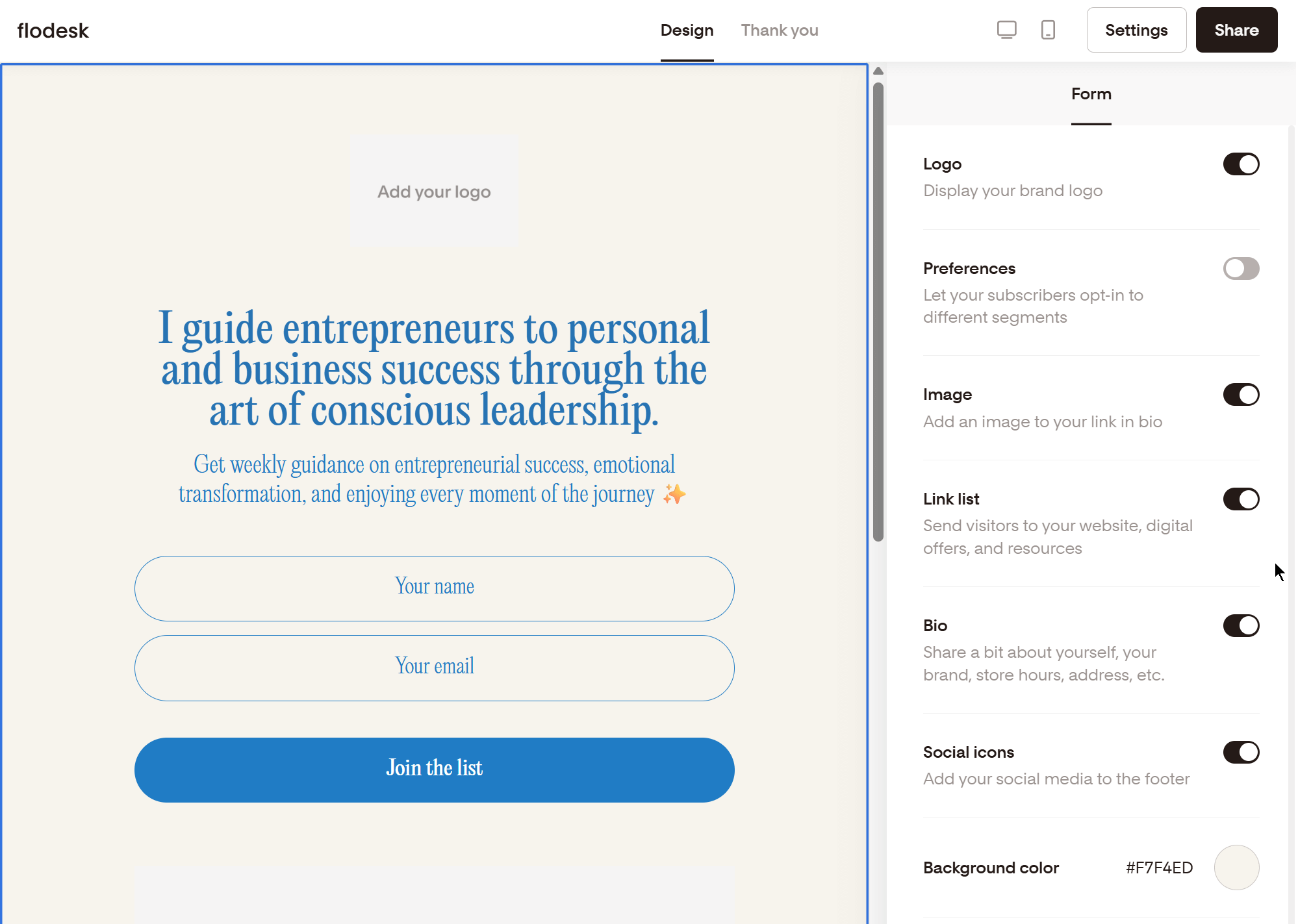
You can also set up single or double opt-in, as well as add custom fields. Moreover, Flodesk offers several pre-made thank-you messages, or you can craft a custom one if you want. The main “pain point” we found in Flodesk’s forms is that you cannot add CAPTCHA.
Regarding landing pages, Flodesk focuses on sales pages and checkout pages, which function as conversion-ready landing experiences. You can create a landing page to sell digital products, subscriptions, or services directly, complete with pricing, product details, and payment collection.
These pages integrate natively with Flodesk’s email workflows, segments, and custom fields, making it easy to trigger post-purchase emails and onboarding sequences, or access delivery without extra tools.
For beginners and solopreneurs, this is a strong advantage. You can capture leads, sell products, and automate follow-ups within the same platform. That said, users looking for advanced page customization, A/B split testing, or complex funnel logic may find these pages limiting.
Reporting & Analytics
For email campaigns and workflows, you can track key engagement metrics, including open rates, click rates, unsubscribes, and revenue (when using Flodesk Checkout). Results are presented in a clean, visual format that makes it easy to understand how a campaign performed at a glance.
Flodesk also provides basic insights into subscriber growth and engagement over time, helping you see which forms, emails, or workflows are contributing to list growth and conversions. When combined with Link Actions, you can gain additional visibility into how subscribers interact with specific links and use that engagement to trigger automations or update segments.
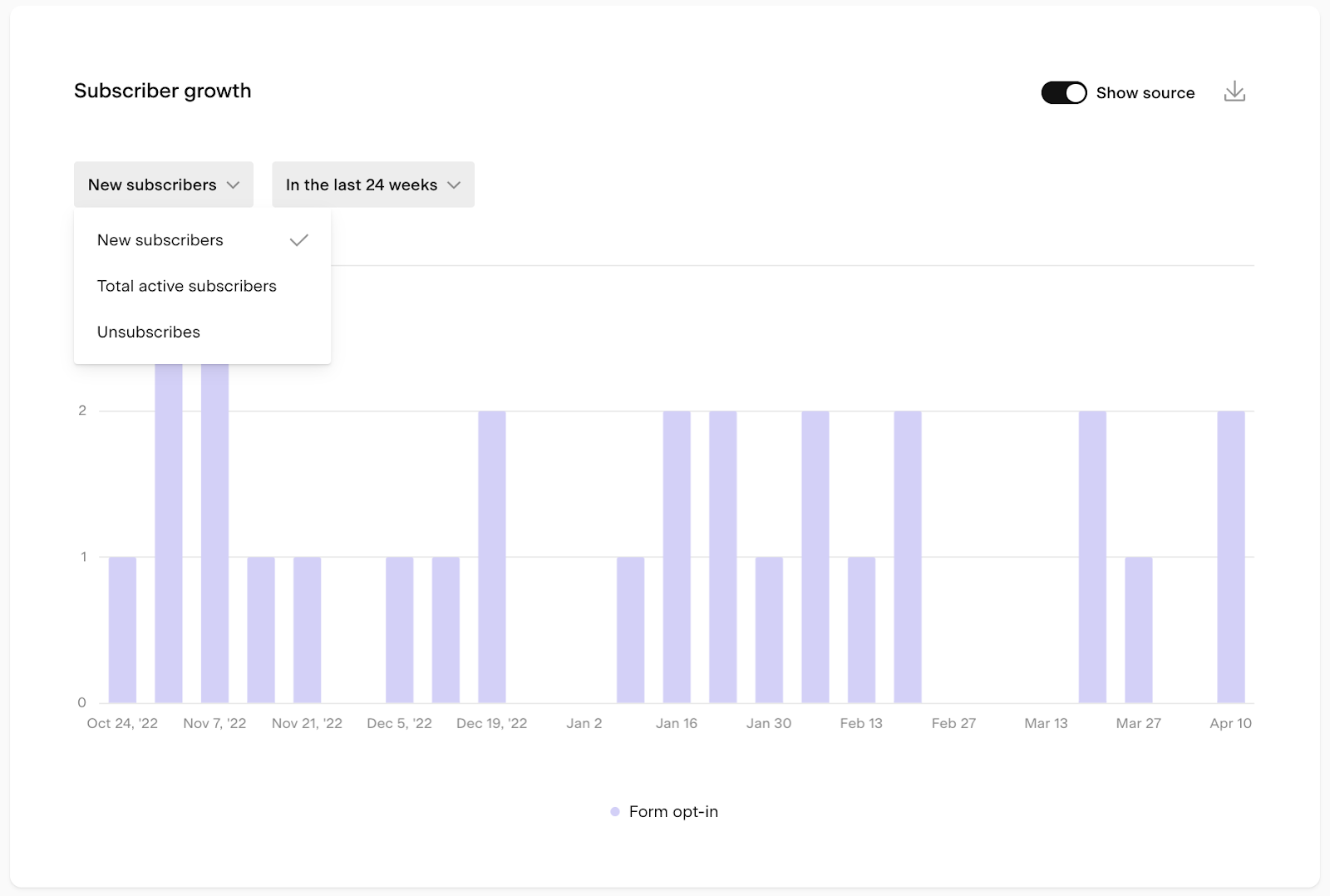
We didn’t find more advanced reporting options like click heatmaps and custom reports. Additionally, Flodesk doesn’t filter bot clicks, and Apple Mail Privacy Protection (MPP) opens. This means results could be skewed.
Integrations
Flodesk integrates natively with 15 popular platforms such as Shopify, Squarespace, Wix, and Canva.
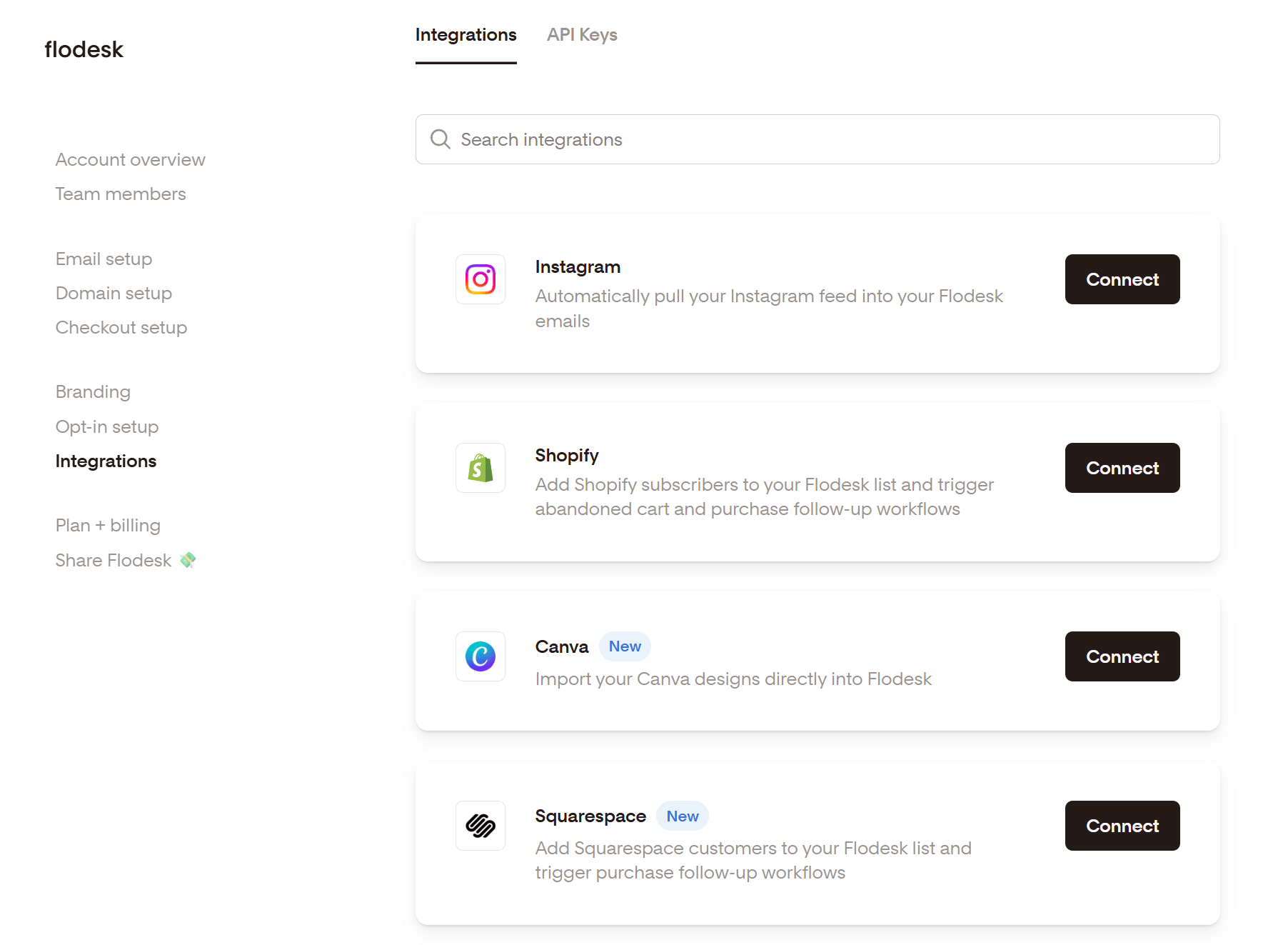
You can extend Flodesk’s ecosystem through Zapier, which allows you to connect with other apps for lead generation, payments, online courses, and more. Alternatively, you can use Pabbly Connect.
For more complex applications, you can leverage Flodesk’s API, but you’ll also need the help of a developer.
Customer Support
If you encounter problems, you can contact Flodesk’s support via email Monday through Friday, from 7:00 AM to 7:00 PM Central Time. Unfortunately, the platform doesn’t offer live chat or phone support.
Nevertheless, there’s an extensive Help Center available, which covers most common issues. It can also guide you through scenarios like how to use branching logic in your workflows, authenticate your domain, and more.
If your business doesn’t require immediate, real-time assistance, this support model won’t be an issue.
Email Deliverability
Email deliverability is essential so that your email campaigns successfully reach subscribers’ inboxes instead of landing in the spam folder. Even though Flodesk doesn’t position itself as a deliverability-first solution, it holds up well against other small-business-focused email marketing platforms.
The platform supports standard email authentication protocols, including SPF, DKIM, and DMARC. To further protect sender reputation, Flodesk automatically suppresses hard bounces, unsubscribes, and spam complaints, ensuring these contacts are excluded from future sends.
On the other hand, you won’t find deep deliverability diagnostics, inbox placement testing, or sender reputation dashboards. It also lacks a dedicated deliverability team to provide support.
Overall, Flodesk’s deliverability features are solid for small businesses and creators sending campaigns to well-maintained lists.
Flodesk Pricing
Flodesk’s pricing has undergone one of the most significant changes in the platform’s history, and it directly affects how different users should evaluate its value today.
Previously, Flodesk was known for its flat-rate pricing with unlimited contacts, a model that strongly appealed to creators and small businesses who wanted predictable costs as their audience grew. As of December 2025, that structure has shifted to an audience-based pricing model, where your monthly cost increases based on the size of your subscriber list.
Under Flodesk’s new pricing, the cost depends on the number of subscribers you have, bringing Flodesk more in line with how most email marketing platforms charge.
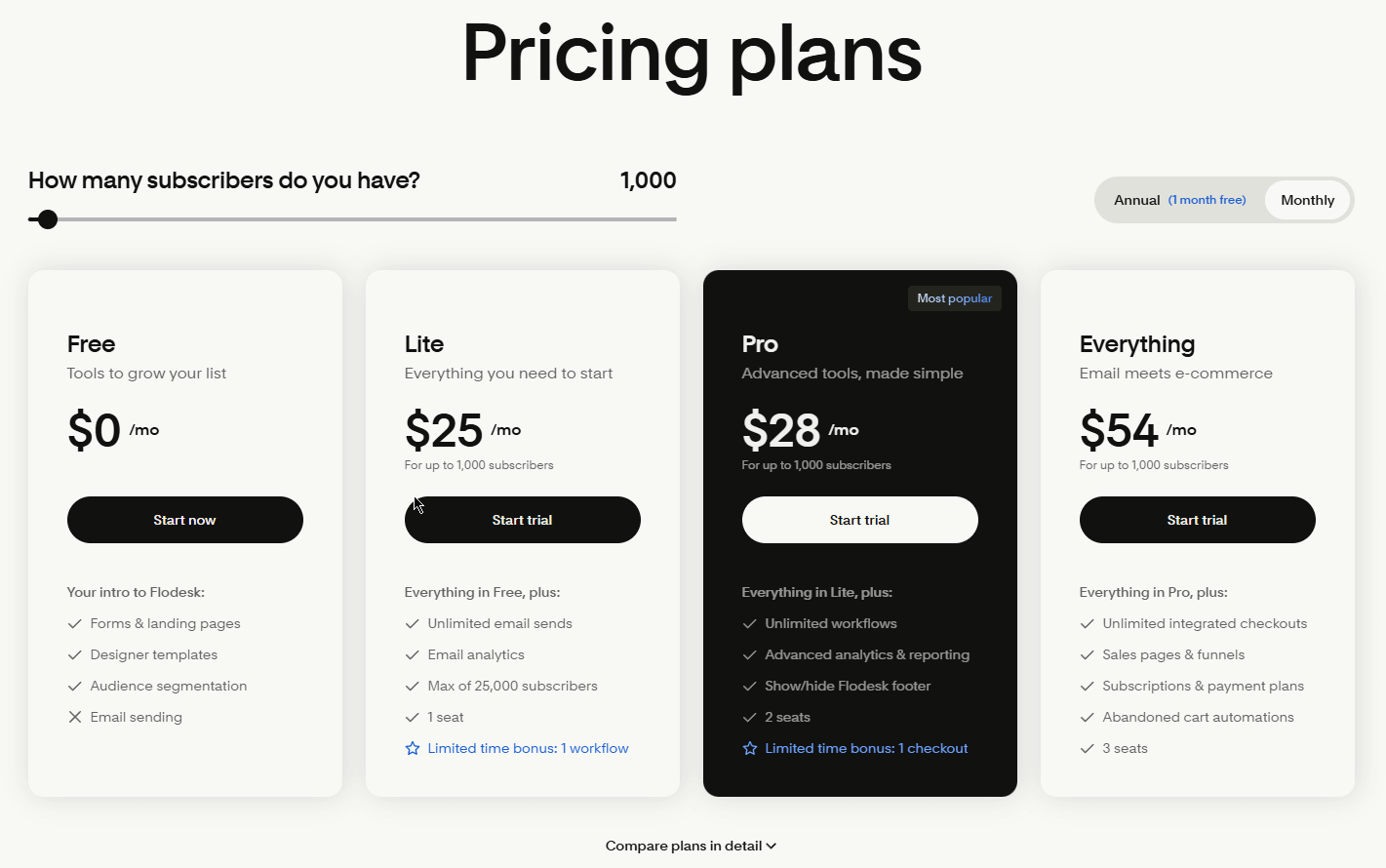
As you can see, there’s a limited free plan and three paid options. Purchasing an annual subscription gets you 1 month free.
Now, let’s review each plan in detail.
Free Plan
Even though Flodesk “promotes” its free plan, this does not include email marketing. You can only access forms and landing pages, see the available templates, and experiment with segmentation.
If you want to get a taste of email marketing, then you need to sign up for Flodesk’s 14-day free trial.
Lite Plan – $25/month
Flodesk’s Lite plan starts at $25/month for up to 1,000 subscribers and includes unlimited emails, access to analytics, and 1 automation workflow.
This plan is great if you want to get started with email marketing and don’t have advanced needs yet.
Pro Plan – $28/month
The Pro plan unlocks eCommerce functionality, allowing you to create sales pages, accept payments, and use discount codes. This is Flodesk’s most popular plan.
Everything Plan – $54/month
The top-tier Everything plan is exactly what its name implies.
You get unrestricted access to all of Flodesk’s features like sales pages and unlimited checkouts, as well as the option for a dedicated IP as an add-on.
Flodesk Pros & Cons
In this section, we’ll recap the main pros and cons of Flodesk, so you can quickly assess whether it’s the right fit for your business.
Flodesk Pros
- High-quality email templates: The platform’s templates are stunning out of the box and require little to no design work.
- Clean and user-friendly interface: Flodesk has a minimal learning curve, while navigating the platform and understanding its features takes very little time. This makes it ideal for email marketing newbies.
- Built-in forms, sales pages, and checkout pages: These features are ideal for capturing leads and monetizing your audience. What’s more, Flodesk doesn’t charge any transaction fees.
Flodesk Cons
- New audience-based pricing: The new pricing model gets more expensive as your audience grows and is now pricier than competitors’.
- No AI features: The platform doesn’t include AI-powered tools for content creation, segmentation, or analytics.
- Basic segmentation: You cannot create advanced segments based on user behavior or apply lead scoring.
- Limited automation: Flodesk’s automation is great for simple journeys. If your business relies on more sophisticated flows or advanced triggers, you’ll find Flodesk restrictive.
Flodesk Alternatives
If Flodesk’s design-first approach or new pricing model doesn’t fully align with your needs, there are several strong alternatives worth considering.
- Moosend is a strong alternative for businesses that want more advanced automation and segmentation without sacrificing ease of use. It comes with a modern email builder, a visual workflow editor, behavior-based triggers, block-level conditional logic, and detailed reporting, features that go beyond what Flodesk currently supports. Moosend’s pricing remains competitive ($9/month for 500 contacts) as your audience scales, while another benefit is its responsive customer support through live chat and email.
- Kit is built specifically for creators who rely on email to sell digital products, courses, and subscriptions. Its automation and tagging system is more robust than Flodesk’s, especially for audience-based journeys and creator funnels. While its email design options are more minimal, Kit excels at subscriber management, monetization tools, and integrations tailored to content creators.
- MailerLite offers a mix of affordability, usability, and features. It includes a drag-and-drop editor, solid automation capabilities, landing pages, and advanced segmentation at a lower price point than Flodesk for many list sizes. While its templates aren’t as stunning as Flodek’s, it’s a great alternative option for small businesses that want more control and scalability.
The Verdict: Is Flodesk Worth It?
Flodesk remains a compelling option, but for a more specific audience than before. Its biggest strengths are still its beautifully designed emails, intuitive editor, and low-friction experience that helps users launch campaigns quickly without advanced technical knowledge.
However, the shift to audience-based pricing changes the overall value equation. While new users with smaller lists may still find Flodesk competitively priced, growing businesses will need to weigh its cost against more feature-rich platforms that offer deeper automation, segmentation, and analytics at similar or lower price points.
Ultimately, Flodesk is best suited for solo entrepreneurs, creators, and small teams who want email marketing to feel approachable rather than complex. If your priority is speed, visual consistency, and a streamlined workflow, Flodesk is still worth considering. However, if you rely heavily on advanced targeting, data-driven optimization, or scalable automation, you may find better long-term value in one of its alternatives.
FAQs
Here are some frequently asked questions about Flodesk.
1. Is Flodesk good for small businesses and solo entrepreneurs?
Yes. Flodesk is ideal for small businesses, creators, and solopreneurs who want to send professional-looking emails without dealing with complex tools. Its intuitive editor, ready-made templates, and simple automations make it easy to get started, even with no prior email marketing experience.
2. Is Flodesk still worth it after the pricing change?
It depends on your list size and growth plans. Flodesk’s new audience-based pricing is competitive for small or early-stage lists, but it can become more expensive as your subscriber count grows. If you value design simplicity and don’t need advanced automation or analytics, Flodesk can still offer good value. For fast-growing lists, comparing costs with more scalable platforms is recommended.
3. Does Flodesk support advanced automation and segmentation?
Not fully. Flodesk supports basic automations, triggers, and segmentation that work well for simple customer journeys. However, it lacks advanced behavioral triggers, block-level conditional content, and deep multi-layer segmentation.
Similar Posts

 Published by


Create, send and optimize your email marketing campaigns