















Email Deliverability Best Practices: How to Stay in the Inbox [2026]
Published By Marilia Dimitriou
April 24, 2026

24/04/26
You can configure SPF, DKIM, and DMARC, align your domain, and still watch your campaigns land in spam.
While technical setup is essential, it doesn’t guarantee inbox placement. Inbox providers (ISPs) now assess how people react to your emails. Do subscribers open them? Click? Ignore them? Mark them as spam? Over time, these behaviors shape your sender reputation.
This is where deliverability becomes both a technical and a brand issue. When subscribers recognize and value your emails, engagement stays strong. When they forget you or feel overwhelmed, placement suffers.
In this post, we’ll cover the email deliverability best practices your brand should follow to keep your messages in the inbox. We’ll also provide a technical checklist to ensure your setup supports consistent placement.
Better deliverability starts here
Boost engagement, protect reputation, and improve inbox placement.
Try MoosendEmail Deliverability Vs Email Delivery Rate
Email deliverability refers to your ability to land in the inbox, not just reach the recipient’s mail server. It measures whether your emails are delivered to the intended recipients, read, and acted on.
On the other hand, your delivery rate is the percentage of emails accepted by the receiving server. If you send 10,000 emails and 9,900 don’t bounce, your delivery rate is 99%. However, this only means your emails were accepted, not that they reached the inbox.
Mailbox providers still decide where your message goes next. Even with a high delivery rate, a large share of your emails can end up in spam or in secondary tabs like promotions, limiting visibility and engagement.
The Two Factors Behind Email Deliverability
Email deliverability is shaped by two core forces: technical setup and sender behavior.
On the behavioral side, inbox providers analyze how subscribers respond to your emails. Engagement trends, spam complaints, list quality, and sending consistency influence whether your messages earn inbox placement over time. These signals gradually shape your sender’s reputation.
On the technical side, your emails must be properly authenticated and transmitted. This includes implementing Sender Policy Framework (SPF), DomainKeys Identified Mail (DKIM) as a digital signature, and DMARC policies, along with correct IP configuration and domain alignment. Without these authentication protocols in place, messages may be rejected, flagged as spoofed, or treated as potential phishing attempts by spam filters before engagement is even evaluated.
The aftermath? Technical compliance ensures your emails are accepted. Consistent, positive engagement determines whether they stay in the inbox.
Why Email Deliverability Matters More Than You Think
Email deliverability directly affects how much revenue your list can generate. But the impact goes beyond immediate sales.
When inbox placement improves, brands benefit in multiple ways:
- Stronger sender and domain reputation: Mailbox providers such as Gmail, Yahoo, and Microsoft Outlook evaluate how recipients interact with your emails over time. Consistent engagement strengthens your reputation and improves your inbox placement rate.
- Better overall email performance: Higher inbox visibility drives stronger open rates, higher CTR, and more conversions. These engagement signals create a positive feedback loop that reduces recurring deliverability issues.
- Lower risk of filtering and blocklisting: Maintaining a healthy spam rate and stable sending patterns helps protect your campaigns from filtering or blocklisting.
- Reduced long-term recovery costs: Repairing reputational damage can take months and may require suppressing large portions of your list. Preventing the issue is far easier and less costly than rebuilding trust.
Behavioral Email Deliverability Best Practices
Now that we’ve covered why email deliverability matters, here are some best practices to help you build positive engagement signals and protect your sender reputation.
1. Launch re-engagement campaigns for inactive subscribers
Inactive contacts lower your average open and click rates, even if they don’t complain. Over time, mailbox providers interpret this sustained lack of engagement as a signal that your emails aren’t relevant.
Before removing these contacts, give them one clear opportunity to confirm their interest. A focused re-engagement email campaign helps recover subscribers who still value your brand while protecting your overall sender reputation.
Start by identifying subscribers with no opens or clicks within your defined inactivity window, such as 90 to 180 days. Then:
- Create a dynamic segment: “Opened or clicked in the last 30–60 days.”
- Exclude subscribers with no activity in the last 90+ days.
- Send the re-engagement campaign.
- Monitor open rate, click rate, and complaint rate.
Effective re-engagement emails should include a simple subject line, a reminder of the value they signed up for, and an incentive, such as a limited-time discount or exclusive content. If needed, you can add a preference update option to adjust frequency, along with a clear “Stay subscribed” confirmation button.
You can automate this process with a simple workflow:
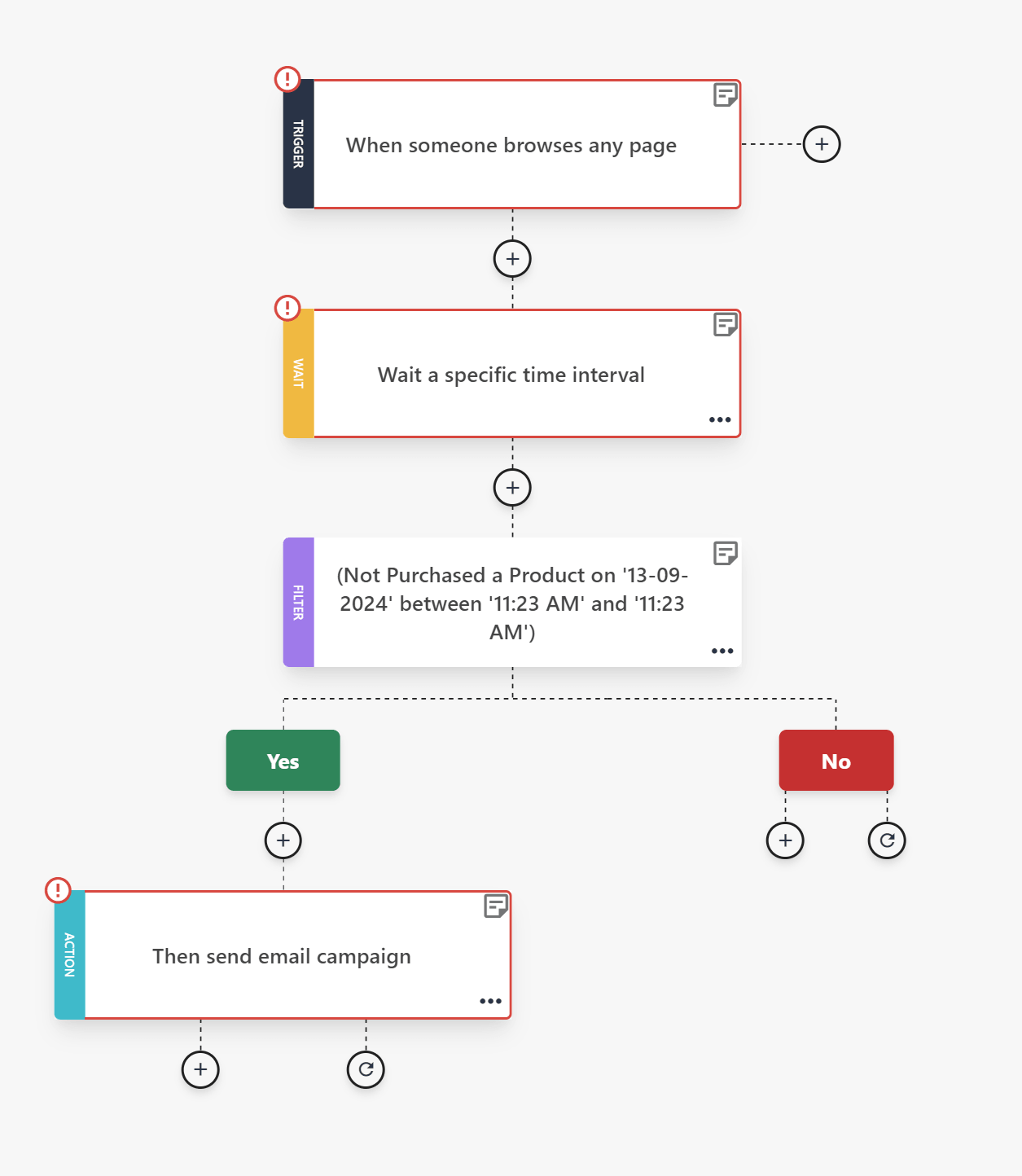
Keep the sequence short. Two or three emails over one to two weeks is enough. If they engage, move them back into your active segments. If they don’t respond, suppress or remove them.
Most email service providers (ESPs), like Moosend and Constant Contact, allow you to build this type of automation using behavioral triggers and conditional steps, so list hygiene runs in the background without manual work.
2. Maintain a consistent sending schedule
Did you know that inconsistent sending patterns also create uncertainty for inbox providers?
Long gaps followed by aggressive campaigns often trigger filtering or throttling, even if your content is legitimate.
Set a realistic cadence based on your resources and audience expectations. For most brands, a weekly or biweekly schedule works well. The key is predictability.
Also, keep your volume stable. Avoid going silent for months and then oversending to your full list. If you don’t have a major launch planned, send something small and useful. Share a short founder update, a curated industry resource, or a simple “What we’re working on this month” note. It doesn’t need to be heavily designed or promotional. Just focus on maintaining engagement.
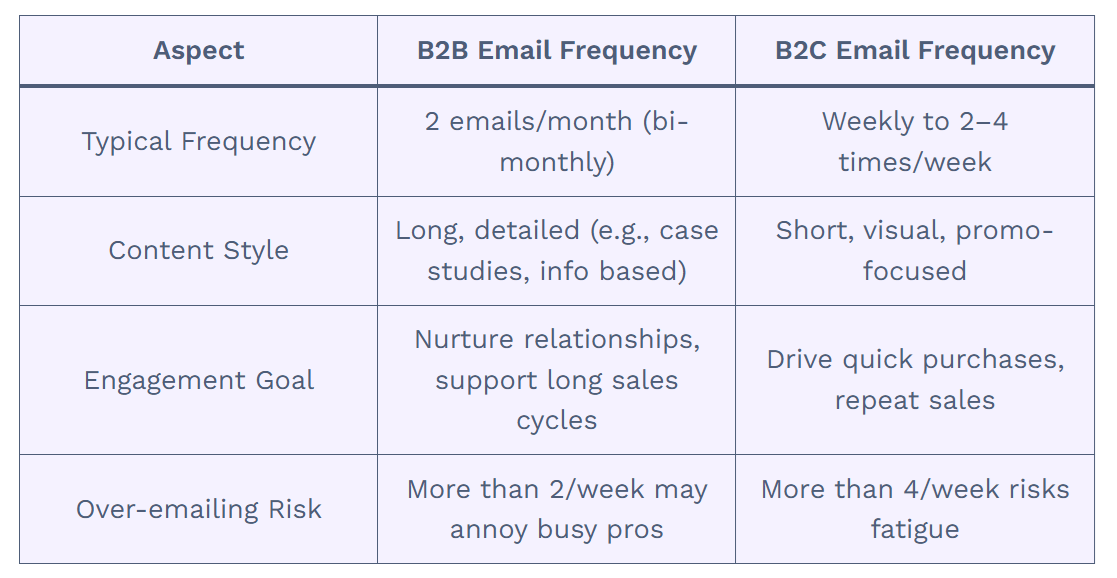
Lastly, before major promotions, increase frequency gradually rather than jumping from 2 emails per month to 5 in a single week. Aim for controlled volume growth and avoid doubling or tripling sends overnight.
Consistency builds a sending history, and that helps mailbox providers recognize your patterns and treat your campaigns as expected behavior rather than potential spam.
3. Align email content with signup expectations
Subscribers decide whether to open, ignore, or report your emails based on what they expected when they signed up. If there is a mismatch, engagement drops quickly.
Start by reviewing your opt-in value proposition. What did you mention they would receive? A weekly newsletter? Product updates? Educational content? Discounts? Now compare that promise to what you are actually sending.
For example, imagine someone signs up through a form that says, “Learn how to become a better entrepreneur,” like this one below from Copyblogger:
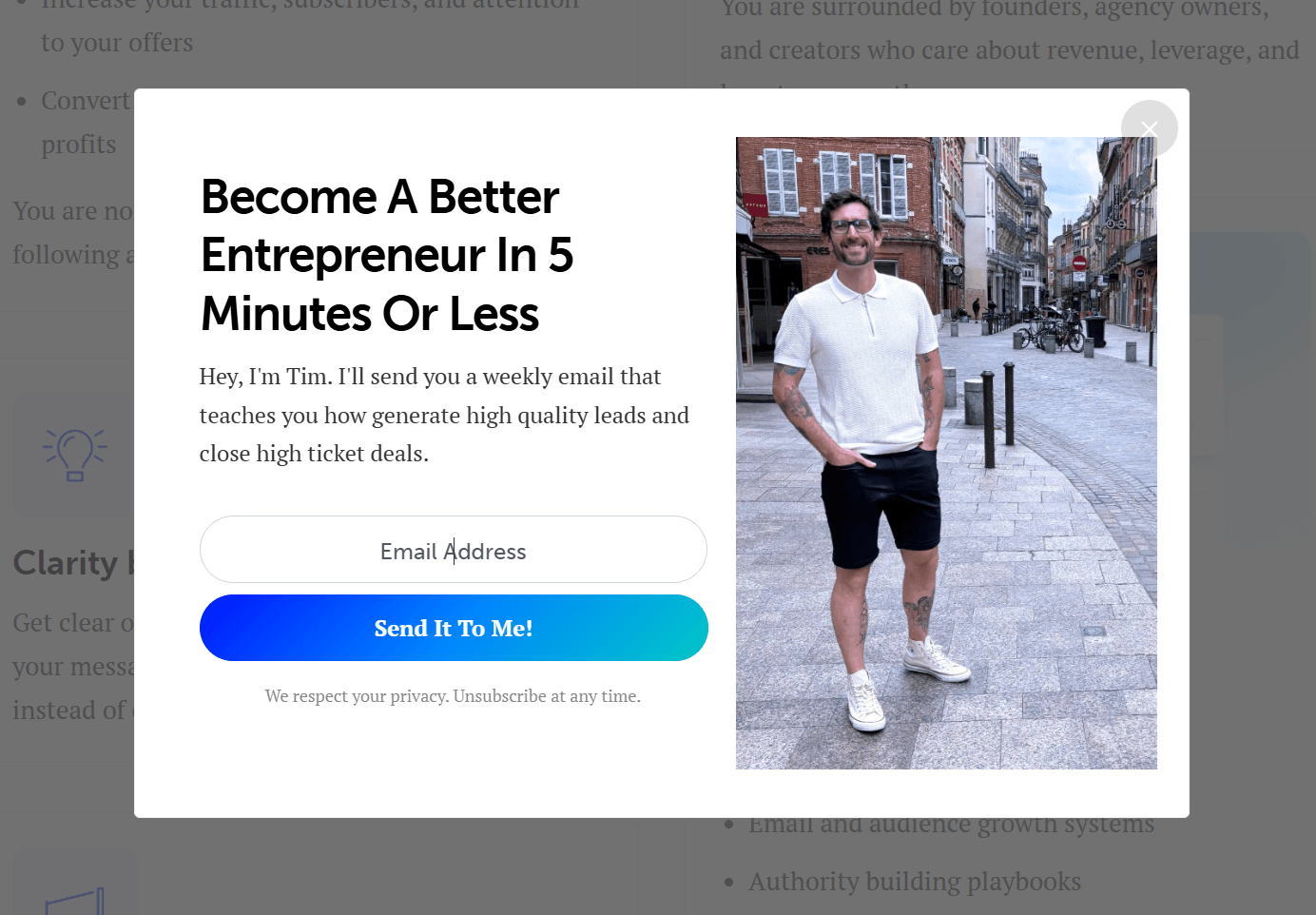
Now, it’s pretty straightforward what one expects to get. However, instead of weekly educational content, they begin receiving three promotional emails per week that push product upgrades.
Even if the offers are relevant, the shift in frequency and tone can feel misleading. The result is lower opens and a higher risk of spam complaints.
To avoid this:
- Keep email content consistent with the promises made.
- Separate educational and promotional streams if needed.
- Reconfirm preferences if you change your content strategy.
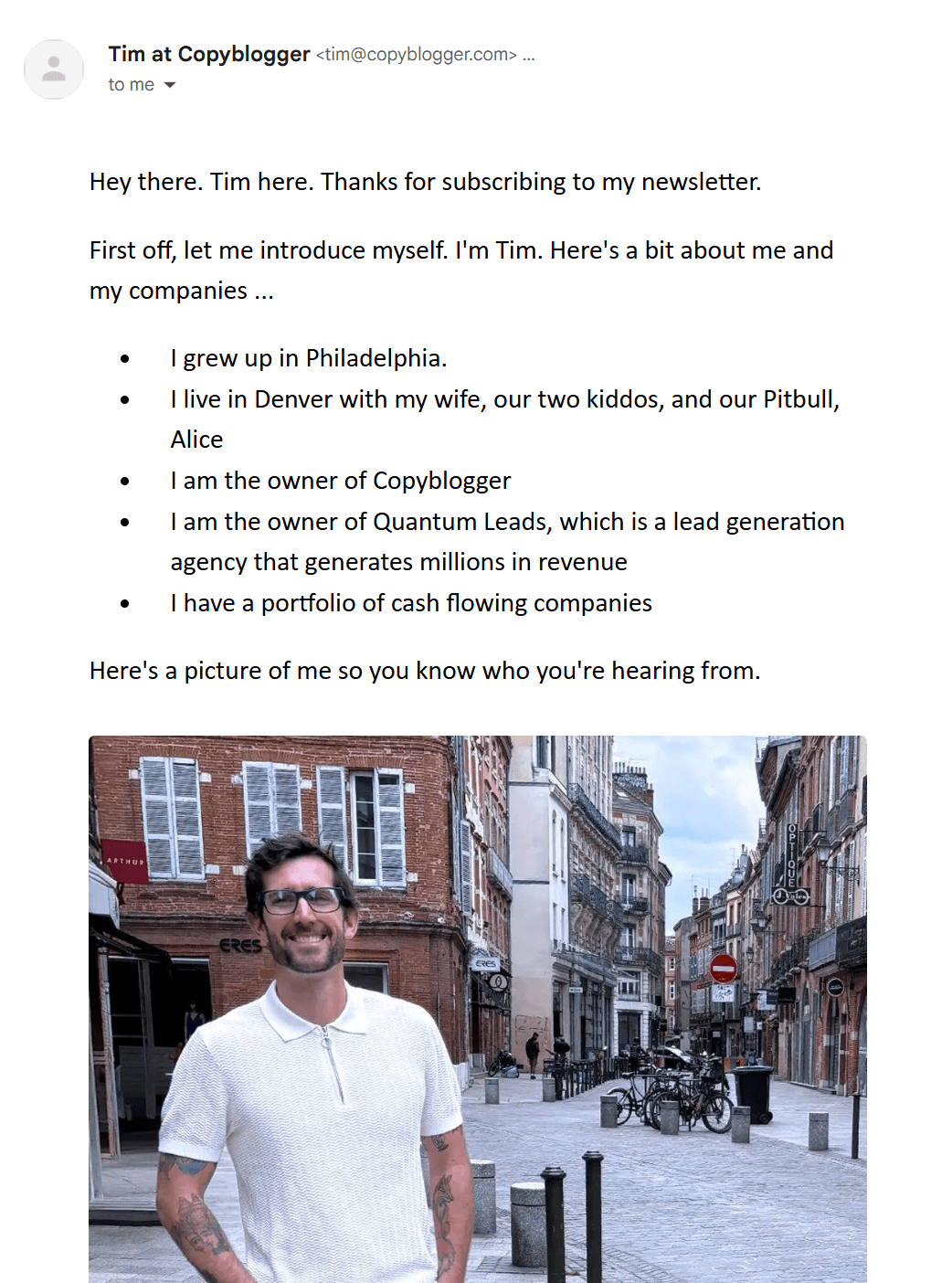
Here’s an example from Copyblogger’s email. See how it sets the tone for what’s about to follow?
4. Keep your sender name and domain consistent
Subscribers are more likely to open emails from a sender they recognize. Frequent changes to your “From” name or domain create confusion and lower trust, even if your content remains the same.
Choose a clear, easily recognizable sender identity (e.g., @yourbusiness.com) and stick to it. For example, “Maria from Brand” or “Brand Team” are some of the most popular formats. Also, avoid switching between personal names and generic company labels.
Subdomains can help you stay organized without sacrificing recognition. When configured properly, they allow you to separate traffic while maintaining a strong connection to your main domain name.
Depending on your industry and needs, you might use:
- news.yourbrand.com for newsletters
- offers.yourbrand.com for promotions
- orders.yourbrand.com for transactional emails
This structure allows you to separate traffic types, protect your reputation, and keep everything clearly connected to your primary domain. It also helps isolate potential issues tied to a specific sending stream or IP address.
Avoid introducing entirely new domains for campaigns unless absolutely necessary. A new or unfamiliar domain resets recognition and may require IP warming and careful monitoring of the number of emails sent during the warm-up period.
5. Make unsubscribing simple
There’s nothing more frustrating than wanting to leave an email list and not being able to find the unsubscribe link. When subscribers feel trapped, they report the email as spam.
Always include a clear and easy-to-find unsubscribe link to prevent that. Don’t hide it in tiny text, require a login, or add unnecessary steps to remove someone from your list. In many regions, failing to include a clear opt-out option also violates regulations such as CAN-SPAM and similar compliance laws.
While it may sound counterintuitive, unsubscribing can help you. When someone leaves, they remove themselves from your list, helping your engagement metrics stay strong. A smaller, interested audience consistently delivers better open and click rates than a larger, frustrated one.
Of course, don’t forget to watch your unsubscribe rate. A stable number is normal, but a sudden increase usually means you’re sending too often, missing expectations, or pushing content that isn’t relevant.
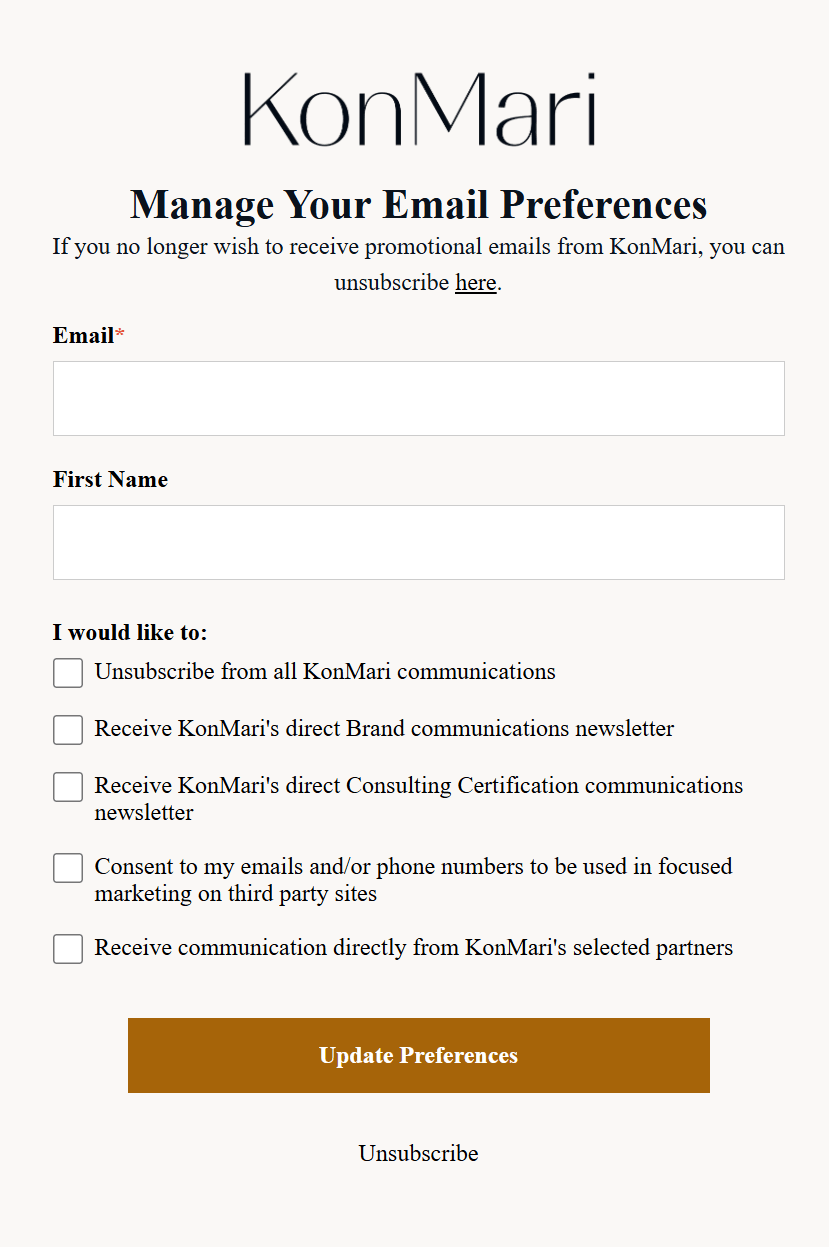
If that happens, review your frequency and consider adding a short feedback option or a preference center like this one from KonMari:
6. Monitor spam complaint rates weekly
Along with your unsubscribe rate, don’t forget to track your spam complaint rate every week, not just after large campaigns. Keep it below 0.1%. If it rises above that threshold, treat it as an early warning sign.
Start by checking complaint metrics inside your ESP dashboard and, if possible, through Postmaster Tools. Look at trends and patterns. A sudden spike often indicates a specific segment, campaign, or a change in frequency.
If complaints increase, you should act promptly:
- Identify which audience segment received the campaign.
- Review the subject line and content for misleading or aggressive messaging.
- Check whether the campaign was sent to inactive subscribers.
- Pause or reduce sends to that segment until engagement stabilizes.
Don’t ignore small increases, as reputation damage can accumulate over time. A few poorly targeted campaigns can affect future inbox placement.
7. Segment instead of blasting your entire list
Another email deliverability best practice is to segment your target audience based on behavior, interests, and recent activity before you hit send.
You can start by grouping subscribers by:
- Recent engagement
- Product category interest
- Purchase history
- Signup source
For example, if you run an eCommerce store and launch a new summer collection, send the announcement first to customers who have previously purchased similar items or recently browsed that category. Don’t send it to subscribers who haven’t opened an email in six months or who have only signed up for a one-time discount.
The engaged shoppers are far more likely to open and click. That early activity strengthens your engagement signals and improves inbox placement before you expand the campaign to a broader audience.
Technical Email Deliverability Checklist
Whether you’re building your sending foundation or fixing declining inbox placement, use the following email deliverability checklist to strengthen your technical setup and protect your reputation.
- Authenticate your domain: Configure SPF, enable DKIM, publish a DMARC policy, and ensure your “From” domain aligns with your authenticated sending domain.
- Separate transactional and marketing traffic: Use different subdomains or a dedicated IP address so order confirmations and account-related emails aren’t affected by marketing performance issues.
- Use double opt-in for higher-risk sources: Require subscribers to confirm their email address for lead magnets, giveaways, or paid ads. This reduces fake signups and prevents you from sending to invalid contacts.
- Avoid purchased or scraped lists: Only send emails to people who have explicitly opted in. Buying or importing contacts without consent increases spam complaints, hits spam traps, and damages your reputation.
- Review campaign structure: Test your HTML templates for formatting issues, broken links, or overly aggressive promotional language that may appear spammy to filtering systems.
- Write clear subject lines: Avoid excessive urgency, all-caps, or misleading hooks, which are common spammer tactics.
- A/B test your messaging: Use A/B testing to evaluate subject lines or offers with a smaller, more engaged segment before rolling the campaign out more broadly.
- Optimize for readability and accessibility: Use short paragraphs, clear CTAs, and mobile-first layouts. Higher readability improves engagement, which strengthens deliverability. Email accessibility also matters, so take a moment to optimize your email accordingly.
- Monitor soft and hard bounces: Remove hard bounces immediately, and suppress addresses that soft-bounce repeatedly to protect your IP reputation and prevent deliverability issues.
- Use real-time email validation at signup: Implement tools to verify email addresses, catch typos, disposable domains, and malformed addresses before they enter your database.
Additional Email Deliverability Resources
For more technical setup details, expert insights, and tips, take a look at our dedicated guides:
- Email Deliverability: Avoiding The Spam Folder
- How Important Are Authentication, Reputation & Content for Google’s Email Filtering?
- The Invisible Deliverability Killers Marketers Ignore
- Expert Insights: How To Boost Your Email Marketing Engagement
Improve Your Email Deliverability the Easy Way
You can have perfect email authentication and still struggle if people ignore your messages.
The best thing to do is to pay attention to patterns. Are open rates declining? Are complaints increasing after certain campaigns? Are subscribers engaging less frequently than before? These reactions tell you how your emails are being perceived.
Of course, don’t forget to review your technical setup regularly to fix issues early and ensure smooth delivery.
Deliverability improves when your brand acts intentionally, and your audience responds positively. So, monitor both sides and optimize accordingly. That’s how you stay in the inbox long term.
FAQs
Here are some questions regarding email deliverability.
1. What is a good email deliverability rate?
A good email deliverability rate typically means an inbox placement rate of 95% or higher. Keep in mind that delivery rate and deliverability are different. A 99% delivery rate only means the receiving server accepted the emails and doesn’t confirm they landed in the primary inbox.
2. Does a 99% “delivery” guarantee success?
While a 99% delivery rate sounds ideal, it can hide serious problems. For instance, if 9,900 emails are accepted by the server but 3,000 land in spam and 4,000 land in promotions, your real visibility is much lower than you think. Consequently, your open rate drops, and so do your click-through rate and revenue.
3. Why are my emails going to spam even with SPF and DKIM setup?
SPF and DKIM are essential authentication protocols, but they only confirm that your emails are legitimate. Emails may still go to spam if you have low engagement rates, high complaint rates, inconsistent sending patterns, or poor list quality. ISPs evaluate email sender reputation, recent engagement signals, content patterns, and sending history. If subscribers ignore or report your emails, filtering will increase even with proper authentication.
4. How long does it take to improve sender reputation?
It typically takes several weeks to a few months, depending on the severity of the issue. If damage is minor, cleaning your list and improving engagement can stabilize performance within a few campaigns. More serious reputation damage, such as high spam complaints or blocklisting, may require gradual reductions in sending volume, a re-engagement strategy, and consistent email sending patterns over time.
5. Does engagement affect email deliverability?
Engagement is one of the strongest signals mailbox providers use. Opens, clicks, replies, and forwards indicate that subscribers value your emails. Low engagement, deletes without reading, and spam complaints signal the opposite. Consistently sending to engaged segments improves inbox placement, while repeatedly sending to inactive contacts weakens your reputation.
6. Is double opt-in better for deliverability?
In most cases, yes. Double opt-in improves list quality by confirming that the email address is valid and that the subscriber genuinely wants your content. While it may slightly reduce list growth, it lowers bounce rates, reduces spam complaints, and strengthens long-term deliverability. For high-risk acquisition sources such as giveaways or paid ads, double opt-in is especially beneficial.
Similar Posts
 Published by

 Published by
 Published by

Create, send and optimize your email marketing campaigns