














How to Create a Landing Page Without a Website: A Brief Guide
Published By John Desyllas
December 15, 2025

15/12/25
What if you could skip the slow, complex website building process and jump straight to collecting leads or making sales?
Despite what some marketers still believe, you don’t need an entire website to launch an idea, promote a product, or grow your audience. A single landing page can do all of that, and sometimes, even better. Because it’s faster to set up, easier to manage, and way more focused on one goal: getting people to take action.
In this guide, we’ll show you how to create a landing page without a website, using beginner-friendly tools and smart marketing strategies. Learn how to make these digital assets work seamlessly to meet your marketing goals.
Turn ideas into polished landing pages with ease
Launch custom landing pages fast with our intuitive builder.
Try MoosendLanding Pages vs. Websites: What’s The Difference?
A landing page is a standalone page designed with a singular marketing goal in mind, such as collecting emails or promoting a service.
A website, on the other hand, is like your digital headquarters. It’s where visitors explore who you are, what you offer, and maybe get lost clicking through your blog, about pages, and contact forms.
While a website typically contains large amounts of content, linking to both internal and external pages that serve different purposes, a landing page has one clear goal, one call to action, and most importantly, zero distractions. Instead of saying, “Here’s everything we do,” it says, “Here’s what you should do, right now.”
Explore their key differences in the table below:
| Website | Landing Page | |
| Purpose | Brand awareness and long-term growth | Lead generation and direct sales |
| Structure | Multi-page, with navigation | Single-page, no navigation |
| Audience | Visitors exploring your business | Visitors from a specific source |
| Setup time | Longer (requires hosting, structure, design) | Short (can go live on the same day) |
Can a Landing Page Act as a Website?
Short answer: yes, it can. A landing page can replace a website, especially if your main goal is to create an online space where people can learn who you are and take a clear action, like subscribing, booking, or buying. This setup works surprisingly well for small businesses, freelancers, and creators.
Think of it as a one-page website. It still represents your brand, highlights your offer, and guides visitors toward a conversion, all from a single, focused space. Plus, you can save the time and budget required to build a full site.
Here’s how SimplyDigital’s agency used landing pages to expand its audience:
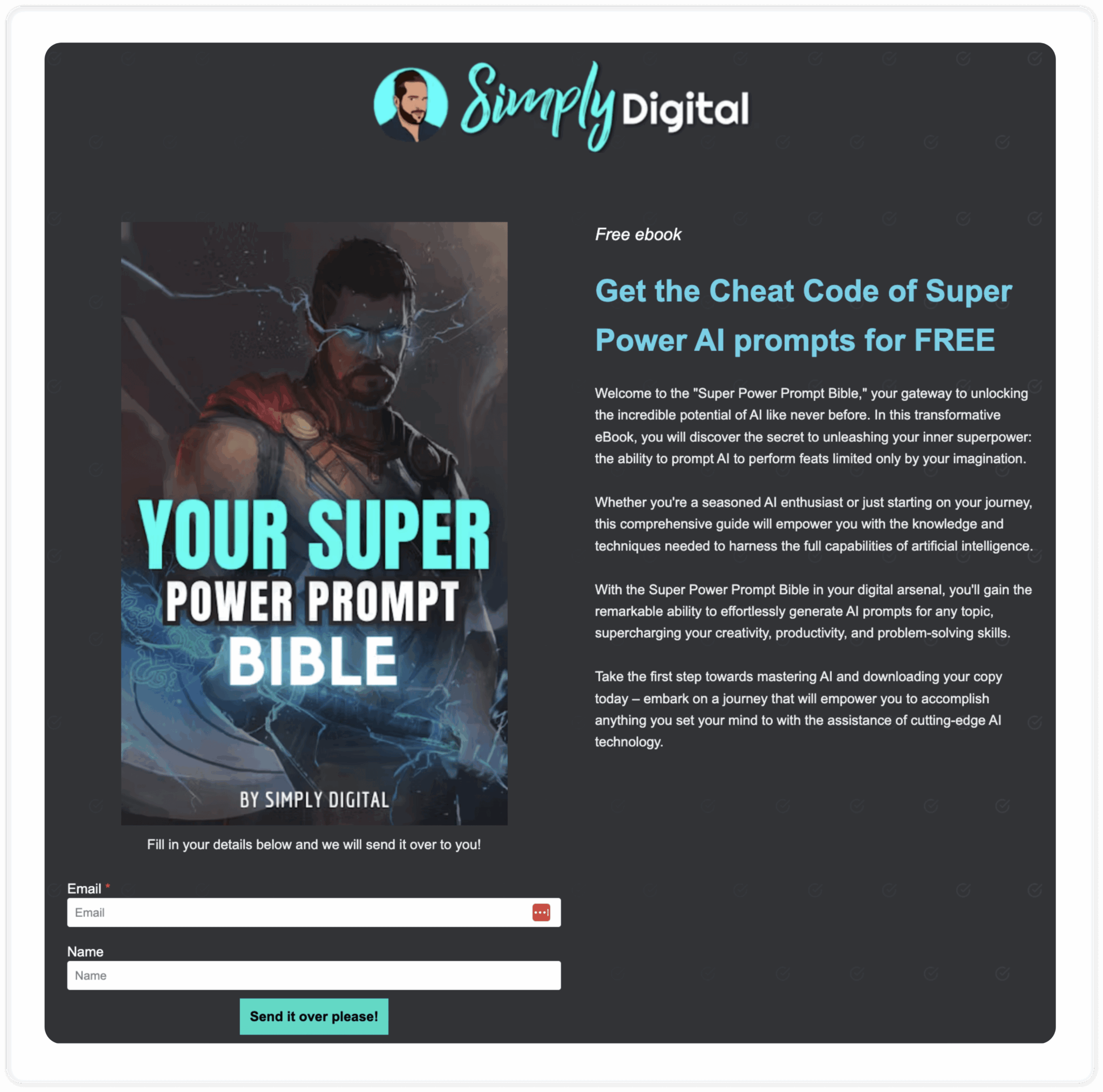
Moreover, some businesses even use multiple types of landing pages covering different purposes, such as lead generation and event promotion, that also work as “mini-sites,” instead of investing in a website.
Pros and Cons of Creating a Landing Page Without an Existing Website
While a landing page can absolutely take the place of a website, it’s not a one-size-fits-all solution. Whether it’s the right move for you depends on your goals, resources, and how fast you want to get things rolling. Let’s explore its main perks and drawbacks:
Pros
- Better ad performances: When you run paid ads, sending visitors to a focused landing page instead of a full website increases the conversion potential. There are no menus, no navigation links, just one clear call to action.
- Faster to launch: You can have a landing page live within a day. It’s the ultimate quick-start option for creators, small businesses, or anyone who wants fast results.
- Lower investment: With landing pages, you won’t need to pay for a domain, hosting, or web development. You can launch your offer for a fraction of the cost and test ideas before committing to a full site.
- Easier to test and optimize: A single page means fewer moving parts. You can quickly A/B test headlines, visuals, and CTAs to see what converts best.
- Ideal for limited-time offers: Landing pages are great for campaigns that don’t need a permanent home. These include flash sales, event registrations, product pre-launches, and more.
Cons
- Limited content flexibility: If you want your landing pages to work, you’ll need to keep your message short and strategic. This can be a problem if you have a complicated product, since readers may find your page weak.
- Reduced brand awareness: Without a full website, it’s harder to showcase your entire brand story or product variability. Since a landing page focuses on a single goal, there is limited space for storytelling.
- Harder to build long-term SEO: Search engines love websites with structured content and multiple pages. A single landing page won’t drive much organic traffic on its own.
- Perception of legitimacy: Some users may expect a full website to feel reassured that your business is credible. This is especially true if they’re about to make a purchase or share personal data.
How to Create a Flawless Landing Page Without a Website
Ready to go from idea to live page? Here’s how you can create a fully functional landing page without owning a domain or writing a single line of code.
Step #1: Define your landing page goal
Before you start designing your landing page, the first thing you need to do is establish its purpose. For example:
- Lead generation: Collecting email addresses for future marketing efforts.
- Direct sales: Selling a product or service immediately.
- Event promotion: Drive sign-ups for a specific event or webinar.
Establishing a clear goal will help you determine the exact information and arguments needed to convince your target audience to take action, and will ultimately inform your entire strategy.
#Step 2: Choose a landing page builder
Once you define the goal of your landing page, the next step is choosing the right tool. Luckily, there are several great landing page builders in the market, with both free and paid options.
A good builder should offer features that help you design quickly, test variations, and optimize for conversions. At a minimum, look for:
- Premade templates so you can start with a proven layout
- A drag-and-drop editor to customize your page without coding
- Mobile-responsive designs that look great on all devices
- SEO settings support (e.g., meta title, description, URL slug)
- A/B testing options to compare versions and improve performance
- Integrations with your email marketing platform or CRM
If you want a simple, beginner-friendly tool that checks the above boxes, Moosend’s landing page builder is a solid choice. You can create a free Moosend account, pick from professionally designed templates, and customize everything using the intuitive drag-and-drop editor.
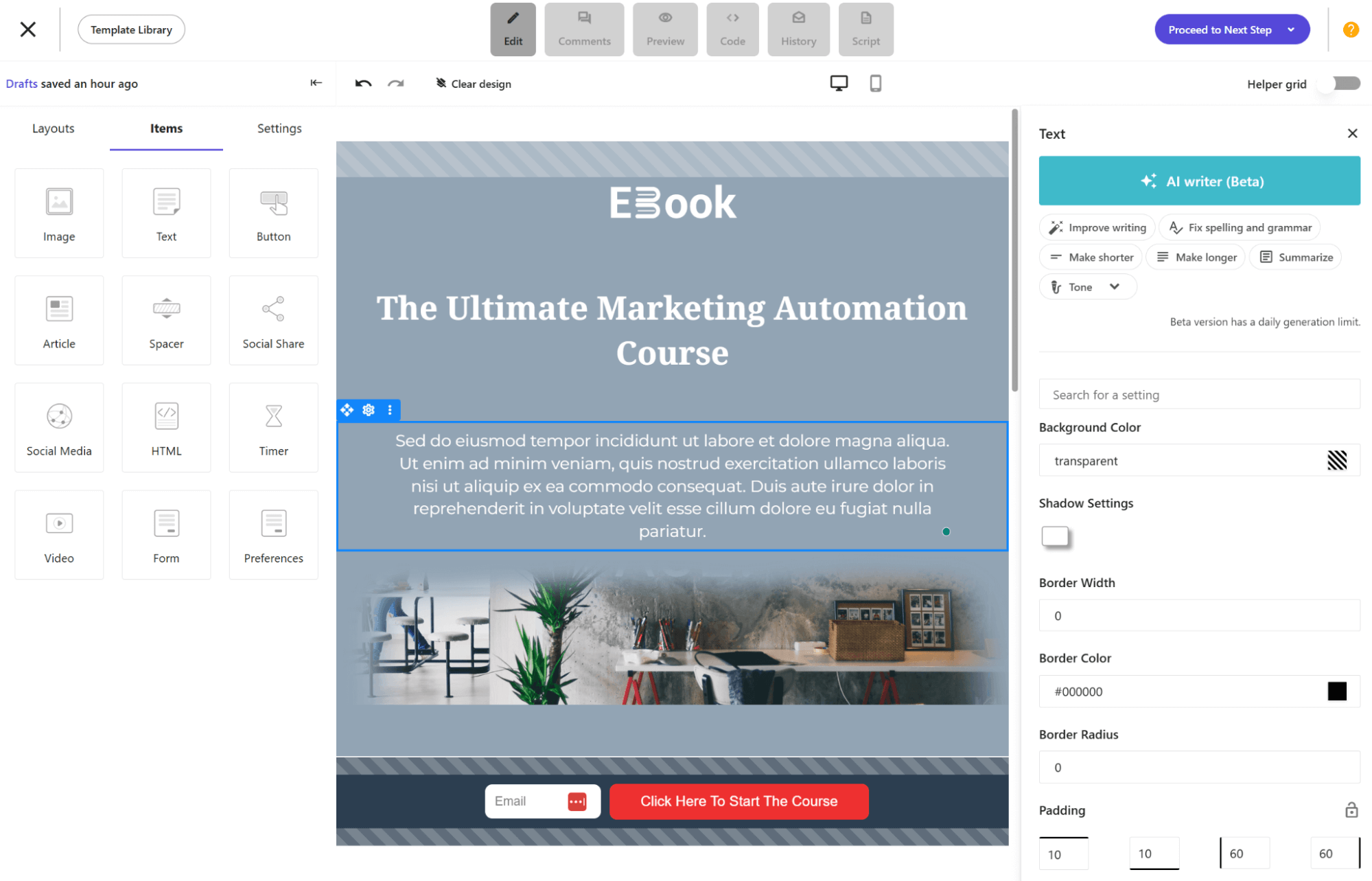
Create your first landing page
Step #3: Design your landing page
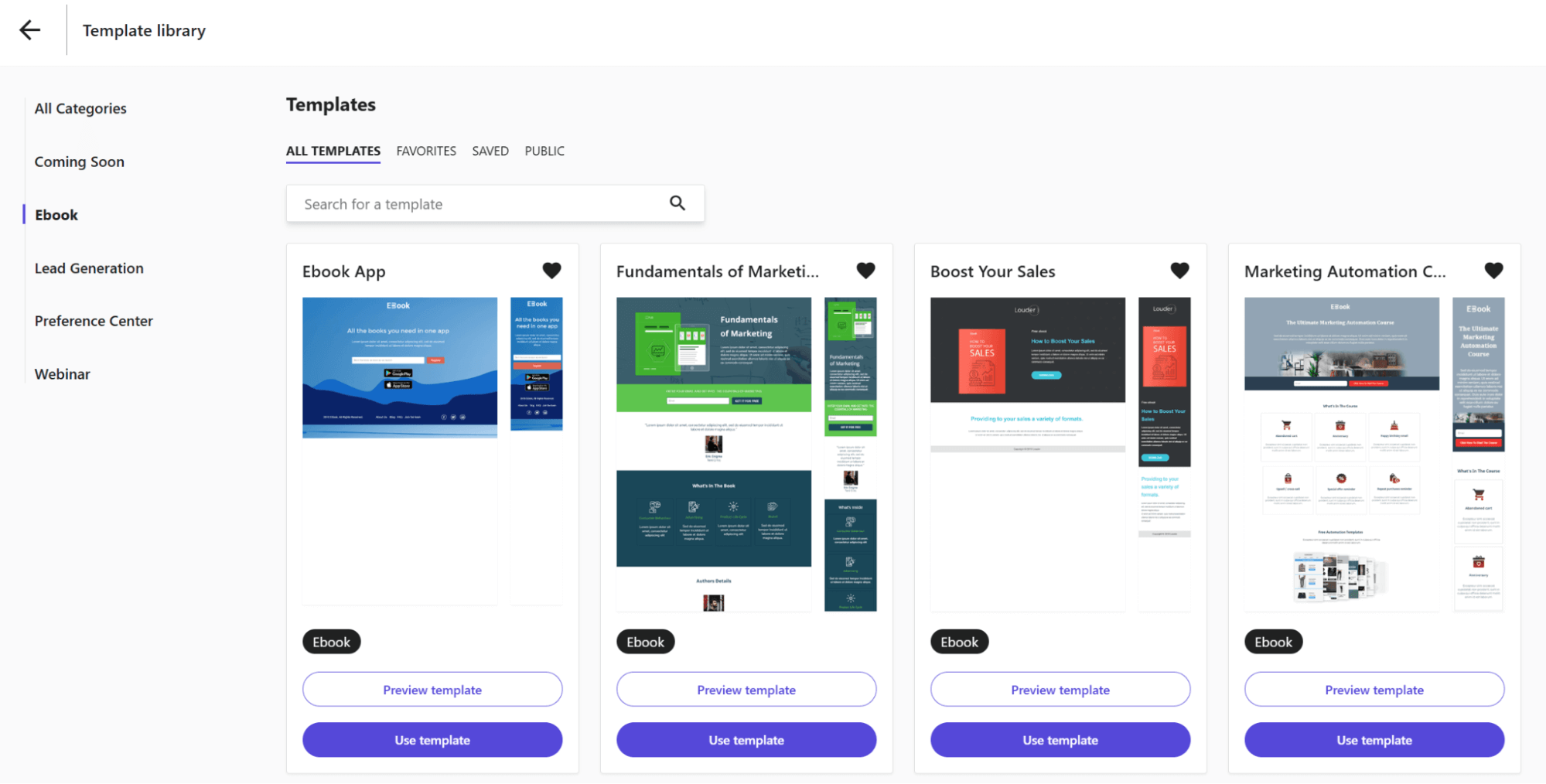
You’ve reached the fun part. Now, you can begin with the landing page creation. You can either start building a design from scratch or select a landing page template.
If you don’t want to involve a designer, selecting a template is the best option. Many landing page builders offer pre-made landing page templates that you can use as a starting point to save time and effort.
For example, Moosend offers 40+ templates for lead generation, promotions, events, and more.
Step #4: Write engaging copy
As we said before, landing pages are focused pages. So, your landing page copy matters more than you think. Write clear, benefit-focused copy that tells visitors exactly what they’ll get and what to do next.
First, think of an eye-catching headline that grabs attention and aligns with your landing page goal. You’ll also need to create short supporting text that encourages readers to delve deeper, while also highlighting how your offer differentiates from the competition.
The better you communicate your Unique Selling Proposition (USP), the more value your readers will see in your offer.
At this step, you can leverage AI writing tools that are integrated into your landing page software. For example, Moosend has an AI Writer that assists users with creating and proofreading copy for email campaigns and landing pages.
Next, you’ll need to create a compelling CTA button, such as “Sign up now” or “Grab your eBook”. It’s advisable to use contrasting colors for your CTA to make it stand out.
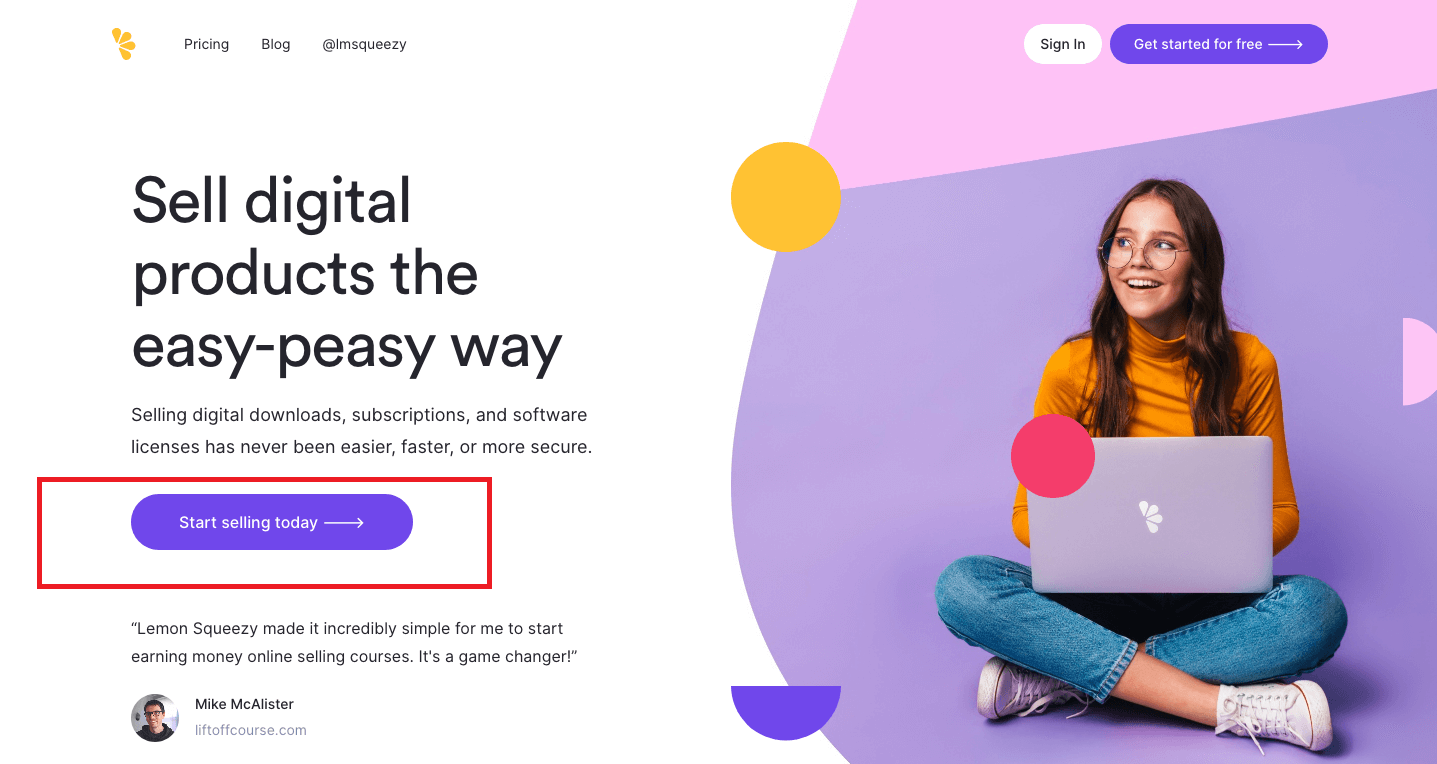
Keep the message consistent, from your ad or email to your landing page, so users know they’re in the right place.
Step #5: Customize visuals and layout
Use the drag-and-drop editor to add images, forms, buttons, social icons, and even countdown timers. Try to use visuals that support your offer, such as product photos, mockups, or screenshots, in order to help people understand what they’re getting.
Alternatively, it’s a great idea to add testimonials or a quick explainer video.
Tip: Avoid lengthy forms as they can “intimidate” potential customers.
Step #6: Set up conversion tracking
After you finalize your design and proofread for any typos and errors, it’s time to decide how you want to track conversions.
Many landing page builders let you track your conversions in two ways:
- When someone submits a form
- When someone clicks a button
Additionally, you can enable tracking with Google Analytics and Facebook Pixel by following your builder’s instructions.
Step #7: Set SEO settings
After finalizing the content of your landing page, your landing page builder will usually ask you to fill in some SEO details to boost visibility via search engines. These can include your page title, meta description, and an internal name to help you identify the page in your dashboard.
Here are two quick tips:
- Keep your title under 60 characters and include your main keyword (e.g., “Free Webinar on Email Marketing”).
- Write a meta description around 150–160 characters that clearly tells users what they’ll get when they visit your page.
You can also upload a favicon, which is the small image that represents your website in web browser tabs.
Step #8: Publish your landing page
Now, you’re ready for publishing. Most landing page builders will host the landing page for you, so you don’t need your own domain or hosting service. You’ll get a shareable link you can use on social media, in ads, or in your email campaigns.
And just like that, you’ve launched your first page without ever touching a website builder.
Actionable Landing Page Design Best Practices
If you want your landing page to actually perform, here are a few quick strategies you can apply right away:
- Put the value upfront: Your headline should answer the question: “Why should I care?” Make the benefit clear in the first few seconds.
- Use one clear CTA: Use bold color and clear text (“Get the guide,” “Join the webinar”), and remove distractions like menus or external links. Place the CTA button above the fold and after key sections as you see fit.
- Add social proof: Testimonials, reviews, logos, and anything that shows real people already trust you can boost your credibility.
- Keep forms short: Ask only for what you truly need. Failing to do so might discourage visitors from providing their details and reduce overall landing page performance.
- Optimize for mobile: More than half of your visitors are probably on their phones. Check spacing, button size, and load time on these devices.
- Use consistent messaging: Match the promise from your ad, email, or social post. Otherwise, your page will feel “foreign” and won’t deliver the expected results.
- Test one thing at a time: When A/B testing your page, change one thing at a time (e.g., the headline or CTA color). Otherwise, you won’t be able to track what worked (or didn’t).
Ready To Launch Your Landing Page?
What’s the aftermath? A simple landing page can give you all the visibility and functionality you need, without the high costs or the wait for someone to “get back to you next week.”
And now that you know exactly how to build one, there’s nothing stopping you from getting started.
If you’re ready to try it for yourself, creating a free Moosend account is all it takes. Your first landing page is only a few clicks away.
Similar Posts

 Published by
 Published by
 Published by

Create, send and optimize your email marketing campaigns!