














Plain-Text Vs HTML Emails: Why the Obvious Choice Isn’t Always Right [2026]
Published By Marilia Dimitriou
November 7, 2025

07/11/25
Marketers love to debate HTML vs plain text emails and which format delivers better results.
But what if I told you that neither format is inherently superior? Each serves a different purpose, yet many businesses default to design-heavy campaigns, assuming eye-catching layouts always win.
That assumption is flawed. A plain-text email can outperform a polished HTML template when the goal is to appear genuine and build trust with your audience. Of course, there are times when design plays its part, but the bigger blind spot for most digital marketers is underestimating the power of simplicity.
So, the real question now is: will you continue to use design for every campaign and risk weakening your message, or start using the format that best serves the goal of your email?
From minimal to full-on visual
Use Moosend to create plain-text and HTML emails in one place.
Start freeWhat are Plain-Text Emails?
Plain-text emails are the basic messages you type in email services like Gmail or Outlook. They include only text and URLs without images, colors, formatting, or layouts.
These emails look and feel like personal notes, which is why they work well when the goal is to establish a more personal relationship with your subscribers or get a quick response.
Here’s an example from Smart Blogger:
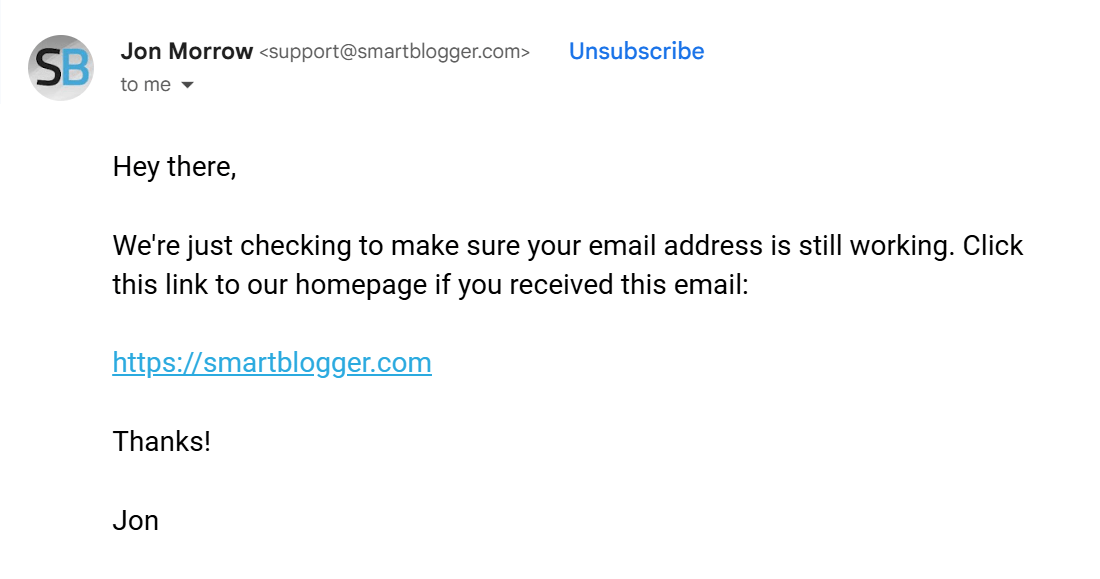
The email is written in plain text with only a single URL to the brand’s homepage. The goal is to make a quick check-in to confirm that the subscriber is still active. It works because it removes friction, making the request feel straightforward.
How to create: Apart from Gmail and Outlook, plain-text emails can also be created and sent through an email service provider (ESP) that offers a plain-text editor.
Pros & cons
Plain-text emails may look simple, but this is exactly what shapes their performance. The absence of design brings clear advantages in some cases and drawbacks in others.
Pros
- Plain-text messages often achieve strong email deliverability because they avoid heavy code and images that trigger spam filters.
- The format feels personal, resembling a one-to-one message rather than a mass campaign.
- Creating them is quick since you only need text and URLs.
- Replies come more naturally, helping establish two-way communication.
- Reading is easy on any mobile device, whether in Gmail, Microsoft Outlook, or with accessibility tools like a screen reader.
- They’re fully dark mode supported.
Cons
- Logos and visual branding elements can’t be added.
- Tracking is limited, which makes it harder to measure opens and clicks.
- The design may appear too plain for promotional purposes.
- Highlighting multiple offers in one email is difficult without the structure of a webpage-like layout.
- Visual-heavy industries, such as fashion, travel, or food, may find them less effective.
What are HTML Emails?
HTML emails go beyond words. Built with Hypertext Markup Language (HTML), they can include images, GIFs, colors, logos, buttons, product grids, and sections that break up content. The format provides marketers with the opportunity to tell a story visually and guide the reader toward taking the desired action.
Here’s an example from Lucchese:
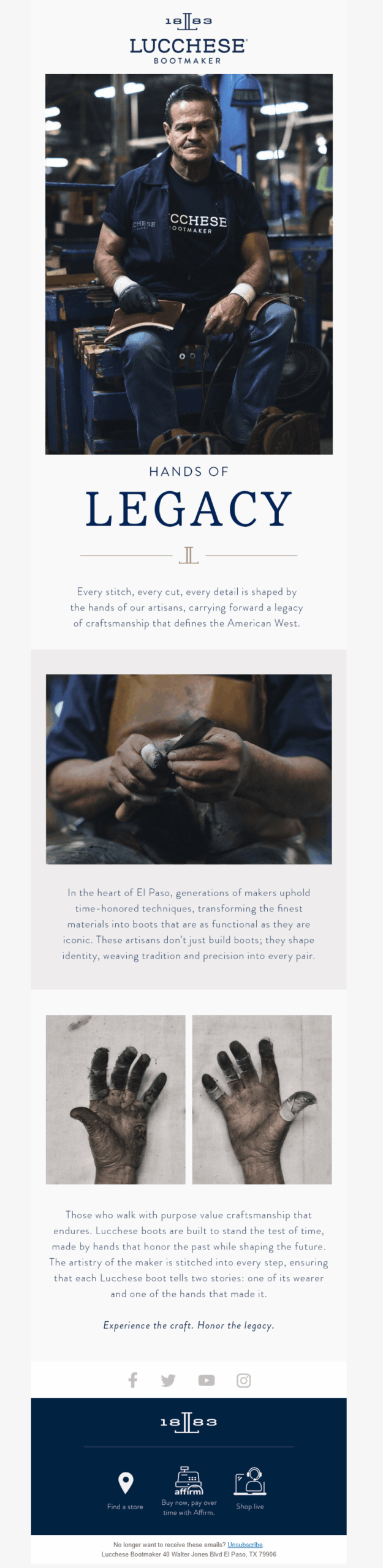
The brand uses HTML design to tell a story through photography, typography, and spacing. The images show the makers’ hands and the materials used, while the headings break the narrative into parts. Here, the HTML format allows the reader to “feel” the brand’s story from the visuals alone.
How to create: Of course, to build and send a campaign like this, you’ll typically use an email marketing service. Most ESPs offer ready-made HTML email templates and drag-and-drop editors, making it easy for marketers to design campaigns without touching code.
Pros & cons
HTML email design can lift performance when the content relies on visuals and structure. However, the same features can add friction if they are overdone.
Pros
- Strong brand presence through fonts, colors, logos, and visuals using customizable HTML email templates styled with CSS.
- Ideal for showcasing new products, collections, or stories with rich multimedia content.
- Clear hierarchy for multi-section marketing email campaigns like newsletters.
- Built-in tracking provides valuable metrics, including opens, click-through rates, and conversions.
- Supports accessibility features, such as alt text and larger tap targets.
Cons
- Heavier to design and test across different email clients, which can impact compatibility.
- Risk of clipping or slow load if images or HTML code are too large.
- Can feel like a campaign rather than a personal note, unlike plain text or basic HTML messages.
- Poor coding practices or excessive visuals increase the likelihood of ending up in the spam folder.
- Requires specific mobile layouts to avoid long scrolling and ensure a smooth user experience.
When to Use Plain-Text Email Format
A plain-text version is ideal when you want quick actions, especially for moments where trust and urgency matter more than design.
These include:
- Pricing changes or policy updates
- Transactional emails, such as password resets, order confirmations, etc.
- Founder’s notes or leadership messages that need a human touch
- VIP or early-access promotions that should feel private and personal
- Re-engagement emails or follow-ups where a single click is the only goal
- Zero-click newsletters that deliver the full content directly in the inbox
But what about promotions? Marketers often assume promotions belong in HTML, but that isn’t always the case. A plain-text promotion can be more effective when the goal is exclusivity or a personal tone.
“Here’s your early access code” feels more genuine when it looks like it came from a person rather than a polished template. Ugmonk proves the point with this plain-text reminder for a limited-time sale.
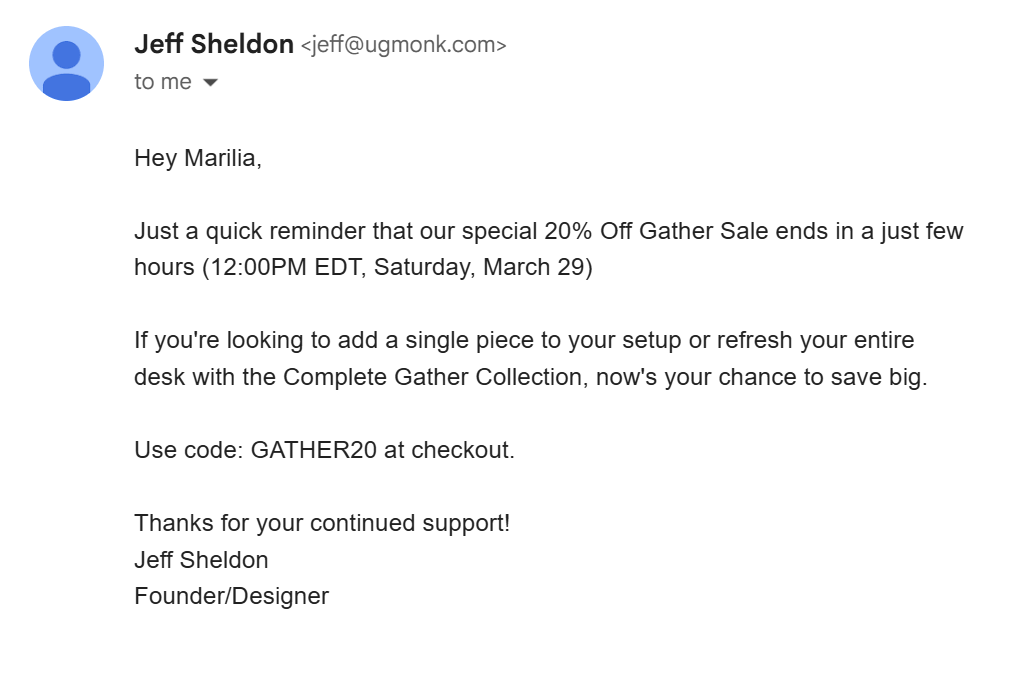
Instead of a glossy layout, the email uses text, a deadline, and a discount code. The style works because it feels like a personal nudge from the founder rather than a mass promotion.
When to Use HTML Email Format
An HTML version, on the other hand, shines when visuals are what convince the recipient to act. This format is particularly effective for:
- Fashion, travel, or food campaigns where imagery drives desire
- Multi-offer newsletters that need structure and hierarchy
- Product launches that rely on visuals to explain new features
- Seasonal promotions and event invites where design cues help guide the reader
- Brand storytelling where visuals strengthen the narrative and create an emotional connection
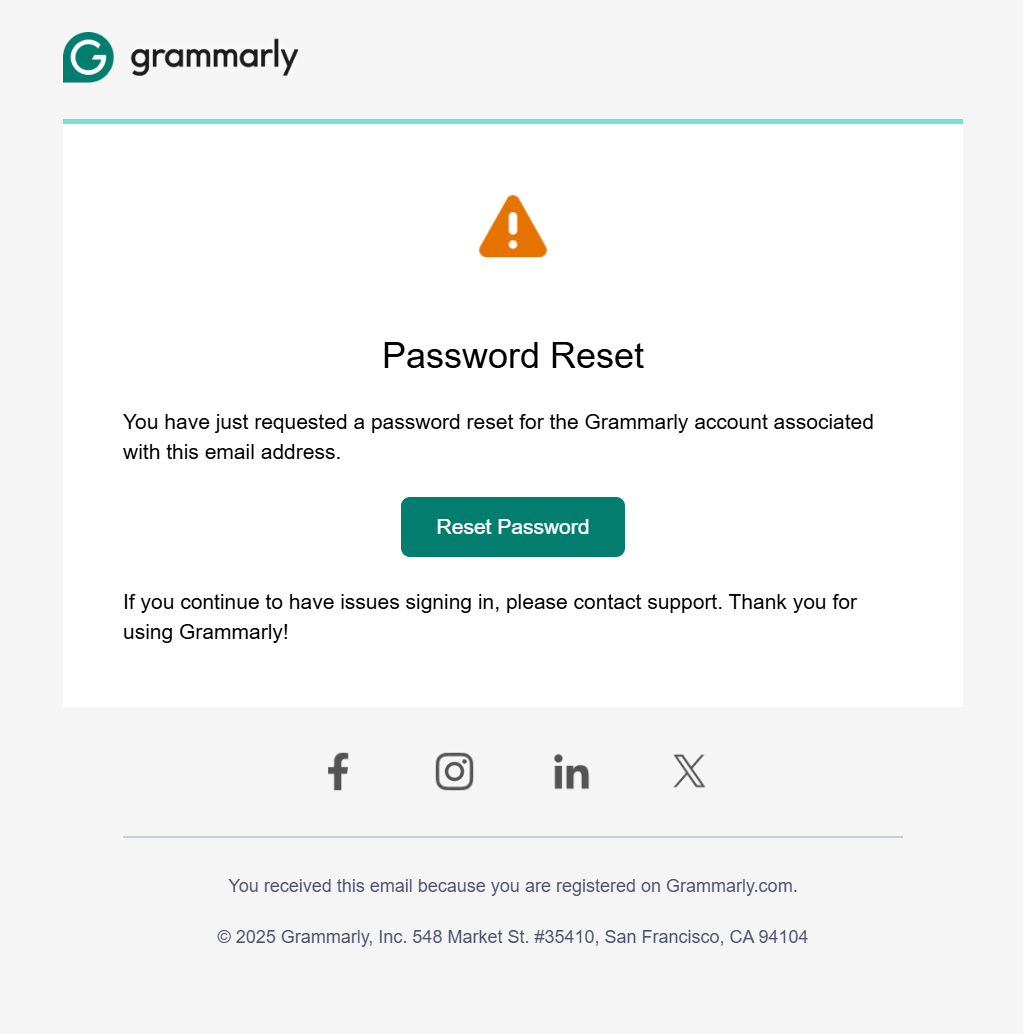
But that’s not all. While password resets are almost always thought of as plain-text, HTML can improve the experience here as well.
Grammarly’s password reset email adds a clear branded button, an alert icon, and simple formatting that makes the action clear. Instead of hunting for a raw link in a wall of text, the recipient sees exactly what to do.
Plain-Text Vs. HTML in Action
The strength of each format depends on intent. No campaign is locked to one style by default. The following examples show how the same type of email can succeed in very different formats.
When HTML wins
Print.inc used two promotional emails for their seasonal sale. The first went out in plain-text format. It listed multiple product offers in a long body of text with hyperlinks scattered throughout.
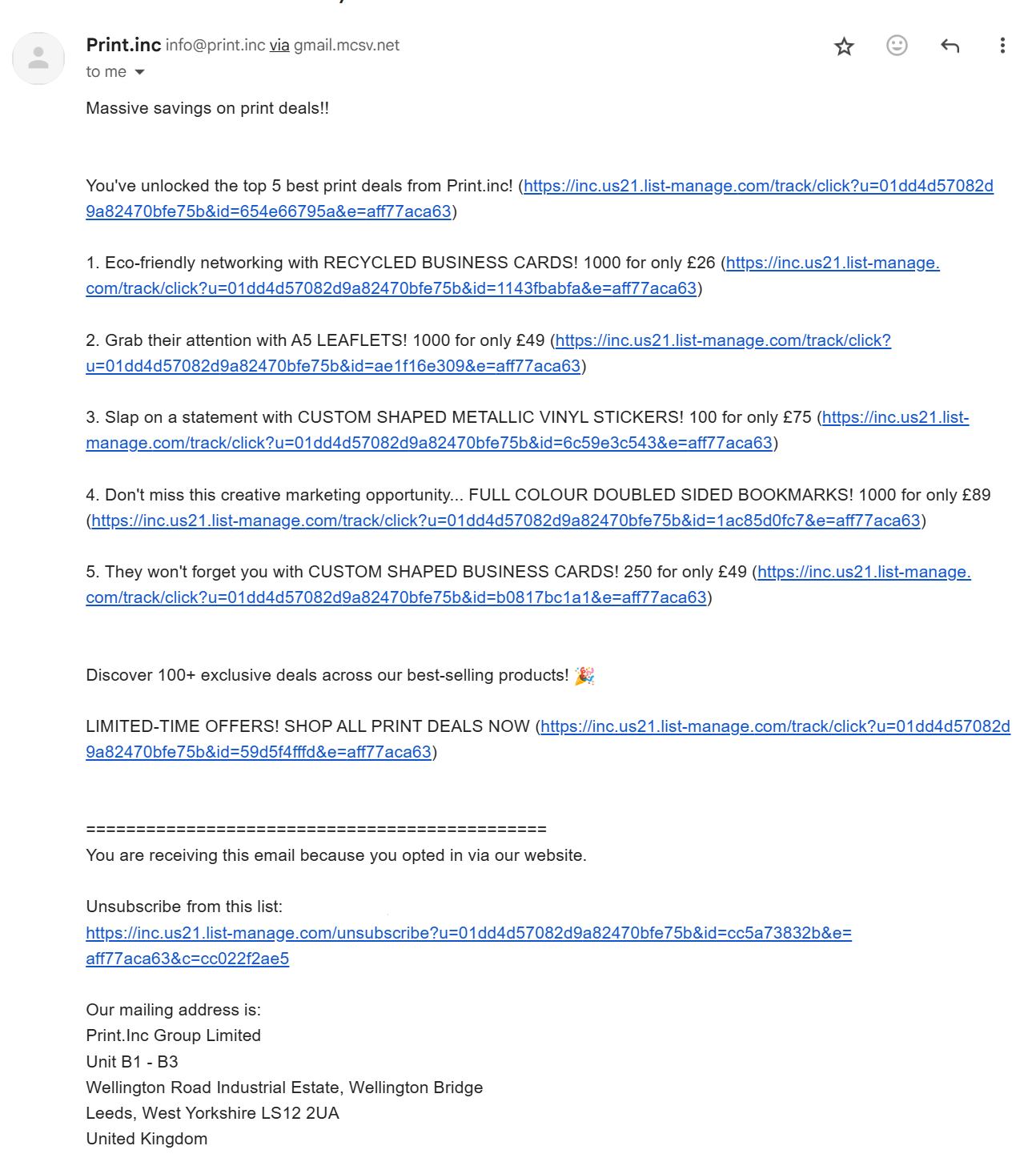
While the email technically delivered the information, it required readers to scan through dense copy and click links that offered little visual context. For a campaign built on variety and choice, this approach created friction. Plus, the lack of visuals made it look boring.
The second email used a complete HTML layout. Instead of text-heavy descriptions, it displayed the products with images, pricing, and bold calls-to-action (CTA).
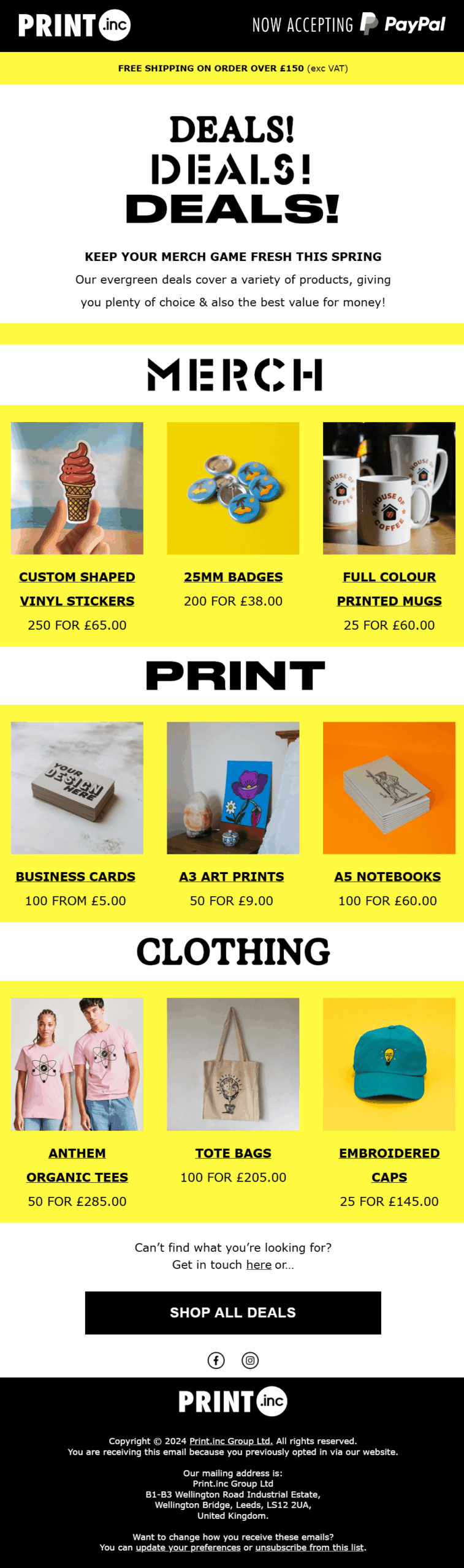
Here, they added clear categories, making it easy for readers to browse, compare, and take action. In this case, HTML design communicated value faster than words could, and the structured layout turned what felt overwhelming in plain text into a digestible shopping experience.
Takeaway: The plain-text email forced all those details into long copy with scattered links, which created friction. If the deal had been about a single product or one clear offer, plain-text would have been an excellent alternative for more exclusivity.
When plain-text wins
Steel Mace Warrior sent a re-engagement email using an HTML design.
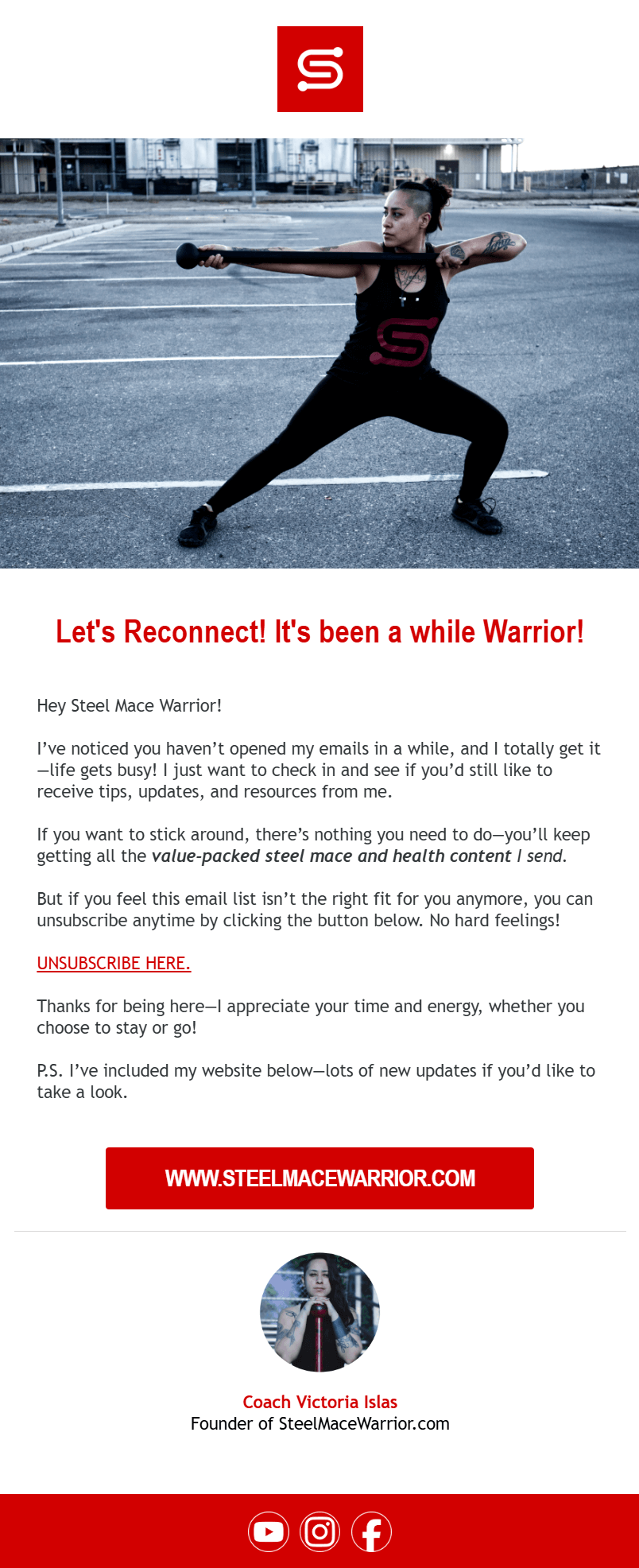
The large hero image, bold red headlines, and branded buttons made it look more like a sales campaign than a simple check-in.
The intent, which was to ask whether the subscriber still wanted to receive emails, was buried under styling. And instead of feeling like a personal message, it came across as another promotional push.
Here’s the opposite approach. This re-engagement email was created using Moosend’s plain-text functionality. It’s nothing more than a short message with one confirmation link and a clear copy that the subscriber would be removed if they didn’t respond.
The format makes the action obvious, while it feels like it was sent from a personal address, not an email marketing platform.
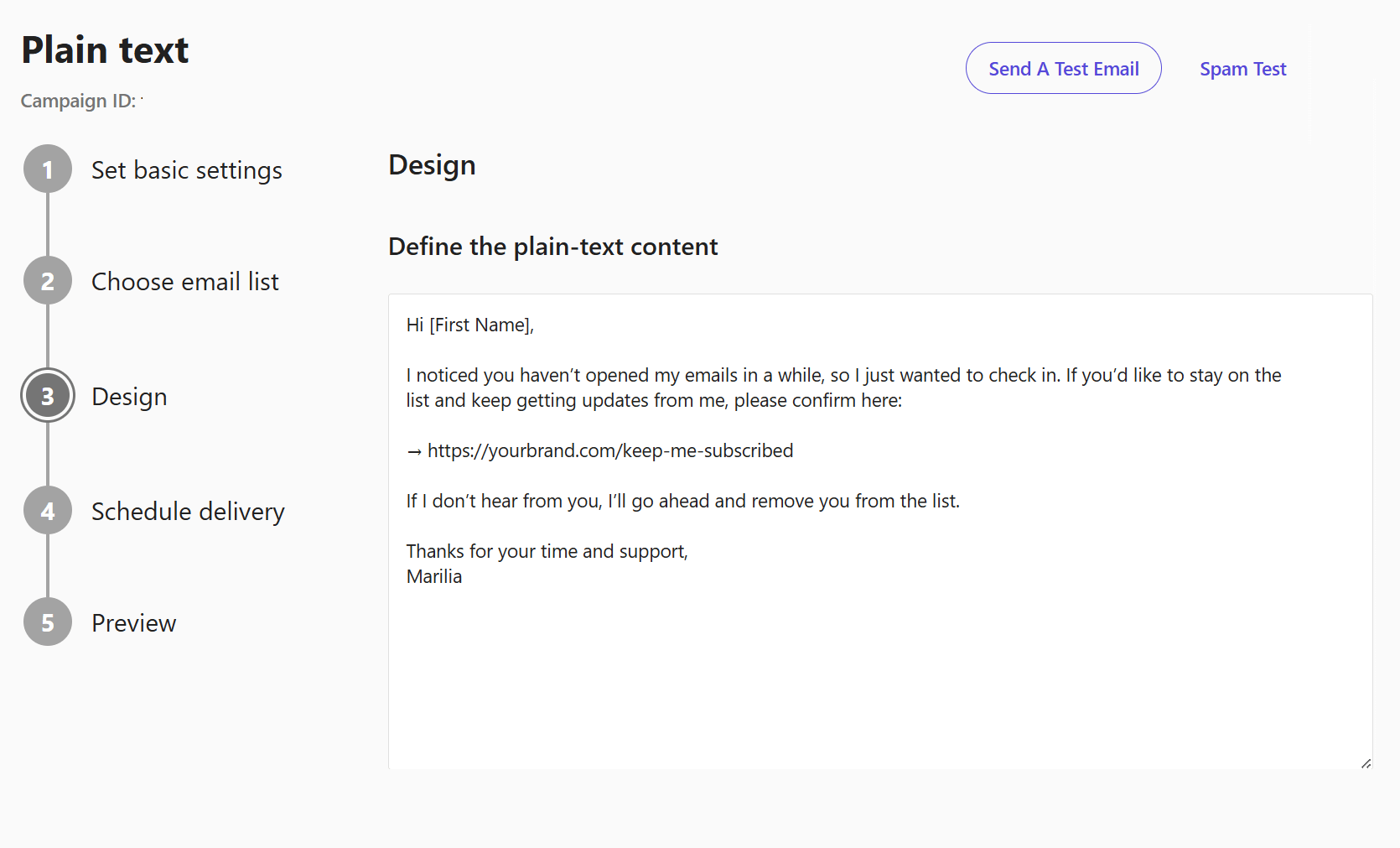
Takeaway: Re-engagement depends on trust. You’re asking subscribers to confirm if they still want to hear from you. A plain-text format delivers that request without distractions, while a design-heavy version risks looking like just another marketing campaign.
What about Rich-Text Emails?
We’ve covered plain-text and HTML emails. But what if you want something a little more polished than plain text without going all-in on design-heavy HTML? That’s where rich-text emails come in.
Rich-text emails allow for simple formatting, including bold or italic text, bullet points, links, and even different font sizes. You can think of them as “dressed-up plain text.”
Here’s an example from Ask the dentist:
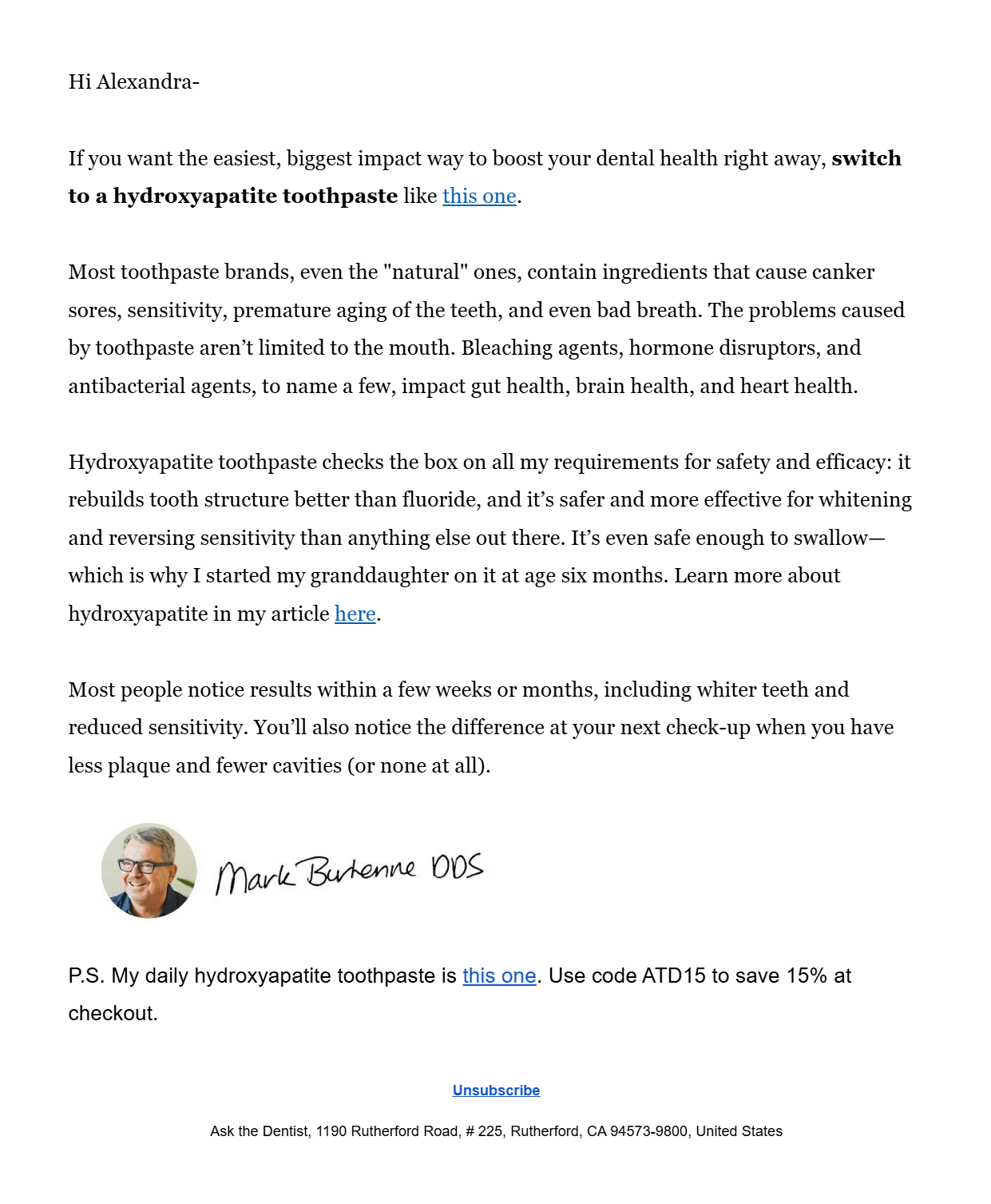
This email format works well for short newsletters with headlines and links, quick updates that need a bit of emphasis, or internal communications where clarity matters but design isn’t the focus.
In these cases, rich-text offers a middle ground as it’s cleaner than plain-text and lighter than HTML.
Plain-Text vs HTML Email: Key Takeaways
As we saw above, neither format is the default winner. The marketers who succeed are the ones who stop asking which format performs better and start considering what the message needs to accomplish, and which format will get it there.
Here are some key takeaways:
- Plain-text and HTML emails each serve a different philosophy: authenticity vs branding.
- Plain-text isn’t only for password resets, as it can outperform HTML when you want a “personal note” vibe.
- HTML isn’t automatically spammy. Well-coded, lightweight designs with balanced text and images perform strongly.
- Format and intent go hand-in-hand. Use plain-text emails for trust and single-focus actions, and HTML for visuals, multi-offers, and campaigns where brand recognition matters.
- You need to test both styles. The same campaign can succeed as plain-text for VIPs but requires HTML for the broader list.
Choosing the Right Style for Your Marketing Strategy
Plain-text, HTML, and even rich-text emails each have their place. The format you use should never be automatic, but rather match the job the email needs to do.
Sometimes that means stripping everything back to build trust; other times it means leaning on design elements to tell the story. The marketers who understand this don’t argue about which format is “better.” They use the right one at the right time.
FAQs
Let’s take a look at some questions regarding plain text and HTML emails.
1. Are plain-text emails better than HTML emails?
Plain-text works best when you need trust, urgency, or simplicity, while HTML is stronger when visuals and structure are essential. The right choice depends on the goal of your campaign.
2. What are the key differences between plain-text and HTML emails?
Plain-text emails contain only text and links, making them simple, personal, and highly deliverable. HTML emails incorporate design elements such as images, colors, and buttons, enabling stronger branding, enhanced visuals, and optimized tracking.
3. Can I use plain-text emails for promotions?
While most marketers default to HTML for promotions, plain-text (or rich-text) can be more effective when you want the offer to feel exclusive, personal, or distraction-free. A single link with a short message can often outperform a heavily designed template.
4. Do plain-text emails hurt my branding?
Not necessarily. They don’t showcase logos or visuals, but they strengthen your brand by sounding authentic and personal. Many brands mix plain-text with HTML campaigns to balance trust and design.
5. What are some best practices for HTML email design?
Keep code clean and lightweight so emails load quickly and don’t get clipped. Balance text and images to avoid deliverability issues. Also, make sure layouts are mobile-friendly with large tap targets. Use design to support the message, not distract from it.
6. Do plain-text emails get better deliverability?
They often do because they contain less code and fewer images that can trigger spam filters, though well-coded HTML can also achieve strong deliverability.
7. Can I track plain-text emails?
Tracking is limited. You can still measure clicks with link tracking, but open rates are not reliable since there are no tracking pixels.
8. Should newsletters be plain-text or HTML?
Most newsletters are HTML because they benefit from structure and visuals. Plain-text newsletters can work if your audience values a simple, personal feel.
Similar Posts

 Published by
 Published by

Create, send and optimize your email marketing campaigns