













How to Grow Your Email List With Moosend In Just 30 Days [2026]
Published By Sarah Papadopoulou
February 19, 2026

19/02/26
Growing your email list doesn’t have to feel like solving a marketing puzzle at 2 a.m.
You don’t need a huge budget, complicated setups, or months of “let’s see what happens” experiments. With a clear plan and the right tools, you can start building a healthy, engaged list sooner than you think.
In this guide, we’ll walk through practical steps you can implement using Moosend’s built-in features, even if you’re starting from zero and wondering where to begin.
Let’s get down to business
Build the landing page, launch the automation, and watch your list grow.
Try MoosendStep 1: Create One High-Converting Landing Page (Days 1–7)
To expand your email list fast, you don’t need multiple pages or complex funnels. You need a single, focused landing page for a single action: email sign-ups.
This page will serve as the foundation for your 30-day list-building plan. You’ll use it across ads, social media, popups, and links in bio.
How to do it in Moosend:
- Go to Landing Pages
- Choose a ready-made template
- Customize:
- Headline (clear value)
- Short description
- One CTA button
- Enable mobile optimization (default)
Here’s one of the customizable landing page templates you’ll find inside Moosend’s platform.
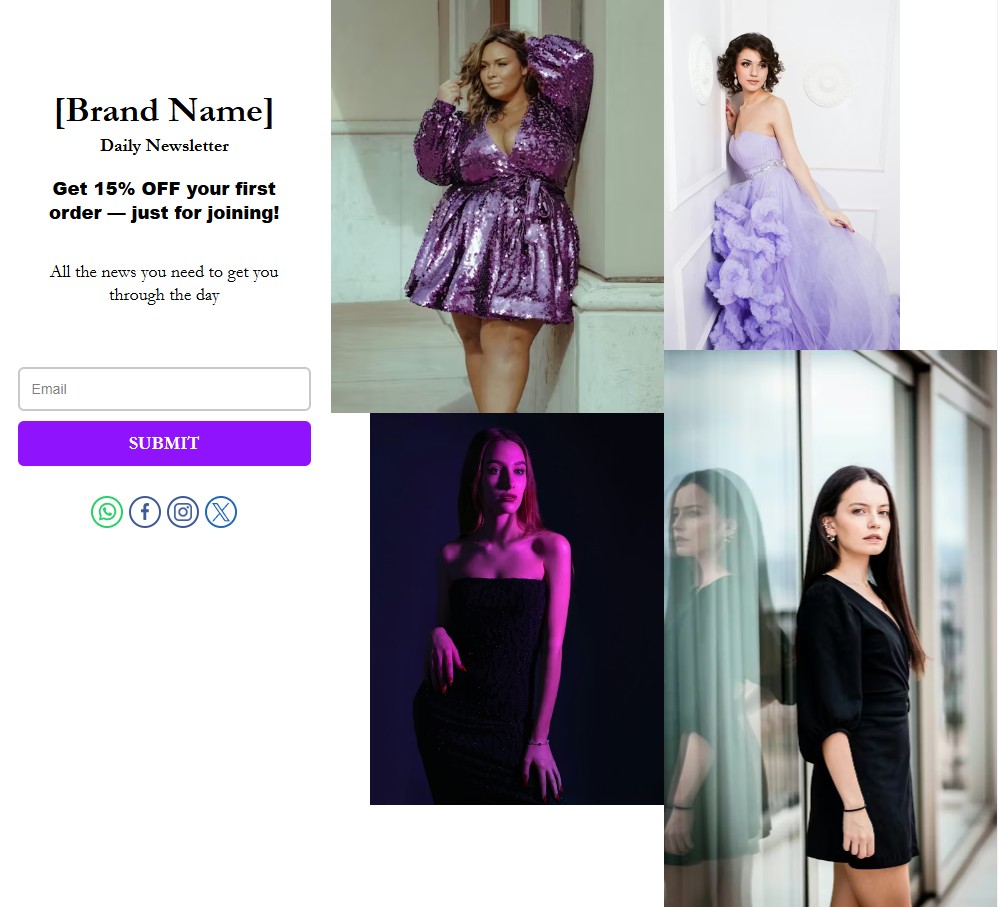
Templates help you skip layout decisions and focus on what matters in the first week:
- Swap in your own images so the page reflects your brand.
- Adjust the CTA color to match your visual identity and stand out.
- Keep the structure as is unless it blocks clarity.
You can always create a landing page from scratch later. For now, templates save time and effort so you can launch, test, and start collecting emails within days.
Step 2: Offer a Real Incentive (Days 7–14)
People don’t subscribe just to stay in touch. They usually join you because there’s a clear reason to act now.
A strong incentive makes that decision easy. It might be a discount they can use right away, a short checklist or guide that solves a problem, early access to something new, or content they won’t find anywhere else. The format doesn’t matter as much as the timing.
If the value is clear and delivered immediately, signing up feels like a fair exchange.
Moosend features to use:
- Custom Field: Store coupon codes, interests, or preferences
- Personalization tags: Automatically insert the incentive into emails
- Welcome Automation
- Trigger: Subscription
- Action: Send an incentive instantly
IANOS’ welcome email is a strong example of how automation can create an immediate and meaningful connection with new subscribers.
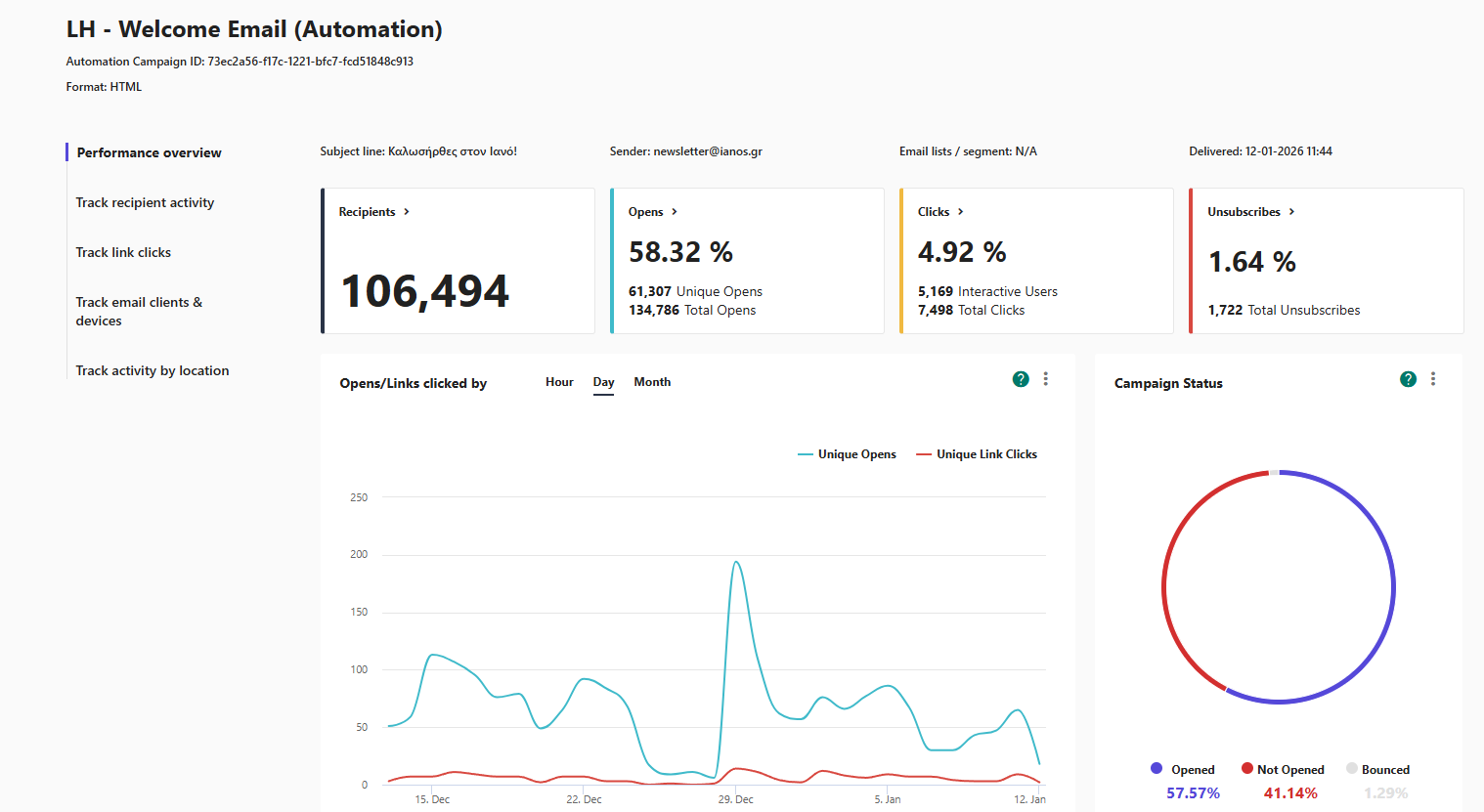
With an open rate reaching 58% and consistent engagement, the first message goes beyond a simple subscription confirmation and becomes a true welcome experience.
The right timing, clear messaging, and strong brand identity show how well-designed welcome automations can set the tone for long-term engagement from day one.
Step 3: Promote Your Landing Page (15-20)
A landing page works only if people actually see it. At this stage, the goal is simple: place your signup link in spots your audience already visits.
Also, you don’t need ads yet, but to take advantage of key strategic spots to promote your landing page.
Social media bios
Your bio link is prime real estate, especially for people who are discovering your brand for the first time. Instead of pointing visitors to a generic homepage, use your bio links to surface something specific and valuable.
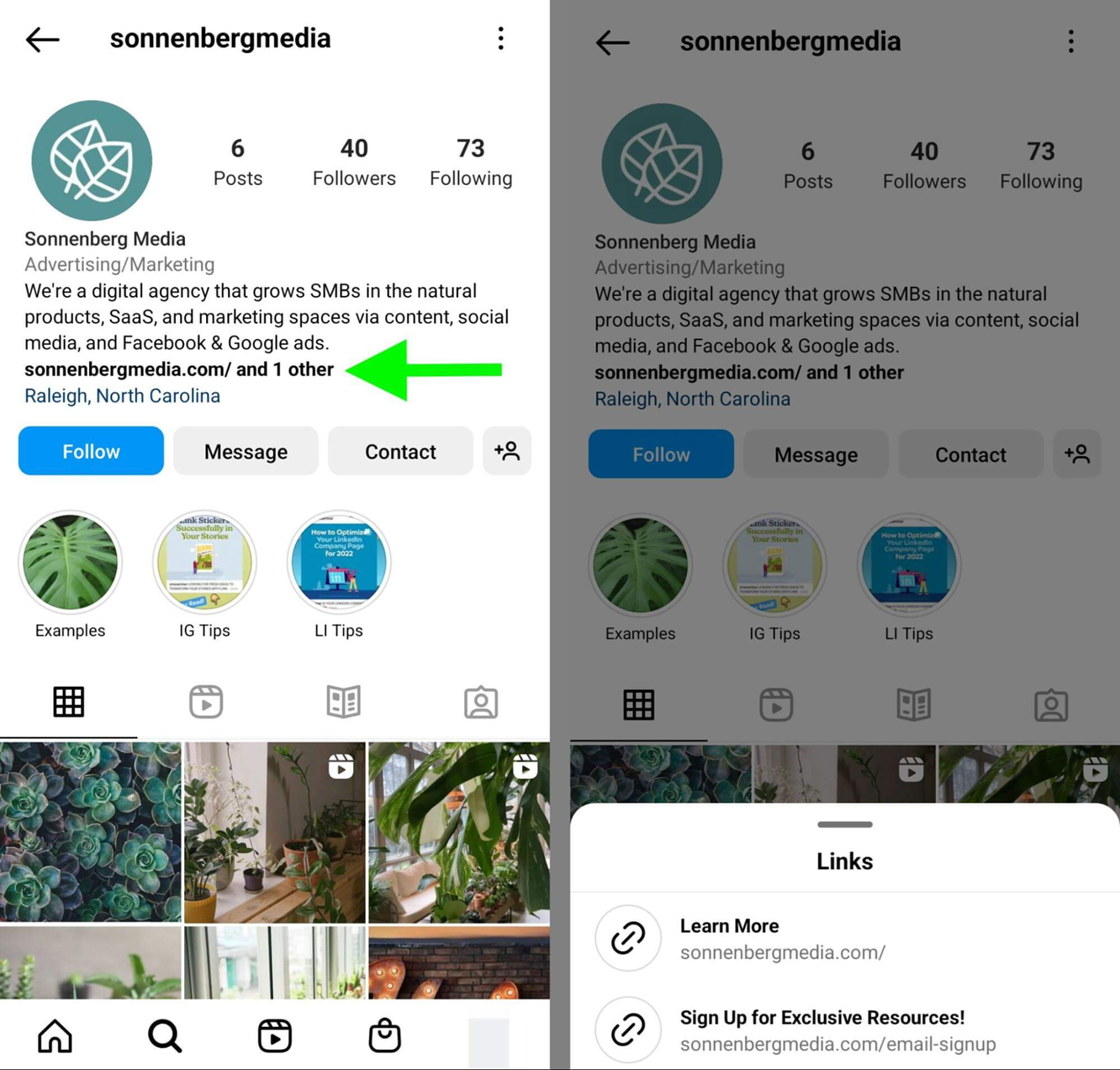
In the example above, the main website link sits alongside a second link that leads directly to an email signup page offering exclusive resources.
This setup works because:
- The signup link is visible without scrolling
- Visitors immediately understand what they’ll get by clicking
- The landing page focuses on one action: subscribing
You can apply the same idea by adding your email signup landing page as a dedicated bio link with clear copy like “Sign up for exclusive resources” or “Get 10% off your first order.”
If you’re limited to one bio link, make it your landing page, not your homepage.
Pinned social media posts
Pinned posts work like a permanent promotion at the top of your profile, even when you’re not actively posting.
Instead of letting your latest content rotate out of view, pin a post that clearly invites people to join your email list. A simple, realistic example could be:
“New here? Join our email list and get a free guide on how to improve your [specific outcome]. 👉 Sign up here: [landing page link]”
This approach works well on platforms like Facebook, LinkedIn, and X (Twitter), where pinned posts stay visible at the top of your profile.
Anyone visiting your page for the first time will see this message immediately, making it an easy, low-effort way to turn profile visits into email subscribers.
Website header or footer
Your website already attracts visitors, so it’s one of the easiest places to promote your email list without extra effort.
A simple way to do this is by adding a clear CTA in your header, such as a “Get 10% Off” button that links directly to your Moosend landing page. This makes the signup option visible on every page, without interrupting the browsing experience.
If your header space is limited, the footer works just as well. A short line like “Subscribe to our newsletter for exclusive offers” gives visitors a low-pressure option to join before they leave your site.
The advantage here is speed. You don’t need to redesign your website or add new forms. Just link to your landing page URL and let it handle the signup process.
Email signature
Email signatures are an easy way to reach people who already interact with you but haven’t joined your email list yet.
Every direct email becomes a natural opportunity to point them to your signup page, without sounding promotional. A short line in your signature is enough, for example:
Sarah Papadopoulou
Marketing Manager
🎁 Get 10% off your first order → [landing page link]
This works especially well in customer support replies, sales conversations, and partnership emails, where recipients are already engaged but may not know your newsletter exists.
For B2B businesses, this can quietly turn everyday conversations into new subscribers.
Blog sidebar or inline CTA
If you publish content, your readers are already interested, which makes this one of the most natural places to promote your email list.
Sidebar example:
- 📬 Enjoying this article?
- Get similar tips straight to your inbox
- 👉 Subscribe here
Inline CTA example (inside article):
- Want more tips like this? Join our email list here → [link]
- Get more practical tips like this. Join our list → [link]
- Want insights like this delivered to your inbox? Subscribe here → [link]
Step 4: Use Smart Pop-ups (Days 21–30)
Pop-ups can be an effective way to grow your email list, but only when they respect the visitor’s experience. The goal isn’t to interrupt someone mid-action, but to show up at the right moment, when interest already exists.
Instead of using one generic pop-up everywhere, choose the type based on how visitors behave on each page.
Exit-intent pop-up
Exit-intent pop-ups appear when a visitor is about to leave your site, making them ideal for last-chance offers.
This type is ideal for eCommerce stores, blogs, and landing pages with high bounce rates because it doesn’t interrupt active reading or browsing.
Moosend setup:
- Trigger: Exit intent
- Frequency: once per session
- Pages: homepage, product pages, blog
Here are some copy examples you can use for your pop-up. Keep it short and valuable.
- Ecommerce: Before you go, get 10% off your first order. Enter your email to receive your code.
- SaaS/Digital products: Before you leave, download our free checklist to get started. Enter your email, and we’ll send it instantly.
- Content/Education: Leaving already? Get our best tips and resources in your inbox. Subscribe to stay updated.
Scroll-based pop-up
Scroll-based pop-ups appear after a visitor has scrolled part of the page, making them a good fit for blog posts, educational content, and longer pages.
Recommended settings:
- Trigger: 50–70% scroll
- Display: desktop & mobile (optional)
- Audience: new visitors
And here are some copy examples you can use:
- Enjoying this article? Get similar tips straight to your inbox.
- Finding this useful? Get more practical tips delivered to your inbox.
- Want insights like this on a regular basis? Subscribe to our newsletter.
Since the visitor has already invested time in reading, this feels relevant and timely.
Time-based pop-up
Time-based pop-ups appear after someone spends a set amount of time on a page, typically 20-30 seconds. These work well on service websites, SaaS pages, and product explanation pages where visitors need time to understand what you offer.
A realistic example might be: “Still exploring? Join our email list for exclusive tips and offers.”
By setting a short delay and limiting the pop-up to one appearance per visit, you filter out quick bounces and reach visitors who are genuinely interested. This makes the signup invitation feel like a natural next step rather than a distraction.
Growing Your Email List with Moosend
By the final days of your 30-day plan, you should have a clear system in place to attract subscribers, capture their details, and follow up consistently. What matters next is keeping things organized and relevant, so new contacts don’t just join your list but actually stay engaged.
This is where having the right setup helps. With tools that support landing pages, forms, segmentation, and automated emails, you can turn your early momentum into a sustainable email list without adding complexity as you grow.
Ready to get started with Moosend? Sign up for a free account to try the platform, and if it’s a match, start building landing pages, capturing leads, and automating emails from day one.
Similar Posts
 Published by


Create, send and optimize your email marketing campaigns