















How to Cancel Your Klaviyo Subscription in 2026
Published By John Desyllas
March 11, 2026

11/03/26
If you’re planning to cancel your Klaviyo subscription, it’s important to understand your options first.
In this guide, we’ll walk you through exactly how to cancel your Klaviyo subscription step by step, so you can avoid unexpected charges or data loss. We’ll also cover your cancellation options, what happens to your data, how reactivation works, and important things to check before you make the final decision.
Not sure if canceling is the right move yet? We’ll also help you evaluate whether switching software makes sense for your goals and what to do next if you decide to migrate to another email marketing platform.
What Are Klaviyo’s Cancellation Options?
Before you start cancelling your Klaviyo subscription plan or account, it’s important to understand that there are different options available. Each one affects your account differently in terms of data retention and feature access.
Consequently, selecting the right course of action depends on your specific business needs and future marketing plans.
Downgrading to a free plan
Downgrading to Klaviyo’s Free plan can be a temporary solution if you’re not ready to fully cancel.
When you downgrade:
- All future payments stop (unless you exceed the free plan limits)
- You retain access to your account and campaign history
- Your contacts remain stored
- Advanced features (such as higher email send limits, SMS credits, and certain automation capabilities) may be restricted
This option is useful if you want to pause paid activity but keep your lists, templates, flows, and reporting data intact. However, sending limits are significantly reduced, and SMS features may be disabled.
Cancelling a plan
Canceling a paid Klaviyo plan stops future charges for that specific plan, but it doesn’t delete your account.
Your account stays active, and any other paid features continue running as usual. For example, if you cancel your SMS plan, your email marketing plan will remain active and unaffected.
After cancelling:
- You’ll retain access until the end of your current billing cycle
- Your data remains stored in your account
- Campaigns and flows will stop sending once your paid subscription expires
- You won’t be charged again unless you reactivate
This option is ideal if you want to stop paying for a certain plan but keep using Klaviyo’s platform
Keep in mind:
- Klaviyo doesn’t typically offer prorated refunds
- SMS billing requires separate cancellation steps
Cancelling your account
Another option is to cancel your account. Choosing this option keeps your data intact, but all features are turned off immediately. Your campaigns will pause, your flow will stop sending, and integrations will be disabled.
You’ll still be able to log in to export data, review reports, or prepare for migration.
This option works well if you need to temporarily suspend your marketing operations or start transitioning to another email marketing service.
Closing your account
If you choose to close your account, then it will be permanently deleted. Once you choose this option, all data in the account will be deleted, and this process can’t be reversed.
Make sure you export any data you want to keep, because once the process is complete, you’ll be immediately logged out of your account, and it’ll be deleted.
This option is suitable for businesses that want to move away from Klaviyo with no intention of returning. The process also requires owner-level permissions and ensures customer data privacy and compliance with data protection regulations.
Pre-Cancellation Preparation Steps
To avoid unexpected complications and ensure a smooth cancellation process, there are a few steps you can take.
Review your current billing
Before making changes to your account, it’s important to understand your billing situation. This will also help you determine the best time to make changes to your subscription.
Check whether your account is on manual billing or has a contract that extends beyond one month. To check if you’re manually billed, head to your Account Overview in Klaviyo. If you want to cancel your subscription when billed manually, you’ll need to contact Klaviyo’s support team.
Check account permissions and access
User roles determine what changes you can make to your Klaviyo account/plan.
Specifically, to cancel an account or downgrade to the free plan, you must be an account Owner or Admin. Closing an account is only available to Owners.
It’s advisable to review which team members have access to the account and notify them about upcoming changes. This way, you can avoid confusion and better prepare for upcoming changes.
Export essential marketing data
Backing up your data is crucial before making changes to your account.
Make sure to export valuable marketing assets, including performance analytics, customer profiles, segments, and campaign templates.
While Klaviyo lets you export your data before closing your account, being prepared beforehand reduces the risk during the process.
How to Cancel Your Klaviyo Plan/Account
First, log in to your Klaviyo account using your credentials. Then, navigate to the account menu in the bottom-left corner and click on it. In the menu that pops up, click Billing.
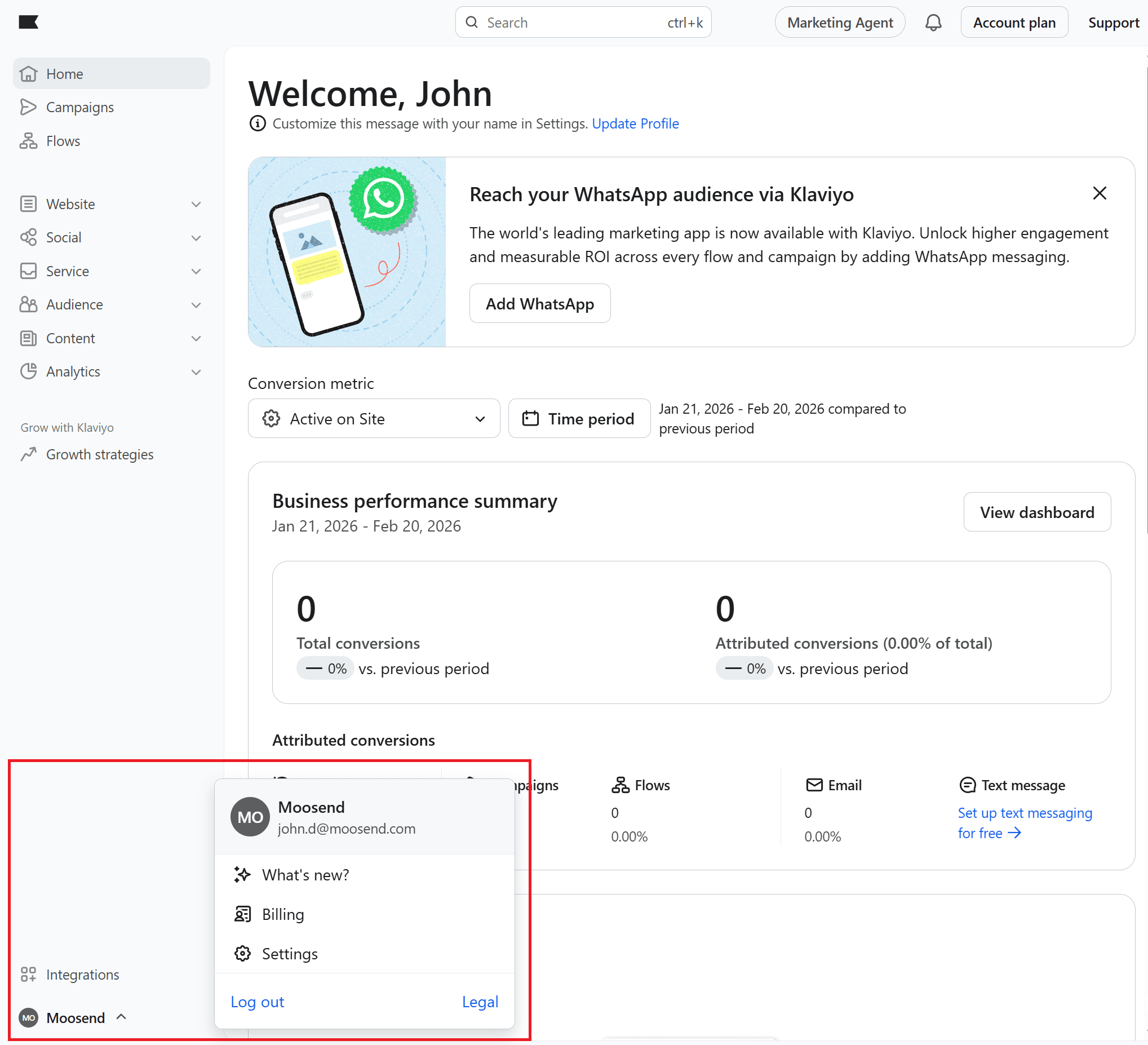
In the Billing section, click Cancel Plan.
Now, Klaviyo will ask you to select the plan(s) you want to cancel. If you want to cancel your account, select Cancel all plans. Then click Continue.
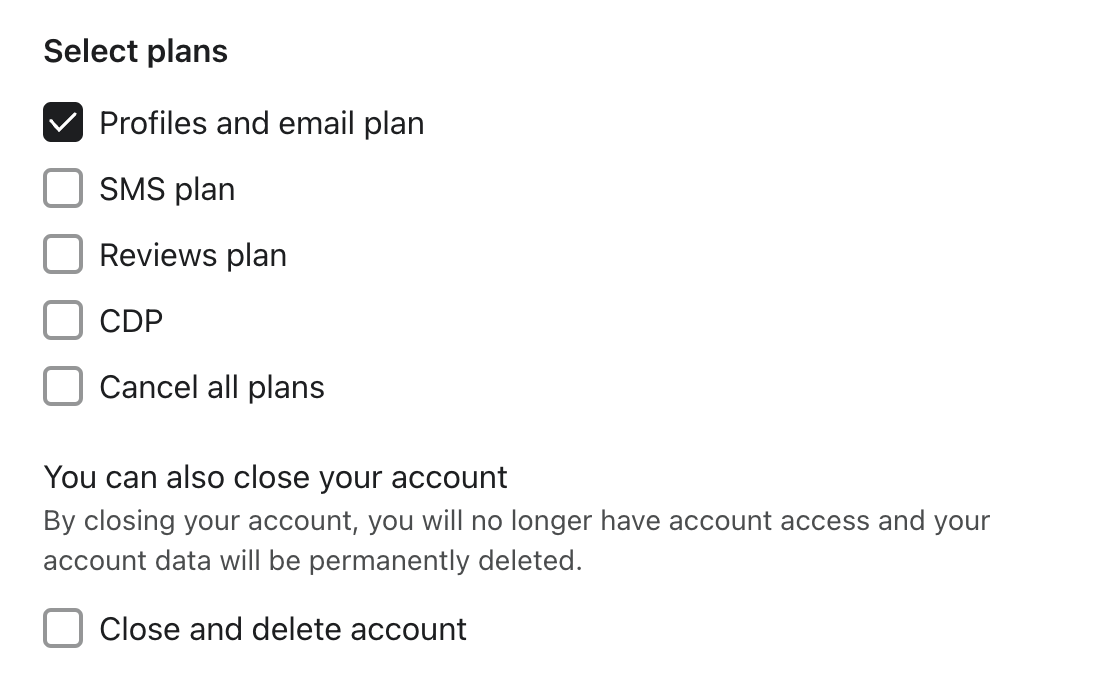
Important note: If you cancel your SMS plan, any flows that contain SMS messages will be completely disabled. This means that none of the messages within those flows, including emails, will be sent.
Now, you’ll need to select the reason(s) you want to cancel; then click Continue.
You’ll see that the platform gives you two options regarding when you want your plan to end:
- at the end of the billing cycle (recommended).
- immediately
If you select the first option, your campaigns and flows will continue working until the last day of the billing cycle. The same applies to your integrations. After that, future payments will be disabled. Selecting the second option terminates your plan immediately (no refunds).
Next, enter the account name to confirm and click Cancel Plan. Then click Exit, and you’re done.
How to Downgrade to Free Plan
If you want to use a free Klaviyo plan, you first need to cancel your paid subscription.
For users with two or more paid plans, canceling one automatically sets it to the free plan.
If you want every plan in your account to be on the free version, cancel your account (see above) and then reactivate it as free. Let’s see how.
Navigate to Billing, then open the Preferences tab.
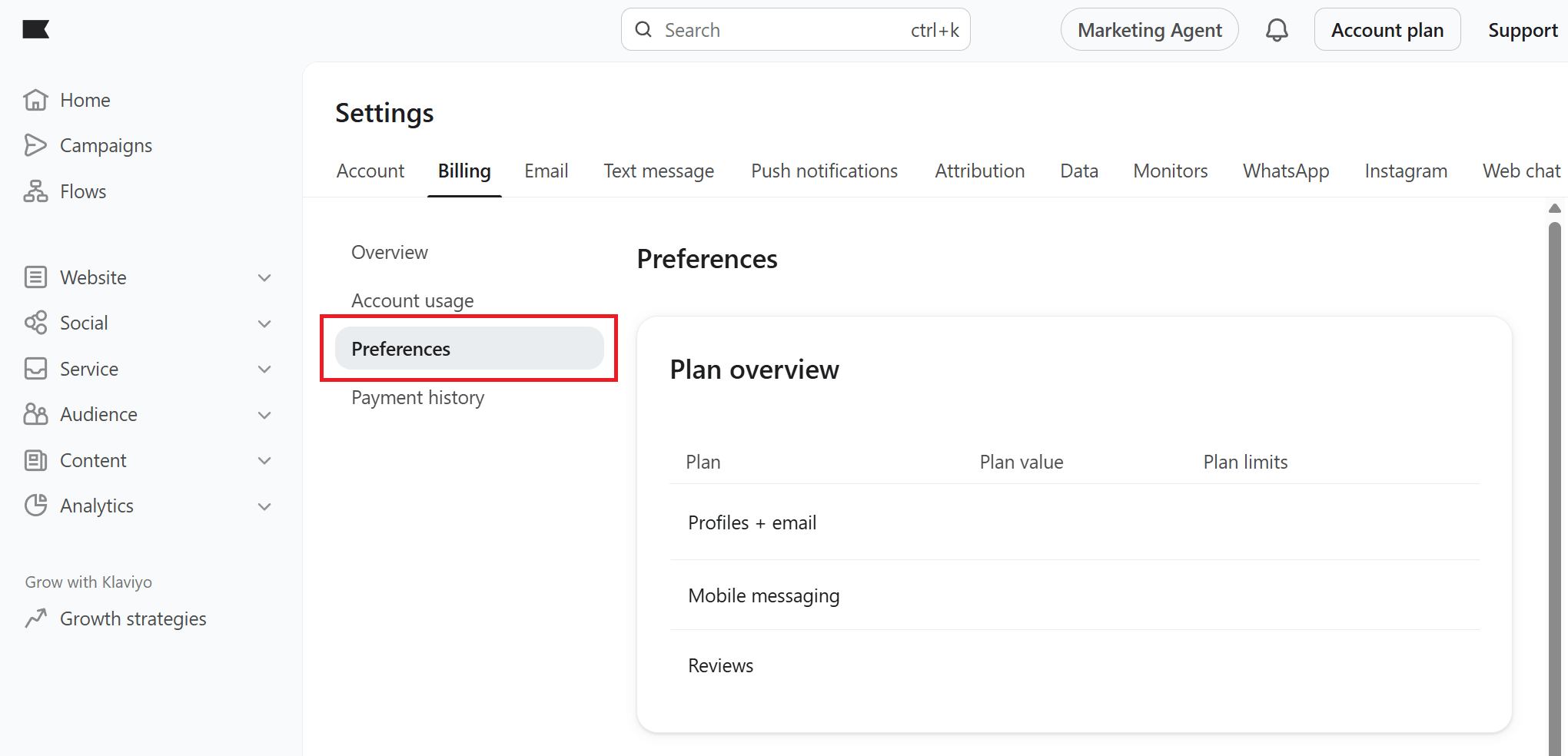
Scroll down the page to the Reactivate your account section. Click Reactivate to free.

Note: Upon reactivating as a free account, you’ll still have access to your data from any former paid account. You will need to manually turn flows back to live, reschedule your campaigns, or enable third-party integrations you may want.
How to Close Your Account
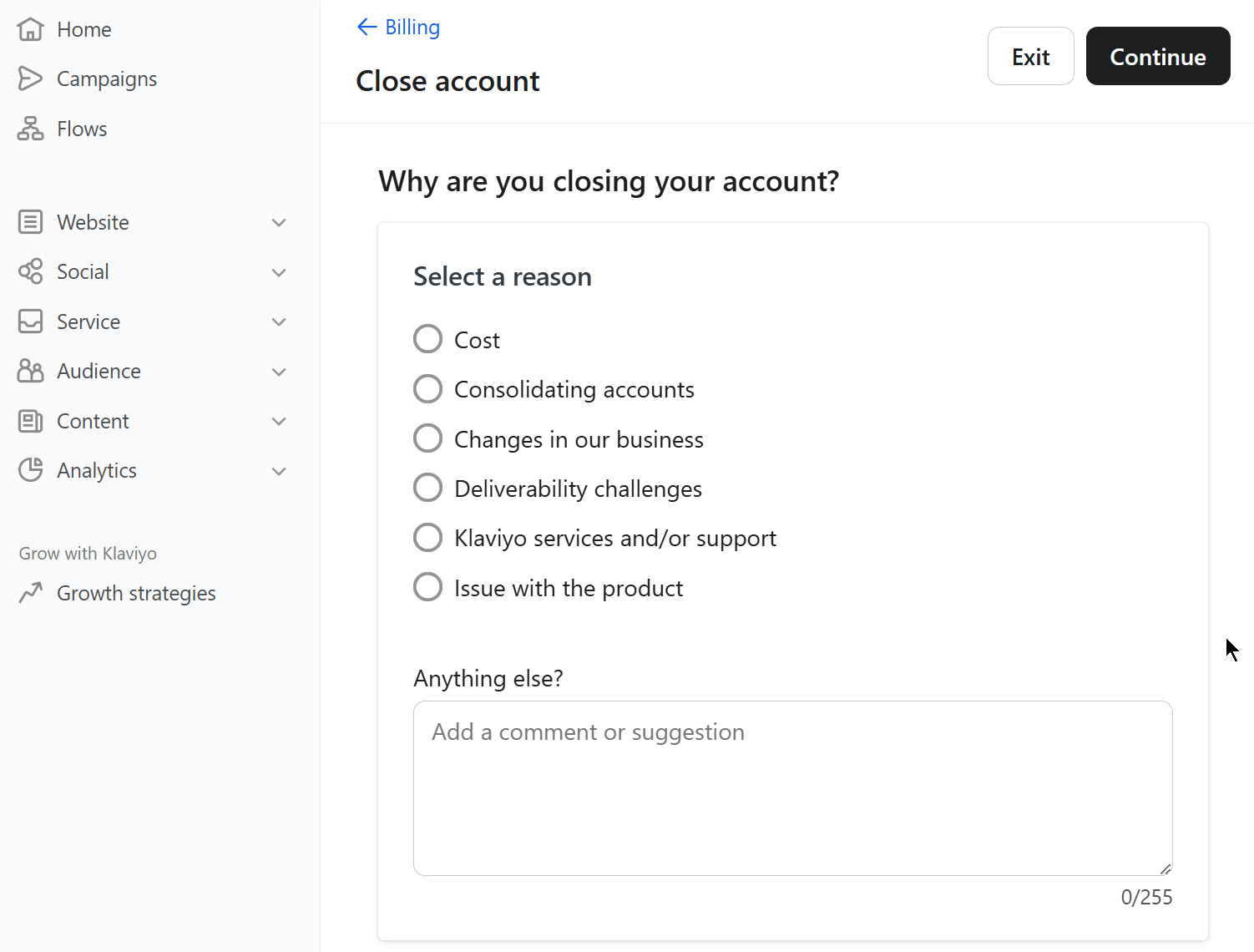
To permanently close and delete your account, navigate to Billing and follow the steps mentioned above for cancelling a paid plan/account. Also, tick the option Close and delete account.
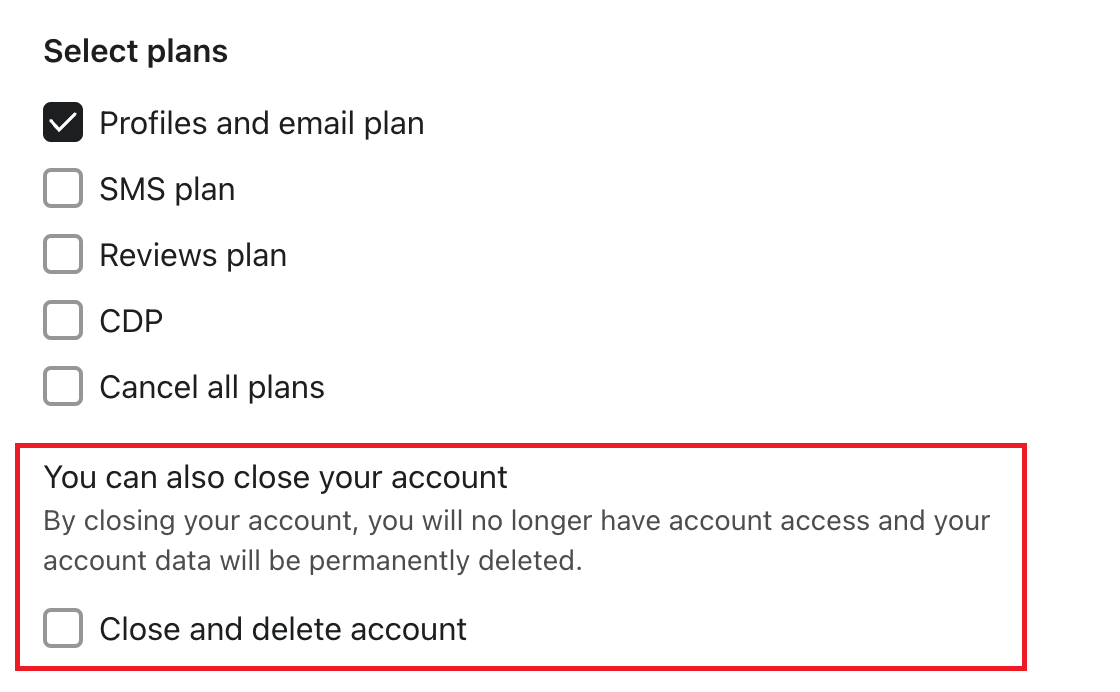
Select the reason(s) you want to cancel and click Continue.
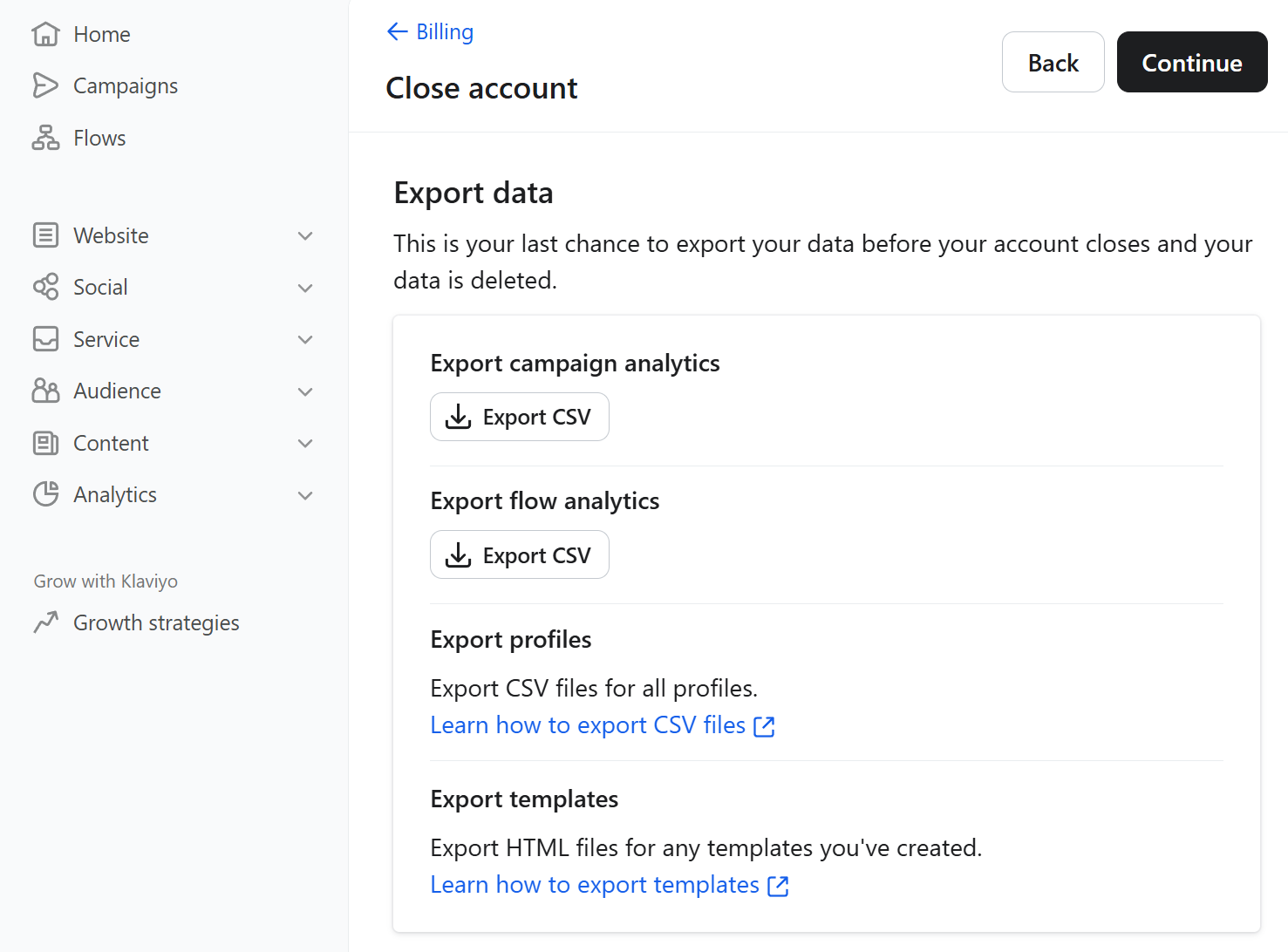
In the next step, the platform lets you export any data you want to keep, such as campaign analytics, flow analytics, profiles, and templates.
If you haven’t already exported your data, this is your last chance to do so. After that, your account will be closed, and the data will be deleted.
In the next step, you’ll be asked to confirm your account name.
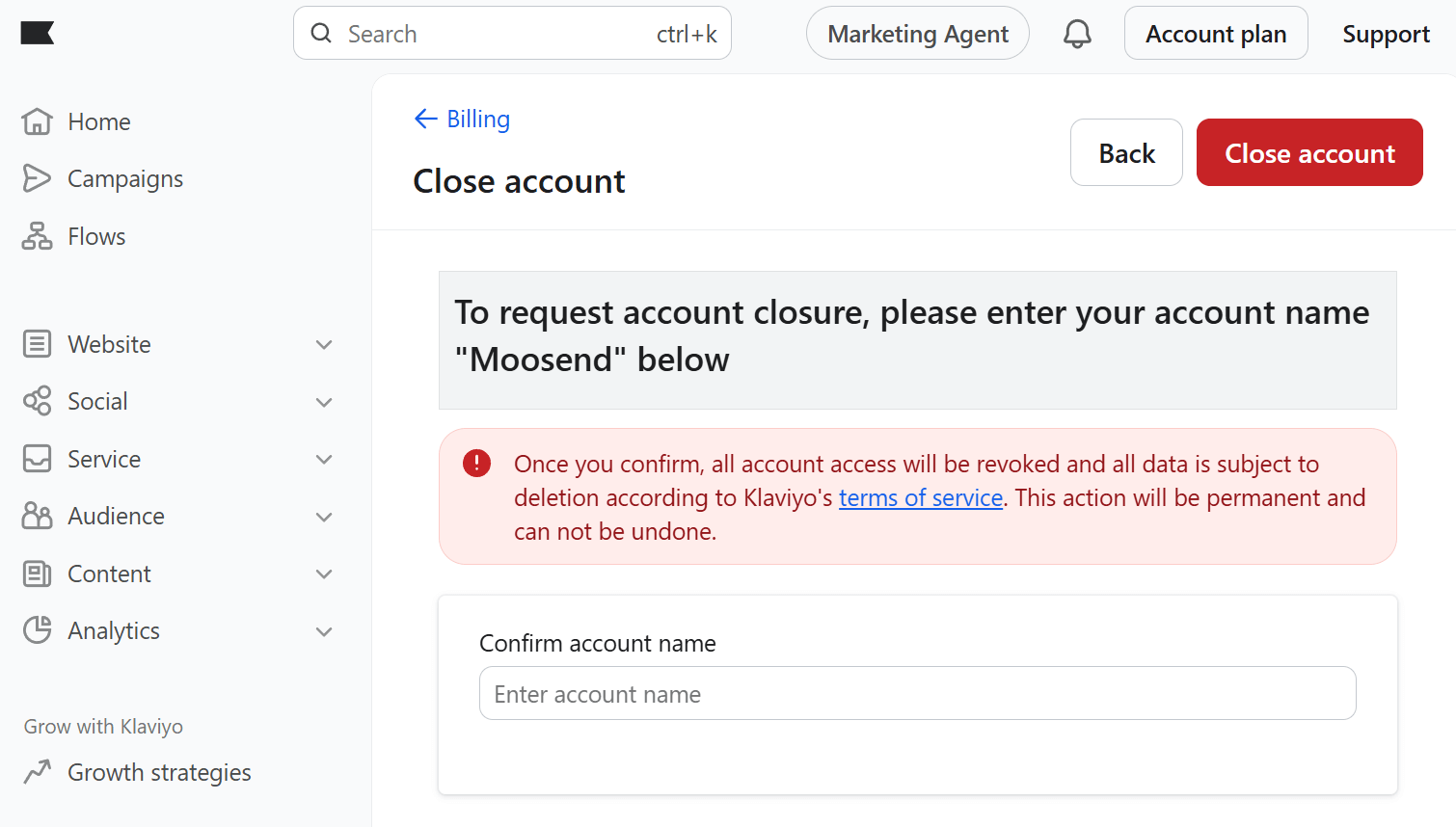
Click Close account, and you’ll be immediately logged out of your account.
Why Klaviyo Might Not Be the Best Fit for You
Klaviyo is a powerful platform, especially for eCommerce brands. However, that strength can also make it less suitable for certain businesses.
Here are a few common reasons why users consider switching or select an alternative:
- Pricing based on active profiles: Klaviyo’s pricing scales with the number of active profiles in your account, not just the emails you send. As your list grows, costs can increase quickly, even if a portion of your contacts are inactive. For businesses with large databases or seasonal campaigns, this model can become expensive over time.
- Advanced features may add complexity: Klaviyo offers advanced segmentation, predictive analytics, and multi-channel automation (email + SMS). While powerful, smaller teams may prefer a more streamlined interface that focuses on essential automation without a steep learning curve.
- SMS and add-on costs: SMS credits and certain advanced capabilities are billed separately. Depending on your usage, total costs may exceed your initial expectations.
- Strong focus on eCommerce: Klaviyo integrates deeply with platforms like Shopify and WooCommerce and offers advanced revenue attribution and customer lifecycle tracking. While this is valuable for online stores, non-eCommerce businesses (B2B, creators, service providers, local businesses) may find many features unnecessary or overly complex.
If your priorities include predictable pricing, simplicity, or a tool that works equally well beyond eCommerce, it may be worth evaluating alternative platforms before renewing your subscription.
How to Transfer Your Data to Another Email Marketing Service
If you’re moving away from Klaviyo, switching to a new email marketing platform can feel intimidating.
Here’s how to approach the migration:
1. Choose your new platform wisely
First, identify the features you need and evaluate new email software.
Do you want advanced automation, an intuitive interface, better deliverability, or lower costs? Moosend, for example, is a great choice for businesses looking for powerful automation, a wide range of triggers, user-friendly email design, and affordable pricing.
Other great Klaviyo alternatives include Constant Contact, ActiveCampaign, and Omnisend, depending on your needs.
2. Export your data from Klaviyo
Access your Klaviyo account and export any valuable data you’ll need, such as your email campaigns, templates, reports, and custom automations.
3. Import your data into the new platform
Most email marketing tools, including Moosend, offer a straightforward import process. For example, you can upload your contact list as a CSV file and map the fields to ensure all data (like names, tags, and segments) is transferred correctly.
If your contacts gave explicit opt-ins, it’s a good idea to maintain that status and ensure compliance with any anti-spam regulations in your region.
4. Recreate email templates and automations
Most likely, you’ll need to rebuild your automation workflows and design your email templates from scratch. This is unless your new platform offers a migration tool or a template import option.
It may also be a good time to clean up old templates you no longer use and modernize your designs.
5. Test everything before going live
Before fully committing, send a few test emails to yourself and your team to ensure everything looks and works as expected. Double-check your automation triggers, confirm your sender authentication (SPF/DKIM), and verify that your unsubscribe links and contact info are correct.
6. Cancel your Klaviyo account
Once your new email platform is fully functional, it’s time to cancel your Klaviyo account permanently.
Don’t get to this step unless you’re sure everything’s running smoothly. Otherwise, you risk disruptions in your email marketing.
Ready to Move From Klaviyo?
Knowing your options when canceling your Klaviyo subscription will make the whole process a piece of cake. Whether you’re taking a break or switching to a more affordable platform, this guide will help ensure a smooth transition.
Don’t forget to back up your data and explore in detail the alternatives that match your needs before making any final decisions.
Similar Posts

Create, send and optimize your email marketing campaigns