















How to Write the Perfect Apology Email With Examples [2026]
Published By Alexandra Marinaki
May 8, 2026

08/05/26
We all mess up sometimes. A missed deadline, a link leading to a 404 page, or a delayed shipment are just a few of the things that can go wrong in business. When we fail to acknowledge these errors, they can quickly turn into dealbreakers.
Thankfully, the right email campaign can help you make amends for any negative consequences you might accidentally cause. More importantly, you can maintain rapport during these moments by moving beyond a simple “I’m sorry” and toward “We’re fixing this.”
In this post, we’ll show you how to craft compelling apology emails that secure professional relationships when errors occur. We’ve also included examples and pre-made templates to help you get started.
When to Send Apology Emails
When should you consider sending an apology? Are there cases where you can skip them? Let’s start with the most common scenarios that require a sincere follow-up:
- Incorrect Information: A broken link or inaccurate details can hurt the user experience or damage your professional reputation. Sending a quick correction email can lower the stakes.
- Delays or cancellations: If you missed a project deadline or had to cancel an event due to unexpected circumstances, apologize and show that you value their time.
- Billing and invoice errors: Financial friction, such as overcharging or forgetting to send an invoice, should be corrected immediately, accompanied by a note that shows you take these issues seriously.
- Service outages: If your website or platform goes down, follow up with a brief explanation of what happened and reassure users that everything is back on track.
- Customer complaints: If you failed to support a customer effectively or in a timely manner, express regret for the inconvenience and offer a solution to rebuild trust.
- Interpersonal issues: Sometimes we unintentionally cross a line. If you’ve shared a harsh comment or overly critical feedback, a brief, sincere note can help make things right.
However, there are cases where you might feel like an apology is needed when it’s actually not. Apologizing for a minor typo, a necessary price increase, or simply setting professional boundaries can make you look “overly apologetic” for no reason.
The bottom line? If you feel guilty but no one was actually mistreated or misled, you can skip the email.
How to Create an Effective Apology Email
Let’s have a look at the apology email below:

Well, you just read an inadequate apology. Let’s see why.
First, references like “we apologize if” or “external factors” suggest that a business isn’t taking full responsibility for its mistake. Instead, they indirectly blame the reader for feeling upset or offer excuses. Not to mention, “for your own good” often comes across as passive-aggressive.
To avoid these traps, here is how to craft a professional apology email:
- Write a clear subject line: Get straight to the point with phrases like “We messed up” or “Update regarding your invoice.” A transparent subject line builds trust before the email is even opened and ensures your message isn’t ignored.
- Take responsibility: Use “I” and “we” to own your mistakes and avoid blaming others for the inconvenience. Admitting “We dropped the ball” is much more human and professional than blaming external factors, such as a third-party vendor.
- Explain what happened: Share a brief explanation of the reason behind the error without making excuses. Providing context (e.g., “Our server hit a capacity limit we didn’t expect”) helps the reader understand it was a technical error, not a lack of care.
- State your compensation: Mention what you’ll do to make things right, such as offering a refund or a discount for a future purchase. Actions always speak louder than words.
- Future-proof your process: Reassure readers that you’re taking precautions to prevent similar issues in the future. Mention a specific change, like “We’ve added an extra internal review step,” to rebuild confidence.
Another thing to consider is whether to use plain text or HTML. When these emails are sent as part of a larger email marketing initiative, marketers often prefer HTML to make them more interactive. However, when the message needs to feel personal and direct, plain text is usually preferable.
Best Apology Email Examples to Get Inspired
Ready to share your sincerest apologies without sounding fake or cringe-worthy? Check out the examples below before crafting your message.
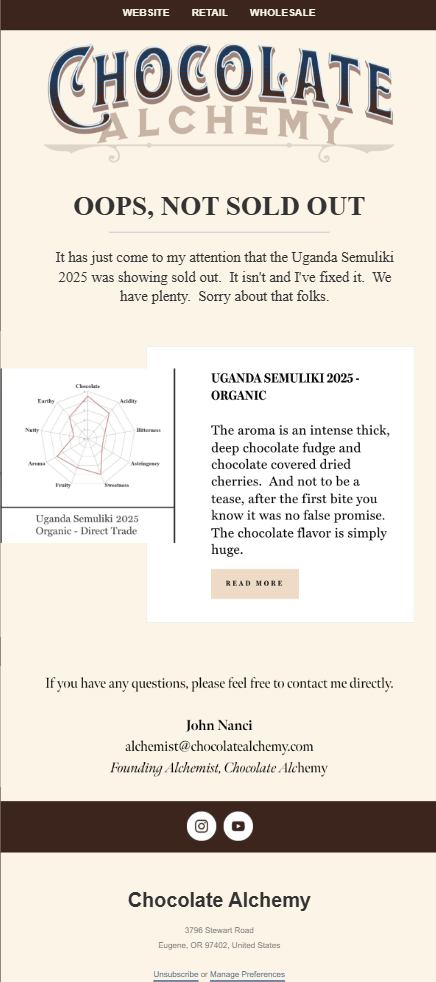
Chocolate Alchemy miscommunication fix email
When the team at Chocolate Alchemy noticed that one of their in-stock products had been accidentally marked as sold out, they immediately notified their audience.
Subject line: Oops, not sold out
Why it works:
- The subject line grabs the reader’s attention quickly and clearly hints at the email’s purpose.
- Using the pronoun “I” and the founder’s email signature adds a layer of accountability to the message.
- They included a brief product description to help drive conversions from those who missed out.
- The founder expressed their availability to address any potential concerns or questions, further building trust.
Nordstrom’s item cancellation email
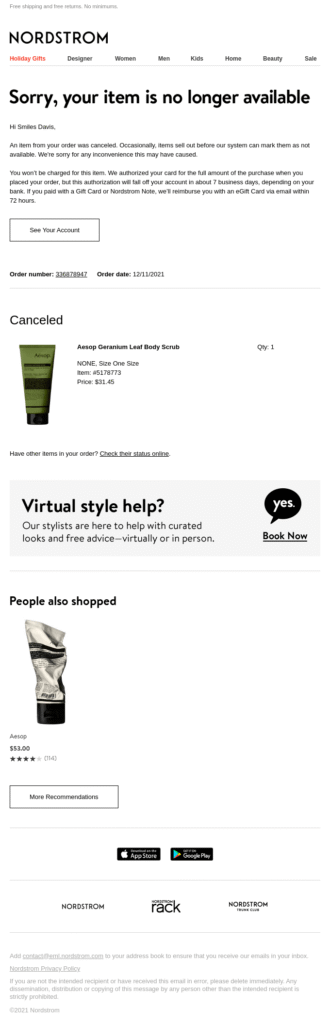
Nordstrom notifies customers who purchased an out-of-stock item that it was removed from their order with a detailed apology email. This tactic is also suitable for billing errors, as it maintains a high-quality customer experience.
Subject line: [Name], an item from your order was canceled
Why it works:
- The personalized subject line makes the message feel direct and less like a generic automated response.
- The apology is paired with a brief explanation of the system error, demonstrating the brand’s full responsibility.
- Including detailed information about the refund process immediately reassures the customer that their money is safe.
- Using a product image helps the customer identify exactly what was canceled, which is especially helpful for large orders.
MeUndies’ power outage apology campaign
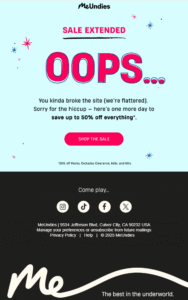
MeUndies sent a sale extension email to make it up to customers and prospects who were unable to make a purchase while the site was down due to technical issues.
Subject line: Oops… You Broke the Site 😅
Why it works:
- The subject line is enhanced with an emoji that shows the “awkwardness” of the situation.
- The email copy reflects the brand’s signature sense of humor and a readiness to make things right, all while delivering a professional apology.
- They reassure recipients by giving them an additional 24 hours to purchase products at the discounted price.
- The CTA button invites users back to the website and directs them toward the checkout process.
Framebridge’s wrong email apology
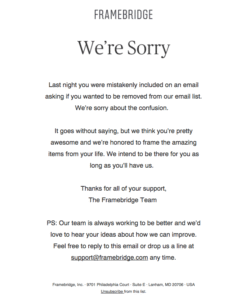
When Framebridge accidentally sent an unsubscribe email to recipients who weren’t supposed to receive it, they reached out immediately to fix the error before users actually opted out.
Subject line: Our mistake
Why it works:
- The email intro leads with the apology, clearing the air, and stating the purpose of the message straight away.
- They explained exactly why the recipient received the incorrect email, followed by a sincere loyalty promise from the brand to the customer.
- They shared direct customer support contact information in case anyone needed further clarification.
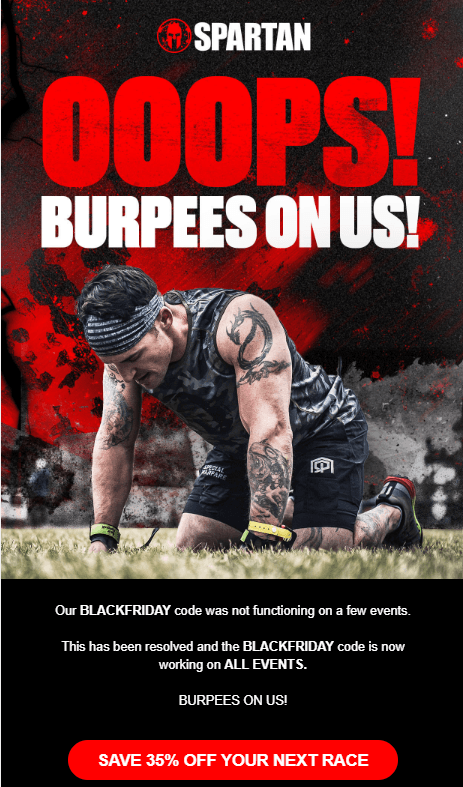
Spartan’s humorous apology email
During the hectic Black Friday season, Spartan realized the coupon code they shared wasn’t working. Naturally, they had to act fast to restore lost revenue.
Subject line: Oops, We Made a Mistake (and We’ve Fixed It)
Why it works:
- The subject line doesn’t just inform recipients that a mistake was spotted; it also confirms that it has already been resolved.
- With the phrase “Burpees on us,” they take responsibility for the error in a hilarious, on-brand way that resonates with their fitness-focused audience.
- The CTA button directs readers straight back to the website to claim their deal, removing any friction.
Do you think a funnier apology approach better suits your brand and email intent? Feel free to customize this Moosend template using the elements shared in the previous section to craft your email apology without wasting time:

Pre-made Apology Email Templates To Save Time
Interested in making up with your customers or colleagues? Here are some ready-made apology emails you can easily customize for your needs. You can also use tools such as Moosend’s AI writer to find the right tone based on your brand guidelines:
Wrong information apology template
Subject line: Correction: The right link is inside!
Hi [Name],
I’m reaching out because I just sent you an email regarding [Topic], but I included the wrong link [or wrong date/price]. I’m sorry for any confusion this may have caused.
Here’s the correct information:
Link/Date: [Insert correct info here]
Update: [One-sentence explanation, e.g., ‘The previous link led to an expired page.’]
To make it up to you, I’ve extended the [Deadline/Offer] by an extra 24 hours to ensure you have plenty of time to check it out.
Thanks for your patience!
Best,
[Your Name]
Event cancellation email sample
Subject line: Apologies: Rescheduling [Meeting Name]
Hi [Name],
Please accept my apologies, but I need to reschedule our meeting today at [Time].
An urgent [internal issue/personal matter] has come up that requires my immediate attention.
I know you’ve set aside time for this, and I want to make sure we stay on track. Below is my calendar link, or I’m free at these times tomorrow:
[Option 1]
[Option 2]
Please let me know which works best, or feel free to book a slot that suits you. I look forward to catching up then.
Best regards,
[Your Name]
Technical issues apology email template
Subject line: Service Restored: We’re back up and running
Hi [Name],
I’m sincerely sorry for the service outage you experienced earlier today. I know how much you rely on [Product Name] to keep your business moving, and we failed to be there when you needed us.
- What happened: A power failure at one of our primary data centers took our systems offline for [Duration]. While we have backup systems in place, they didn’t trigger as quickly as they should have. That’s on us.
- How we’re making it right: Our team has fully restored all services, and your data is safe.
- Preventing this in the future: We’re currently auditing our protocols and adding [System] to ensure a single point of failure never stops your work again.
Thanks for your patience. Feel free to reach out to our team if you have any concerns.
Kind regards,
[Your Name]
[Title]
Customer service apology email template
Subject line: I’m sorry for the delay regarding your order [Order number]
Hello [Name],
I’m sincerely sorry for the late response regarding your shipment. You reached out with an urgent request, and I didn’t get you the answers you needed.
- What happened: We’ve had a higher volume of inquiries than usual this week, and your message took longer to reach my desk than it should have.
- The update on your shipment: I’ve personally looked into your order, and it’s currently [Status]. You can track it directly here: [Link].
- How I’m making it right: Because I kept you waiting, I’ve refunded your shipping costs.
I’m also working with my team to improve our “urgent” flagging system so we can respond to priority questions like yours much faster in the future.
Thanks for your patience with us,
[Your Name]
[Company Name]
In-person apology letter template
Subject line: About our conversation yesterday
Hi [Name],
I wanted to send a quick note to apologize for the comment I made during our [Meeting/Conversation] yesterday. Looking back, I realized I was too blunt, and that isn’t the way I want to communicate with you.
I let my own stress about [Project/Deadline] get the better of me, and I took it out on the conversation. That wasn’t fair to you.
I really value your input on [Topic], and I want to make sure we keep a space where you feel comfortable sharing it. I’m going to be more mindful of my tone moving forward.
If you’re up for it, I’d love to grab a quick coffee or chat for five minutes today just to clear the air and get back on the same page.
Best,
[Your Name]
Apology Email Best Practices
Here are a few more pro tips to streamline good apology emails.
1. Add empathy to your apology
Every mistake has consequences. Whether it’s a delayed deliverable with a tight deadline or incorrect information that confused your customers, partners, or teammates, don’t just apologize for the error; acknowledge the impact. Using an empathetic tone helps you craft a much more effective apology.
While some companies hide behind a collective “we,” using “I” is often better for building empathy. Having a specific person sign the email makes the message feel more human and personal. Instead of “We’re working on it,” try: “I am personally overseeing this issue to make sure you get what you need by the end of the day.”
Moreover, remember that many mistakes carry an emotional cost. Reflecting on the stress or annoyance the recipient might be feeling shows that you’re truly aware of the situation. Avoid a dismissive “sorry,” which can often do more harm than good. If you’re stuck, feel free to use an AI writing assistant to double-check your tone before you hit send.
2. Match the email length to the loss
How long should an apology be? A simple rule of thumb: the bigger the mistake, the longer the email. Over-apologizing for a minor slip-up, like sending the wrong link to a blog post, can come across as “cringe” or unprofessional.
On the flip side, for significant errors like a major service outage, it’s important to go into more detail. In these cases, you should provide a clear explanation and outline exactly what you’re doing to prevent it from happening again.
In a nutshell, respect your readers’ time by keeping your apology proportional to the trouble.
3. Send a second-day follow-up
Sometimes, a single apology email is enough. Other times, it’s best to check in the following day to ensure everything is under control. This is especially important if you work in customer service or partnerships.
For example, a quick note like, “Just checking in! Is everything working as expected on your end now?” can go a long way. In certain cases, failing to reach out again might make recipients feel that your only goal was to “close the ticket” and get back to your own workflow, rather than truly resolving their issue.
4. A/B test your subject line
To ensure recipients actually open your email and read the apology, you need a powerful subject line that gets straight to the point. Failing to do so can block the path to making amends.
Before hitting “Send,” use split testing to find the subject line that yields the best open rates. By testing variations on a small segment of your list, you can ensure the rest of your subscribers receive the version that resonates most with your audience.
5. Never use a no-reply address
Sending an apology email from a no-reply address is a massive red flag. Ensure the From field is a real person’s email address and monitor the inbox to respond quickly to follow-ups.
Nothing feels more awkward than implying to a customer, “We’re so sorry, but please don’t talk back to us.” To show accountability, keep the communication channel open.
Don’t Just Say It, Mean It
Apologies are trust-building tools. Some brands use them to end a conversation, but the best ones use them to restore a partnership. Anyone can type “I’m sorry,” but few follow up with a concrete change.
To truly mean it, stop focusing on the mistake and start focusing on the person it affected. Prioritize their time and peace of mind over your own reputation to truly connect.
Own the mess, make it right, and move forward together.
FAQs
Let’s see some frequently asked questions regarding apology emails:
1. What are the 5 R’s of apology?
The 5 R’s of a sincere apology include: expressing regret, taking responsibility for your mistake, showing rationale through excuses, committing to repentance, and repairing what you caused. Actions speak louder than words.
2. Is it okay to use humor in apology emails?
It depends on the error you’re apologizing for and your existing brand tone. If it’s a minor one you can make amends through humor, but if the consequences are bigger stick a professional tone. In any case, make sure that the apology takes more space than a joke.
3. How do I know if the apology actually worked?
Based on the email type, an apology was efficient through a timely response accepting your apologies. For marketing-related apologies, open and click-through rates can pinpoint that your relationship with the customer or prospect remains on good terms.
Similar Posts

 Published by

 Published by

Create, send and optimize your email marketing campaigns