















Transactional Email Best Practices: A Practical Guide for 2026
Published By Tea Liarokapi
January 26, 2026

26/01/26
When a customer completes a purchase, confirms a booking, or requests a password reset, they expect a clear, instant response in their inbox.
That usually comes in as a transactional email, an automated, event-triggered message that confirms what just happened and guides the customer to the next step.
Transactional emails are a core part of the customer experience. This guide covers transactional email best practices and common mistakes to avoid, helping you deliver clear, reliable, and compliant messages that support your customers at every step.
Create effortless transactional emails
Design and send transactional email campaigns that keep customers in control.
Try MoosendWhat Are Transactional Emails?
Transactional emails are automated messages triggered by a specific user action or system event. They deliver essential, one-to-one information (confirmations, alerts, or updates) that customers actively expect after completing an action, such as placing an order or resetting a password.
Unlike welcome or other marketing emails, transactional emails confirm what has already happened, rather than promoting something new or trying to influence future behavior.
Most businesses rely on a core set of transactional emails to support everyday customer interactions. The most common types include:
- Account creation and security emails (including 2FA)
- Order confirmation and billing emails
- Shipping and delivery updates
- Payment confirmations (including failed payment notices)
- Account change notifications (password, email, profile updates)
- Security alerts like unusual logins
- Subscription renewals, expirations, or cancellations
What sets transactional emails apart is their purpose and the expectations they set. Customers open them because they need immediate and clear information about their action, a link, or a status update. That’s why reliability, clarity, and compliance matter more here than anywhere else.
The Core Principles Behind Great Transactional Emails
Before diving into specific transactional email templates and best practices, it helps to understand the principles that make these messages effective. These foundations shape how customers experience critical moments and guide the tactical decisions that follow.
- Purpose over promotion: Every transactional email should clearly answer one question: What just happened? Any secondary content must support that purpose, not provide distractions.
- Immediacy builds trust: Fast delivery signals reliability. Delays in transactional emails undermine confidence, especially during security or payment-related actions.
- Low cognitive load: Users open transactional emails to confirm or complete an action. Clear structure, plain language, and visible next steps help them move on without friction.
- Predictability and consistency: Familiar layouts, tone, and formatting make messages instantly recognizable and reinforce trust across every interaction.
- Accessibility as a standard: Critical information must be readable and usable for everyone, across devices, environments, and assistive technologies.
- Reassurance reduces support tickets: Calm, confirming language helps users feel confident that everything worked as expected, preventing confusion and unnecessary support requests.
Transactional Email Best Practices by Category
Now it’s time to turn the core principles into concrete decisions on the page. The way a transactional email is designed, written, personalized, and delivered directly impacts how trustworthy and effortless your product feels.
From layout and clarity to deliverability and subtle engagement, let’s see which areas break down the practical choices that shape those experiences.
Design and Layout
A clear transactional email design builds a zero-friction, reliable “pattern” your customers recognize every time. The goal is to help them solve their micro-task in seconds, on any device, without hunting for the information they care about.
1. Put the key information at the top
Make sure your structure is scannable. A simple one that can be applied to all types of transactional emails your brand sends works best.
Use a short introductory line inside the email that names the event in your subject line. Like this example from Roark:
Subject line: Order #xxxxx confirmed
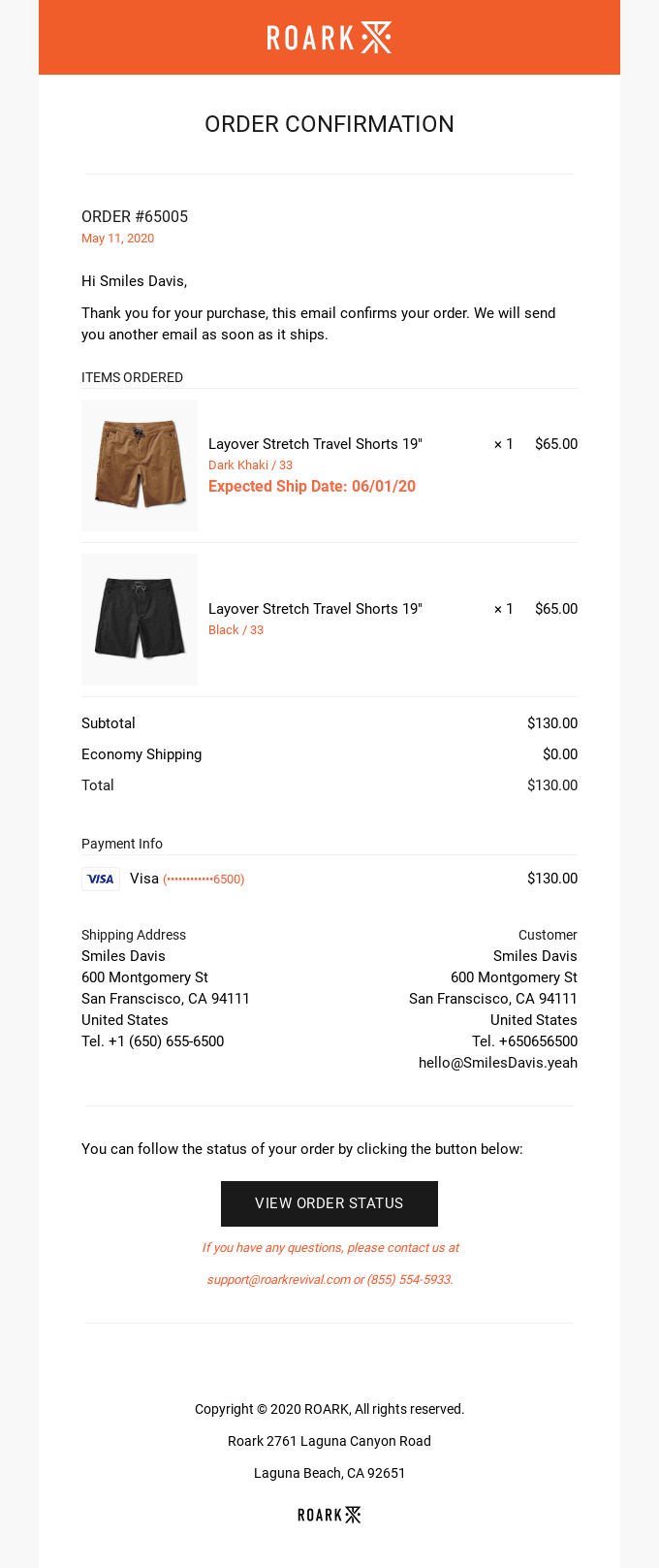
So we’ve got the following:
- Order number
- Items
- Amount
- Primary CTA (in our case, the “View order status” button, which is the main action)
The brand used headings and bold labels so the user could jump straight to what matters. On mobile, this entire sequence should fit above the fold or very close to it. If someone has to scroll before they even know whether their payment went through, the layout is working against them.
Of course, all of these leave a question unanswered: “What about brand consistency?” It’s logical to think that this messes with your brand’s tone, look, and feel.
Transactional emails should look like you, but in a calmer, pared-down way compared to campaigns. Use your logo, brand colors, and typography, just without heavy imagery or complex layouts. Think more like “product UI email” and less like “campaign creative.”
2. Make the main CTA easy to see and tap
Your email CTAs should be obvious. The main action button should clearly stand out from the surrounding text, with enough padding to feel tappable, and a clear label like “Reset password” instead of “Click here.”
You can teach your customers a pattern across all transactional flows. Keep the basic layout consistent for confirmations, receipts, alerts, and resets:
- Similar header and intro line placement
- Details block styled the same way
- CTA in a predictable spot
Once customers recognize the pattern, they don’t have to “figure out” each new email type. Their brain already knows where to look.
3. Use one simple, mobile-friendly layout
Most transactional emails are opened on mobile devices. According to Forbes Advisor, around 41% of email opens happen on phones. That makes mobile optimization a baseline requirement.
Start with a single-column layout like the one below:
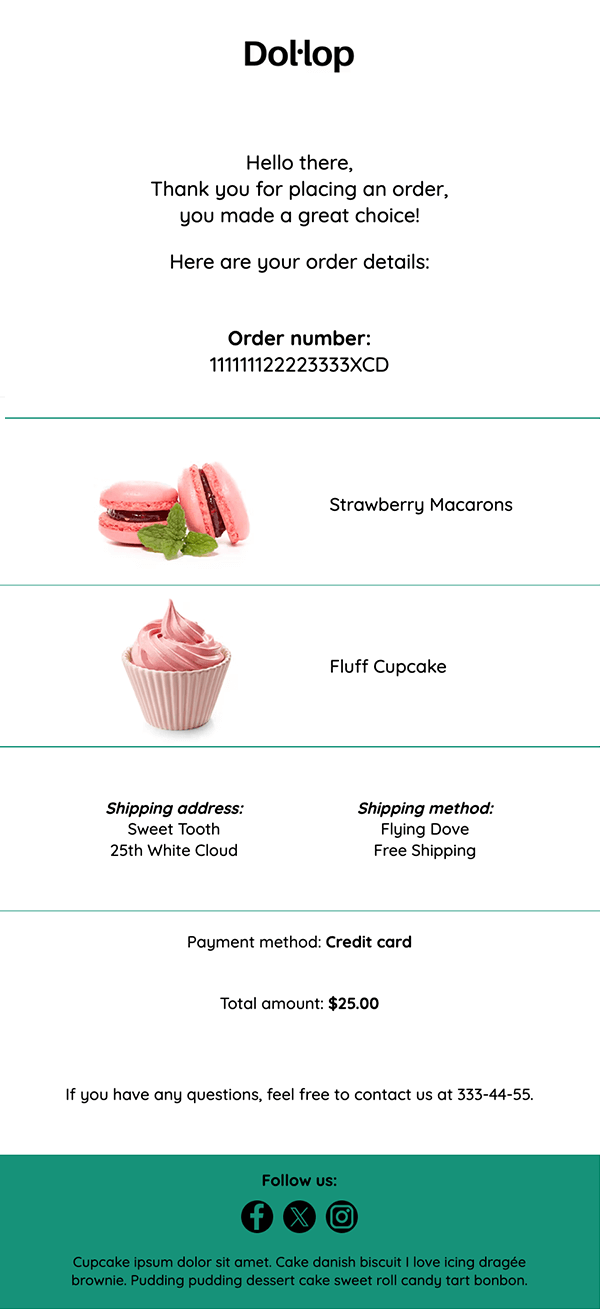
Designs like this are easier to scan, adapt better to smaller screens, and reduce cognitive load when users are looking for specific information, such as a confirmation number, receipt, or reset link.
When designing for mobile users, focus on clarity, accessibility, and consistency to reduce friction and prevent user errors. More specifically:
- Use templates with dynamic content so one layout can adapt to different transactional scenarios without duplicating or manually editing emails.
- Leave generous spacing between sections, links, and buttons to prevent misclicks, especially in time-sensitive interactions.
- Keep body text large enough to read without zooming, as small fonts reduce clarity and trust in transactional messages.
- Design for dark mode by ensuring logos stay visible, icons remain clear, and text maintains sufficient contrast across color inversions.
Tone and Copy
The tone of a transactional email should be calm and reliable, providing users with exactly the information they need at the right moment.
Simple language works best, since most people skim these messages to confirm what happened and what to do next.
4. Use plain, neutral language
First of all, use plain, concrete language. Here’s an example from our inbox:
Subject line: Your subscription expired yesterday
Transactional subject lines should be clear and direct. This is not the place for puns or clever phrasing. People need to understand immediately what happened and whether they need to act.
A good transactional subject line starts with the action that triggered the email. Its job is to help recipients recognize the message at a glance and decide if it requires attention.
In practice, the subject line should answer three questions:
- What is this?
- Is it urgent?
- Do I need to act?
When it comes to transactional email body copy, remember to add one short line that closes the worry loop, especially for sensitive events:
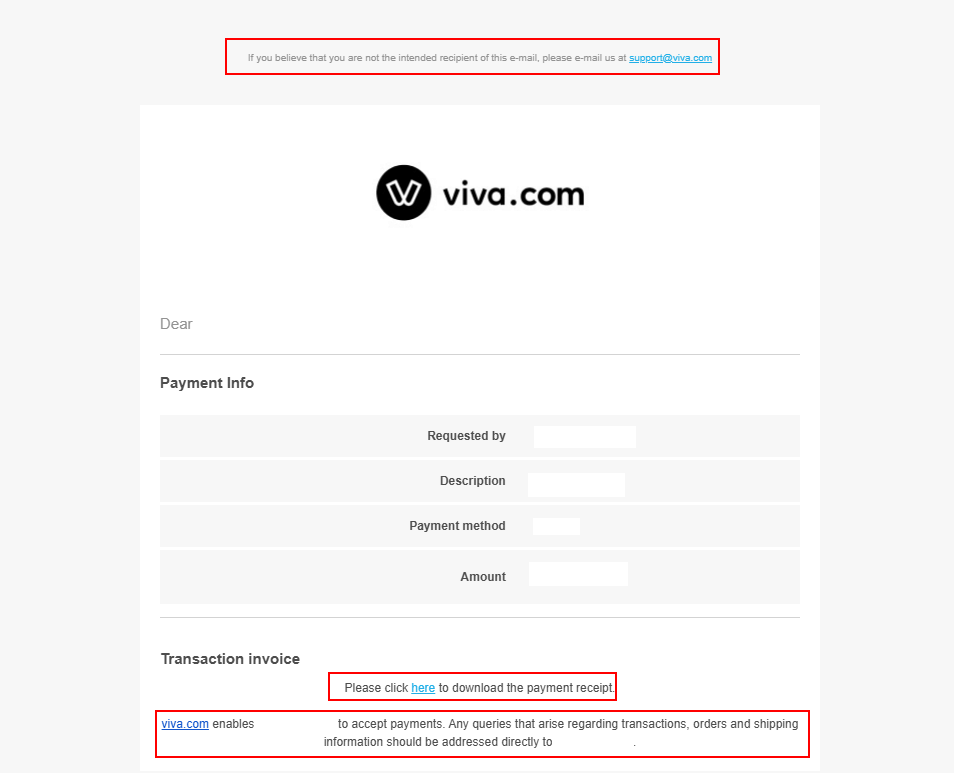
This transactional email example is written in a simple format and showcases all details necessary:
- Starts with the action the recipient must follow if the email was not intended for them.
- States the requested payment amount, the recipient, the payment method, and the amount.
- Shows where the recipient can find and download their invoice and what to do if they have any additional questions.
The matter-of-fact tone of this email is what you should be aiming for: a tone that feels calm, factual, and on the customer’s side, not clever copywriting’s sake.
5. Remove humor, hype, and clever phrasing
Of course, as mentioned above, you’ll still want to sound like your brand, but transactional emails aren’t the place for full-strength personality.
So, remember to keep the core informational blocks neutral and precise, and email storytelling to a minimum. The parts with costs, access, or security should read like a trustworthy UI.
To keep your personality without compromising the quality of your transactional email, add light brand flavor in low-stakes areas:
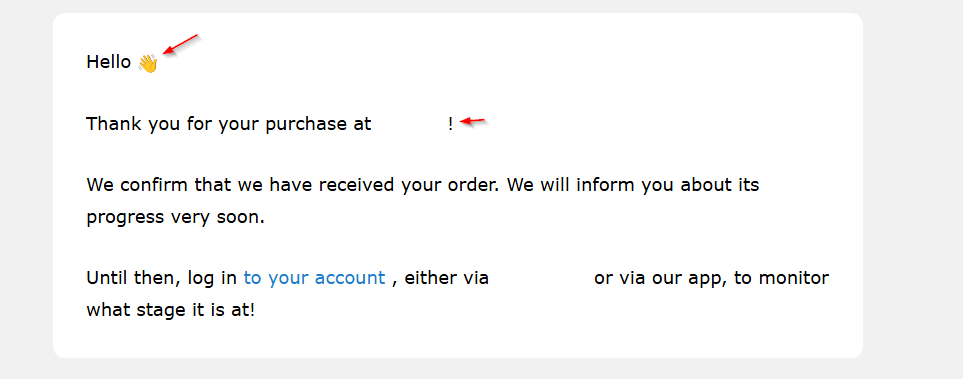
You can see that the body copy includes a greeting, a friendly closing line, and an emoji that matches the brand’s playful personality. It’s still calm and informative, with no puns or imaginative copywriting.
To write good transactional emails:
- Use direct language that clearly states what happened, especially for sensitive actions such as payments or account issues.
- Avoid jokes, vague phrasing, or playful copy that could confuse the message.
- Keep the tone calm and neutral, not excited or salesy, to reduce stress for the reader.
- Write in simple, globally understandable English, or localize when possible.
- Avoid idioms, slang, or culture-specific references in instructions.
- Make sure the reader can immediately understand what happened, what it means, and what to do next.
Email Personalization
In transactional emails, personalization should clarify context and confirm the action that triggered the message. Done well, it reassures users that the email is relevant and trustworthy without adding unnecessary noise.
6. Use personal details to confirm the email is legitimate
The best personalization in transactional emails is the kind that lets people immediately verify, “Yes, this is mine.”
To achieve that, include details that confirm the event and add just enough data to anchor the message to a real action:
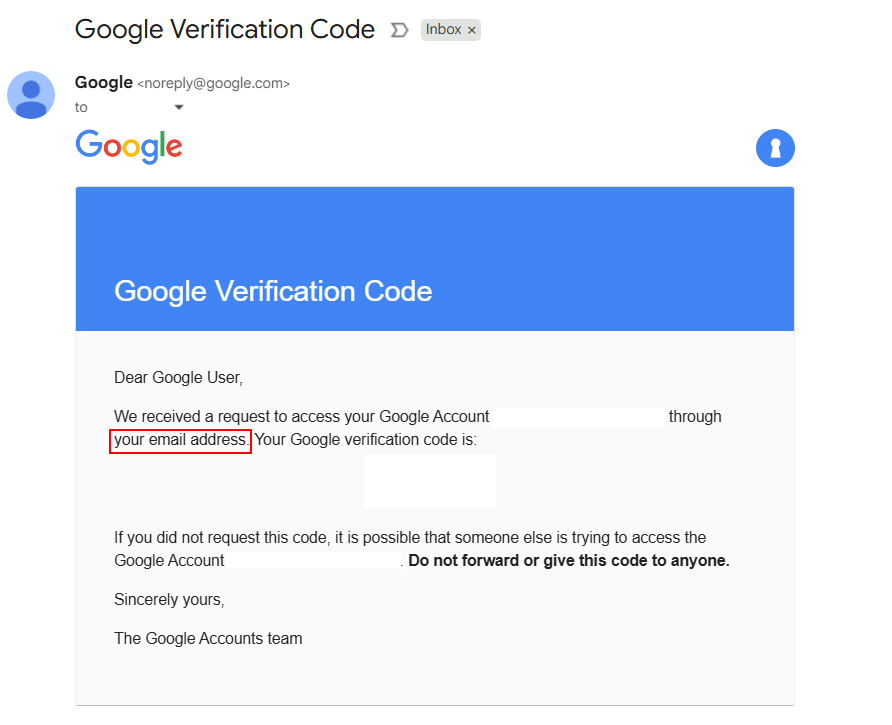
This email did not include the recipient’s name, but it did include the email address and a clear reassurance that the action was requested from that address. In this case, adding a name would have been redundant, since the email address already confirmed identity.
As a rule, any data that does not help the recipient understand or validate the event should be omitted from a transactional email. Focus on the key details that reduce doubt and support the primary action, while also helping users quickly spot fraud or mistakes.
In this example, the email answers three essential questions:
- Which action took place?
- Who requested it?
- Through which email address?
For post-purchase, payment, or security-related emails, show enough information to identify the method used without exposing risk. Mask card numbers, abbreviate addresses where appropriate, and avoid including data that is not required to understand or complete the transaction.
7. Match language, currency, and time to the user
When it comes to transactional information, try to add contextual personalization. This element is what makes transactional emails feel accurate and usable across regions, not just “translated.”
Use local language wherever applicable, as well as currency symbols or codes. Show VAT or tax where it’s expected, and follow the address formats that make sense for the country. This reduces confusion and support queries around billing and shipments.
Another crucial element is date and time. When you mention such data, especially for deliveries, appointments, or expiring links, try to tie them to the user’s timezone.
Personalization in transactional emails should be clear about whether the message is intended for the recipient and how it makes sense to them. If it does that, it’s doing its job.
Email Deliverability
Transactional emails only work if people actually receive them. The good news is you don’t have to become a deliverability expert. As a marketer, your job is to know what “good” looks like, ask for the right setup, and keep an eye on a few simple signals.
8. Authenticate your sending domain
Mailbox providers need to confirm that emails sent from your domain are legitimate. Set up SPF, DKIM, and DMARC to authenticate your domain and protect against spoofing.
Don’t assume this is handled automatically. Explicitly confirm with your technical team or email provider that these records are correctly configured and monitored. Proper authentication improves inbox placement and ensures transactional emails reach recipients when they matter most.
To give you a hand, many platforms provide documentation, DNS setup guides, and even a DMARC checker.
9. Send emails from a branded, verified address
Always send transactional emails from a domain you own, such as [email protected], rather than a free webmail address. Branded domains signal legitimacy to mailbox providers and enable authentication via SPF, DKIM, and DMARC.
Using a consistent, purpose-specific sender address also helps recipients quickly recognize the message as legitimate. This is especially important for sensitive emails like password resets, payment notices, and account changes.
Free webmail addresses are harder to authenticate, scale poorly for automated sending, and are more likely to trigger trust or deliverability issues. A branded sending address supports long-term inbox placement and reinforces user confidence when the email is opened.
10. Use infrastructure built for transactional email
Transactional emails rely on speed and reliability. Providers designed for transactional sending handle infrastructure, IP reputation, and routing to ensure messages are delivered quickly and consistently.
This reduces the risk of delays or filtering for critical emails such as password resets, booking confirmations, and order notifications.
11. Keep transactional and marketing email flows separate
Not all your traffic is created equal. A weekly promo can afford to be delayed or filtered more than a password reset can. Grouping everything together technically makes life easier. However, it puts your most important emails at the mercy of your boldest campaigns.
At a high level, aim for separation by subdomain, pool, or category. Many teams use different technical “lanes” for different email types. For example, you can use one pool for newsletters and promos like “news.yourbrand.com” and one like “notify.yourbrand.com” for transactional flows.
This helps protect transactional deliverability if a campaign performs poorly or if you experiment aggressively on the marketing side.
12. Choose between SMTP and API
Most transactional platforms offer two ways to send emails: SMTP and a transactional API. Transactional email services like Moosend support both methods for things like order confirmations, password resets, and order status updates.
But where does the SMTP vs transactional API question help?
SMTP is the “classic” route. It operates like a regular email server connection and is easier for many developer teams to plug into quickly. If you’re using basic transactional flows where you don’t need advanced logic or microscopically detailed logging, it’s all you need.
Transactional API, on the other hand, is the “faster” route. It’s built specifically for users to send high-volume, real-time transactional messages. It is also often faster and more reliable under load, with cleaner, structured data. The transactional API is also easier to track, log, and debug when issues arise, such as failed sends or timeouts.
13. Monitor important transactional email metrics
Treating transactional emails as a “set and forget” campaign is risky. A few light-touch checks can catch problems early.
Focus on delivery and bounce trends. Keep an eye on whether your delivery rate on key transactional flows is stable. Sudden spikes in bounces or drops in delivered messages can signal issues with domain health, list quality, or a configuration change gone wrong.
For example, for things like password resets and two-factor codes, you can look at how quickly people open those emails after they’re sent. If users regularly request multiple resets or contact support because “the email never arrived,” there’s an issue to investigate.
User engagement
Transactional emails land in the inbox because they’re useful. However, that doesn’t mean you can’t add engagement; it just has to feel like a natural next step, not a distraction.
14. Add help center or FAQ links
Help links work best when users may have questions or need reassurance, such as after invoices, error messages, or failed payments. A simple line like “Need help? Visit our help center” feels supportive and gives people a clear next step without adding pressure.
This approach works well because it respects the moment. Here’s an example from Spotify:
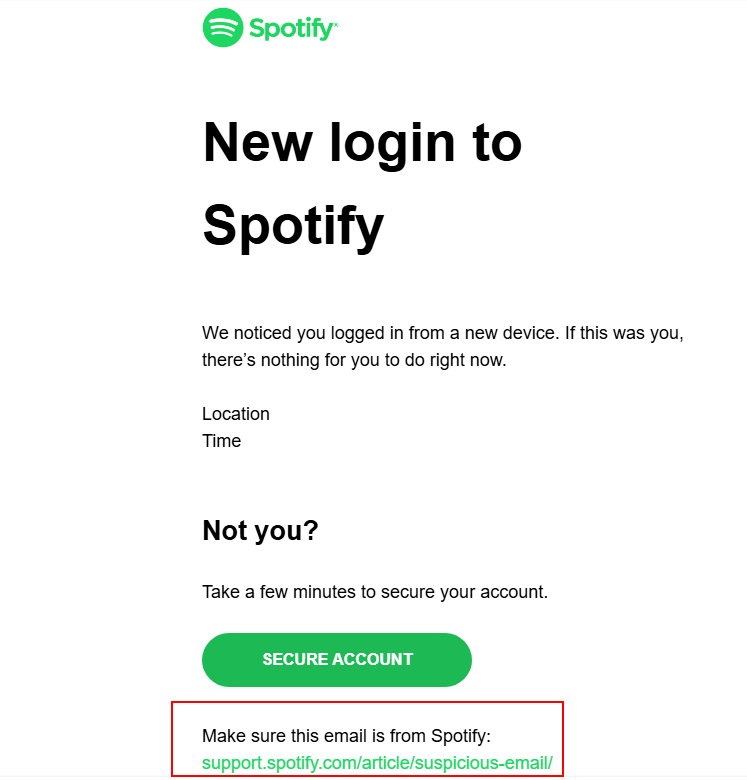
This email was sent after what seemed to be an “irregular” login to my account. The section at the end makes it all the more legitimate and is placed ideally after the CTA button.
15. Cross-sell and upsell without being salesy
You can cross-sell or upsell in transactional emails, as long as you don’t cross the line between “smart” and “annoying.”
Keep recommendations tightly relevant and include complementary products in the order confirmation, such as accessories and refills.
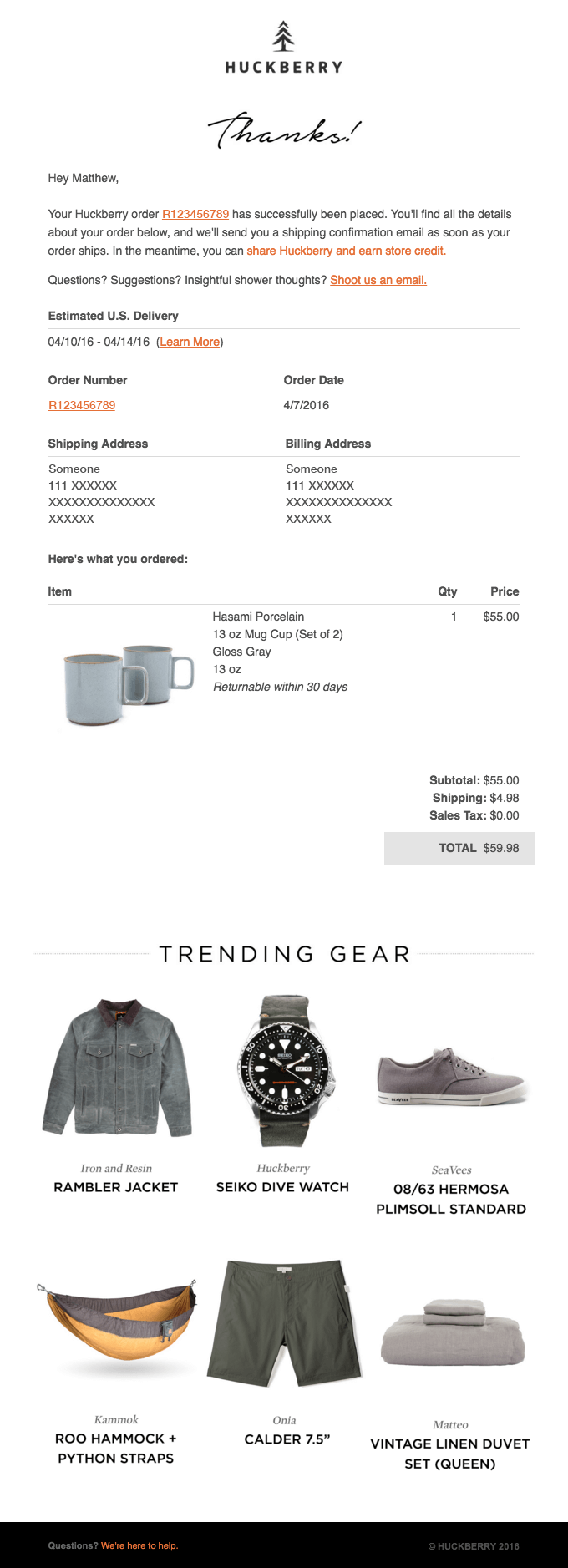
This cross-sell email example from Huckberry is essentially an order confirmation email that gently nudges the user towards checking out more products. The confirmation, details, and core CTA sit at the top. The additional items are further down, so they can either be skipped without friction or the user can then calmly check out what’s offered if they want to.
The main point here is that customers shouldn’t get the feeling that the real reason for the email was to sell them something. When it comes to transactional emails, this is a breach of trust.
16. Run A/B tests
Transactional emails should be to-the-point and simple, but this doesn’t mean you can’t do some light experiments. Especially when it comes to engagement.
First of all, you can A/B test small variations. Try different subject lines, preheaders, sender names, or subtle copy changes to see what improves opens and essential clicks while keeping your core metrics stable.
Then, you can compare engagement across versions. Review your reporting and analytics to see how a “purely transactional” version performs compared to one with a small help link or a contextual recommendation.
Done this way, engagement in transactional emails feels like part of the service, not a distraction from it.
Common Transactional Email Mistakes to Avoid
Even well-intentioned teams can accidentally turn transactional emails into tiny sources of friction, confusion, or mistrust.
However, most issues fall into a few predictable categories related to how the email reads, looks, is sent, and is maintained over time.
UX & content mistakes
These are the common mistakes that make customers work to understand what happened. They can hinder the user experience and turn the email customer journey into anything but smooth.
- Vague or misleading subject lines: Phrases like “Update on your account” or “Important information” prompt users to open the email to figure out whether it’s serious, urgent, or relevant. For transactional emails, this feels lazy at best and suspicious at worst. Always state the specific action that triggered the message so recipients instantly understand why they’re receiving the email.
- Using “no-reply” addresses: A no-reply@ address signals that you don’t want to hear from customers when they might actually have a question. It would also make it harder for some inbox providers to associate engagement with good sender behavior. Use a monitored or clearly redirected address instead.
- Burying key information in a wall of text: If users have to scroll and skim to find out whether their payment went through or which order this is about, the email is doing the opposite of its job. Long, unstructured paragraphs are especially painful on mobile.
- Overly technical or robotic language: Transactional emails often touch on security, billing, or errors. If the copy reads like a system alert, non-technical users will feel anxious and lost. You want calm, human, plain language.
Design & accessibility mistakes
These mistakes don’t just make emails look worse; they also make them harder to read.
- Inconsistent branding across updates: If your password reset email looks completely different from your receipts or shipping updates, users may question its legitimacy. Inconsistent branding also forces them to “re-learn” each email type instead of trusting a familiar pattern.
- Poor mobile experience: Tiny fonts and cramped layouts are all common in older transactional designs. On a phone, this translates into zooming, mis-taps, and general frustration. This is not a best practice in email design and definitely not what you want during time-sensitive actions.
- Putting critical information only in images: If order details, prices, or CTAs live only inside an image, they can become inaccessible when visuals are blocked or when someone uses a screen reader. Essential content must exist as text, with images as supporting elements.
Deliverability & compliance mistakes
These are the quiet issues that don’t show up in the UI but hurt you in the background.
- Using the same infrastructure for everything: If you’re using the same IP or pool to send transactional emails as you do for promos, any damage from campaigns or no list cleaning can drag down critical mail, too. That’s how password resets end up being filtered: last week’s sale was oversent.
- Skipping authentication & domain hygiene: Lack of proper domain authentication makes your emails look suspicious to inbox providers. For the customer, this can translate into missing resets, invoices ending up in spam, or not trusting security alerts.
Operational mistakes
These are process problems rather than one-off choices. And they’re incredibly common.
- Not testing flows end-to-end after changes: A small tweak in your product, billing system, or ESP configuration can silently break an important email. If no one regularly walks through signup, checkout, password reset, and key account changes like a user, issues can go unnoticed for weeks.
- Letting copy and patterns drift across teams: When different teams own different parts of the customer journey, you often end up with three versions of a “payment failed” email, all with slightly different tone and guidance. That inconsistency confuses customers and makes troubleshooting harder.
- Ignoring bounce, complaint, and failure signals: If nobody owns the health of transactional flows, warning signs like rising bounces, spam complaints, or repeated “didn’t get the email” messages never come together into a clear problem.
Avoiding these mistakes takes less effort than one might imagine, provided the actions are intentional. Decide what “good” looks like, document it, and treat transactional emails as part of the product, not as one-off system messages.
Turning Transactional Emails into a Competitive Advantage
Transactional emails may look simple, but they reveal how reliable and user-focused your product really is. When design, tone, personalization, deliverability, and engagement work together, these messages stop feeling like background system notices and start reinforcing how easy your product is to use.
To improve them, start with a quick audit. Walk through your customer’s transactional emails and check whether each message clearly serves its purpose.
Even small, focused improvements can lead to smoother user journeys, fewer support tickets, and a customer experience that stands out without being loud.
FAQs
Now let’s answer some of the most common questions regarding transactional email campaigns.
1. Can I include promotions in transactional emails?
Yes, as long as the promotional content remains clearly secondary. The main purpose of the email should be clear and visible at the top. Any upsell or recommendation should appear below the core details and feel optional rather than intrusive.
2. Do transactional emails need an unsubscribe link?
They’re often not legally required because they’re considered essential service communications. However, it’s a best practice to give users control over notification frequency or categories where appropriate. Offering a simple “manage notifications” link reduces frustration and helps maintain long-term deliverability.
3. How many transactional emails is “too many”?
If users receive multiple notifications for small, similar events, it becomes noise. Combine low-priority updates when possible (e.g., summaries or digests), and respect user preferences for alert frequency. Real-time notifications should be reserved for events that are genuinely important or time-sensitive.
4. Are transactional emails subject to marketing email regulations?
They’re treated differently because they’re tied to an urgent action the user already took, not to promotional messaging. Still, mixing too much marketing inside a transactional email can blur the line and cause compliance questions, so keep promotional content minimal and clearly secondary.
5. What if my transactional emails are going to spam?
This usually points to a domain authentication issue, a sender reputation problem, or transactional and promotional traffic being mixed on the same sending pool. Check that SPF, DKIM, and DMARC are set up correctly and consider separating transactional traffic from marketing sends.
Similar Posts

 Published by
 Published by
 Published by

Create, send and optimize your email marketing campaigns